- AI
- A
Who is developing with AI today?
Two years ago, writing a web application required knowledge of programming languages, frameworks, databases, deployment, and debugging. Today, it is enough to be able to formulate a task.
AI has radically lowered the barrier to entry in development. This is not a hypothesis – it’s statistics:
63% of users practicing vibe coding identify themselves as non-developers (Second Talent, 2026)
Gartner predicts that by 2026, "citizen developers" will outnumber professional developers 4:1 (VentureBeat/Gartner)
51% of all code committed on GitHub at the beginning of 2026 was generated or significantly written with the help of AI (BetaNews)
70% of new enterprise applications are created by "citizen developers," not IT teams (Gartner via Kissflow)
Marketers build landing pages. Analysts write dashboards. Business owners gather CRM integrations. Enthusiasts create full-fledged applications. All this – without a single line of code written manually.
It sounds like a revolution. And it has already happened.
But every revolution has a downside.
How do they develop with AI?
The typical approach to AI development looks like this:
A person describes the task
AI writes the code
A person checks if it works
If not – throws the error back into the chat
Repeat until successful
At best, a planning stage is added: a person asks AI to create a plan and then implements it. It seems reasonable. It works – also, in some percentage of cases.
I call this approach "direct development." Task – code – result. Minimum intermediate steps. Maximum speed. The feeling of productivity is off the charts.
And that’s a problem.
"But I developed with this approach, and I’m satisfied with the result. What’s wrong?"
If you just thought this phrase – I understand you. I thought so too. You complete a task, AI delivers the code, the code works. What’s the problem?
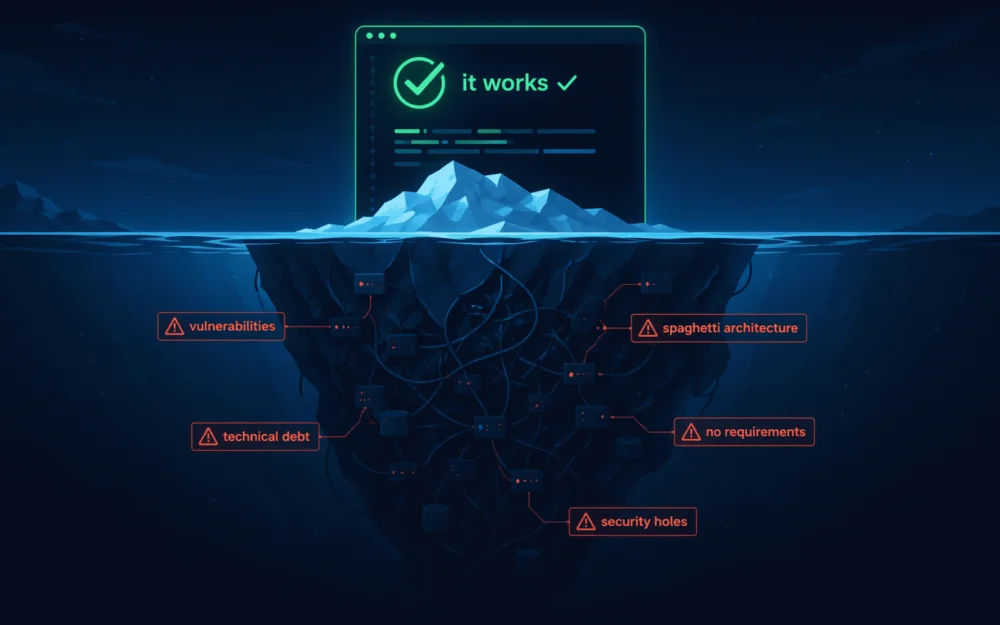
The problem is called "survivorship bias."
What you see
Your project. It works. AI helped write it quickly. You are satisfied.
What you do not see
Thousands of projects where such an approach has led to specific, recurring problems.
Code that broke at the first change in requirements. AI writes code based on the task "as it sounds now." The client says "add a date filter" – the AI adds it. Then the client says "now by date range" – and it turns out that all the filtering logic is hardcoded, the select is embedded in HTML, and the data flows in a single request without pagination. Changing it – it's easier to rewrite. This is not a hypothetical scenario; it's a typical result of a direct approach.
Architecture where everything is connected to everything. Professional developers know the term "spaghetti code," but AI creates its new form – "spaghetti with nice presentation." The code looks clean: neat names, structured files. But inside – the authorization component directly pulls from the orders table, the form handler writes to three different databases, and the business logic lives in the controller. There are no boundaries between modules, no layers of abstraction, no separation of concerns. Why is this a disaster? Because a change in one place breaks three others. You can't replace one part without rewriting the others. You can't test in isolation. And AI sees no problem with this – it doesn't think architecturally; it generates file after file.
Security that doesn't exist. This is not an exaggeration. A study from Stanford University (Do Users Write More Insecure Code with AI Assistants?) showed that developers with AI assistants wrote significantly less secure code – and were more confident in its security. AI does not implement validation on user input, does not escape SQL, leaves XSS holes, generates API endpoints without authorization. Worse yet – it hardcodes API keys and passwords directly into the code. According to GitGuardian, 12.8 million new secrets were found in public GitHub repositories alone in 2023 – a 28% increase from the previous year.
The consequences are real. The year 2024 is record-breaking in terms of leaks: National Public Data (~2.9 billion records), Snowflake attacks on Ticketmaster (~560M) and AT&T (~110M), Change Healthcare (~100M people). According to the IBM Cost of a Data Breach Report 2024, the average cost of a breach is $4.88M, and if the breach is related to AI systems, it is $5.17M. The average time to detect a breach through stolen credentials is 292 days. Almost a year of unnoticed access to data.
When AI generates an endpoint /api/users without token verification, it’s not a “minor oversight.” It’s an open door. And you won’t see it because the code looks neat and the application works.
Technical debt that makes development impossible. Technical debt is when a not-so-good but fastest solution is chosen for the sake of speed. Like a loan: you take it now – you pay later, with interest. You copied a function instead of extracting it to a common module – debt. You hardcoded an ID instead of using a config – debt. You skipped error handling – debt. Each such decision individually is trivial. Together, they form a snowball that at some point makes any change more expensive than developing from scratch. AI generates technical debt by default because it optimizes for “works now” rather than “will work in a year.”
Cycling on fixing bugs. A familiar picture: AI wrote code, you found a bug, sent the error back, AI “fixed” it – and broke something else. You send a new error – AI fixes it, breaking the first fix. And so on: 5, 10, 20 iterations – and the problem remains unresolved because the root cause is not in a specific line of code, but in the incorrect architectural decision made at the very beginning. 63% of developers have spent more time debugging AI-generated code at least once than they would have spent writing it from scratch (Second Talent, 2026). This isn’t a bug – it’s a predictable result of development without design.
Dead ends. Even worse than cycling are the moments when AI reaches a dead end. The context window is filled with previous attempts, the model starts repeating the same solutions, and there’s nothing to roll back to – no intermediate commits, no saved points. The only way out is to start a new chat and explain everything from scratch. Or even to start the project over – because the code that resulted is easier to throw away than to dissect.
Why the "direct approach" doesn't work
The problem is not with AI. The issue is that the direct approach skips stages that exist in traditional development for a reason: research, requirements, architecture, security, performance. When you give AI a task directly, it doesn't perform any of these steps. It simply generates code that looks correct. And you confirm it—because the code works in a test scenario. It's a classic survivor's error.
According to the Standish Group CHAOS Report (over 50,000 projects): only 31% of IT projects are completed successfully. 39% of failures are due to poor requirements gathering. In AI development, the problem is even more acute: AI won't ask you about the requirements. It won't say, "Are you sure?" It will simply do what you said—even if it’s wrong.
Development by methodologies
Okay, AI can't independently build a process. But what if we give it a process?
Not a prompt like "make a feature," but a methodology—a sequence of stages with clear rules, artifacts, and checkpoints.
The idea isn't new. In 2025, a series of articles from HumanLayer discussed that AI agents need human checkpoints, structured stages, and documented decisions. AWS released Kiro—a development environment with the approach of "specification first, then code." Superpowers gained 93,000 stars on GitHub as a plugin that prevents AI from jumping straight into implementation. The trend is clear: the industry has concluded that code is written last.
Our RDPI methodology (Research => Design => Plan => Implement) is a practical application of these ideas. It's not a theoretical framework, but a set of rules that has grown from real project work. The key difference from "just planning" is that each stage produces an artifact—a document that is preserved and used going forward.
Why are artifacts needed? Two reasons:
Context. Research, requirements, design, plan—all these are documents that AI loads in subsequent stages. Without them, each new request is a "clean slate" job, losing everything that was developed.
Retrieval. If you need to return to a task after a month, artifacts allow you to restore context in minutes rather than hours. For both you and the AI.
This works because AI is a powerful tool but a poor project manager. The methodology takes on the role of the manager: it guides AI step-by-step through proven stages, preventing it from skipping steps.
This is confirmed by DORA – an annual report by Google on the state of DevOps practices in the industry, one of the most authoritative sources in the field. DORA 2025 states clearly: AI is an amplifier of existing conditions, not a magic wand. If you have a good process, AI will make it faster. If there is no process, AI will amplify the chaos.
“AI does not automatically improve the quality of development – it amplifies existing conditions.”
DORA Report 2025
Research: The Foundation of Context
The quality of AI's work at all subsequent stages directly depends on what it knows about the task. The research phase is when this context is created. The more accurate and complete it is, the better the result.
In a direct approach, AI skips this stage. It receives the task and immediately starts generating code. Where does it get the information? From training data. Which may be outdated, incomplete, or simply incorrect for your specific project. The result is code built on assumptions rather than facts. Low accuracy, low completeness – low quality.
The research solves this problem: AI studies the codebase, finds similar solutions within the project, identifies platform constraints, and gathers facts into a document that will serve as the context for all subsequent stages.
Key rule: first the source, then the assertion. Not the other way around. It is the reverse order – “I’ll write it and then confirm” – that is the main reason for AI hallucinations. When the model first generates an answer and then looks for confirmation, it always finds it, even if the answer is incorrect.
Each fact receives a level of confidence:
Sources | Confidence | Action |
Project code + similar case | 🟢 HIGH | We implement confidently |
Project code without a case | 🟡 MEDIUM | We implement cautiously |
Documentation only | 🟠 LOW | STOP – verification needed |
No source / assumption | 🔴 VERY LOW | STOP – do not include |
Implementation with confidence below MEDIUM (70%) – is prohibited. This is a rule that saves from the most expensive mistakes – those built on assumptions.
Interviews and requirements: finding out what the user wants
Requirements are not "make authorization." Requirements are:
What methods of authorization are needed?
What happens with an incorrect password? Lockout? Delay? CAPTCHA?
Is two-factor authentication needed?
What does the user see without authorization?
What data do we store? Is GDPR applicable?
With a direct approach, all these questions remain unanswered. AI takes the task "make authorization" and does it – the simplest version. Without lockout, without CAPTCHA, without 2FA, without GDPR. And formally the task is completed.
The requirements phase forces us to ask these questions before writing code. Each requirement receives:
Identifier (F1, F2, NF1)
Level of confidence (HIGH / MEDIUM / LOW)
Acceptance criteria
Requirements are a contract. Everything that is written will be implemented. Everything that is not written is out of scope. Clear boundaries instead of "well, I thought it was obvious."
Design: architecture is not a luxury
Many confuse design with planning. "I asked AI to create a plan!" – they say. Yes, but a plan is what to do. Design is how to do it right.
Design | Plan | |
Focus | WHY and HOW at the architecture level | WHAT and WHERE at the file level |
Questions | What components? How do the data flow? What are the boundaries? | Which file? Which function? Which command for testing? |
Cost of error | Expensive to change after approval | Cheap to change during implementation |
The rule of three questions. Each non-trivial architectural decision answers:
Why this? – What problem does it solve?
What was considered? – What alternatives were there?
What will happen if you choose an alternative? – What will we lose?
Example:
Decision: store rates in a key-value store
Why? A flexible schema without fixed columns. Out-of-the-box admin panel.
Alternatives? Relational table, config file.
Why not? Relational – rigid structure, hard to add rate options. Config – no UI, need to write from scratch.
Without this analysis, a colleague (or you in a month) will ask "why not relational?" – and there will be no answer.
At the implementation stage, the AI writes code strictly according to design.md and plan.md, phase by phase. It does not improvise – it follows the plan.
Each phase undergoes self-check:
Complies with design and planning documents
No vulnerabilities (XSS, SQL injections)
No debugging code (console.log, var_dump)
Sources are indicated in comments
Context control. A critically important point that is not often mentioned. Every AI has a context window, and as it fills up, the quality of responses degrades unnoticed:
less than 60% – safe zone
60–80% – warning
more than 80% – degradation zone (quality drops, AI starts to "forget" earlier instructions)
If in a direct approach you are communicating with the AI over 50 messages – you are almost certainly in the degradation zone. And you don't know it.
Testing and verification
The code is written – but the task is not closed.
AI as an assistant in testing. AI excels at writing automated tests and test cases: it sees the code, understands boundary conditions, and can generate dozens of scenarios in minutes. This should be utilized – let AI prepare tests, run them, and catch obvious bugs.
But manual testing is irreplaceable. Automated tests check what is included in the scenario. A person checks what is not included in the scenario: “what if I click here twice?”, “does it look fine on mobile?”, “what if there is no data?”. The user personally tests the implementation and confirms that the result meets expectations.
Fixing bugs is a separate process. If problems are found during testing, they are classified:
Local bug => fix it on the spot
Systematic problem => go back to the design
And here, the methodology includes an important protection: a safeguard against getting stuck. If after 3 attempts to fix the problem it does not work – stop. It’s not about making a fourth attempt at the same thing, but rather a conscious change of approach. The methodology helps the person at this moment: to record the logs of unsuccessful attempts, analyze why it’s not working, return to the research phase or conduct new research, rethink the architecture. Without the methodology, a person gets lost at this moment – “well, I’ll try again.” With the methodology – they have a concrete plan to get out of the deadlock.
Case: Knowledge Preservation
After completing the task – documentation: what has been done, what deviations from the design occurred, which patterns will be useful in the future. This is an investment: the next similar task will be solved faster because AI will find a ready case during the research phase.
Context: The Key Rule
Here’s the main thing I’ve learned while working with AI:
It’s not the prompt that matters. It’s the context.
In 2025, Shopify CEO Toby Lutke articulated this most accurately: “I prefer the term 'context engineering' over 'prompt engineering.' It better describes the key skill: the art of providing all the context needed for a task to be solvable by AI.” Andrei Karpathy (former AI director at Tesla, one of the founders of OpenAI) agreed—and this became the consensus: the prompt is a small part of the context. The rest is the history of the dialogue, documentation, project state, results of previous stages.
Simply put: you can write the perfect request, but if the AI does not see your codebase, does not know your requirements, and does not understand the architecture—the result will be mediocre. But if the context is complete and of high quality—even a simple request will yield good results.
Quality Context Formula
In our methodology, the quality of context is defined by the formula:
K = (Correctness + Completeness) / (Volume + Noise)
Component | What it is | How to improve |
Correctness | Each statement is backed by a source | Source first – then statement – then reference |
Completeness | All questions for the next phase are answered | Check against task requirements |
Volume | Only what is needed for the task | Do not include unnecessary details |
Noise | Opinions without sources, duplicates, irrelevant | Maximum 3 similar examples |
A high K means every fact is verified, all gaps are closed, nothing unnecessary, and no noise. This is a specific checklist that AI goes through during each investigation. And that is why artifacts from previous stages are so important: they are the quality context that makes the subsequent stages successful.
Human Check: Why Gates are Needed
In our methodology, the AI pauses and waits for human confirmation at four points:
After requirements – The AI gathered a list of what needs to be implemented, asked clarifying questions, and established acceptance criteria. Now it waits: “Is everything correct? Did I miss anything? Are the boundaries of the task set?” Without this, the AI may implement something entirely different from what you intended.
After design – The AI proposed an architectural solution: which components to use, how data flows, and what alternatives were considered. It waits: “Is this approach acceptable?” This is the last moment when changing the architecture is inexpensive – while it's just a document, not code.
After planning – The AI outlined a step-by-step implementation plan with specific files and checks. It waits: “Shall we start coding?” This is the last checkpoint before real changes appear in the project.
After implementation – The code is written, and the AI ran tests. It waits: “Please check if everything works as expected?” Only the user can confirm that the task is indeed solved.
Why is this critical? According to Veracode (an analysis of 100+ models across 4 programming languages), 45% of AI-generated code contains vulnerabilities from the OWASP Top 10 list. Moreover, AI code appears professional and thorough – with clean names and neat structure. You look at it and trust it. Yet inside, there could be an SQL injection or an unprotected endpoint.
Without gates, the AI may implement the wrong requirements, make architectural decisions that cannot scale, write code with vulnerabilities – and mark the task as completed. Each mistake at one stage compounds in the following stages.
This is precisely why AI development requires an engineering approach. And this is also why AI will not completely replace developers for a long time: someone must make decisions at each gate. The machine prepares, the human decides.
But gates are not only needed by professionals. If you are not a developer and are using AI to create applications, checkpoints are even more essential for you. They help ensure that the AI hasn’t wandered off into its fantasies and is doing what you requested, not what it “thought was right.”
AI Review: Reviewer Agents
Human review is important, but a person cannot (and should not) check every line for vulnerabilities, performance, and compliance with standards. For this purpose – reviewer agents.
In our methodology, 15 independent reviewers work in parallel at each stage:
At the research stage:
Completeness reviewer (have all sources been checked?)
Quality reviewer (is there noise? Are the confidence levels correct?)
At the design stage:
Architecture reviewer (SOLID, scalability)
Security reviewer (vulnerabilities at the architecture level)
“Devil’s advocate” (challenges decisions, looks for blind spots)
At the implementation stage:
Standards compliance reviewer
Security reviewer
Performance reviewer
Maintainability reviewer
Reliability reviewer
Why independence is critical
The key point: each reviewer is isolated. They do not see the results of others. They check one aspect.
This is not paranoia – it is a proven effect. Research shows that language models prefer their own results and evaluate them higher than similar quality results from other models. When the same model both writes code and reviews it – bias accumulates. It’s like if an auditor checked their own accounting: the conflict of interest is built into the system.
Therefore, in our methodology:
If possible – different models for writing code and reviewing
Complete isolation of reviewers from each other (no one sees another's conclusions)
Each pass must be confirmed by specific evidence – “checked, all good” is not accepted
Maintainability: code that will live
Here’s a statement to get used to:
Code written by AI is very likely to be maintained by AI as well.
And this creates a new class of requirements. The code must be understandable not only to humans but also to the next AI agent that reads it.
Understanding debt: an invisible problem
Addy Osmani (Google Chrome engineer) described a new type of technical debt – “understanding debt”: the growing gap between the amount of code in a project and how much anyone actually understands of it.
The Anthropic study (52 engineers) showed: AI assistance did not slow down work, but engineers understood the written code 17% worse. The ability to find and fix bugs—what is needed for maintenance—dropped the most.
Standard metrics—speed, test coverage, number of releases—look excellent. But no one measures whether the team understands their code. And if they don't understand it, the next change will break what was working.
Maintainability Criteria
In our methodology, maintainability is a separate discipline with specific criteria. Here are the key ones:
File size – no more than 300 lines, one responsibility. Why this is important for AI: language models have a limited context window. A 1000-line file results in a loss of precision because the model "smears" attention. An AI fully understands a 300-line file and works with it accurately.
Clear file names – based on functionality, not “generic”. A file named utils.php or helpers.js is a garbage can where everything is thrown in. AI cannot understand the purpose of such a file by its name and does not know when to use it and when not to. OrderCalculator.php is a different matter.
Cognitive complexity – no more than 15. Cognitive complexity is a measure of how difficult it is to understand the code. Each branching (if, switch), each nested loop, each exception increases it. Code with 4–5 levels of nesting (if inside for inside if inside try) is difficult for a human and catastrophic for AI: the model begins to lose logical connections and generates incorrect fixes.
Prohibition of global state in business logic. Global state is when a function depends not only on its arguments but also on some "external" variable that can be changed by anyone at any time. For AI, this is a trap: it cannot see who and when changes this variable and builds solutions on false assumptions.
Prohibition of cyclic dependencies. A cyclic dependency is when module A depends on module B, and module B depends on module A. This creates a closed loop: one cannot be understood without the other, one cannot be changed without the other, and they cannot be tested separately. In such situations, AI loses context and suggests solutions that break both sides.
Empty error handling blocks are prohibited. When AI sees an empty catch {}, it doesn't know whether the error was deliberately swallowed or the developer forgot to add handling. And it starts to "help" – either by removing the handling or adding unnecessary code, breaking the logic.
All these rules work both ways: for humans and for AI. Code written according to these criteria is equally readable by both the developer and the agent.
CodeRabbit summed it up perfectly: “2025 was the year of AI speed. 2026 will be the year of AI quality.”
Conclusions
AI has lowered the entry threshold – and that's great. More people can create software products than ever in history.
But lowering the threshold does not negate the rules. The direct approach of “task => code => result” works for small projects. For real tasks – it does not. Developers overestimate the benefits of AI, and code degrades unnoticed.
The survivor's fallacy is real. You see your working project. You do not see the thousands of projects that failed at the first change of requirements.
Methodologies exist for a reason. Research => Requirements => Design => Plan => Implementation => Testing – each stage produces an artifact, and each artifact becomes the context for the next one. AI is an amplifier: it speeds up a good process, and the absence of a process exacerbates issues.
Context is more important than prompts. C = (Correctness + Completeness) / (Volume + Noise). Don't waste time on perfect formulations – spend it on quality context.
Humans verify – because 45% of AI-generated code contains vulnerabilities, while the code looks flawless. Gates are not bureaucracy but protection. And that’s why an engineering approach will be needed for a long time.
AI checks AI – but independently. The model is biased towards its own code. Isolating reviewers and providing proof for every omission is not over-cautiousness, but a necessity.
Code will live on. And it will likely be maintained by another AI. The burden of understanding is an invisible problem that standard metrics do not catch. Write maintainable code today so you don’t have to rewrite it tomorrow.
Develop with AI. But develop effectively – with research, requirements, architecture, and testing. Not because it’s more complicated. But because it’s cheaper.







Write comment