- Network
- A
How One Street Router Pulled a Village Out of Digital Darkness: The Second Part of the Ballet
In the first part, I talked about how the street NR-712 pulled our village out of the "digital swamp" and provided decent internet at home instead of suffering with 3 Mbps. In the second part, I want to show the behind-the-scenes: what hardware really works in the field, how I illuminated Wi-Fi for half the village, and how it all affected the people—from school kids to the elderly.
Outdoor NR-712: how the "basic internet pipe" made its way to the village
The main "breathing apparatus" of the village is the outdoor 4G router NR-712. This is not a home box, but a solid outdoor device: inside is an LTE modem Cat.12 with aggregation of up to three bands, two SIM slots, and a built-in 4×4 MIMO panel antenna with gains of up to 9–12 dBi right in the casing. According to the specifications, it can achieve up to 600 Mbps at peak times, provided the operator and the signal allow, and it's designed specifically for outdoor use: a sealed case, PoE power, and operation in cold and wet conditions.
The NR-712 is mounted on the southern wall of my wooden house, under the roof, almost at the ridge. The height from the ground is about 8–10 meters—this is enough for the antenna to "see" the base station almost straight on, without trees and houses in the way. I didn't build a mast: unnecessary hardware, unnecessary sail in the wind, and in fact, the wall under the ridge gives the same height, but with less hassle. The router hangs in its standard plastic case, and the cable is a shielded twisted pair Cat.6, about 15 meters long to the PoE injector inside the house.
Power is supplied via PoE; I didn’t bring a separate power line to the roof. There is currently no surge protection: no arresters or separate grounded blocks; everything is operating as is in a plastic sealed "box." This is a conscious compromise: less hardware and work now, with the understanding that I will add PoE surge protection and grounding later, so I don't gamble with thunderstorms.
Inside the house, the role of the "brain" and distributor is taken by the TP-LINK Archer AX55—a regular home Wi-Fi router with gigabit ports and support for Wi-Fi 6. It receives a gigabit from the NR-712 via twisted pair and already distributes the network throughout the house, so as not to struggle with just one radio from the outdoor router. As a result, the actual performance looks like this: during the day, tests show 80–90 Mbps, at night—100–120 Mbps, with ping around 40–45 ms. This is enough for RuTube, updates, and online work, without the feeling that you are living "on the edge of civilization."
Upgrade: NR-712 + AGATA-2, when the weather decided to play tricks
The NR-712 itself is not a weak device, but our weather knows how to change the rules of the game: rain, snow, "mush" in the air, and the signal from the base station is no longer so strong. In good weather, the built-in MIMO panel is enough to maintain stable speeds, but I wanted some reserve in case the sky decides to "squeeze" the channel.
As an upgrade, I added the AGATA-2 MIMO 4×4 panel antenna from ANTEX to the setup. This is no longer a decorative little dish, but a full-fledged broadband brick operating at 1700–2700 MHz with a gain of 4×15–17 dBi and four connectors for each MIMO chain. The antenna supports true MIMO 4×4: it has two pairs of emitters with orthogonal polarization, tailored for routers like the NR-712. The beam width is about 30–50° horizontally and 15–24° vertically, meaning it doesn’t pick up all the noise around but rather looks narrowly towards the desired base station.
With the NR-712 + AGATA-2 combination, I don’t just have "something working," but a truly more stable channel. When the weather deteriorates or the signal drops for some reason, the reserve in gain and spatial streams helps keep the channel from collapsing. In practice, this is evident: where speed drops and ping spikes used to start, now the connection remains functional or at least doesn’t drop to zero. For the village, this isn’t about pretty directional diagrams, but about the fact that in the evening during a snowstorm, RuTube doesn’t turn into a slideshow and a student’s video lesson doesn’t cut off in the middle.
The CPE210 gun: a white brick that illuminated the village
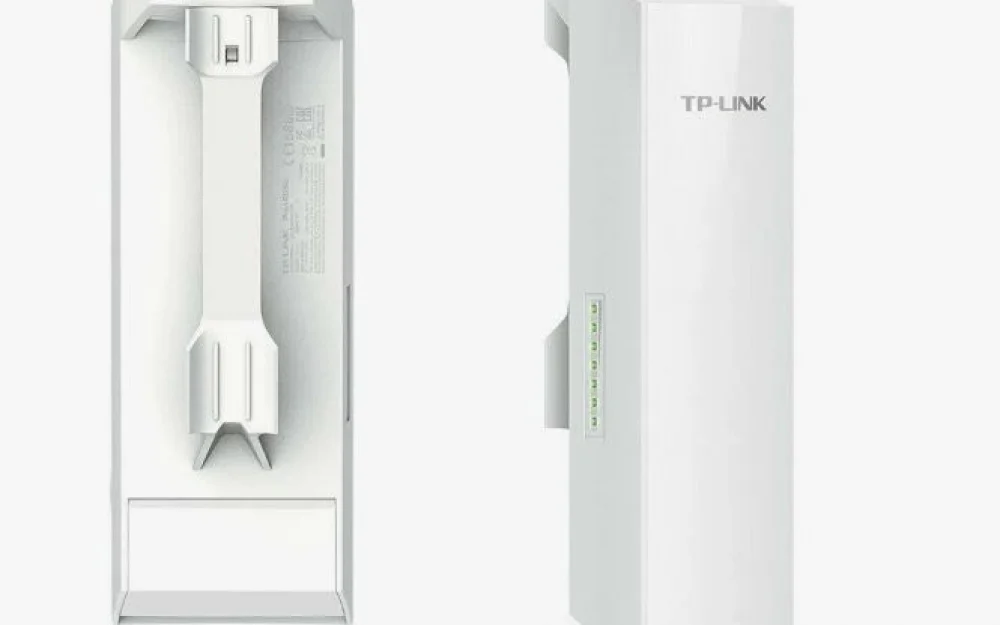
To ensure that the internet lived not only in my house but also on the neighboring street, I had to extend it "into the field." For this, I installed an outdoor access point, the TP-LINK CPE210.
The CPE210 is a simple device, but not entirely "toy-like." Inside is a built-in 9 dBi directional MIMO antenna 2×2 with dual polarization, with a beam width of about 65° horizontally and around 40° vertically. It operates in the 2.4–2.483 GHz range according to 802.11b/g/n, capable of up to 300 Mbps in a 40 MHz channel, and the channel width can be selected: 5/10/20/40 MHz — I have it set to 40 MHz to maximize the rural airwaves. The transmitter can be adjusted from zero to about 25 dBm in 1 dB steps, so if necessary, you can either dial it back or boost the point if the air allows it.
The CPE210 is powered by passive PoE 24V through a single shielded Ethernet port, with a maximum cable length of up to 60 meters from the injector to the unit, as specified in the documentation. The body itself is made of outdoor ASA plastic with an IPX5 protection rating, and it operates within a temperature range of approximately -40 to +70 °C; inside, it has basic lightning and ESD protection (up to 6 kV for lightning and up to 15 kV for static), so it feels quite confident under our wind and weather. On paper, it's an ordinary outdoor access point, but in practice, it's a working rural spotlight for Wi-Fi.
This device is simply mounted in my setup: just like the NR-712, it is attached to a wooden wall of the house on the southern side, under the roof, almost under the ridge. One "large nail without a head" — it sounds rustic, but given our wind, the main thing is that the metal doesn't slide down along with the fasteners. The height is about 8–10 meters from the ground, so the signal goes over fences and sheds rather than hitting every first picket fence.
According to the scheme, the CPE210 operates in client mode: the main internet connection is provided by the home TP-LINK AX55 in the house, and the CPE210 picks up this Wi-Fi and transmits it further into the village. I set the channel to 40 MHz — those who need it can connect, and random devices from neighbors won't easily jump onto this network. I left the power at the default setting specified in the firmware: even in this mode, the device has a noticeable range reserve, and if desired, it can be adjusted in the web interface.
I directed the sector along the street so that it targets specific houses, rather than heating the air over the gardens. According to the specifications, the horizontal beam is about 65°, while the vertical beam is narrower, around 40°, which is just right for "lighting up" the street instead of the clouds. As a result, with a regular smartphone, one can stroll around the village: the device connects easily to this access point, most often showing all the Wi-Fi bars on the screen, whether sitting on a bench with a neighbor or walking to the store. People quickly realized that it now catches not only for the chickens by the sheds, and started to gather around this unremarkable white brick on the facade.
Life in the village with Wi-Fi: from lessons to the outhouse
When the internet came out of the house through the CPE210, it became clear that it was needed in the village not just by me "for speed tests." People use it in different ways, depending on their needs. For those who find satellite channels insufficient, online TV and streaming services are available: they turned on smart TVs or set-top boxes — and movies, series, and sports broadcasts started rolling in, while the dish on the roof became more of a backup and decoration. Schoolchildren gained a proper opportunity to learn remotely: there’s no need to slog through the muddy road back and forth every autumn and spring; they can connect to lessons from home, saving their nerves and energy instead of wasting them on buses and slush.
Adults quickly got used to video calls. If before the maximum was a short voice call on a mobile phone, now you can talk "face to face" with relatives and children via messengers. Such calls don’t consume much data, especially with modern codecs and VoLTE/VoWiFi, and they feel completely different: you get live emotions here, and there's no feeling that you have to conserve the connection like it's your last piece of bread. For many, it’s also a savings — fewer trips to the district "just to talk" and more issues that can be resolved from home.
More practical things have also emerged: online payments, utility bill payments, orders from marketplaces. Earlier, you had to travel specially to the "big world" for this, now all you need is a smartphone and steady hands. Banking services in villages are now even officially being discussed — the Central Bank and relevant agencies are promoting ideas to serve villages through mail, online channels, and partner points. Half of such tasks are already being handled through the internet and couriers: you pay for electricity, order the necessary small items, pick them up at the pickup point — without cashiers, queues, and bus schedules. For the village, this isn't about "playing with toys," but about real savings of time, money, and nerves.
The most illustrative changes are seen in specific stories. One local boy used to travel twice a week to the district center for additional classes: in autumn and spring, the journey turned into a quest "get there and don't drown your boots." Now those same classes are conducted via video calls: he turns on his laptop, there's the teacher, there's the board, there's the homework. Fatigue and colds have sharply decreased, and motivation to learn has increased — when you’re not jostled over bumps, your head thinks better.
From the older generation, one local grandmother was the first to go online. At first, she was shy in front of the camera, but then they set up a tablet for her — now every Sunday she “visits” her grandchildren via video call. Previously, they would call once a month on a regular phone, but now the kids show her drawings, the cat, gifts through the camera, and for her, it’s like a small holiday, just without the travel and queues at the bus station.
A special mention goes to rural humor. For example, old man Petrovich now goes to the toilet with his phone. What he does with that Wi-Fi is something he carefully hides from his neighbors and his grandmother Proskovia, but the fact remains: before, the outhouse was just an outhouse, and now it’s also a mini-coworking space with a stable signal. Thank you, CPE210, as they say.
And one neighbor used to go to the city every two weeks for spare parts and various household trifles: gasoline, time, nerves. After the arrival of decent Wi-Fi, he mastered marketplaces, and now he orders many things online and picks them up on his way to the district from the pickup point. Against the backdrop of all the official programs aimed at “eliminating digital inequality,” this seems quite simple: hung an outdoor router, adjusted the panel antenna, set up the device — and suddenly it turned out that the village lives by the same rules as the city, only the air is cleaner.


Write comment