- AI
- A
MSP: Three in a Boat, Not Counting Context
In the previous article, we introduced the main concepts of the Model Context Protocol and wrote a simple application that allowed LLM to read files. We used tools with the caveat that we did this for simplification, to avoid rushing in. We mentioned that if a tool can be compared to a POST method, then a resource is comparable to a GET. Resources are passive data sources that the MCP server provides to the client for reading.
Part 2. Resources: Giving the Model "Eyes"
In the previous article, we introduced the basic concepts of the Model Context Protocol and wrote a simple application that allowed the LLM to read files. For this, we used tools with the caveat that we did this for simplicity, so as not to jump straight into the deep end.
We already mentioned that if a tool can be compared to the method POST, then a resource is compared to GET. Resources are passive data sources that the MCP server provides to the client for reading. Such sources can be the contents of a file, console logs, or a string in a database.
Identification: Each resource has a unique URI (Uniform Resource Identifier).
file://logs/error.txtpostgres://db/users/schema
Difference from Tools
Besides the fact that a resource does not modify data, there are other differences. Here’s a small table to make it easier to remember.
Tools | Resources | |
|---|---|---|
Role | “Hands” (Performing actions) - analogous to POST | “Eyes” (Reading context) - analogous to GET |
Initiator | LLM. The model decides itself to invoke the tool. | Host/User. The application itself “attaches” the resource to the dialogue. |
Making Changes | Yes (writing to DB, API request). Unsafe. | No (Read-only). Safe. |
In the FastMCP library, resources are defined using decorators, very similar to routes in web frameworks (FastAPI/Flask). We can construct the resource name according to a template.
@mcp.resource("file:///{filename}") — the server will parse the URI and pass the filename argument to the function.
IMPORTANT FastMCP is very sensitive to the correct writing of URIs.
For some reason, none of the sources I reviewed while writing this article emphasized this point. For file URIs, three slashes need to be specified. As I understood, FastMCP expects the structure
//{host}/{filename} If given one argument with two slashes, it assumes that a host has been provided. The file will not be found.
Security: "Sandbox"
Let’s recall another assumption that was discussed in the first part of the article.
There are many stories on the internet about how (un)wise agents erase all files on users' computers. Is it possible to avoid this?
Even in the simplest case, we only provided access to a test folder called “sandbox.” However, by using relative paths, it is always possible to escape this folder and reach the main directory.
Solution: Always convert paths to absolute ones (os.path.abspath) and check that the final path starts with the allowed root directory.
Implementation in code
1. Server (mcp_file_server.py)
We will use the code from the first part of the article. We will convert the file reading tool into a resource. This way, we can be sure that the content of the file will not change when accessed. Moreover, we have improved path protection by converting the relative path to an absolute one.
I also added an example of logging in the MCP server. This can be done in other ways, through context, but for now, this is how it is. If you mess up the paths, at least it will be clear where the MCP server is looking for files. I remind you that the usual way through print or logger will not work here, as the client intercepts the stdio stream.
import sys
import os
from mcp.server.fastmcp import FastMCP

mcp = FastMCP("demo-files-server")

# Define the demo_files folder next to the server script
BASE_DIR = os.path.dirname(os.path.abspath(__file__))
WORK_DIR = os.path.join(BASE_DIR, "demo_files")
os.makedirs(WORK_DIR, exist_ok=True)

def debug_log(msg):
    """Writes debug information to the error stream (stderr)"""
    sys.stderr.write(f"[SERVER DEBUG] {msg}\n")
    sys.stderr.flush()

debug_log(f"Server started. Working directory: {WORK_DIR}")
debug_log(f"Files in the folder: {os.listdir(WORK_DIR)}")

# ===  HELPER FUNCTIONS ===
def get_safe_path(filename: str) -> str:
    # Remove scheme prefixes if they accidentally got into filename
    clean_name = filename.replace("file://", "").lstrip("/")
    target = os.path.join(WORK_DIR, clean_name)
    abs_target = os.path.abspath(target)

    debug_log(f"File request: '{filename}' -> Path: '{abs_target}'")

    if not abs_target.startswith(WORK_DIR):
        debug_log(f"❌ Blocked: {abs_target} outside {WORK_DIR}")
        raise ValueError("Access denied (out of sandbox)")

    if not os.path.exists(abs_target):
        debug_log(f"❌ File not found: {abs_target}")
        raise FileNotFoundError("File not found")

    return abs_target


# ===  RESOURCES (RESOURCES) ===
# using the template file:///{filename} - three slashes after file
@mcp.resource("file:///{filename}")
def read_file(filename: str) -> str:
    """Reads the contents of a file."""
    debug_log(f"--- Resource read_file called with argument: {filename} ---")
    try:
        path = get_safe_path(filename)
        with open(path, "r", encoding="utf-8") as f:
            content = f.read()
            debug_log(f" File read successfully ({len(content)} bytes)")
            return content
    except IOError as e:
        debug_log(f" Error inside resource: {e}")
        # Return error text so client doesn't crash silently
        return f"Error reading resource: {str(e)}"

if __name__ == "__main__":
    mcp.run()
2 Client (mcp_client.py)
Add the method read_resource(). It takes a URI and returns the content. Initialization and session termination remain from the first part. In this example, we read as text, although different types can be read
import asyncio
from contextlib import AsyncExitStack
from typing import Any
from mcp import ClientSession, StdioServerParameters
from mcp.client.stdio import stdio_client
from mcp.types import Tool, CallToolResult

class MCPClient:
    def __init__(self, command: str, args: list[str], env: dict[str, str] | None  = None):
        # Parameters for launching the server subprocess
        self.server_params = StdioServerParameters(
            command=command,
            args=args,
            env=env
        )
        self.session: ClientSession | None = None
        # Context manager to hold the connection
        self._exit_stack = AsyncExitStack()

    async def connect(self) -> None:
        """Launch the server and initialize the session."""
        try:
            # Launch the process and create transport
            read, write = await self._exit_stack.enter_async_context(
                stdio_client(self.server_params)
            )
            # Create JSON-RPC session
            self.session = await self._exit_stack.enter_async_context(
                ClientSession(read, write)
            )
            # Handshake
            await self.session.initialize()
        except Exception as e:
            await self.cleanup()
            raise e

    # added resource reading
    async def read_resource(self, uri: str) -> str:
        """Requests the content of a resource from the server by URI"""
        if not self.session:
            raise RuntimeError("No session")

        # list of contents (can be text or binary)
        try:
            result = await self.session.read_resource(uri)
        except IOError as e:
            print(f"[Client]Error reading resource: {e}")

        return result.contents[0].text

    async def cleanup(self) -> None:
        """Close resources and terminate the server process."""
        # Proper exit from all context managers
        await self._exit_stack.aclose()
        self.session = None
3. Host (agent_host.py)
In the host, we implement the "Context Collector". It receives a URI, downloads data, and inserts it into the system prompt.
import json
from typing import Any
from openai import AsyncOpenAI
from mcp_client import MCPClient

class AgentHost:
    def __init__(self, mcp_client: MCPClient, openai_client: AsyncOpenAI, model: str = "gpt-4.1"):
        self.client = mcp_client
        self.openai = openai_client
        self.model = model
        # Dialog history (Agent's memory)
        self.messages: list[dict[str, Any = []

    async def process_w_resources(self, user_query: str, resource_uri: str = None) -> str:
        """Reading resource from the link"""
        # LOADING RESOURCE (If provided)
        if resource_uri:
            print(f"[Host] Reading resource: {resource_uri}...")
            try:
                content = await self.client.read_resource(resource_uri)

                # Injecting content into System Prompt
                system_msg = (
                    f"Use the contents of this file to respond:\n"
                    f"--- URI: {resource_uri} ---\n"
                    f"{content}\n"
                    f"--- END OF FILE ---"
                )
                self.messages.append({"role": "system", "content": system_msg})
            except IOError as e:
                return f"[Host]Error loading resource: {e}"

        # REQUEST TO LLM
        self.messages.append({"role": "user", "content": user_query})
        response = await self.openai.chat.completions.create(
            model=self.model, messages=self.messages)

        return response.choices[0].message.content
4. Main (main_res.py)
To demonstrate reading a file, we will ask the LLM to look at the application log and explain the essence of the error.
You can take a fragment of a real document or generate one. For example, something like this:
# Creating a test log
    os.makedirs("demo_files", exist_ok=True)
    with open("demo_files/app.log", "w") as f:
        f.write("ERROR 500: Database connection timeout")
Next, we implement the simplest scenario, passing the filename to the host. This is roughly how the “attachment” works in applications with LLM when you ask it to read the attached document.
If the code is copied without errors, and the paths are correct - the LLM should issue a verdict on the error.
import asyncio
import os
import sys

from dotenv import load_dotenv
from openai import AsyncOpenAI

from agent_host import AgentHost
from mcp_client import MCPClient

load_dotenv()

async def main():
    try:
        openai_key = os.getenv("OPENAI_API_KEY")
        openai_model = "gpt-4o"
        server_script = "mcp_file_server.py"

        mcp_client = MCPClient(
            command=sys.executable, # Current interpreter
            args=[server_script]
        )

        openai_client = AsyncOpenAI(api_key=openai_key)

        await mcp_client.connect()
        print("✅ Server connected")

        # Agent initialization
        agent = AgentHost(
            mcp_client=mcp_client,
            openai_client=openai_client,
            model= openai_model
        )

        # Explicitly specifying the file
        question = "Why did the application crash?"
        target_file = "file:///app.log"

        print(f"Question: {question}")
        print(f"Attaching: {target_file}")

        # The host will download everything itself and ask LLM
        answer = await agent.process_w_resources(question, resource_uri=target_file)

        print(f"\nAI Response: {answer}")

    except IOError as e:
        print(f"Resource reading error {e}")
    except Exception as e:
        print(f"Error {e}")

    finally:
        await mcp_client.cleanup()

if __name__ == "__main__":
    asyncio.run(main())
What is all this for? (Advantages of MCP)
The reader may have a reasonable question. Why all these clients, servers, hosts, if I can read any file using the usual open() and pass it to the context?
In simple applications, it is probably easier to do it that way. However, there are reasons to struggle a bit for a multifunctional AI combine.
Subscriptions
Problem: Suppose the LLM needs to receive data about thousands of users to take them into account when responding. While it may not happen often, this data can change. Querying the database every time can be noticeably slow and resource-intensive.
MCP Solution: The client can subscribe to the resource. The server will send a notification resource/updated when the file changes.
MIME Types
Current models are often multimodal. They can accept text, images, audio.
MCP transmits metadata. The server informs: "This is an image (image/png)" or "This is Python code (text/x-python)".
In our examples, we do not use subscriptions and MIME types, I haven't really figured it out myself to avoid overloading the article.
Unification (Abstraction)
For the Client (and Host), it does not matter where the data comes from.
file://report.txt(File)postgres://users/last(SQL query)…
All of this is just a URI.
This approach makes our code more structured and readable. Moreover, the beauty of the standard is that we can use others' developments. We create a host with the ability to read resources - we can connect MCP servers for reading internet links, scanning repositories, etc.
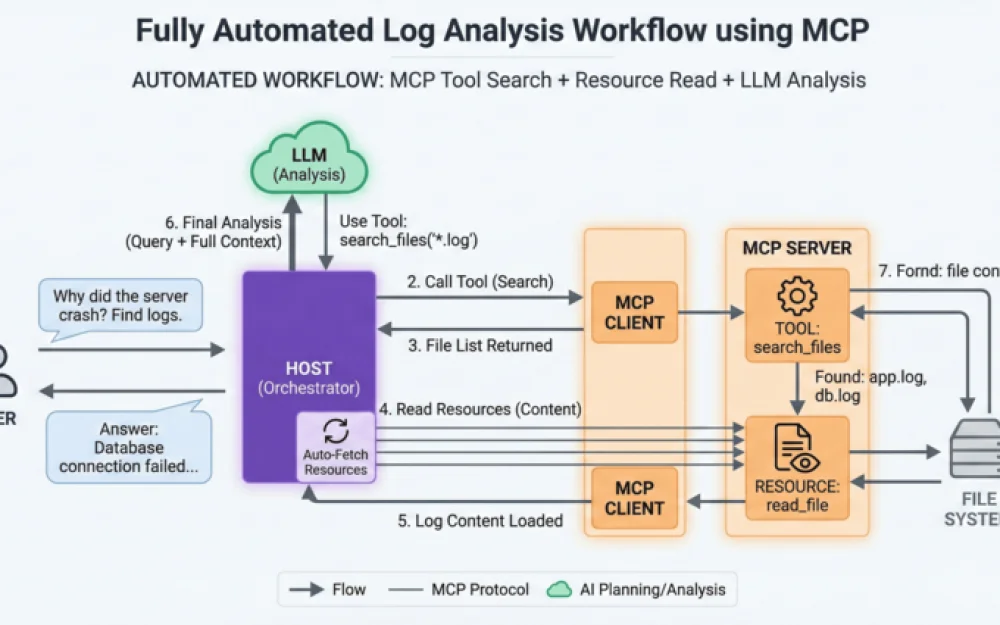
Search Tool + Read Resource
To finish on a major chord, let's add a bit of MCP magic.
Let our host figure out what files it needs
User: "Find and explain the error in the logs."
LLM calls Tool:
search_files("\*.log"). The necessary search filter selects itself based on the request.The response from LLM should be a list of files that meet the search criteria.
LLM calls Resource:
read_file(...).LLM provides the final answer to the user's question after analyzing the log text.







Write comment