
- Security
- A
How I Developed a PoC Constructor for Android Applications
How routine development of PoC applications for Android led to the creation of a proprietary payload constructor from the idea generation to the emergence of DexRunner and DEXLab - tools for quick assembly delivery and execution of DEX payloads directly on the device without interfering with the application logic.
Everyone who has ever tested the security of Android applications has inevitably faced several problems:
Found a potential vulnerability? Thinking about how to confirm it.
The check can only be triggered from code? Writing an application.
Found new places with potential vulnerabilities? Improving the application or writing a new one.
Suddenly, instead of checking, you're already working as a developer... again and again.
Hello everyone, my name is Anton Khazov, and we at SecWare often deal with testing Android applications for vulnerabilities. One day, I counted how much time I, as a mobile security researcher, spent on writing code. After realizing this terrible number, I came up with the idea to try creating a PoC constructor for such checks. Here's what I came up with.
Why don't regular tools cope?
I'll give a brief theoretical overview (those already familiar with the topic can safely skip this section). Android applications and their exportable components (Activity, Service, ContentProvider, BroadcastReceiver) are often formally accessible from the outside – it’s not uncommon for the usage logic to be tied to the internals of the application itself, where you might encounter complex Intents with a large set of parameters or a custom Parcelable object with a direct dependency on the application's internal classes. And while the existing universal debugging tool ADB is very useful, it only covers basic scenarios; transferring anything more complex than primitive types becomes either inconvenient or outright impossible (again, hello Parcelable objects).
Yes, many might point out that most potential problems can be solved with such a powerful tool as Frida – and that’s true. But then we’re talking about dynamic intervention into the application, and that’s not something we want to deal with when we aim to build a Proof-Of-Concept where, frankly, even the enabled developer mode (and thus ADB) moves us away from real sandbox conditions.

This is where we come to the conclusion that writing a separate application with the necessary load in the code brings us closest to combat conditions. However, in practice, fighting the vast Android Studio can take an unreasonable amount of time to produce a polished PoC. Maven and Gradle build systems, various debug managers, emulation, SDK version management, XML visual editors, hundreds of Toolbar toggles, etc. – all this seems excessive when it comes to writing a tiny piece of code of ~25 lines. And, as practice shows, even for a single application, you have to perform dozens of such checks.
From dozens of APKs to a single tool
When I realized that a separate application had to be developed for each hypothesis, it became obvious that this process needed automation. The task was to simplify the approach to writing a small piece of Java code, compiling it, and executing it directly on the device, bypassing the application build itself. The idea came quickly and was as simple as ABC – let me present you with a two-part solution:
DexRunner: An Android application with a base for loading and executing code.
DEXLab: A VS Code extension to simplify the load building and delivery.

At the core of DexRunner lies the standard mechanism for executing DEX files on Android – the DexClassLoader method, while DEXLab is tied to using the Android Studio environment. For DEXLab, I even tried to draw an icon.
The first attempt was a vibe-coded mess, but it worked! Initially, I sought help from Claude AI – it's great that vibe coding allows you to save a huge amount of development time, but you always had to keep an eye out to avoid losing details, so I still had to polish the code myself. And right at the beginning, I just wanted to check that nothing would interfere with the operation. The payload architecture at that moment consisted of:
A configuration file config.json, which stored information about who to hand control over to:
{
  "entryClass": "payload.Payload",
  "entryMethod": "run",
}
A DEX payload, whose build had a pipeline: Java compilation with android.jar --> JAR --> DEX.
And it seemed like it was time to pop the champagne, but here it's important to remember that the payload may have dependencies on the target application (its classes, methods, or some other data). At this stage, I manually converted all DEX files from the target application into a JAR using dex2jar, which was then used when building the payload. But besides building, to avoid losing dependencies, before launching the payload, you need to pass the DEX files of the target application to DexRunner. The application can have many DEX files, and it can be difficult to quickly figure out which ones are required to run the payload.
When There Are Too Many Files
In my concept, I expect the PoC constructor implementation to have two approaches:
When the payload is a full-fledged PoC delivered manually via Intent.ACTION_OPEN_DOCUMENT and launched by the DexRunner UI interface, since it's considered that the launch will occur without developer mode.
When the payload is a quick intermediate check, where it's important not to waste time on transfer so that the checks are truly fast, and development is simplified.
Therefore, for the second case, I added automation of delivery and launch in DexRunner via BroadcastReceiver with commands for loading (LOAD_BUNDLE) and execution (RUN_BUNDLE). DexRunner stores the DEX file in the app's private storage (in the code_cache folder), and when RUN_BUNDLE is called, it takes the payload from this folder and executes it. This trick is due to bypassing protection against dangerous code execution from user directories – you can load the payload into the /sdcard/ directory, but nothing can be executed from there (in the future, DEXLab will by default load the payload into the /data/local/tmp/ directory, from which DexRunner will later take it).
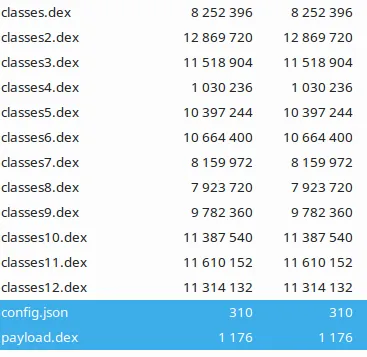
Later, I also implemented these Broadcast commands in DEXLab, which allowed the full cycle—from building and preparation to delivery and execution on a device—to be automated with a single command from the extension. However, one thing was still missing: a single format containing all necessary files for launch. Therefore, a proprietary zip format with the «.dexs» extension was developed. I integrated it with DexRunner and even added HMAC-SHA256 signature support for this archive. And here, as an example, is how a built DEXS payload might look inside (highlighted: the config and the payload itself):
What results were achieved
Now, I would finally like to go over the usage of the DEXLab extension itself. I placed two commands for creating a project template in it: one with the target application and one without it.

After project creation, the final template structure includes the necessary directories and configuration files with various build versions, as well as a basic payload.java file with a small toast and println, so you can immediately get a project that builds successfully and shows its activity. I placed the commands in a submenu for dexlab.config.json — the project configuration file (not to be confused with the config that gets packaged into the DEXS package). The result is what you can see in the screenshot below.
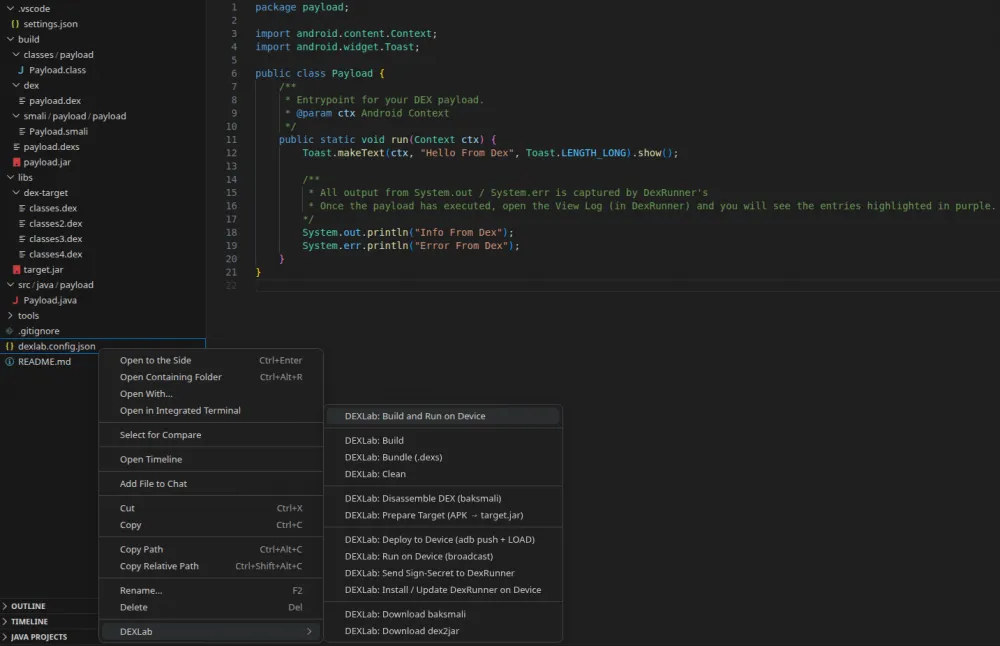
The screenshot intentionally shows the full project template tree and all possible functionality at the moment, so you can see what I was actually aiming for. An attentive reader will also notice the similarity in user experience with APKLab, and it's no coincidence—as you might have guessed, I was partly inspired by this extension, and even the name DEXLab sort of hints at this =)
Regarding the commands:
Build and Run on Device – builds and runs with a single command
Build – builds the payload and packages it into payload.dex
Bundle (.dexs) – packages all DEX files (payload+target) and signs the DEXS
Disassemble DEX – disassembles payload.dex
Prepare Target – prepares the target application for analysis, extracting all DEX files and assembling them into a single JAR library
Deploy to Device – pushes payload.dexs and sends a signal to DexRunner
Run on Device – sends a signal to DexRunner to start execution
Set Secret – sends the build secret if needed
Install / Update DexRunner – downloads and installs the latest release build from GitHub
Download baksmali – downloads baksmali
Download dex2jar – downloads the dex2jar utility package
Clean – cleans the build
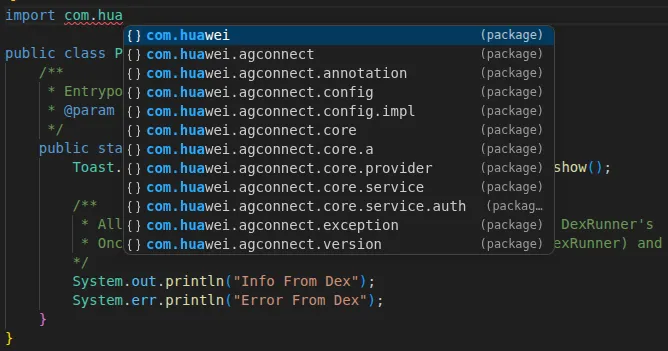
As a nice-to-have, I also recommend using the Language Support for Java(TM) by Red Hat extension, which allows you to easily reference classes from the formed JAR library obtained from the target application.
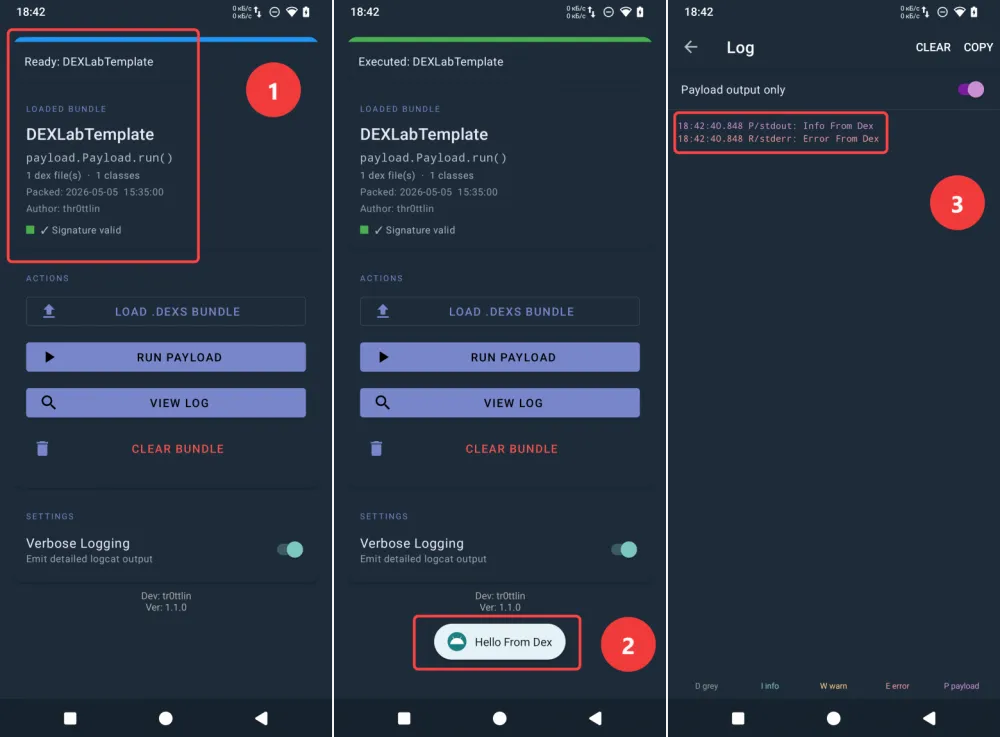
The key features of DEXLab are clear, but what does DexRunner itself look like? Everything is quite mundane: load information, manual control buttons, and a separate activity with logs. However, if you run a project template created by the DEXLab extension in DexRunner, you get the expected short Toast and debug messages in the logs.
Summary
So, the result of all this is such – I got a convenient and multifunctional tool for writing PoCs and research with the ability to include the working environment of the classes of the application under investigation. The tool has already shown its convenience and demonstrates its main strength – the ability to reproduce PoCs without changing the environment and without interfering with the application.
I think this is not yet the limit of its potential capabilities. During testing, something very tricky might come up, and this will surely prompt further expansion of functionality. I'll be glad to read comments and new ideas, and for now I've gone to draw an icon for DexRunner =)
P.S. I've posted my developments on Github. I'll also be glad for subscriptions to my (still small and cozy) Telegram channel.








Write comment