
- Software
- A
MarkMello: fast Markdown viewer for those who live in .md every day
Recently, I work with Markdown files almost every day.
GitHub: https://github.com/dartdavros/MarkMello
Lately I've been working with Markdown files almost every day.
Documentation, specifications, ADRs, implementation plans, instructions for AI agents — it's convenient to keep all of this in .md. The format is simple, readable, works well with git, and functions properly for both humans and models.
But there's a practical problem.
To quickly view a Markdown file, you often have to open an IDE. Sure, any decent IDE can display .md. But launching a full-fledged development environment for that is excessive. Especially when the task is simple: click the file, read quickly, copy a piece of text, close.
I started looking for a lightweight Markdown viewer and realized most options I found didn't suit me.
Often they're not viewers but editors. With all the consequences: extra interface, workspaces, panels, modes, heavy startup. Sometimes the main scenario is immediately tied to editing. Sometimes it's inconvenient to simply select and copy text. For example, right-click is often for formatting rather than plain text copying.
I didn't need yet another Markdown editor.
I needed a simple tool:
open .md → read immediately.
What I wanted to get
The basic scenario was very simple:
The Markdown file should open quickly.
The app shouldn't require a workspace, project, or separate structure.
The primary mode is viewing, not editing.
The interface shouldn't interfere with the document.
Reading should be comfortable: theme, font size, text width, line height.
If an edit is needed — editing mode should be available, but not required to load on startup.
In other words, this isn't an attempt to make an IDE, knowledge base, or another all-in-one note-taking combo.
It's a small desktop tool for a specific task.
Why .NET + Avalonia + Native AOT
I didn't want to do this via a webview.
For such a scenario, bringing in a browser layer seemed unnecessary. A Markdown viewer should be a desktop app that starts quickly, opens properly via file association, and behaves like a normal OS tool.
So I chose:
.NET
Avalonia UI
Native AOT for production builds where applicable
Avalonia provides cross-platform UI, .NET offers a solid engineering foundation, and Native AOT fits well with the idea of fast startup without a heavy runtime scenario.
The key architectural decision: the application is designed as viewer-first.
Viewing mode is primary. Editing mode is secondary and should only be enabled when it is actually needed.
What was achieved
The result is MarkMello.
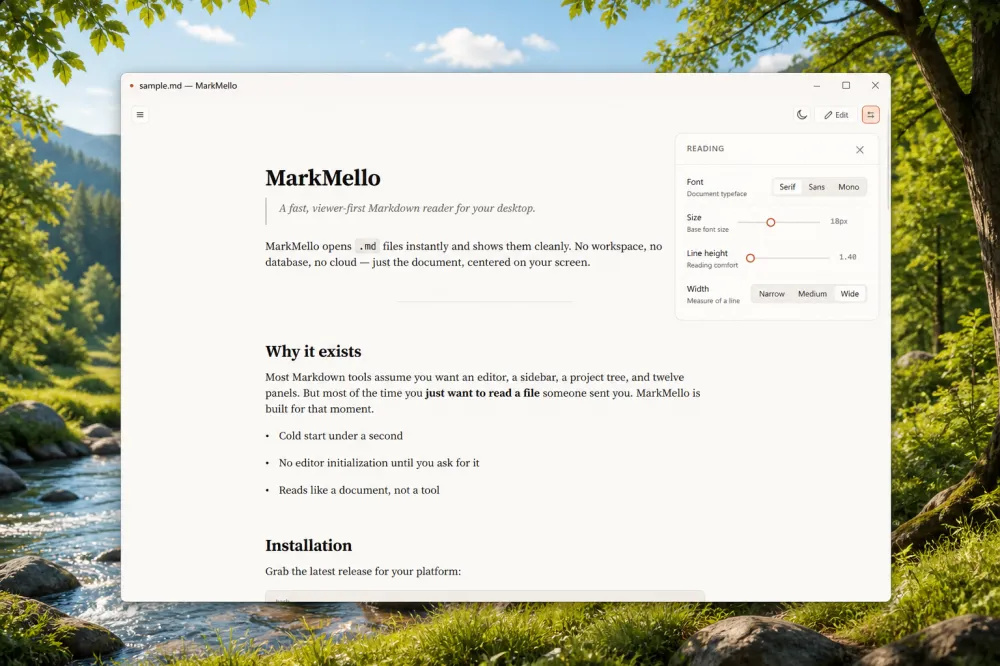
MarkMello can:
quickly open Markdown files in viewing mode;
display the document without unnecessary visual noise;
switch themes: system, light, dark;
customize reading: font size, line height, document area width;
switch to editing mode when necessary;
save changes to the file.
The main thing is that it first opens the document for reading.
Editing is not imposed. It is there, but it is not the starting scenario.
Why this is important
When working with documentation and specifications every day, small delays start to irritate.
Open the IDE. Wait for it to load. Open the file. Switch to preview. Make sure everything is rendered. Then just copy a couple of lines.
For development, this is normal.
For quickly viewing a file — it is not.
Markdown has long since become not just a README format. Now it is also a format for working artifacts in AI-assisted development: specifications, architectural decisions, instructions, plans, reports, context for agents.
Therefore, a separate fast viewer for .md seems to me like a perfectly normal tool, not an redundancy.
What MarkMello is not
It is important to define the boundaries right away.
MarkMello is not an IDE.
It is not Obsidian, not Notion, not a workspace for a knowledge base, and not a universal Markdown combiner.
I do not want to turn it into a product where, just to view one file, you have to drag along the project tree, plugins, synchronization, indexing, and a complex data model.
In short:
MarkMello should remain a fast viewer with an additional edit mode.
Not the other way around.
Status
The project is open source.
GitHub: https://github.com/dartdavros/MarkMello
You can download a build from Releases or build from source. Currently, this is an early version, so some things are still being polished: file association, builds for different platforms, UI polishing, behavior on macOS/Linux, and so on.
But the basic scenario already works:
open Markdown → quickly read → fix if necessary.
Who might find it useful
I think, first and foremost, for those who:
frequently open local
.mdfiles;work with documentation, ADRs, specs, and READMEs;
don't want to launch an IDE just to view something;
use Markdown as a working format for AI agents;
want a simple viewer without extra product bloat.
If you need a lightweight Markdown viewer — feel free to use it.

Write comment