
- AI
- A
Overview of Open Source Models for TTS Task
The Text-to-Speech task, also known as speech synthesis, involves vocalizing pre-prepared text using a speaker's voice. This task is one of the important components in human-computer interaction systems. Although speech generation is encountered less frequently than tasks involving text generation or processing, its application areas are expanding in scale and becoming increasingly in demand.
Article Plan
Introduction to the essence of the task. What it is and why it is needed.
How to evaluate such models. Metrics and nuances of comparison.
Main part. Analysis of each model. Brief summary. Opportunities and limitations. Conclusions.
Final conclusion, overall comparison table of OpenSource models for the TTS task.
Introduction
The Text-to-Speech (TTS) task, also known as speech synthesis, involves voicing a pre-prepared text in the speaker's voice. This task is one of the important ones in human-computer interaction systems. Of course, such a task of speech generation occurs much less frequently than, for example, the task of text generation or processing; however, its areas of application are only increasing in scale over time and becoming more and more in demand.
The task of speech synthesis underlies all voice assistants, such as the smart speaker Alice, navigators, or technical support services. Besides such global implementations, there are systems that directly assist people for whom this is truly important, such as helping blind individuals obtain information about their surroundings. These technologies are used to voice audiobooks, characters in video games, and many other interesting applications.
Like in other areas of big data, the TTS field is evolving. New open models and repositories are emerging, allowing this task to be solved with maximum approximation to the human voice. Pronunciation, intonation, pauses between punctuation marks, emotions, and synthesized speech are perceived as real.

Hello, tekkix, my name is Muzafarov Danil, I work as a DS engineer at Raft, and today we will consider existing Open Source models and repositories that solve TTS tasks for the Russian language. Perhaps not all models will make it into my list, so I would appreciate it if you suggest any other interesting models in the comments that are worth paying attention to, and in that case, a second part could be made.
Success Metrics
Before starting the analysis and comparison of models, it is necessary to define the metrics by which we will evaluate them. In this speech synthesis task, it is difficult to objectively assess the quality of speech, but the generation speed can certainly be measured. We will measure speed on GPU and CPU in seconds.
Latency (CPU/GPU)
There will also be my subjective assessment of the generation result based on the following parameters on a scale from 1 to 5:
Naturalness (Naturalness): How closely the speech resembles human speech in terms of intonation, timbre, speed, fluency, and pace;
Expressiveness (Expressiveness): Whether the model can convey emotions, vary intonation, and adapt to context;
Ease of integration and setup: The quality of documentation, how difficult it is to run the project locally on a PC
Main Part
So, today we will look at 7 Open Source solutions, namely:
Boson AI / HiggsAudio
ChatterBox
ESpeech
F5-TTS
QwenTTS
Silero
XTTS-v2
HiggsAudio
Boson AI - A company specializing in TTS tasks. They have an Open Source repository that provides access to their open models for TTS, as well as usage examples.
Link to Boson AI: https://www.boson.ai/blog/higgs-audio-v2
Link to GitHub HiggsAudio: https://github.com/boson-ai/higgs-audio
During testing, I immediately notice a warning that it is recommended to have at least 24 GB of video memory. Unfortunately, I only have 12 GB, so I had to perform some operations in the code to reduce the amount of cache used by default so that the model would fit on my graphics card.
Testing
The system prompt specifies the instruction-description of how the voice should sound, external sounds, recording clarity, and other characteristics.
system_prompt = (
    "Generate audio following instruction.\n\n<|scene_desc_start|>\nAudio is recorded from a quiet room.\n<|scene_desc_end|>"
)
A User Prompt is also specified. It is responsible for the actual audio content that will be synthesized. The final Message for the model looks like this:
messages = [
    Message(
	    role="system",
	    content=system_prompt,
    ),
    Message(
	    role="user",
	    content="Colleagues, hello everyone! This is synthesized speech from higgs-audio. My name is Muzafarov Danil and I am testing this repository.",
    ),
]
Next, the generation took about a couple of minutes, which is quite long; for English, it took me 1 minute.
Conclusion
The synthesized voice came out with a strong accent. It is clearly not possible to specify the Russian language in the generation parameters, so we have this result. There were no problems with the English language; the synthesized speech was clear and high quality.
Chatterbox
A Chinese multilingual model for voice generation
GitHub: https://github.com/resemble-ai/chatterbox
I was unable to run this repository on GPU due to conflicts with dependencies for the new types of graphics card architectures. But that's okay, let's try on CPU.
Testing
The text I plan to vocalize:
"Colleagues, good afternoon! I am testing speech synthesis using the Chatterbox model. This is the synthesized voice of Danil Muzafarov."
Speech synthesis with standard timbre (voice)
I made a mistake in a couple of words with stress, incorrectly used intonation at the beginning.
Speech synthesis with the cloned voice of the speaker
Here I pre-recorded my voice and used it as an "Audio prompt".
The same problem with stress and intonation. But overall it sounds similar to the speaker's voice.
Conclusion
It can work with the Russian language, but not very well. If you use a GPU, it will be quite fast.
For generating each synthesized audio track with the text I wanted to vocalize on my CPU, it took about 38 seconds.
ESpeech
A Russian-speaking team of developers has released models for TTS with a gradio interface.
Link to HF: https://huggingface.co/ESpeech
Link to HF for the latest model: https://huggingface.co/ESpeech/ESpeech-TTS-1_RL-V2
There is no detailed documentation here, only a script that allows you to launch the gradio web interface and test models within it. This means you'll have to figure out all the code yourself, extracting the necessary functions.
Testing
The setup was very simple. Code was provided, along with the dependencies that need to be installed. I created an environment, installed the dependencies, created a python script, and launched the gradio web application.
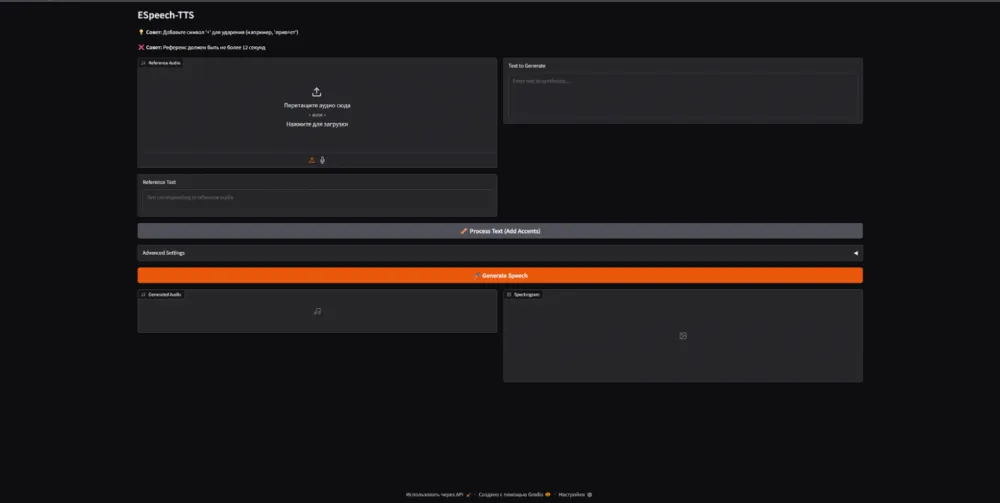
A reference audio is loaded, its transcription is written down.
The text for generation (synthesis) is specified.
There are also Advanced settings for more fine-tuning of the speech.
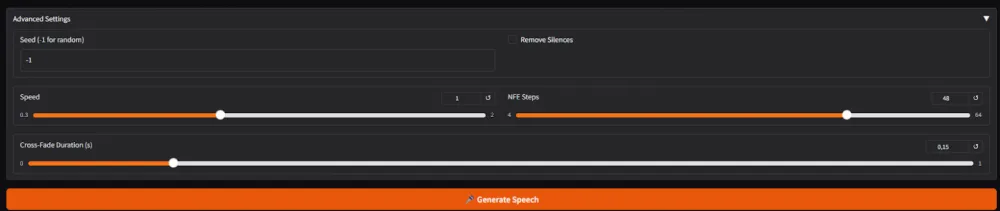
Next, just press the "Generate Speech" button.
Reference audio
Generation result
Conclusion
The Russian intonation is fine if punctuation marks are placed correctly.
The stress is good.
The generation is excellent, with no complaints about the quality.
The generation speed is good; it took 6 seconds of processing on the GPU for 14 seconds of generation.
F5-TTS
Original repository: https://github.com/SWivid/F5-TTS
The original F5-TTS repository does not include the Russian language. However, a fine-tuned F5-TTS based on Russian and English samples was found on HF: https://huggingface.co/Misha24-10/F5-TTS_RUSSIAN

I will test the fine-tuned model.
Testing
I took the fine-tuned Russian model from HF: https://huggingface.co/Misha24-10/F5-TTS_RUSSIAN.
I am using the latest version - F5TTS_v1_Base_v4_winter.
To use the model, you need to have reference audio, preferably with a transcription; if you don't have a transcription, additional resources will be used for transcription.
As a result, the following CLI arguments need to be specified for generation:
f5-tts_infer-cli /
    --model_cfg src/f5_tts/configs/F5TTS_v1_Base_v4_winter.yaml /
    --ckpt_file ckpts/F5TTS_v1_Base_v4_winter/model_212000.safetensors /
    --vocab_file ckpts/F5TTS_v1_Base_v4_winter/vocab.txt /
    --ref_audio ref_danil.ogg
    --ref_text "Hello everyone, my name is Muzafarov Danil and I am currently testing a new audio format" /
    --gen_text "Colleagues, good afternoon, my name is Muzafarov Danil, I am currently testing speech synthesis on the F5 model, fine-tuned for the Russian language"
    --device cuda
model_cfg - model configuration, it is originally present in the repository, you need to change the name of the configuration itself and the name of the model inside from "F5TTS_v1_Base_v4" to "F5TTS_v1_Base_v4_winter";
ckpt_file - model weights;
vocab_file - vocabulary with symbols that the model knows. Taken from the Russian repository on HF;
ref_audio - reference audio. The voice of the speaker we are going to clone;
ref_text - Transcript of the reference audio;
gen_text - Text we want to generate;
device - here either cuda or cpu. But this is optional, you can omit this parameter.
Reference audio
Generation result
Output
Excellent generation: order with pronunciation, order with intonation.
Generated audio is 9 seconds long.
On GPU - generation took 2 seconds. On CPU - 2 minutes.
No models for the Russian language in the official repository.
Works slowly on CPU.
No scripts for inference, operation occurs via terminal and cli arguments.
QwenTTS
Fresh Chinese OpenSource from Qwen for speech synthesis.
GitHub: https://github.com/QwenLM/Qwen3-TTS
Here provided 3 main models:
CustomVoice - provides a limited number of speaker voices (timbres) that can be used to voice text;
VoiceDesign - allows you to describe how the speaker's voice should sound with a prompt;
Base - clones the voice of the reference speaker and voices the given text with that voice.
Testing
Model Qwen3-TTS-12Hz-1.7B-CustomVoice
The model supports multiple languages:
['auto', 'chinese', 'english', 'french', 'german', 'italian', 'japanese', 'korean', 'portuguese', 'russian', 'spanish']
The model has timbre options for several speakers:
['aiden', 'dylan', 'eric', 'ono_anna', 'ryan', 'serena', 'sohee', 'uncle_fu', 'vivian']
Let's move on to speech synthesis. In the method model.generate_custom_voice(), there are parameters:
text - the text to be synthesized;
language - the language of generation, explicitly indicating Russian or Auto;
speaker - choose a speaker, specifically the voice timbre that will voice the text. Choose from the available ones (see available ones through the method model.get_supported_speakers());
instruct - a prompt describing how the text should be voiced. It's optional.
import torch
import soundfile as sf
from qwen_tts import Qwen3TTSModel

model = Qwen3TTSModel.from_pretrained(
    "Qwen/Qwen3-TTS-12Hz-1.7B-CustomVoice",
    device_map="cuda:0",
    dtype=torch.bfloat16,
)

wavs, sr = model.generate_custom_voice(
    text="Hello, my name is Danil Muzafarov. This is a speech synthesis test.",
    language="Russian",
    speaker="ryan",
    instruct="Speak in a calm, confident voice.",
)
sf.write("output_custom_voice.wav", wavs[0], sr)
Generation Result
Output
Although the model places stress correctly, it feels like there is a slight accent and issues with intonation. This is related to the fact that the speakers' voices have Chinese or English as their native language, not Russian.
Qwen3-TTS-12Hz-1.7B-VoiceDesign Model
To generate in the method model.generate_voice_design(), the following parameters must be specified:
text - the text to be synthesized;
language - the language of generation, explicitly indicating Russian;
instruct - a prompt describing how the text should be voiced.
import torch
import soundfile as sf
from qwen_tts import Qwen3TTSModel

model = Qwen3TTSModel.from_pretrained(
    "Qwen/Qwen3-TTS-12Hz-1.7B-VoiceDesign",
    device_map="cuda:0",
    dtype=torch.bfloat16,
)

wavs, sr = model.generate_voice_design(
    text="Colleagues, good afternoon, my name is Danil Muzafarov. This is a speech synthesis test.",
    language="Russian",
    instruct="The male voice of the announcer with a low timbre",
)
sf.write("output_voice_design.wav", wavs[0], sr)
Generation Result
Output
The prompt must be described in English; it does not work in Russian. The result is good, and the instruction for describing the voice is followed.
Qwen3-TTS-12Hz-1.7B-Base Model
To generate in the method model.generate_voice_clone(), the following parameters must be specified:
text - the text to be synthesized;
language - the language of generation, explicitly indicating Russian;
ref_audio - the audio of the speaker's voice that we want to clone;
ref_text - the transcription of the speaker's voice audio.
import torch
import soundfile as sf
from qwen_tts import Qwen3TTSModel

model = Qwen3TTSModel.from_pretrained(
    "Qwen/Qwen3-TTS-12Hz-1.7B-Base",
    device_map="cuda:0",
    dtype=torch.bfloat16,
    #attn_implementation="flash_attention_2",
)

ref_audio = "ref_danil.ogg"
ref_text  = "Hello everyone, my name is Muzafarov Danil and I am currently testing a new audio format."

wavs, sr = model.generate_voice_clone(
    text="Colleagues, good afternoon, my name is Danil Muzafarov. This is a speech synthesis test. Today is January twenty-sixth.",
    language="Russian",
    ref_audio=ref_audio,
    ref_text=ref_text,
)
sf.write("output_voice_clone.wav", wavs[0], sr)
Audio reference of the speaker's voice
Generation result
Output
Good repository, everything is very conveniently described, intuitively clear.
Built-in voices are not suitable for Russian.
A good prompt description of the speaker's voice showed good results.
Voice cloning of the speaker is excellent.
Inference is unlikely to be suitable for real-time work, but in projects where real-time is not so important - it can perform quite well.
Silero
Russian-language development for speech synthesis.
GitHub: https://github.com/snakers4/silero-models
Link to the latest article on tekkix: https://habr.com/ru/articles/961930/
Testing
Only standard timbres of speaker voices can be used. There is no option to use a custom voice.
The models themselves are lightweight and can fit on a CPU
from silero import silero_tts

model_id = 'v5_ru'

device = torch.device('cpu')

model, example_text = silero_tts(language='ru',
                                 speaker=model_id)
model.to(device)  # gpu or cpu
Next, you can see the available speaker voices through the method sorted(model.speakers)
['aidar', 'baya', 'eugene', 'kseniya', 'xenia']Next is a block of code for speech synthesis
# v5_cis_base_nostress
sample_rate = 48000
speaker = 'eugene'

example_text = 'Colle+agues, g+ood a+fternoon, my+n+ame is Muza+far+ov Dan+il, right+n+ow I am te+sting spe+ech sy+nthesis from Sili+ero'

audio = model.apply_tts(text=example_text,
                        speaker=speaker,
                        sample_rate=sample_rate)
print(example_text)
display(Audio(audio, rate=sample_rate))
You may notice that the text I wrote here looks non-standard, there are "+" symbols present. This indicates stress for the model.
Of course, this is all done not manually, but through a separate library that Silero also provides. An example of usage is below.
from silero_stress import load_accentor

accentor = load_accentor(lang='ru')  # lang could be "ru" / "ukr"
sample_sent = "Colleagues, good afternoon, my name is Muzafarov Danil, I am currently testing the speech synthesis from Silero"
print(accentor(sample_sent))
And we get the following result:
Coll+eagues, g+ood a+fternoon, m+y n+ame is Muzaf+arov Dan+il, n+ow I am t+esting the s+peech s+ynthesis from S+ileroGeneration result
Output
Silero has a license for use, so it can only be used for free for educational purposes.
The system has proven to be quite high quality, with a convenient library that can place accents in the text that needs to be voiced.
Generation is very fast even on CPU.
XTTS-v2
GitHub: https://github.com/Jaden-J/Coqui-TTS-XTTS-v2-
HuggingFace: https://huggingface.co/coqui/XTTS-v2
Testing
You can view available models through
tts --list_modelsRussian models are not available, so you will have to use multilingual ones.
Voice cloning and synthesizing new audio based on it
from TTS.api import TTS
device = "cpu"

tts = TTS("tts_models/multilingual/multi-dataset/xtts_v2").to(device)

tts.tts_to_file(text="Colleagues, good afternoon, my name is Danil Muzafarov, I am currently testing a new model for speech synthesis, it turns out quite well, but I couldn't run it on my graphics card, but it worked on the processor.", speaker_wav="Danil.mp3", language="ru", file_path="output_dan.wav")
Subjective assessment - really quite good, the timbre of the voice has been preserved. At first, the intonation is slightly off, but otherwise it's fine. The audio duration of 11 seconds was generated in 19 seconds on CPU.
Generation result
There is a feature for cloning the speaker's voice timbre and reproducing text in foreign languages. But let's not dwell on this in detail.
Voice transformation
It is possible to transfer the timbre of the voice from one audio file to another audio file. Thus pronouncing the second audio file with the voice from the first.
Unfortunately, on the multilingual model with the Russian language, this works very poorly, but I am attaching an example of how to do it.
tts = TTS(model_name="voice_conversion_models/multilingual/vctk/freevc24", progress_bar=False).to("cpu")

tts.voice_conversion_to_file(source_wav="source_audio.ogg", target_wav="target_audio.ogg", file_path="mix.wav")
Output
Very convenient repository, everything is intuitive. There is an option for CPU generation at an acceptable speed. It more or less adequately solves the task of cloning the speaker's voice and voicing text. But a big downside is that there is no model specifically for the Russian language. There is an option for fine-tuning your own models.
Voice cloning and speech generation in Russian are available, it works fine, but there is room for improvement. It would be great to have a Russian model, as all work is done on a multilingual one and clearly cuts potential quality.
Good repository, but we need to wait for the Russian model or fine-tune it ourselves.
Conclusion and Summarizing Results
Now we need to compile all the results into a table to visually assess the models we reviewed. Previously, we just looked at how the models work, how they sound, and some aspects of their implementation. At the very beginning, we discussed the metrics by which we will evaluate the models, and for the honesty of measuring the metrics, we will use the same conditions. Specifically, we will generate the same audio message and rate it in the table.
GPU - RTX 5070
Processor - Ryzen 7500F
We will voice: “Colleagues, good afternoon, my name is Muzafarov Danil. I am writing an article on tekkix and now I am measuring audio generation metrics by speed.” This audio lasts about 10-15 seconds.
Model | Latency (CPU), sec | Latency (GPU), sec | Naturalness | Expressiveness | Ease of Integration |
HiggsAudio | 123.34 | 50.36 | 1 | 1 | 3 |
ChatterBox | 31.63 | - | 3 | 3 | 3 |
ESpeech (TTS-1 RL-V2) | 3.85 | 3.76 | 4.5 | 4 | 2 |
F5-TTS (v1_Base_v4_winter) | 128.83 | 2.32 | 4.5 | 5 | 1 |
QwenTTS (1.7B-VoiceDesign ) | 40.487 | 15.001 | 4.5 | 5 | 4 |
Silero (v5_ru) | 2.62 | 0.071 | 4 | 4 | 4 |
XTTS-v2 | 20.65 | 18.54 | 3 | 3 | 2 |
The obvious underdog in the table is HiggsAudio. Although it shows good results in English, unfortunately, it performs poorly in Russian. I don't want to go into detail about the other models, as they all have potential, with their own pros and cons, allowing each user to choose what they like best and what meets their needs.
I hope this article provides a primary understanding of each model and helps you make a quicker decision that can address your specific task.
I welcome comments and constructive criticism that will help me improve my future articles!




![From Virtual Hands to AI for Survivalists: Curious Open Agent OSes [and One Hardware Project]](https://cdn.tekkix.com/imgs/2026/05/habrcom/big/ce0b1057616faed51cd8b9f3b2b9.webp)

Write comment