- AI
- A
Semantic Updatable Cache on AlloyDB Omni
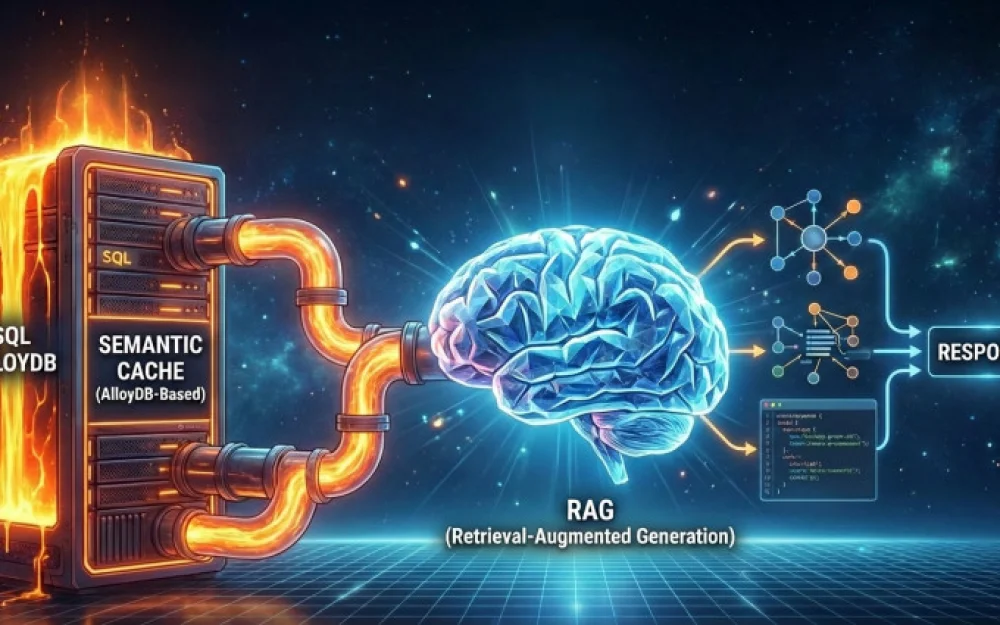
Suppose you have built an RAG service on SQL, and it works great. Quite fast, very accurate, and very expensive, as each request to the service requires calling the LLM to generate a response from chunks extracted from the knowledge base. The more fragments we extract, the more input tokens are spent on the composite prompt, even if the response consists of just one sentence.
Of course, you can pre-cut the number of extracted chunks, but this will affect the quality of the answers.
You can set up a cache that saves on calls to the service when identical questions come in. But when one user asks "How to get developer support?", and immediately another user asks "How to ask development-related questions?", your service will generate a new answer each time, burning through your tokens and making the user wait. A regular cache is powerless here: for it, these two phrases are completely different keys.
In this article, I will explain how to deploy a powerful semantic cache based on AlloyDB Omni (PostgreSQL from Google), using ScaNN vector search, automatic partitioning, and a task scheduler. We will go from setting up a Docker container to a production architecture.
What is semantic caching?
The logic of the cache works as follows:
The user asks a question.
The application generates a vector (embedding) of this question.
A search is performed in the database using the ScaNN index with a similarity threshold.
If a similar question is found, the saved answer is returned.
If not found: the question's embedding is sent to RAG, suitable fragments of information are extracted, the answer is generated, and the pair "question + vector + answer" is saved in the database.
Unlike a classical cache, which looks for exact matches of text, a semantic cache looks for semantic similarity.
We convert the user's question into a vector (a set of numbers) and search the database for close vectors of previous questions. If such a question with a close vector is found (distance less than some threshold), we return the saved answer immediately without calling RAG.
So, our task is to maximize the average response time of our “Question-Answer” system. To do this, we will use both a classic cache for exact matches, as the fastest way to get a response, and a semantic cache that allows us to find an answer based on the embedding of the question.
Level 1 (cache search for exact question match): The client calculates the MD5 hash of the question. The database searches for it in microseconds. If found, we return the answer.
Level 2 (search by semantic similarity of stored questions): If there is no exact match, we calculate the embedding of the question and look for the nearest neighbors among those stored in the cache. If we find one, we return the answer.
Level 3 (RAG): If nothing is found, we ask in the knowledge base, and save the result in the cache.
The information in the knowledge base is dynamic. New facts emerge, the surrounding world changes, and the answers to questions must also be adjusted. Suppose we are launching a certain service with API access, and initially we had a developer support service, but we decided to implement an agent AI that will search for answers in the codebase and respond to questions via the API. And if earlier the answer to the question “How to get developer support?” was something like “There is a ticket system available for developer support,” now it should provide a link to this service.
The simplest solution is to delete old cache entries that may become irrelevant at the current moment. At the planning stage, it is necessary to estimate the lifespan based on the dynamics of information updates that you provide. For example, set the lifespan of an entry to three months if you are a help desk for archaeology. However, if you are the technical support for a website, then the lifespan of the cache cannot be that long, and it’s better to set the lifespan to one day.
So, we need to estimate in advance the balance between two quality indicators: token savings + latency reduction versus the reactivity of the service.
In this article, we will set up a monthly cache, and let this be the FAQ section of the blockchain site: The same questions come up repeatedly, information is updated regularly, but not frequently. If a new topic with frequently asked questions arises, we can set up cache clearing for similar questions (but we are not discussing thematic cache clearing here; that is a topic for a completely separate article). And cache older than a month can be safely deleted by the task scheduler.
The traditional DELETE command in PostgreSQL works like marking with a "deleted" marker. Physically, the data remains on the disk, creating "holes" and burdening the cleanup process. With intensive cache rotation, this kills performance.
An elegant solution here is to partition the large cache table into partitions that will be stored in different files, and the DROP PARTITION command, which operates at the file system level: it simply "detaches" the file with the data. This is instantaneous, free for the processor, and leaves no debris. For this, we will enable the pg_partman extension and create a schema for it called partman.
However, partitioning creates a conflict: we want to break the data into chunks (by months) for convenient deletion, but the ScaNN index requires large tables. In PostgreSQL, partitioning is the creation of an illusory table. The parent table is a "ghost," a logical router that does not contain data. Since there is no data, the ScaNN index has nothing to learn from.
Unlike classical indexes (B-Tree), which simply order the data, ScaNN is a learnable index. It needs to "look" at the data to build a map of the multidimensional space (to cluster vectors and quantize them).
Attempting to create an index on the parent table will return an error requiring the creation of indexes on each child partition separately. This is not a software bug, but a mathematical inevitability: you cannot build a map of a terrain that does not yet exist.
So, we will create the scann index on each partition, which complicates the task a bit, but is quite solvable.
In the indexing algorithm, there is functionality for processing small sets of records, where a regular brute force is activated, measuring distances between all embeddings pairwise. But if we always have brute force in the partitions instead of a full-fledged scan, we lose all the magic. The right way is not to create small tables.
The efficiency of ScaNN and partitioning depends on the expected number of queries to the service. Choose a strategy based on your volume:
Strategy A: < 5,000 posts per day
If you have only a couple of thousand queries a day, daily partitions are harmful.
We will break it down by month. In a month, we will accumulate ~150k vectors. This volume is sufficient for the ScaNN index to be built qualitatively and work quickly.
DROP PARTITION works once a month. Storing the cache a bit longer (for example, deleting a query not exactly after a month but when a whole month becomes outdated) is usually acceptable for the cache.
Result: ScaNN works great, management is easy.
Strategy B: 5k – 50k vectors per day
Daily partitions make sense, but ScaNN for each of them is too expensive.
You can use daily partitions without creating a ScaNN index. With 20-30k records, brute force (sequential scan) works faster than searching through the index. PostgreSQL can perform Parallel Seq Scan. If you're searching over the last 7 days, the database will launch 7 parallel workers, each scanning its small table in 5-10 ms. The ScaNN index here will add overhead for reading the tree structure but won't yield any gains.
As a result, we will achieve speed (thanks to parallelism) and ease of deletion (DROP PARTITION), without suffering from the limitations of the index.
Strategy C: > 100k vectors per day
Daily partitions are huge, searching without an index is slow.
Here we need both daily partitions and the ScaNN index. At this volume, ScaNN trains excellently. The issue of "fewer than 5000 rows" resolves itself within the first hours of the system's operation.
But there are nuances: When creating a new (empty) partition "for tomorrow," use scann.allow_blocked_operations = true during partition creation, and create a "blank" index in advance. You will need a separate task for the scheduler that will run REINDEX CONCURRENTLY on the active partition every N hours to retrain the centroids on fresh data.
Step 1: Custom setup for launching AlloyDB Omni in Docker
AlloyDB Omni is an open source version of PostgreSQL from Google, enriched with AI features, that can be run on your own resources. Try the following launch command:
Bash
docker run --name
-e POSTGRES_PASSWORD=
-d \
google/alloydbomni
An image with the Alloy DB server will be downloaded and started with your password. After launching, check the logs: the container should start in a couple of seconds, not hang in an infinite restart. If everything works, it can be connected to like a regular PostgreSQL server.
Installing Extensions and Dealing with Schemas
We need 4 extensions:
vector — for storing embeddings.
alloydb_scann — a super-fast index from Google.
pg_partman — for managing partitions (cleaning old caches).
pg_cron — task scheduler.
There are nuances here: pg_partman likes order and its own schema, while pg_cron in AlloyDB Omni is tightly bound to the system schema. We can easily handle the first one by simply creating the necessary schema ‘partman’ and then creating the extension specifying this schema.
Here is the SQL initialization script:
-- 1. Enable extensions
CREATE EXTENSION IF NOT EXISTS vector;
CREATE EXTENSION IF NOT EXISTS alloydb_scann;

-- 2. pg_partman is EXPLICITLY set in its schema.
CREATE SCHEMA IF NOT EXISTS partman;
CREATE EXTENSION IF NOT EXISTS pg_partman SCHEMA partman;
The extension ‘pg_cron’ is trickier. By default, it is not enabled in the container, and it needs to be activated with a special server configuration flag when running docker:
-c 'shared_preload_libraries=pg_cron'
It is important to remember that the -c (config) flag must come AFTER the image name, otherwise it will be an option for the running server. If placed before, Docker will think it’s the --cpus (CPU shares) flag, which relates to Docker's own settings.
The second point: in the default configuration, this extension is installed on the system database postgres. And this is correct because if you have multiple databases on the server, it’s better if the task scheduler resides in the system database and launches scheduled tasks in any database from there. So do that if you need to maintain several different databases.
But let's assume that we are not looking for simple ways, and we like to perform all operations in one database without creating an additional connection to the system database postgres. And that's exactly how I like it; I want to create a hermetic service and administer it in one connection, set up all user grants for one database and not let them into the system one. To do this, I added another configuration variable cron.database_name to the container launch line.
Here is the complete launch script with both keys:
docker run --name
-e POSTGRES_PASSWORD=
-d \
google/alloydbomni \
-c 'shared_preload_libraries=pg_cron' \ -c ‘cron.database_name=
After restarting, I ran directly in my database:
CREATE EXTENSION IF NOT EXISTS pg_cron;
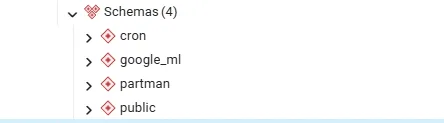
And I have a new schema cron in the list, containing everything necessary for organizing scheduled task execution. Here's what it looks like after all the manipulations:
Stage 2: Creating a Table and Partitioning
The "Cold Start" Problem
For ScaNN to work effectively, a critical mass of data is required. It is impossible to identify quality cluster centroids with small samples. An index trained on 100 rows will give very poor Recall when searching among future millions of embeddings. We have already mentioned that there should be no less than 5000 records in the table. If a partition contains fewer rows, the creation of the ScaNN index is either blocked by the system or becomes meaningless.
On the hardware level, for small volumes of data, the classical nearest neighbor algorithm Brute Force (pairwise distance calculation between all embeddings) works faster. Reading 2000 vectors from memory and comparing them pairwise directly is cheaper than traversing a complex index tree.
So, we will create a separate table for each month and simply drop (DROP) the outdated tables entirely.
CREATE TABLE public.semantic_cache (
    id BIGSERIAL NOT NULL,
    created_at TIMESTAMPTZ NOT NULL DEFAULT NOW(),
    user_query TEXT NOT NULL,
    -- MD5 hash is calculated on the client (Python), the database simply saves it.
    -- This saves the database CPU.
    query_hash CHAR(32) NOT NULL CHECK (query_hash ~ '^[a-f0-9]{32}$'),
    -- Vector (size 768 for OpenAI/Gecko)
    embedding VECTOR(768),
    rag_response TEXT NOT NULL,
    -- created_at must be in PK for partitioning
    PRIMARY KEY (created_at, id)
) PARTITION BY RANGE (created_at);
Index Configuration
We need two types of indexes. The first one is for exact search using a hash table with MD5 (fast and cheap)
CREATE INDEX idx_cache_hash ON semantic_cache USING HASH (query_hash);
The second one is for semantic search (ScaNN)
CREATE INDEX idx_cache_scann ON semantic_cache
USING scann (embedding vector_cosine_ops)
WITH (num_leaves = 100, quantizer = 'sq8');
Surprise! This index will immediately throw an error, as it cannot be created on a partitioned table.
Stage 3. Creating ScaNN on a Partitioned Table
Building the index on a small amount of data will lead to a significant imbalance in clusters, and therefore, as partitions fill up, it will need to be rebuilt by the scheduler. All this clutters the implementation and makes the solution opaque. In the latest versions of AlloyDB, functionality for automatic index maintenance (scann.enable_preview_features) is being introduced, which attempts to automate the processes of centroid rebuilding (UpdateCentroid) and partition splitting (SplitCentroid). Enabling this functionality may reduce operational load, but requires thorough testing.
There is a compromise solution: indexing of closed periods. Instead of trying to create an index on an empty partition "for tomorrow" (which will lead to an error or poor index quality), we create an index on the "yesterday" partition as soon as it stops accepting active records.
Look how beautifully it works out: the partition is already filled with data (> 5000 rows), so AlloyDB blocks nothing, the index is trained on real completed data, not on emptiness, which guarantees good Recall.
As for the current, filling partition – we will not create a ScaNN index on it. Then inserting records there will work at maximum speed, without consuming CPU resources for real-time vector tree recalculation.
Searching in the current partition is done via Brute Force (fast, as there is little data), while searching through the huge history is done via ScaNN. In my opinion – it's beautiful.
Step-by-Step Implementation
You use pg_partman to create monthly partitions.
Step 1. Configuring pg_partman
When configuring pg_partman, make sure that the template table or the parent table DOES NOT have a ScaNN index defined. Regular indexes (B-Tree on id, created_at) can and should be left in place.
We configure partman (in the working database my_app_db):
-- Tell partman to manage our table
SELECT partman.create_parent(
    p_parent_table => 'public.semantic_cache',
    p_control      => 'created_at',
    p_type         => 'range',
    p_interval     => '1 month',
    p_premake      => 2
);

-- Configure old cache deletion (Retention 3 months)
UPDATE partman.part_config
SET retention = '3 months', retention_keep_table = false
WHERE parent_table = 'public.semantic_cache';
Step 2. Adding ScaNN to the completed partition
Create a procedure that finds the partition from the previous month and indexes it:
CREATE OR REPLACE PROCEDURE public.create_scann_on_last_month()LANGUAGE 'plpgsql'
AS $BODY$
DECLARE-- The name of the partition is generated by pg_partman by default:-- table_name_pYYYYMMDD-- Calculate the name of the table for last month
part_name TEXT := CONCAT('semantic_cache_p', to_char(date_trunc('month',NOW() - interval '1 month'), 'YYYYMMDD'));
index_name TEXT := CONCAT(part_name, '_embedding_idx');sql_cmd TEXT;
BEGIN
-- Check if such a table exists (protection against failures)IF EXISTS (SELECT FROM pg_tables WHERE tablename = part_name)THEN
-- Form the index creation command
sql_cmd := format(
'CREATE INDEX IF NOT EXISTS %I ON %I USING scann (embedding cosine) WITH (num_leaves = 100)',
index_name, part_name ); -- Execute
RAISE NOTICE 'Indexing partition: %', part_name;
EXECUTE sql_cmd;ELSE
RAISE NOTICE 'Partition % not found, skipping.', part_name;END IF;
END;
$BODY$;
Run this procedure and see what happened.
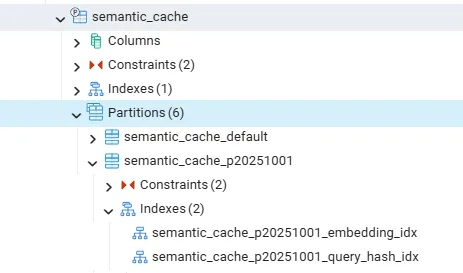
This is what the partitions with indexes in my database look like after all these manipulations:
Step 3. Setting up scheduled runs
Now comes the interesting part. We need the database to automatically create new tables for the next month and delete old ones (older than 3 months).
Install and enable pg_cron if you haven't done so already.
If you followed my example and enabled cron in your own database, then it's simple:
-- Create a task
SELECT cron.schedule('partman-maintenance', '0 * * * *', 'CALL partman.run_maintenance()');–- '0 * * * *' – in cron syntax means that the task will be executed,-- when the hour shows the zero minute. That is, once an hour at 00 minutes.
If you need to run the task scheduler for multiple databases and you've left it in postgres, first connect to postgres, create the task by executing the query mentioned above, and then modify this task so that it connects to the required database my_app_db:
UPDATE cron.job
SET database = 'my_app_db',
    username = 'postgres',
    nodename = '127.0.0.1' -- or
localhost
WHERE jobname = 'partman-maintenance';
Life hack: To allow pg_cron to connect to 127.0.0.1 without a password, make sure there is a rule in the pg_hba.conf file: host all all 127.0.0.1/32 trust. This is usually set by default, but it's good to double-check. Postgres can show a table with the rules that it is currently applying:
SELECT * FROM pg_hba_file_rules
You need a line that looks something like this:
type: host
database: all (or your database name)
user_name: all (or postgres)
address: 127.0.0.1/32
auth_method: trust (this is the main point!)
And finally, we need a task that checks the filled partition once a month and creates an index on it.
Schedule the execution of this procedure every first day of the month (for example, at 01:00), when the record for the previous month is definitely complete:
SELECT cron.schedule('0 1 1 * *', 'CALL create_scann_on_last_month()');
Stage 4: Logic on the client (Python)
Here is an example of calling the cache on the client:
import hashlib
from alloydb_connection import get_alloydb_connection_params, try_connect_to_alloydb #you need to write these functions yourself, I don't want to clutter the text with utility functions
def get_cache(user_query): # 1. Calculate hash on the client query_hash = hashlib.md5(user_query.encode()).hexdigest() params = get_alloydb_connection_params() conn = try_connect_to_alloydb(params) cursor = conn.cursor() # 2. Look for an exact match (Instantly) cursor.execute("SELECT rag_response FROM semantic_cache WHERE query_hash = %s", (query_hash,)) res = cursor.fetchone()
if res: cursor.close() conn.close() return res[0]
# 3. Look for a semantic match (ScaNN) # A threshold of 0.3 means average similarity
cursor = conn.cursor() cursor.execute(""" SELECT rag_response FROM semantic_cache WHERE (embedding <=> embedding('text-embedding-005', %s)::vector) < 0.3 ORDER BY embedding <=> embedding('text-embedding-005', %s)::vector LIMIT 1 """, (user_query, user_query)) res = cursor.fetchone() cursor.close() conn.close() return res[0] if res else None
if name == "__main__": print(get_cache("How to ask developer questions?"))
That's it, a high-load cache for the RAG service is ready.
Finally, let’s remember our simple hash index built by the MD5 function and why we do not compute it on the server.
Postgres has its own hashing mechanisms; for example, we could create our table semantic_cache with an auto-filled field query_hash:
CREATE TABLE IF NOT EXISTS public.semantic_cache(… query_hash character(32) NOT NULL GENERATED ALWAYS AS (MD5(user_query)) STORED,…)
But in our case, removing hashlib on the Python side may be inefficient. For quick cache lookup, it is more advantageous for us to send the ready hash function value along with the text of the question to the server since it is unknown whether we need to save it in the cache; maybe it is already there. The logic will be as follows:
Client: Computes hash (consumes CPU).
Client: Makes SELECT by this hash.
Client: If not found, performs INSERT of the sent text.
Server (if there is a GENERATED COLUMN): Receives text -> recomputes hash (again consumes CPU) -> writes to disk.
Nevertheless, such auto-generation makes sense, for example, in scenarios with microservices:
For instance, you have many different microservices (in Python, Go, Node.js) that write to this table, and it can be assumed that one programmer uses md5, another sha256, and a third one might forget to fill in the query_hash field at all. This will lead to "dirty" data. Therefore, you prohibit clients from sending hashes manually. The database itself guarantees that the query_hash field is always filled in correctly and according to a single algorithm. We sacrifice extra CPU usage for computation on the database but gain a guarantee of data integrity.
So, we have a system that:
Filters out repeated and similar questions before calling RAG, relieving the LLM and saving tokens;
Self-maintaining: Old data is automatically deleted, partitions are created by themselves;
Ready for heavy loads: AlloyDB Omni is optimized for vectors better than standard Postgres.





Write comment