- AI
- A
How We Turned a BPM System into a Tool for AI Agents: Implementing MCP at "First Form"
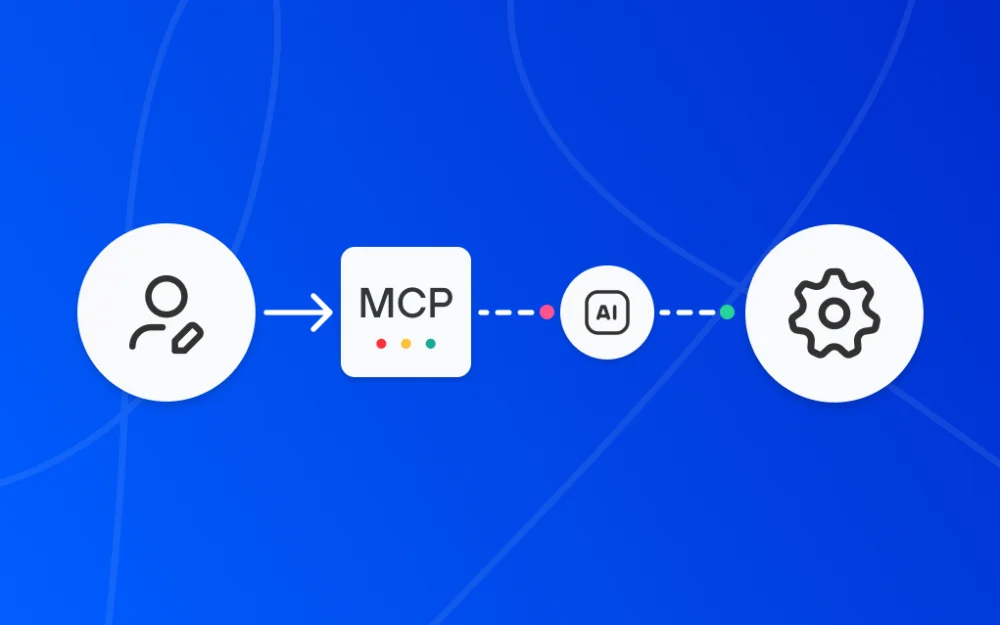
Any process management system has one inconvenient bottleneck. Between the person who understands which process the business needs and the system where this process should work, there is almost always an intermediary—developer, integrator, or at least an advanced administrator.
The process owner knows they need a category for vacation approval with specific fields and permissions. But for it to appear in the system, they write a technical specification, assign the task, wait in the queue, and get the result after several days. Every process management system has one inconvenient bottleneck. Between the person who understands what process the business needs and the system where this process should run, there is almost always an intermediary — a developer, integrator, or at least an advanced administrator. The process owner knows they need a category for leave approvals with certain fields and permissions. But for it to appear in the system, they write a specification, create a task, wait in the queue, and receive the result after several days.
At “First Form,” we decided to change this. Our team implemented support for MCP — Model Context Protocol. Now you can configure categories, forms, and processes through a dialogue with an AI agent: you describe in natural language what is needed, and the agent implements it via MCP. So far, we haven’t seen any other ready-made MCP server implementations in Russian BPM systems.
My name is Oleg Yushin, I work on the AI direction at “First Form.” I will explain why and how we did this, how the integration works, and what already works in practice.
Problem: why AI agents and BPM systems didn’t get along well
AI agents can call tools — that’s not new. But in practice, connecting an agent to a specific system looked like this: a developer manually described each tool on the agent side. Need the agent to write a comment in a task? You create a custom tool: specify the API call, parameter format, and response handling. Need the agent to create a task? Another tool. Set permissions? A third.
There are two problems here. First, it takes a long time. There are dozens of tools in a BPM system, and each requires developer time. In practice, most of them were simply never implemented. Second, all of this — tool descriptions, call logic, response handling — lived on the agent side. Any API change broke the agent, and two sources of logic had to be kept in sync. We wanted the logic to remain on the system side: it publishes the tools itself, knows how to execute them, and the agent only calls them.
"First Form" has an extensive API, and in theory, you can do everything through it. But the API is designed for a developer who reads the documentation and chooses the appropriate endpoint themselves. The model gets confused at such a scale — the context window is not unlimited, and when there are many endpoints, the agent starts making mistakes when selecting the right one.
What we did: "First Form" as an MCP server
MCP (Model Context Protocol) is an open protocol developed by Anthropic that allows an AI agent and an external system to communicate in a common language. It provides the AI agent with a standardized interface to the system. Some tools are API wrappers, others are standalone, such as log analysis or executing automation scripts.
We implemented "First Form" as an MCP server. This means the system itself gives the agent a list of available tools with descriptions: what each tool does, what parameters it accepts, and what it returns. The agent does not need to know about our API — it receives a ready set of actions it can invoke.
On the agent side, an MCP client is required — a component that can work via the protocol. Such clients exist in Claude Desktop, Cursor, N8N, Dify, and other platforms. Our implementation does not include the client, and that is the point: we provide a universal interface, and how it is used is determined on the agent’s side.
How we solved the context window problem. "First Form" has hundreds of tools. If they are given to the agent all at once, it cannot handle them: the model's context is limited, and when there are hundreds of descriptions in it at the same time, performance drops.
Therefore, we divided the tools into domains — logical groups by functionality (category management, permissions, reports, and so on). The agent connects to one MCP server, which at the start provides only the catalog of domains and documentation. On request, the agent connects to the necessary domain and only then receives its tools. This is a lazy approach: at any given moment, only the tools needed for the current task are in the agent's context.
Level One: System setup through dialogue
The main thing this implementation provides is the ability to configure the system in natural language. The process owner or administrator describes what they need: “Create a category for leave approvals, add fields 'leave dates', 'substitute employee', and 'manager's comment', set permissions for the group 'All employees'.” The agent itself determines which tools to invoke and in what sequence — creating the category, adding fields, assigning permissions.
The AI-admin core consists of six tools for basic configuration: create category, create additional parameters, link parameters to a category, view tree, get parameter types, and get category parameters. For more advanced configuration, hundreds of Admin API tools are also available — routes, permissions, reports, portals, SmartScript, and database objects.
Here’s how it works. We do not give the agent a rigid algorithm. We describe each tool — what it does, which parameters it accepts — and provide usage examples. The model then decides the order in which to call them. That’s the principle: we do not program the sequence, but provide a set of independent actions from which the agent constructs the solution.
Second level: how it works in daily tasks
The MCP server is not just about administration. In daily work, employees already use the agent for operational tasks: analysis, review, bulk data processing. Here are some examples from our practice.
Code review via dialogue. Our testing lead connected the MCP server to the AI agent and asked: “Check which code review tasks are currently assigned to me. Conduct a review based on these criteria: check for correctness, adequacy, and logic.” The agent found the assigned tasks, downloaded the attached code files, analyzed them, and issued comments. After discussion, it posted a comment in the task with the review results and performed the “Check completed” transition. All through MCP, without manually copying between systems.
An important nuance: by that time, the agent was already immersed in the project context — they had been working together for more than one day. It didn’t need to have the code structure or review rules explained again. As a result, a prompt template was created so that other reviewers on the team could use the same approach.
Mass classification of tasks. The head of the AI department analyzed more than 1100 open scenarios with the help of an agent. The agent read task descriptions, comments, and documentation, then filled in additional fields — classification, constraints, feature flag. Essentially, this is mass analytics and data structuring that one person would have spent weeks doing manually. The agent completed it in hours — all that was left was to check the result and publish the report.
Site monitoring. Our support engineer automated the daily check of client sites. The agent collects system status data — errors, responsiveness, anomalies — and posts the check results as a comment in the task. Previously, this required manual collection and formatting, now it's enough to run the prompt.
In all these cases, MCP acts as a bridge: the agent receives the ability to read tasks, write comments, fill in fields, and perform transitions via the protocol without needing to write separate scripts for each action.
A separate story — SmartScripts, automation scripts stored in the database. We wrote a factory that, when the server is launched, automatically turns all active SmartScripts into MCP tools. In practice, this means: the client creates their automation script — and it automatically becomes available to the agent without additional development.
What’s important to understand: limits and honest assessment
It would be dishonest to present MCP as a magic button. Here’s what needs to be considered.
MCP is a protocol, not artificial intelligence. It doesn’t make the agent smarter. It makes the agent’s connection to the system faster and more standardized. We could also write any tool manually before, it just took time and resources, which were always in short supply. MCP removes this limitation: the tools are already ready, they just need to be connected.
Quality depends on two sides. We, as the creators of the MCP server, influence the quality of tool descriptions and the informativeness of answers — this is our domain. But how the agent interprets the task and builds the chain of actions is the domain of the model and those who configure it. If you are building your own agent, you can specify explicit skills — prompts, tool chains, validation rules — and algorithms to improve predictability. If you are using an existing one, be prepared that sometimes you will need to correct it during the dialogue.
The agent works with the specific user's rights, not superuser rights. Authorization occurs through a Personal Access Token (PAT) — the agent can see and do exactly what is allowed for this user. Administrative domains require admin rights, while user domains require standard authorization. The division is the same as in the interface.
What if the agent makes a mistake? We understand this risk, especially if you are connecting an external model whose behavior you do not fully control. Here's what helps minimize it:
Working in a dev environment. This is where you can experiment, check the result, and only then move it to production. This is standard practice for any configuration changes.
Rollback of changes. If the agent created a category incorrectly, it can be deleted and asked to redo it — or manually corrected. On the dev environment, this is safe.
Clear answers in case of errors. When a tool returns an error, we don't just say "failed," but give the specific reason: "the user does not have permission for this operation," "a category with this name already exists." This helps the agent correct its actions independently, without human involvement.
Engineering detail that shows what we have to deal with: MCP responses contain Cyrillic, and the standard JSON serializer escapes it to \uXXXX — unreadable mess. We had to write middleware that intercepts the response and decodes it back to UTF-8. It's a small thing, but without it, debugging turned into deciphering.
What this means for the market
As of the publication date, we are not aware of other Russian BPM systems with an implemented MCP server. Some vendors have announced plans, but we have not seen any ready solutions.
For us, this is not just a technical feature — it is a change in the very approach to system configuration. The entry barrier is lowered: instead of "a developer is needed to write a script," a new paradigm emerges: "a person who understands the process and can describe it is needed." This does not mean that developers are no longer needed, because complex scenarios, integrations, and optimization still require expertise. But typical configuration tasks can now be handled by the process owner, who previously could only set a task and wait.
We continue to develop the MCP server: expanding the set of tools, improving descriptions and error handling, testing complex configuration scenarios. If you have experience integrating AI agents with corporate systems — share it in the comments, we are interested in comparing approaches.






Write comment