
- Security
- A
Illusion of Robbery: F6 Analyzes the Activity of the "Legion Team" and Its Connection to the Cyber Group NyashTeam
During daily threat monitoring, F6's cyber intelligence department discovered a suspicious executable file that appeared to be ransomware. However, analysis revealed it to be a blocker masquerading as an encryptor: instead of encrypting files, it blocked access to the operating system. The message indicated that files and disks were "encrypted... by the Legion team," which had not been mentioned before.
Hello! This is the cyber intelligence department of F6 with the announcement of our new research.
Mimicry in cybersecurity is a common occurrence: attackers disguise malicious activity as normal operations. It is much rarer for cybercriminals to disguise their actions as a more dangerous threat.
In late December 2025, F6 Threat Intelligence specialists discovered a suspicious executable file during their daily threat monitoring (SHA1: 4e26bae10cb8be1ee9e41f124bc982e1510f9e89). At first glance, it appeared to be ransomware that could encrypt files and display a ransom note on the screen. However, analysis showed that it was a blocker masquerading as an encryptor. In reality, instead of encrypting files, it blocked access to the operating system. The message indicated that the files and disks were "encrypted ... by the Legion team", a mention that had not been encountered before.
Blockers that simply restrict access to the system have lost popularity since around 2015, giving way to more profitable ransomware programs that encrypt files and allow attackers to demand a ransom for their decryption. However, some attackers still use blockers—likely because such programs are easier to create, cheaper, and more effective for extorting small sums from inexperienced users.
F6 analysts investigated the new threat, examining related evidence, including notes left by the attackers on victims' devices. They discovered something interesting: analysis of Telegram accounts mentioned in the notes revealed connections to the cybercriminal group NyashTeam.
This group has been known at least since 2022 and was involved in selling malware in the format of Malware-as-a-Service (MaaS). The group's clients attacked users in at least 50 countries around the world, with most of the targets of these attackers located in Russia. In the summer of 2025, F6 specialists uncovered the group's infrastructure, after which more than 110 domains in the .RU zone were blocked, which the cybercriminals used for attacks.
In this blog, we will take a detailed look at the features of the discovered blocker, its spread, and the identified overlaps with other threats.
Analysis of the Blocker Program
A jackal pretending to be a shark – this comparison perfectly suits the malware discovered by specialists from the F6 Cyber Intelligence Department. At first glance, this program is a typical ransomware that encrypts files and displays a ransom note on the device's screen.
During the analysis of the sample, it was possible to establish the PDB path of the file — C:\Users\123quig\Desktop\New Folder\obj\Release\net40\lc.pdb. This indirectly indicates that the developer of the malware may be Russian-speaking.
The malware contains an Anti-VM module to check whether the malware is running in a virtual environment or sandbox. If the check fails, an error will be displayed and execution will be terminated.
To check the environment, the Anti-VM module performs the following actions:
compares the target PC name with "VPS", "VPS"; and the manufacturer name with values like "microsoft corporation", "VIRTUAL", "vmware", "VirtualBox";
checks for execution using the Sandboxie utility by known names of loaded dlls;
checks for execution in the AnyRun sandbox by verifying the presence of certain programs (browsers, media players, etc.) on the desktop; checking the user role and computer name.
To establish itself in the system, the following registry keys are used:
[SOFTWARE\\Microsoft\\Windows\\CurrentVersion\\Run] «MSEdgeUpdateX»=%PATH_TO_EXE%
[SOFTWARE\\Microsoft\\Windows\\CurrentVersion\\Run] «WindowsInstaller»=»%PATH_TO_EXE%» -startup
[SOFTWARE\\Microsoft\\Windows\\CurrentVersion\\RunOnce] «OneDrive10293″=»%PATH_TO_EXE%» /setup
[SOFTWARE\\Microsoft\\Windows\\CurrentVersion\\RunOnce] «System3264Wow»=»%PATH_TO_EXE%» —init
[SOFTWARE\\Microsoft\\Windows\\CurrentVersion\\RunOnce] «System3264Wow»=»%PATH_TO_EXE%» —wininit
[SOFTWARE\\Microsoft\\Windows NT\\CurrentVersion\\Winlogon] «Shell»=%PATH_TO_EXE%
[SOFTWARE\\Microsoft\\Windows\\CurrentVersion\\Explorer\\RunMRU] «a»=»YOU ARE HACKED!\1»
[SOFTWARE\\Microsoft\\Windows\\CurrentVersion\\Explorer\\RunMRU] «b»=»HAHAHAHAHAHAHA\1»
[SOFTWARE\\Microsoft\\Windows\\CurrentVersion\\Explorer\\RunMRU] «c»=»BIBOAN.com\1»
[SOFTWARE\\Microsoft\\Windows\\CurrentVersion\\Explorer\\RunMRU] «MRUList»=»abc»
The malware creates note files (an example is shown in Fig. 2) with the following command:
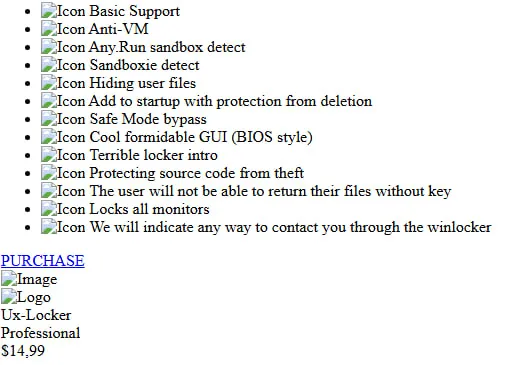
When the "PURCHASE" button is pressed, the user is redirected to the seller's page with the account @Haskers***, and when accessing the site winlocker-site[.]github[.]io, it redirects to winlocker[.]ru.
This is where our new research began. Where the digital traces led, details, indicators of compromise - in a new blog on the F6 website.






Write comment