- Software
- A
antics in IT: Why Convenient Programs Annoy Us
At the center of everything is UX.
At the center of everything is UX (User Experience).
Everyone is talking about UX.
UX is sacred.
UX is the goal.
UX is the path.
And, after all, UX is what we pay (or not quite) money for and forgive the flaws.
But, if you dig deeper, the question arises: "What exactly is UX made of?"
The answers are usually primitive: interface, convenience, speed, familiarity. But do you feel that something is missing? There are systems with beautiful interfaces that are annoying. There are also those that are "ugly," yet you return to them again and again.
A small lyrical digression
I am sure many readers of this article are more or less familiar with the world of information technology. But if you, reader, are not one of them, I have two pieces of news for you:
Bad news: some terminology may be unclear to you.
Good news: there will be moments that I will explain in simple language, so even the unenlightened audience can understand. Thank you very much for spending your precious time on this point.
Book I: "My God, My God, why have You forsaken me?" *
The main evil in the world of information technology (IT)
Here, great holy wars (holy war(s)) may begin. I will offer my point of view, around which the main idea of the article will revolve.
So, the main evil is the devil in the details. And this detail is the line between the production and sale of a product. I think you have already guessed who these "Satanists" are.
MARKETERS
Yes, yes, these seemingly friendly guys. They might be great people on their own, but sometimes they do things that shame the whole industry. And I will explain my point of view.
Theorem: a good product does not need marketing
In an ideal world (described by the philosophy of BSD), everything is simple:
You make a good product.
People use it.
They tell others.
The product becomes popular.
This works in closed ecosystems, where there is no informational noise:
In small towns, the best baker is known to everyone without advertising.
In university circles, the best professor gathers an audience without posters.
In Open Source, the best code attracts developers without marketing.
But we, with you, clearly understand that this theory, nurtured by the finest humanism, does not work everywhere, and often doesn’t work at all. And the blame for this is marketing. The one who shouts the loudest is the most visible.
Scene in "The Witcher"
Imagine, you walk into the market in the morning. There’s fog everywhere, and you can’t see anything. You urgently need to buy bread, and ideally, it should be of excellent quality. But first, you need to find the product. And then, next to you, there’s some street vendor shouting, bragging about the quality of his bread. You head towards him, but you trip over an old man who’s also selling bread. He whispers something. It doesn’t inspire trust, so you quickly apologize and run to the loud vendor.
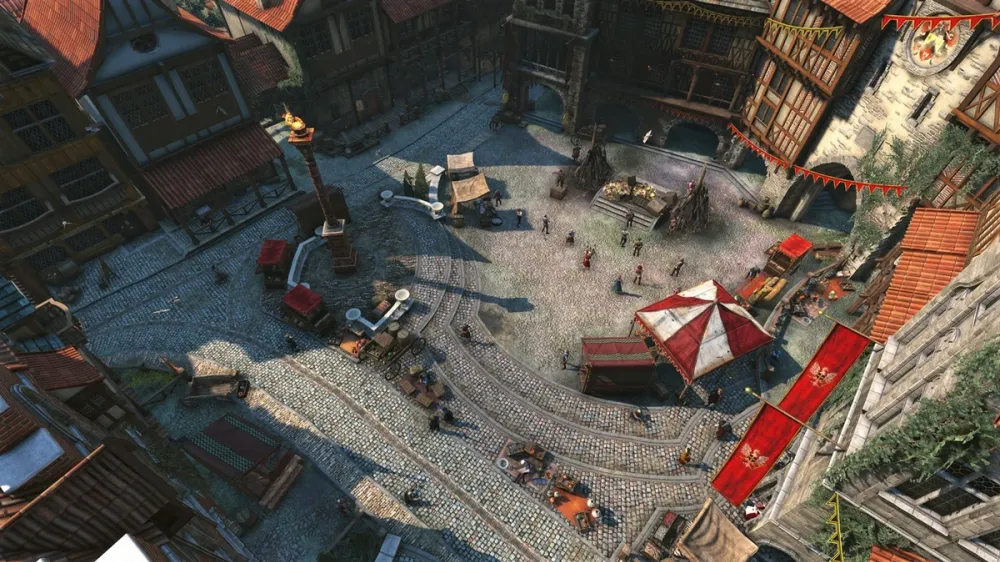
Thus, describing a short scene from The Witcher, that’s how marketing works.
Stepping away from metaphors: What’s wrong?
I’m sure there are many philosophers or simply sharp-minded people in our audience who understood the meaning of that scene.
Can we be sure that the loud vendor will sell us good bread? Maybe he’s actually a maniac, ready to stab anyone who crosses his path? We don’t know, but we go towards the loudest shout, and thanks to the herd instinct, others follow. Well, what can we do, humans are social creatures.
A product with good marketing is not always a good product from an engineering perspective.
I'm not a fool, and I already know
I’m not labeling you, dear readers. Many of you already understand the point of what I just said. But then I have a counter question: why do you keep using a bad product?
Don’t get me wrong. I’m a tolerant and peaceful person. Behind the sharp words is a simple idea: "Why is the world full of bad decisions that gain immense popularity?" I can give the answer myself: inertia.
Inertia: What is it, actually?
Inertia is the property of objects to maintain their state of rest or motion unless some external force changes this state. Physics, grade 7. In the IT world, inertia is everywhere: from the chip in your electric kettle to NASA’s computers. Inertia is especially strong in user software.
So, let’s try to translate the physical term into a term understood by our industry.
Inertia in IT — a terrible force
In the context of software, inertia is the ability of a product to retain users not because it is good, but because changing it requires effort.
A physical object continues to lie still until it is pushed. A user continues to use a flawed OS/program until circumstances force them to change or they find a super-motivation.
The components of inertia in IT:
1. Habit (psychological inertia). A human is a territorial being. We get used to the interface, the placement of buttons, the behavior of the system. Even if the system is objectively bad — relearning is scary. The brain says: "I know how to close the window here, why should I go somewhere else?"
2. Ecosystem (technical inertia). You have purchased programs, games, plugins. Documents are stored in proprietary formats. Friends and colleagues are stuck in the same swamp. Leaving the ecosystem threatens with broken connections and data loss.
3. Fear of the unknown (cognitive inertia). "What if it's worse there? What if I can't figure it out? What if my favorite programs won't run?" This fear paralyzes more than any technical deficiencies.
4. Social pressure (herd inertia). Being like everyone else is safe. Standing out is scary and troublesome.
5. Corporate policy (bureaucratic inertia). In companies, this is like cement: "We have everything set up, there are regulations, we have contracts with vendors. Change? Who will rewrite the documentation? Who will retrain the staff? The boss won't understand."
Inertia is the perfect ally of bad products. A good product must be so good that it overcomes inertia. A bad product only needs not to fall apart completely — inertia will do the rest.
Usually, the main enemies of progress are the types of inertia described in points 2 and 5, while in personal use of software — all the others (see above). But let's not forget: everything in our world is interconnected. The demand for a product in the user center drives the creation of a new ecosystem, which inevitably leads to a new corporate policy. This is the economy and politics of attention.
Summary of the information above: reasons for the popularity of bad products
Inertia and marketing create a vicious, unbreakable circle.
How it works:
Step 1. Marketing creates noise. A loud pitch attracts attention. People follow the noise (herd instinct + limited time to make a choice + sometimes laziness).
Step 2. The product is purchased (or downloaded). It may be objectively bad, but the first batch of users is already there. Money is received, metrics are on fire.
Step 3. No flaws are seen in the product. Initially, everything is "normal", the product is used calmly.
Step 4. Inertia kicks in. People have already spent time on installation, setup, and getting used to it. Even if the product glitches, it's too lazy to relearn. "I'll endure, maybe they'll update it."
Step 5. The ecosystem grows. It's getting harder to leave: there are settings, files, and acquaintances who are also there.
Step 6. Bureaucratic inertia. In companies, this becomes entrenched: "Everything is set up, do we need to retrain everyone? No, let's continue suffering."
Step 7. Marketing gets new budgets. "The product is being bought! That means it's good! Let's shout even louder!"
Step 8. The circle is closed!
graph LR M[Marketing] -->|noise| P[Purchase] P --> I[Inertia] I --> E[Ecosystem] E --> B[Bureaucracy] B -->|new budgets| M
A bad product lives and thrives not because it is good, but because:
Marketing attracted the first users.
Inertia didn't let them leave.
Ecosystem tied them up hand and foot.
Bureaucracy cemented this in corporations.
Marketing uses "successful sales" as proof of quality.
About Lucifer...
A special place is occupied by a product that initially had no competitors. The user simply has no choice. They take this pioneering product. Logically, the ecosystem starts to grow rapidly around it. The competitor software, no matter how good it is, literally suffocates in the absence of its own ecosystem.
This is a monopoly. And economists know well that only competition leads to better solutions.
However, luckily for the user, a worthy opponent to "Lucifer" is still found. Let’s recall the situation with GCC and Apple. Yes, often it’s the corporations that are against monopolies, and that’s when they start to act. Another example: Valve’s policy with Windows — it’s disadvantageous for Valve if Microsoft closes its ecosystem. Thus, SteamOS & Proton were born — and then other distributions started to join in, you know.
Consequences
For a good product to break through, it needs to be not just "good", but breakthrough. So much so that:
It can shout over the marketing noise (even though it doesn’t have the budget for it).
It can overcome user inertia (which is huge).
It can offer migration from the old ecosystem (and that hurts).
It can convince bureaucrats (who fear change).
That’s why the software market often resembles a graveyard of good ideas that didn’t "take off".
Book II: "Reason does not draw its laws from nature, but prescribes them to it" **
Back to Basics
I hope, dear reader, that you didn’t think this article was just to shame marketing. Absolutely not.
So, we were talking about UX. What exactly does it consist of?
Structure of a good UI: the official version
Let’s find out in the usual way — with Google’s help. (Let’s not use Gemini’s automatic search — with all my respect for AI, I’ve studied this information myself).
What do we get (without any preamble):
Usefulness and value (essentially, a mandatory part of any product)
Intuitive navigation and structure (UI)
Ease of use (a vague concept)
Speed of operation (a feature of the implementation)
Adaptability and accessibility (a feature of the implementation)
UX texts (without good documentation, it's hard in this world)
Visual hierarchy and aesthetics (UI)
Personalization (a rather vague concept)
I suspect you also understand that something is missing. Much of the list above comes down to UI and the quality of implementation, and some concepts don’t have exact and equivalent definitions for everyone. So for now, we’ll write down the data we have:
UX = UI + Implementation + X
Where X is an unknown element. Let’s search for it.
There’s no argument, if you search, you’ll always find something, but not necessarily what you were looking for ***
Let's try to formulate this X. I’m giving you unlimited time. Agreed, it's very difficult. UI, implementation—what else? The word is on the tip of my tongue, but it just won’t come out.
Let’s try approaching it from another angle—using real examples. I'll take one from my own experience: working with MacOS & CachyOS.
For reference:
For those who don’t know, CachyOS is a Linux distribution based on Arch, optimized for "squeezing" the maximum performance out of your PC (it is mainly based on x86-64-v3 & x86-64-v4 processors, meaning Desktop Edition, but there is also a Handled Edition available). While many packages in other distributions are compiled with the "‑O2" flag, packages in CachyOS are compiled with "‑O3 ‑march=native". The "‑flto=thin" flag is also commonly used. CachyOS is based on special Linux kernel patches, highly optimized and tailored for specific tasks.
macOS is the operating system for Mac computers (MacBook, iMac, Mac mini, Mac Studio, Mac Pro), developed by Apple. Unlike most other OSs, it works exclusively on Apple’s proprietary hardware, allowing for perfect optimization and seamless integration (the so-called "ecosystem"). It is based on the certified Darwin kernel (XNU), which traces its lineage from BSD Unix (NextSTEP). Thanks to its close connection with Apple Silicon processors (M1, M2, M3) and ROSETTA mechanisms (for Intel software emulation), macOS extracts the maximum energy efficiency and performance for creative tasks (video, music, programming). While other OSs spend resources on compatibility with hardware from hundreds of vendors, macOS is optimized for the smooth operation of specific chips and trackpad gestures.
I won’t go too deep into the details. This information will be enough for the example below.
For the sake of the experiment...
Let’s look at this from the perspective of the AVERAGE ADVANCED USER. Yes, this is a rather subjective profile, I agree. Let’s formulate values and skills for our “test subject” for greater objectivity.
Portrait of the "average advanced user"
Who are they? They are not a hardcore Linux user who builds a kernel with flags that don’t even exist. Nor are they a "noob" user, for whom a computer is just an "internet" icon.
Brief table-description of such a person:
№ | Characteristic | Explanation |
|---|---|---|
1 | Professionally or semi-professionally uses a computer | He does not play games (or plays, but it's not his main activity). He: - Writes code. - Works with texts. - Processes photos/videos. - Mixes music. - Or simply spends a lot of time on the computer for work. For him, the computer is a tool, not a toy. |
2 | Values his time | He is willing to spend an hour setting up a system if it saves him 10 hours in the long run. But he is not ready to spend an hour every day on workarounds. It is important for him: |
3 | Has a "sense of beauty," but not at the expense of functionality | He likes it when things are beautiful. But if there is a choice between "beautiful but buggy" and "ugly but works" — he will choose the latter. Although he will look for a compromise. |
4 | Is not afraid of the terminal, but... | He can open the console and enter commands. He can even edit the config. But: - He does not want to do this every time. - If there is a decent GUI — he will choose the GUI. - If the GUI lags or complicates things — he will choose the terminal. |
5 | Approaches tool selection consciously | He does not install "what everyone else installs." He reads, compares, looks for reviews. He is willing to try new things, but not ready to change every week or month. |
6 | Values privacy, but is not paranoid | He does not like being watched. He disables telemetry where he can. But he is not ready to sit in isolation from the world for the sake of privacy. Compromises — yes, but within reasonable limits. |
7 | Has a "baggage" — old habits, files, projects | He does not start from scratch. He has: - Old documents. - Familiar formats. - Favorite programs (not always the newest). - Experience working in other systems. |
8 | Socially adapted | He has friends, colleagues, clients. He cannot live in isolation. He needs: - To open files that others have sent. - To send his files in a way that they can be opened. - Sometimes to work in a team. |
We'll stop here. |
Comparison: macOS vs CachyOS (Fact Table)
Criterion | macOS | CachyOS |
|---|---|---|
Task Scheduler | Apple's implementation of a Unix scheduler. Optimized for Mac hardware. Dynamic priority management between the foreground and background. | Several schedulers to choose from (BORE, CFS, EEVDF, etc.). Full parameter customization through sysctl or kernel patches. |
Package Management | Official App Store + .dmg files (manual copying to Applications). Homebrew/MacPorts for terminal users. |
|
Kernel | XNU (hybrid kernel from Mach + BSD). Closed, but with open components. | Linux (monolithic kernel). Fully open. In CachyOS — with optimizing patches (BORE, PDS, others). |
Default Filesystem | APFS (Apple File System). Optimized for SSDs, encryption, snapshots. | Btrfs or ext4 (choice during installation). Btrfs provides snapshots, compression, subvolumes. |
Graphical Interface | Aqua (proprietary). Unified, unchangeable style. Highly detailed design. | KDE Plasma (default). Fully customizable: from themes to the behavior of each element. |
System Snapshots | Time Machine — backups to external disk or network. Integrated into the system, easy to use. | Snapper (on Btrfs) — system state snapshots. Integration with GRUB to boot from any snapshot. |
Drivers | Only for Apple hardware. Supplied with the system. No driver = no device support. | For a wide range of hardware. Mainly in the kernel or separate packages. Proprietary drivers (NVIDIA) — separately. |
Updates | System updates through the App Store. Frequency — upon new version releases. Cannot be fully disabled. | Rolling release (constant updates). Full control: when, what, and how to update. |
Documentation | Official Apple documentation + large community. Good for standard scenarios. | Arch Wiki + CachyOS Wiki. In-depth technical description of all system aspects. |
Community | Users of all levels. Lots of "creative class" (designers, musicians, videographers). | Enthusiasts, developers, people who value control and performance. |
Energy Efficiency | Outstanding. Deep integration with Apple hardware. | Depends on hardware and settings. On laptops — configurable (TLP, auto-cpufreq), but requires manual optimization. (Recently, as I remember, a kernel patch for energy efficiency was added.) |
Customization | Limited. Can change wallpapers, some interface settings. Deep changes — only through "workarounds". | Endless. You can change everything: from the kernel to the tray icon. |
Security | SIP (System Integrity Protection), application sandboxes, Gatekeeper. The system protects the user from themselves. | Unix permissions model + additional mechanisms (SELinux/AppArmor optional). Security responsibility is on the user. |
Compatibility with Windows Software | Limited. Some programs are native, others — via emulation. Games — via emulation, with losses. | Wine/Proton for Windows applications. For games — Steam Proton, Lutris. Many games work great (if there are gamers in the comments who disagree with me, write). |
Software Installation (Average Scenario) | Downloaded .dmg, dragged to Applications. Simple and straightforward. |
|
Software Installation (Advanced Scenario) | Homebrew or compiling from source. | AUR (via a helper like yay/paru) — automatic build from source or installation of prebuilt packages. |
What we see from this table
Each system has different strengths:
macOS provides:
Integration with specific hardware.
A thoughtfully designed interface.
High energy efficiency.
Protection from user errors.
CachyOS provides:
Control over every aspect of the system.
A variety of implementations (schedulers, file systems) to choose from.
Access to a vast amount of software through a single interface.
Complete transparency and the ability to fix anything.
graph TB subgraph macOS A1[Stability] A2[Integration] A3[Predictability] end subgraph CachyOS B1[Openness] B2[Control] B3[Flexibility] end
What we’ve concluded...
I think it's clearer to you now, thoughts are more organized, but we still haven't recalled the word. We've realized one thing — different tools for different goals. However, both macOS and CachyOS cover a large spectrum of related areas, programming being one of them at least. So why do some people choose one, and others choose the other? We understand that it’s decided by that mysterious X, but what is it?
And I’ll reveal a terrible secret: people can’t think about something that has no name.
Book III: "If something has no name, it doesn't exist" ****
About the great dystopia
I'm not a fan of dystopias, but that doesn't mean I can’t spot brilliant ideas in them. And George Orwell is a true genius for formulating the idea, which is the basis of the title of “Book III” of my article.
Reference:
In “1984,” through simplifying the language (Newspeak), people were deprived of the ability to think certain thoughts (yes, tautology, please forgive me). You can’t call "freedom" — you can’t think about it either.
Quote from "1984":
Sime took another bite of the black loaf, chewed it quickly, and spoke again, “Don’t you understand that the task of Newspeak is to narrow the range of thought? In the end, we will make thoughtcrime simply impossible — there will be no words for it. Every necessary concept will be expressed by one single word, the meaning of which will be strictly defined, and any secondary meanings will be abolished and forgotten.”
(Thoughtcrime — a term from George Orwell’s dystopian novel “1984,” meaning any doubt, dissent, or thought that contradicts the ideology of the ruling party)
Returning to X:
Yes-yes-yes, many of you guessed where I'm going. There simply isn't a term for X (or it exists, but so rarely that only a minority of people know about it). And you know, I decided it's time to put an end to this:
We are used to thinking that the quality of a product is measured by speed, the number of features, or the beauty of the interface. But why then are there systems that, with all these parameters, cause deep irritation? And there are others — seemingly unremarkable, but you feel drawn to them like an old friend. Because there is something that lies deeper than features and interfaces. I decided to give it a name and take responsibility for it. I call X semantics.
About Semantics in Product Design
Maybe I was too harsh when I said there is no name for it. There is one, but it manifests in our industry exclusively in software development (and, with a fearful observation, this term is starting to be mentioned less and less every year).
Let’s, for clarity’s sake, show a relatively realistic example.
Deadly Example: Social Network Graph
Let’s imagine that we are writing a simple social network where a user has friends, and we want to ensure that when a user is deleted, all references to them also disappear. Let’s take two languages with completely different semantics: Rust and Java.
Java Version (Classic Approach with Garbage Collector)
import java.util.ArrayList;
import java.util.List;
class User {    String name;    List friends = new ArrayList<>();        User(String name) {        this.name = name;    }        void addFriend(User friend) {        friends.add(friend);        friend.friends.add(this); // Mutual friendship    }
}
public class SocialNetwork {    public static void main(String[] args) {        User alice = new User("Alice");        User bob = new User("Bob");        User charlie = new User("Charlie");                alice.addFriend(bob);        alice.addFriend(charlie);        bob.addFriend(charlie);                // Alice wants to delete her profile from the social network        alice = null; // We hope for the garbage collector?                // Bob is still friends with Charlie        System.out.println(bob.friends.size()); // 2 (including alice?)                // The garbage collector will clean up eventually...        System.gc(); // "Please clean up the garbage" (no guarantees)    }
}
Java Semantics:
Garbage Collector (GC) — a magic wand that will "someday" find and delete unreachable objects.
Circular references — not a problem for GC (it's smart).
Null — a valid value for any reference.
Object lifetime — not explicitly controlled by the programmer.
Important: There is a hidden problem in this code — if we set alice to null, but it is still referenced by friends (bob.friends contains a reference to Alice), the object will never be deleted! We have a memory leak, but GC won't help — it sees that the object is reachable through Bob.
Trying to "rewrite" in Rust (naively)
A programmer thinking in Java style might write something like this:
// BAD CODE - WILL NOT COMPILE!
struct User {    name: String,    friends: Vec, // ERROR: recursive type without a pointer!
}
impl User {    fn new(name: &str) -> Self {        User {            name: name.to_string(),            friends: Vec::new(),        }    }        fn add_friend(&mut self, friend: User) { // ERROR: taking ownership!        self.friends.push(friend);    }
}
fn main() {    let alice = User::new("Alice");    let mut bob = User::new("Bob");        bob.add_friend(alice); // alice MOVES into bob.friends    // println!("{}", alice.name); // ERROR! alice no longer exists!        let charlie = User::new("Charlie");    bob.add_friend(charlie);
}
The Rust compiler will explode with a bunch of errors:
Error 1:
Vec— not possible, the type size is unknown at compile time (a pointer is needed).Error 2:
add_friend(self, friend: User)takes ownership offriend, so after adding, the original no longer exists.Error 3: Mutual friendship (
friend.friends.add(self)) is not possible because we don't have a reference toselfinsidefriend.
Correct Rust version (different semantics)
In Rust, we will need to rethink the architecture:
use std::cell::RefCell;
use std::rc::{Rc, Weak};
struct User {    name: String,    friends: RefCell>>, // Weak references to avoid cycles
}
impl User {    fn new(name: &str) -> Rc { // Returning a smart pointer        Rc::new(User {            name: name.to_string(),            friends: RefCell::new(Vec::new()),        })    }        fn add_friend(this: &Rc, friend: &Rc) {        // Adding a weak reference to the friend        this.friends.borrow_mut().push(Rc::downgrade(friend));        // Adding a weak reference to oneself in the friend's list        friend.friends.borrow_mut().push(Rc::downgrade(this));    }        fn friend_count(&self) -> usize {        // Counting only "alive" friends (a weak reference may point to nowhere)        self.friends.borrow().iter()            .filter(|weak| weak.upgrade().is_some())            .count()    }
}
fn main() {    let alice = User::new("Alice");    let bob = User::new("Bob");    let charlie = User::new("Charlie");        User::add_friend(&alice, &bob);    User::add_friend(&alice, &charlie);    User::add_friend(&bob, &charlie);        println!("Bob has {} friends", bob.friend_count()); // 2 (Alice and Charlie)        // Alice is removed...    drop(alice); // Explicitly destroying the object        println!("Bob has {} friends", bob.friend_count()); // 1 (only Charlie)
}
Key Semantic Differences
1. Ownership
Java: Objects are owned by the garbage collector. You just have references.
Rust: Each object has exactly one owner. Assignment = move.
2. Cyclic References
Java: Fine, GC will handle it.
Rust: Disaster! Cycles in
Rcwill lead to memory leaks (no one will be removed). You needWeak.
3. Lifetimes
Java: "Live as long as someone is referencing you."
Rust: "Live exactly until the closing brace, unless stated otherwise."
4. Mutability
Java: Everything is mutable by default.
Rust: Everything is immutable by default. You need a mutable reference (or a mutable pointer, but that's not idiomatic Rust).
5. Null
Java: The base type for all references (a billion-dollar mistake).
Rust: No
null. There isOption— either there is a value, or there isn’t.
Conclusion from the Example
Now, I'm sure many clearly understand why Boromir's phrase "You cannot simply take a project and rewrite it from one programming language to another" (and we haven't even touched on frameworks!) is truer than ever.

How Semantics Affects the Life of an "Ordinary" User
Some might say: "Well, the author did a great job showing an example, but I'm not into programming, why should I know this?" Why is this example important for an ordinary person? Because the same logic applies at the OS level, at the level of any software. And below, I will explain, of course.
Return to the Origins v2
Let's go back to the formula. Now we can write it as follows:
UX = UI + Semantics + Implementation
Awesome. Everything is interconnected: semantics provides navigation and the path for the product, the user interface shows how the product will interact with the user, and the implementation will deliver the finished product to the market.
However, we won't stop here. The name is there — semantics, but everything is still very vague. Let's break down the anatomy of our X.
Anatomy of Semantics
Semantics is not a monolith, but an alloy of several components.
Semantics = Philosophy + Ideology + Architecture + Paradigm + Ergonomics
Component | What it is | The question it answers |
|---|---|---|
Philosophy | The deep foundations, the creators' belief | "Why are we doing this at all? How is the world structured?" |
Ideology | How philosophy is transmitted outward | "What do we declare? What values do we proclaim?" |
Architecture | The technical structure | "How is the system built?" |
Paradigm | The approach to development and interaction | "Who is in charge here — the system or the user?" |
Ergonomics | Ease of interaction | "Is it easy to use?" |
graph TD A[Semantics] --> B[Philosophy] A --> C[Ideology] A --> D[Architecture] A --> E[Paradigm] A --> F[Ergonomics]
Please do not confuse the terms philosophy and ideology, paradigm and ergonomics.
Book IV: The Secret of the Madrid Court
Who is to blame?
And here we come to the most interesting question. If semantics is so important, if it defines everything — from the choice of the operating system to the feeling of "comfort" at the computer — then why does no one talk about it?
The answer, strangely enough, lies in the same plane as the entire article.
1. Marketing doesn't know how to sell semantics
Remember our scene with the Witcher. The marketer — the one who calls people in the fog. What can he shout?
"Our system has a beautiful interface!" — this sells.
"Our system has lightning-fast speed!" — this sells.
"Our system has artificial intelligence!" — this sells (for now, until it's figured out).
"Our system has correct semantics!" — but how about that? What’s that, what do we do with it?
Semantics can't be shown in a screenshot. It can't be measured in megahertz (gigabytes, FPS). It can only be felt after months of use. And marketing works on short distances.
2. Semantics has no lobby
Behind a beautiful interface, there are designers. Behind speed, there are engineers. Behind the number of features, there are product managers. Everyone has their own voice in companies, their own conferences, their own articles on Habr.
But who stands behind semantics? Programming philosophers? They aren't hired in production teams.
It's not profitable for companies to have users think about semantics. Because the semantics of many popular products is "you pay us, and we do whatever we want with you". If users start realizing this — they might ask uncomfortable questions.
3. Language barrier (in a figurative sense)
We've already talked about Orwell: if something doesn't have a name, it doesn’t exist. Semantics has a name, but it's "scientific." It smells like university lectures, linguistics, semiotics. It's not the word you hear in podcasts for startup founders.
In the Russian-speaking IT community, the term "semantics" has firmly settled only in a narrow area — "programming semantics" (linguists in the comments may disagree with me). In the context of user experience, it isn't used. Therefore, for 99% of users, this category simply doesn’t exist.
4. Semantics is about relationships, not properties
Note: In our tables, semantics is always described through relation:
"the system respects the user"
"the system controls the user"
"the system treats the user as a source of income"
These are not technical specifications. These are categories from the world of human relationships. And we are not used to thinking of programs as subjects of relationships. We tend to see them simply as tools.
5. Semantics Requires Awareness
To assess semantics, one must step out of consumer mode and switch to observer mode. One should ask themselves not "what does this system do?", but "how does this system relate to me?".
Most people don't ask themselves such questions. They just use what they've been given and endure. And when enduring becomes unbearable, they go to a familiar "computer guy" and ask him to reinstall Windows. The cycle is complete.
So, what should we do?
At the very least — start a conversation. Giving a phenomenon a name is the first step towards recognizing it.
I have no illusions that after this article, everyone will rush to install Linux and analyze the semantics of every program. But if at least a few people in the comments write: "So that's why this product annoyed me, and I couldn't explain why!" — then the article has served its purpose.
Because the main evil is not in marketers, not in inertia, and not even in monopolies. The main evil is in the lack of a language to describe what we feel.
And now we have a language.
"Yahweh, the world you wished to create truly could have been free of fear. However, in a world without the fear of death, people could not face fear and seek hope. Of course, they could continue moving forward, simply living, but that would not be like moving forward, overcoming their own fears. This is why we give the act of moving forward a special name. We call it 'courage'"
- Sosuke Aizen, title "Bleach"
Notes:
' *Excerpt from "The Gospel" according to Mark
' ** Statement by Immanuel Kant
' *** John Ronald Reuel Tolkien "The Hobbit, or There and Back Again"
' **** Interpretation of one of the ideas in the dystopia "1984" by George Orwell, proposed by the author of the article

Write comment