- AI
- A
AI Bridge: How to Simply Give Gemini "Hands" to Control Your Computer
Imagine: you send a screenshot of a complex program to the neural network and say, "Do this for me." And in a second, the mouse on your screen starts moving by itself, performing the work for you.
This is not magic and not expensive corporate software. This is AI Bridge — a micro-utility in Python that you can launch in a minute.
Quick Start: Repeat the magic in 60 seconds
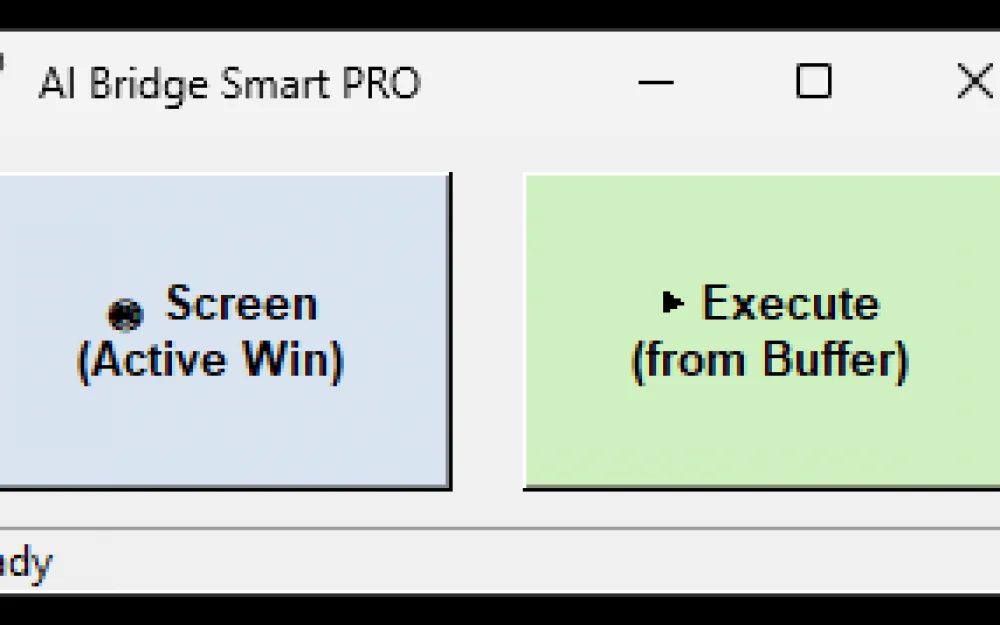
Download and run: http://schoolscience.org/ai_bridge/ai_bridge.exe. A small "AI Bridge" window will appear, which always stays on top of others.
Take a screenshot: Open any program (for example, a 3D editor). In the bridge window, click Screen.
Send to AI: Go to the chat with Gemini (or ChatGPT / Kimi). Press Ctrl+V. The screenshot of your window is already in the clipboard.
Set a task: Write in the chat:
"Act as the operator of my PC. Use functions click(x, y), move(x, y) and pyautogui relative to the top left corner of the window in the screenshot (0,0). Send only pure Python code. Task: [your task, for example: create a cube]".
Execute: Copy the code received from AI to the clipboard, return to AI Bridge, and click Execute.
That's it. The program will activate the required window, "aim" and perform actions with the mouse and keyboard. If something goes wrong — just move the mouse, and the smart "emergency stop" will instantly interrupt the execution.
How it works (for those interested)
Relative coordinates: Our bridge is not tied to the monitor resolution. Each click(x, y) command is bound to the top left corner of the target window. You can move the window around the screen — the AI will still hit the button accurately.
Program focus: We use the Win32 API (SetForegroundWindow) to "teleport" the required window to the front. No unnecessary clicks into the void to activate.
Smart Sentinel (Security): The script includes a position tracker. If you touch the mouse during the AI's operation, the program will see a discrepancy in coordinates and instantly "release" control.
Clipboard Pro: We taught the script to work with the Windows clipboard at a low level (DIB format) so that browsers reliably see the screenshot as an image.
https://github.com/mozg4D/ai-bridge
Example of controlling Cinema4D through AI bridge:
https://rutube.ru/video/0815bdf0bae9c758e35f0e199aa3a9b6/
Why is this needed?
There are programs whose interfaces are so overloaded that it's easier to explain the task in words than to search for the right tab. AI Bridge turns AI into your personal assistant, which does not need an API — it just needs to "see" the screen.
The program will be improved and become smarter. Suggest your features.



Write comment