- AI
- A
Coreness Flow: local AI agent without cloud and excess code
Most AI tools are either cloud-based or require code for each task. Coreness Flow is built around events: a message arrives, a cron job triggers, a webhook comes in — the agent finds the scenario by the trigger and executes a chain of steps.
Most AI assistants are chat-based: you ask a question, you get an answer. Coreness Flow was initially built differently. It’s a local Windows application where the agent responds to events — a message, a webhook, a cron — and executes action chains described in YAML. If you want to change the agent’s behavior — you modify the config, not the code. There is no cloud component: everything runs on your own machine.
Repository: github.com/Vensus137/Coreness-Flow
Idea: not "question–answer", but "event → chain"
The standard AI chat is a synchronous cycle: the user writes something, the model responds. Coreness Flow breaks this cycle.
Here, the central unit is the event. A message came in the chat — event. The cron triggered at 9 AM — event. A webhook came from an external service — also an event. The scenario engine finds the appropriate scenario by the trigger and executes the chain of steps: reads data, calls LLM, searches the knowledge base, sends a response. The same mechanism works for different sources.
This opens scenarios that in a regular chatbot would require writing code — here everything is described in YAML: a daily summary on schedule, automatic response to a webhook, reaction to a specific command with branching logic — all described in YAML.
The agent's behavior is set by the config and scenarios, not code.
Architecture: three layers, one bus
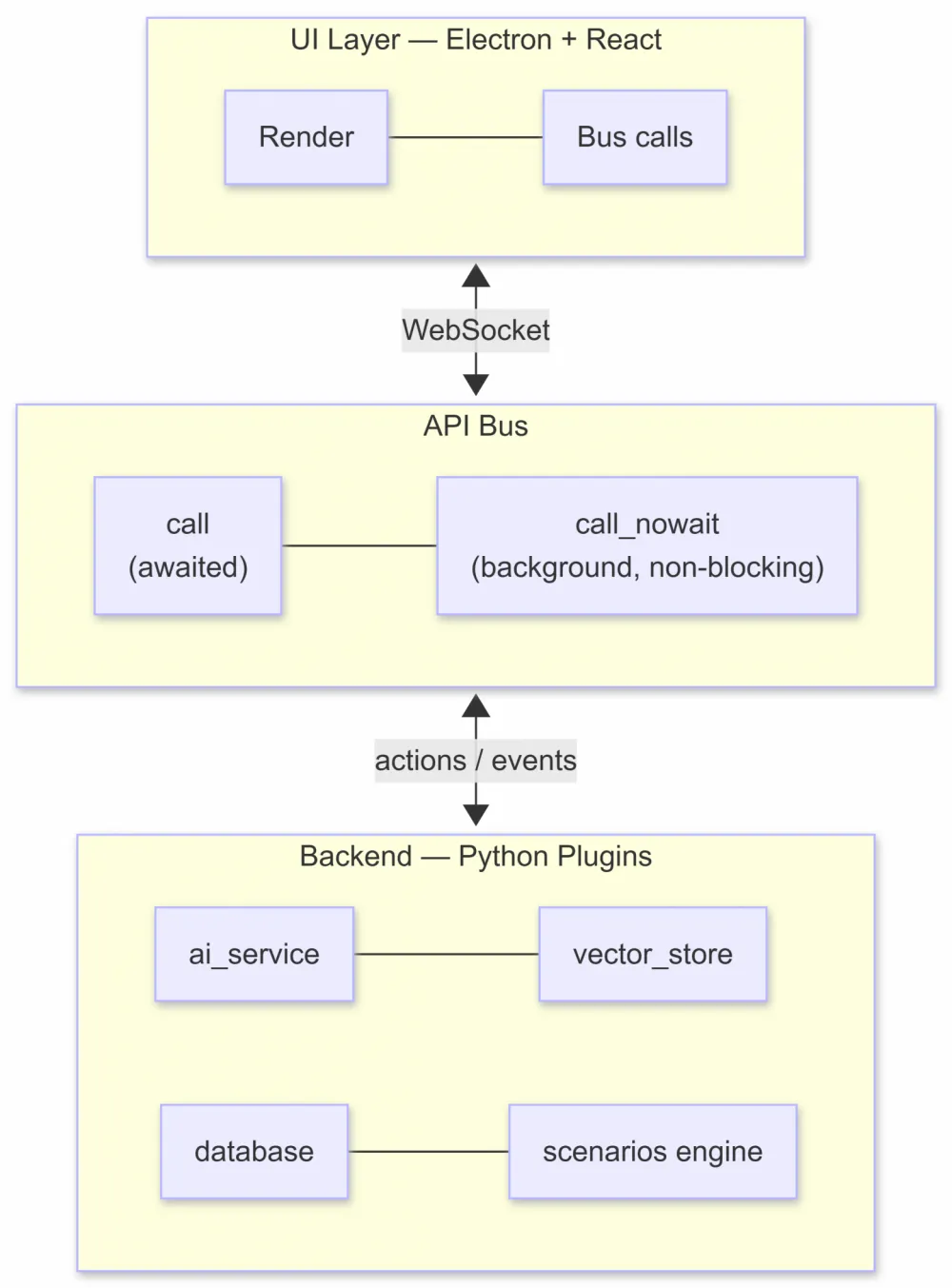
The application is divided into three layers that don’t know about each other directly — they only communicate through the API Bus.
UI Layer — Electron + React. The front end is just a display. It connects to the Python backend via WebSocket, sends actions, and receives events. No business logic in the React code — just rendering and bus calls.
Backend Layer — Python plugins. All the logic lives here: message processing, LLM calls, working with the database, RAG, scheduler. Each plugin is isolated and communicates with the others only via the API Bus.
API Bus — a unified contract between all participants. Two modes:
call— a call with an expected response (needed when the next step depends on the result)call_nowait— background launch without blocking (long chains, external requests)
The unified response format for all calls is: { result, error, response_data }. The script engine makes no distinctions — it simply calls actions by name and reads the result.
Why such separation
The most common architectural mistake in such applications is that the UI knows about the database, and the business logic directly calls components. Adding a new feature leads to surgery in three places simultaneously.
In Coreness Flow, the UI doesn't know what plugins are loaded at all. The frontend, upon startup, queries the backend for a description of what the plugins add to the interface and builds the screen based on this data. A new plugin — a new tab without frontend modifications.
I added the plugin folder — the interface adjusted itself.
Lifecycle: how the application starts
Electron main process
    ↓ spawn
Python backend
    ↓
API Bus is initialized
    ↓
The container scans plugins/, merges configs, creates instances
    ↓
Heavy plugin initialization (splash shows progress)
    ↓
Plugin background tasks
    ↓
WebSocket server starts
    ↓
Main window opens, frontend connects
    ↓
Collect descriptions from plugins → UI builds sidebar, tabs, settings
Each stage is isolated. If a plugin crashes during initialization — the others continue loading. Graceful shutdown: timeouts for plugin and worker termination are set in app.json, the application closes correctly when exiting or updating.
Plugins: VS Code-like, but for desktop apps
Plugin system is one of the most interesting parts of the architecture. The idea is borrowed from VS Code: the plugin not only adds backend logic, it declares its contribution to the application via config.json.
Each plugin is a folder with two key files: config.json (what the plugin can do and what it adds to the UI) and a Python module (how it is implemented). Upon startup, the container recursively scans plugins/ and loads all folders containing config.json. The folder name becomes the plugin identifier. No registry, no module enumeration in the core code.
Config.json — the center of gravity of the plugin
The config describes four things:
metadata — the name and description of the plugin.
settings — the settings schema with defaults. When the container starts, it merges the defaults from the config with user overrides from
user_settings.json. The plugin always receives the already merged config.actions — a list of actions the plugin registers in the API Bus. For each action, the input (payload schema) and output (what it will return) are described.
contributes — what the plugin adds to the UI. This is the most interesting part.
Python class methods with names matching the keys in actions automatically become handlers for calls — no separate registration is required. Describe the action in the config and implement the method with the same name — the engine will automatically link them when loading the plugin.
Config + method with the same name — a link without explicit registration.
Contributes: the interface from the config
Four points of contribution:
Point | What it adds |
|---|---|
| A tab in the main content with a widget (list, settings form, etc.) |
| A section on the general "Settings" tab |
| An item in the sidebar (click triggers an action) |
| Items in dropdown menus |
The widget type of the tab is described by the descriptor: settingsForm, list — the frontend renders the content without custom code. List columns, data source through actions, form fields — all in the plugin's JSON config. The "Vector Storage" tab with a list of chunks and delete buttons is set in the same plugin as follows:
"contributes": {
  "workspace": {
    "id": "vector_store_admin",
    "label": "Vector Database",
    "title": "Vector Database",
    "content": {"widget": "vectorStoreAdmin"}
  }
}
vectorStoreAdmin — an embedded widget type registered in the frontend; the plugin just references it by name. No React code in the plugin — only the config.
This approach gives a clear boundary of responsibility: the backend developer writes the plugin and its config, the UI layer adapts automatically. Want to remove a tab — remove the plugin folder. Want to rename — change label in the config.
Hot reload of settings
A nice detail: when the user changes settings in the UI, the backend notifies the affected plugin — it then recreates clients, clears caches without restarting the application. Changed the API key or model — the plugin immediately picked up the changes.
Scenarios: orchestration without code
If plugins are services with actions, then scenarios are a way to orchestrate these actions without writing code.
All scenarios live in YAML files in config/scenarios/. The engine picks them up recursively from all subfolders. You can organize them however you like: commands/, system/, scheduled/ — scenario names are global: you can call one scenario from another by name.
Basic structure:
daily_report:
  schedule: "0 9 * * *"   # Daily at 9:00 AM
  step:
    - action: "get_storage"
      params:
        group_key: "report_config"
        _response_key: "config"
    - action: "completion"
      params:
        prompt: "Generate the morning summary. Context: {_cache.config}"
        model: "{_cache.config.model}"
    - action: "send_chat_message"
      params:
        text: "{_cache.response}"
Each step is an action call of a plugin. The result is placed in _cache under the key _response_key. The next step takes data via the placeholder {_cache.key}.
Placeholders — small templating
Placeholders work in all step parameters and support modifier chains:
{event_text}— event text{_cache.system.routing_model}— nested field from cache{now|format:datetime}— current time with formatting{_cache.field|fallback:default}— value with default if the field is empty{_cache.result|exists}— boolean: whether the field exists
This allows for building flexible chains without writing Python code — simply by substituting values through templates.
Triggers: from simple to complex
The simplest form of a trigger is the event type plus text:
trigger:
  - event_type: "message"
    event_text: "/help"
The complex form is the condition field with an expression in a mini-language (operators: ==, ~ — “contains”, regex, is_null, etc.; fields via $event_text, $event_type):
trigger:
  - event_type: "message"
    condition: "$event_text ~ '/'"
Several triggers in the list work based on the logic OR. Fields within one trigger are AND. There is no need to duplicate the script for each option—just add the trigger to the list.
Transitions and Branching
After a step, you can set a transition — a list of rules: based on the action result (action_result: success, error, etc.), a transition is executed (transition_action, and if needed, transition_value). For example, a transition to another scenario:
- action: "search_chunks"
  params:
    query: "{event_text}"
    _response_key: "rag_result"
  transition:
    - action_result: "success"
      transition_action: "jump_to_scenario"
      transition_value: "step_with_rag"
    - action_result: "error"
      transition_action: "jump_to_scenario"
      transition_value: "step_without_rag"
If something is found in RAG, we go to one scenario, if not, to another. All in the config.
The chain of steps and branching is in YAML, without code.
A typical tool scenario: download the document via the link, split it into chunks, and place them in a vector storage; in case of an error—transition to the error handling scenario.
Configuration: merge without magic
The configuration scheme is intentionally simple and uniform for everything:
Application defaults —
config/app.jsonPlugin defaults —
settingssection in itsconfig.jsonUser overrides —
%APPDATA%\CorenessFlow\user_settings.json(only changed keys)
When the container starts, it merges defaults with user values and passes the final config to the plugin. Secrets and API tokens are stored in SQLite in %APPDATA%—they do not make it to the repository.
The same config.json format is used for both the application and each plugin—the container code is unified, and the documentation is consistent.
Storage: key-value for agent configuration
The database plugin provides scenarios with a simple key-value storage with grouping: group_key + key → value. But what's more interesting is that initial data is specified directly in the YAML files in config/storage/ and synchronized to SQLite upon startup.
This makes the agent's behavior configurable without script modification. The system prompt of the router, the list of available tools, model parameters, and limits — all of this is stored in storage, and scripts read this data during execution. Changing the model for simple requests means editing storage, with no changes to the YAML scripts.
Agent Routing: How a Single Request Turns into a Chain of Decisions
Agent routing in Coreness Flow is not a built-in core feature, but a set of system scripts on top of a general mechanism. The user sees: sent a message → “Processing…” → reply. Behind the scenes, it's a chain of several scripts and multiple LLM calls.
Message Processing Pipeline
When a message comes from the chat, the following sequence is executed:
Loading Context — settings are read from storage: system prompt, list of tools and response scripts, step limit.
History Compilation — the chat history is taken with a volume limit, and if necessary, fragments found from RAG are added.
Routing — a request to the LLM with the prompt and description of “tools.” The model decides whether to call one of the tools (e.g., knowledge base search) or immediately generate a response.
Execution — if a tool is selected, the corresponding script is launched, and then routing happens again (a cycle until the step limit is reached).
Finalization — a final request to the model, and the response is sent to the chat.
New tool = description in the config + script file; the core is not touched.
Tools are the same YAML scripts: adding a new one means describing it in the storage config and adding a script file. The core of the application is not touched.
RAG Locally: No Servers, No Cloud
The vector storage in Coreness Flow is a separate plugin with several key decisions.
BGE-M3 in ONNX Format, INT8 Quantization
A multilingual model that can generate both dense and sparse vectors simultaneously. The model is run through ONNX Runtime — without PyTorch and CUDA. INT8 quantization reduces memory consumption by approximately 4 times compared to float32 with minimal quality loss. Works on a regular CPU.
Qdrant in embedded mode
Qdrant runs inside the application process and stores data on disk. No separate service, ports, or docker are required.
Hybrid Search with RRF
BGE-M3 provides both dense vectors (semantics) and sparse vectors (keywords). Searching both types and merging results via Reciprocal Rank Fusion gives better quality than semantic search alone — especially for queries with specific terms and names.
In scenarios, this involves two actions: add_chunks for indexing and search_chunks for searching. The search result is placed in _cache and used in the prompt of the next step. Documents do not leave the machine.
Model Loading and Splash Screen
BGE-M3 is a heavy model, and its loading at startup requires a separate solution. It is done before showing the main window: the user sees a splash with the initialization progress, and the main window opens only when everything is ready. Without freezing the interface.
Asynchrony without pain
Actions in API Bus are executed in a worker pool — separate threads with their own event loop. The number of workers is configurable. This means that a long LLM call does not block the processing of another incoming event.
call_nowait is a particularly nice feature. You start a long chain of scripts, don't wait for completion, and continue. The result will come through an event in the UI. This is how the entire chat works: the user sends a message, the backend runs the chain via call_nowait, the UI shows a loading indicator, and does not block.
Plugins subscribe to bus events. This allows you to organize reactions to any system events without direct dependencies between plugins.
Project Structure
Coreness-Flow/
├── run_backend.py          # Backend entry point
├── app/
│   ├── runtime/
│   │   ├── container.py    # Scanning plugins, merging configs, creating instances
│   │   ├── api_bus.py      # Bus: actions, events, workers
│   │   └── ...
│   ├── settings.py         # Loading and merging configs
│   └── ws_server.py        # WebSocket for frontend
├── frontend/               # Electron + React
├── plugins/
│   ├── core/               # Key modules: chats, database, ai_service, vector_store, ...
│   ├── base/               # Non-critical plugins
│   └── extensions/         # Custom extensions
└── config/
    ├── app.json            # Application defaults
    ├── scenarios/          # YAML scenarios
    └── storage/            # Initial storage data
In core/ — the core: chats, database, LLM calls, vector storage, script engine. In base/ — additional plugins, the application works without them too. In extensions/ — a place for custom extensions.
Quick Start
From source code (Python 3.11, Node.js, Windows):
pip install -r requirements.txt
cd frontend && npm install && cd ..
.\scripts\run-dev.ps1
The backend and window are launched with one command. In dev mode: hot reload when changing configs and plugin code.
From releases: Windows installer in the Releases section — Python and Node are not required on the target machine.
After the first launch — set the AI provider in the settings (any OpenAI-compatible API), optionally upload documents to vector storage, and configure storage according to your needs.
Tech Stack
Component | Technology |
|---|---|
Frontend | Electron + React |
Backend | Python 3.11, async/await |
UI ↔ Backend | WebSocket + API Bus |
LLM | OpenAI-compatible API (OpenRouter, Polza.AI, etc.) |
RAG | BGE-M3 ONNX INT8 + Qdrant embedded |
Storage | SQLite + JSON (config) + YAML (scenarios, storage) |
Build | Electron Builder + Python backend |
Key Decisions
What essentially distinguishes Coreness Flow:
Plugins without a registry — a folder with a config and a module, the container picks it up at startup; a unified contract for all.
Interface from config — plugins declare tabs, settings, menu items; the front end assembles the UI based on this data, without listing plugins in the code.
Scripts instead of code — orchestration of actions in YAML: triggers, steps, transitions based on results; the engine calls actions by name.
Local RAG — embeddings and vector database on your machine, ONNX and Qdrant in the application process, offline.
Events and bus — plugins communicate only through the API Bus, subscribe to events; no direct calls between modules.
Repository: github.com/Vensus137/Coreness-Flow
Documentation: docs/ in the repository
Contact the author: @vensus137
Coreness — Create. Automate. Scale.






Write comment