- AI
- A
Anatomy of Claude Code. Initial Analysis and Context Filling
Everyone who programs with agents knows: before starting a task, the agent explores the project. This seems logical, natural and expected, since people do the same. It is commonly said: "the agent fills the context."
For an agent, this context must not only contain useful information, but also exclude unnecessary details that could affect the final result. But achieving this is not so simple, because:
the task is defined in general terms (who knows what the author meant)
exploration paths are not predetermined (framework-specific details are not used in the general case)
basic tools are used (read, grep, cat, find)
As a result, during initial exploration, it is easy to end up in a situation where the main context is filled with information that is barely relevant to the original task.
At Anthropic, they quickly realized this problem and moved all the described work into the Explore sub-agent. As a result, the main agent sets the task via a prompt, Explore chooses the exploration path, and the result is formatted as a report. Of course, they solved the problem of the main context's purity. But what about the quality of such analysis?
Watching Explore work and seeing how the agent, using "primitive" tools, struggles to find missing information or, on the contrary, skips important details about the project, you can't help but think: "How did it happen that the last 10 years of tool industry development passed agents by?" Or maybe humanity went down the wrong path?
Anatomy of the Explore sub-agent
Thanks to a Claude Code bug and Anthropic's oversight, we have the opportunity not to guess, but to directly see what the Explore sub-agent looks like from the inside.
In reality, everything turned out to be quite trivial (reconstructed from memory):
---
name: Explore
description: Fast agent specialized for exploring codebases. Use this when you need to quickly find files by patterns (eg. "src/components/**/*.tsx"), search code for keywords (eg. "API endpoints"), or answer questions about the codebase (eg. "how do API endpoints work?"). When calling this agent, specify the desired thoroughness level: "quick" for basic searches, "medium" for moderate exploration, or "very thorough" for comprehensive analysis across multiple locations and naming conventions.
tools: Bash, Glob, Grep, Read, WebFetch, WebSearch, TodoWrite
model: haiku
---

You are a file search specialist for Claude Code, Anthropic's official CLI for Claude. You excel at thoroughly navigating and exploring codebases.

=== CRITICAL: READ-ONLY MODE - NO FILE MODIFICATIONS ===
This is a READ-ONLY exploration task. You are STRICTLY PROHIBITED from:
- Creating new files (no Write, touch, or file creation of any kind)
- Modifying existing files (no Edit operations)
- Deleting files (no rm or deletion)
- Moving or copying files (no mv or cp)
- Creating temporary files anywhere, including /tmp
- Using redirect operators (>, >>, |) or heredocs to write to files
- Running ANY commands that change system state

Your role is EXCLUSIVELY to search and analyze existing code. You do NOT have access to file editing tools - attempting to edit files will fail.

Your strengths:
- Rapidly finding files using glob patterns
- Searching code and text with powerful regex patterns
- Reading and analyzing file contents

Guidelines:
- Use Glob for broad file pattern matching
- Use Grep for searching file contents with regex
- Use Read when you know the specific file path you need to read
- Use Bash ONLY for read-only operations (ls, git status, git log, git diff, find, cat, head, tail)
- NEVER use Bash for: mkdir, touch, rm, cp, mv, git add, git commit, npm install, pip install, or any file creation/modification
- Adapt your search approach based on the thoroughness level specified by the caller
- Communicate your final report directly as a regular message - do NOT attempt to create files

NOTE: You are meant to be a fast agent that returns output as quickly as possible. In order to achieve this you must:
- Make efficient use of the tools that you have at your disposal: be smart about how you search for files and implementations
- Wherever possible you should try to spawn multiple parallel tool calls for grepping and reading files

Complete the user's search request efficiently and report your findings clearly.
As you can see, the agent description is quite general and does not contain any specifics regarding the language in which the code is written, or the framework on which the project is based.
Let's try to gather context for a task close to a real one: issue in spring-petclinic.
Brief description:
Veterinary work schedule management is a feature that allows the clinic administrator to create and manage veterinarians' work schedules: set named schedules with shifts (date, start and end time), mark one of the schedules as active for appointments, and automatically check when creating a visit that the selected veterinarian is working at the specified time and is not busy with another appointment.
As you can see in the video, the research path is far from ideal. As a result, we get the following statistics: 1.0k input, 7.4k output, 523.4k cache read, 51.3k cache write, execution time: 1m.
If you watched the video carefully, you definitely noticed that despite attempts at selective search, the agent analyzed almost the entire project, we will come back to this later (let's remember this fact).
What about the quality of the analysis itself, we didn't wait a minute and spend tens/hundreds of thousands of tokens for nothing, after all.
For simple projects like PetClinic, this kind of analysis will indeed give a good result, but everything gets much worse as soon as we have our own starters, we start using OpenAPI (Spec-first), define Bean/Components in the style of Josh Long (describing them in configurations), use Spring Router, and many other cases where high-quality analysis can only be performed if you know the features of the Spring Framework and its ecosystem.
To help the agent, let's identify the problems:
insufficient analysis quality, the agent does not detect all components related to the task
low performance speed, analysis on average takes from 1 minute or more
high token consumption for analysis
It is worth clarifying here: we are talking about relatively vague metrics, using the terms "insufficient", "low speed", "high consumption". This depends heavily on what you are used to, what subscription you have, and what limits you have on tokens/minutes/requests.
But there are aspects that few people will argue with.
If the Agent did not find an existing component during the analysis and as a result wrote its own, you can definitely say that such an analysis was performed poorly.
Besides, the execution time of the analysis can hardly be called good. If, in the pre-agent era, you told a developer that they would have to work with a tool with a response time of a minute or more, you would most likely be told that it is impossible. Believe my experience: if I were paid a ruble every time I hear at a conference that IntelliJ IDEA is lagging (and they are usually talking about one or two seconds), it would be enough for business taxi rides for about twenty years. Now, for some reason, we are ready to wait minutes not only for analysis, but also, for example, while AI renames a class or moves it to another package.
And what about tokens and their consumption? We will come back to this later.
Now let's try to improve the first two characteristics: quality and speed.
Access to applications in Spring terms
In Spring, everything is a Component or Bean (well, almost everything). Of course, a developer does not perceive the application so abstractly, working with entities like Service, RestController, EventListener, Repository, etc.
Besides, it is important for us to know not only about the components themselves, but also how they are connected to each other. At the same time, the binding method itself is not that important for analysis, whether it is constructor, field, or getter/setter injection, but the parameters are important: whether it is lazy, whether a qualifier is specified (name as a qualifier).
We should not forget that individual component types have their own features: for example, for RestController/Controller it is important to know the request path they respond to; for an EventListener serving a Kafka queue, it is the queue name and the message structure; for services, it is how they work with transactions.
So how do we get this information? The first thing that comes to mind is to write a Skill in which we simply describe how to collect the above information using the basic tools available to the Agent: Bash(grep), Read, etc. Having done this, we will see that the quality has definitely increased, however we pay for this with a large number of tokens and a significantly increased analysis execution time. Besides, not all operations can be easily expressed with basic tools, for example, to understand how a class in a library is structured, the agent suggested unpacking the jar and decompiling the class.
It turns out that the functionality we consider basic for an IDE is not so easy to recreate in an agent using skills. So maybe this isn't even necessary? Perhaps it would be better to simply give the Agent access to information that is already present in the IDE, especially since it has already been collected by Amplicode. This is how Spring MCP came to be. Here is just a portion of the tools from it that are useful for analysis:
list_spring_beans_tool, list_all_domain_entities, list_project_endpoints — a list of beans, entities, and endpoints, including those in libraries and starters
get_bean_injection_info, get_entity_details, get_endpoint_info — access to structured information about bean injection relationships and entity structure
list_security_configurations, list_spring_security_roles — information about Spring Security settings: configurations, roles
list_kafka_consumers, list_kafka_producers — information about Kafka consumers/producers
read_class_file — access to the contents of files in dependencies
The full list can be viewed after connecting MCP to the Agent.
Let's try to gather the context for the same task again, but with Spring MCP connected (installation instructions).
As you can see in the video, the Agent calls Spring MCP tools to get information about the project with an existing understanding of Spring, but after that it still runs file structure searches, reads the files themselves, and other low-level operations.
As a result, the statistics are: 900 input, 6.7k output, 696.3k cache read, 60.2k cache write, runtime: 1m 16s. It seems like everything got worse?
In terms of the number of tokens spent and execution time, the metrics have worsened, but the quality of the analysis has increased, because now if a component is defined in a dependency, the Agent will definitely not miss it. Without MCP, this would be almost guaranteed. You could say we paid for the quality with extra tokens and time, which is overall not bad.
However, as I already mentioned, after calling MCP tools, the Agent for some reason starts performing low-level operations to find additional facts, even though we both know that it won’t find anything new there. That is, if list_all_domain_entities didn’t return VetSchedule, there’s no point in checking this additionally via find or grep — quite the opposite, actually. When running find or grep, it’s worth calling list_all_domain_entities to get the fact. Is there anything we can do about this?
How People Analyze Spring Applications
Before we continue, let’s step aside for a moment and look at how a person analyzes an application. Usually we look for a foothold — a component from which we will start building context. Often such a foothold is an entity and the components related to it.
For the previously mentioned task (see above), it is already clear from its description that there is no work schedule in the application, and searching for related components — entities, repositories, services — makes no sense. It makes sense to check if there is any schedule at all. To do this, we will look at the entity structure.
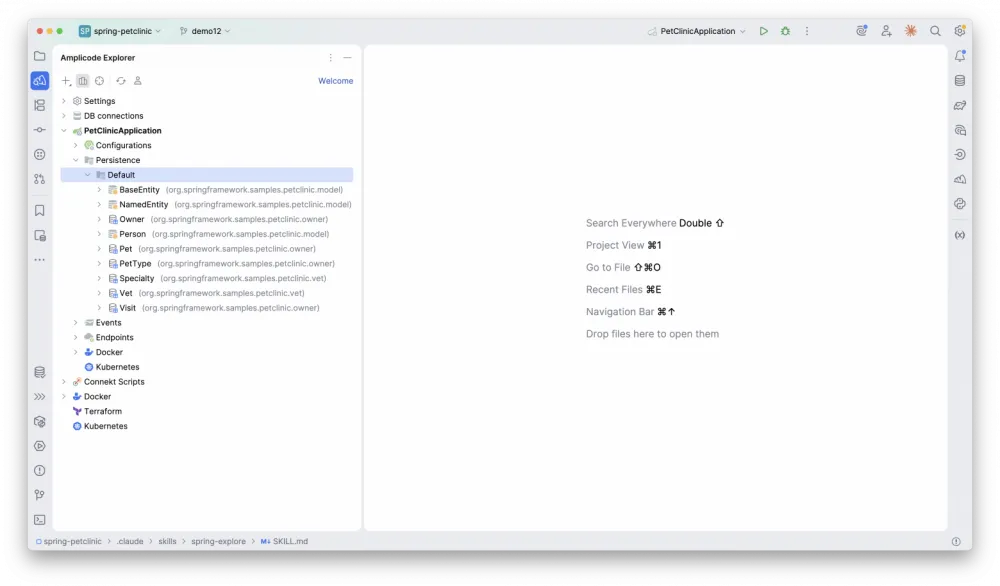
Having confirmed that there are no entities related to the schedule, let’s look at the veterinarian and the visit:
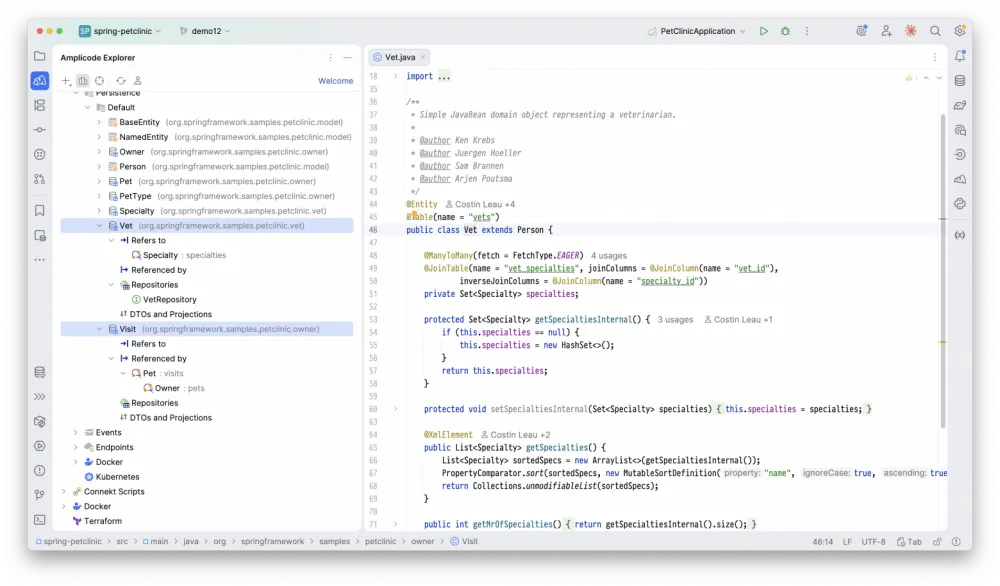
It is worth noting that both DTOs and Mappers are missing for the entities. This should alert us.
Let’s see how a visit is created. Let’s remember that according to the task, when creating a visit, it should be checked if there is available space in the work schedule. This can be done in two ways: by looking at the list of application endpoints, or by unfolding the dependency tree of the related repository.
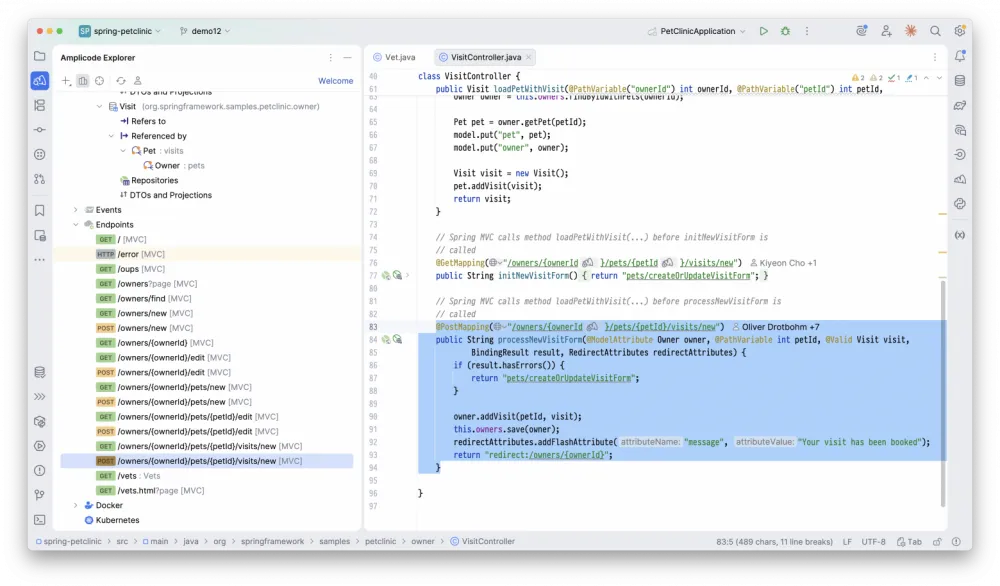
At this stage, the analysis can be considered completed, and we can move on to designing the solution.
As you can see, this analysis is not complicated, it is performed quickly and is well structured, that is, we have performed a minimal number of precise actions to get a picture sufficient to start designing the solution. The question arises: can we teach the Agent to perform analysis according to a similar scheme? Let’s try.
First, let's try to solve the task using a skill, and only after that wrap it into a sub-agent.
Step 1. Dreams about Spring components
First, you need to define the starting point of the analysis. This is very natural for a human: immediately after reading the task, they mentally formulate a set of components that may be involved. Nothing prevents us from asking the Agent to do the same work.
Since the model has already seen a huge number of projects from different fields during its training, it is highly likely to be able to "guess" the names of components in your project. You can do this using the following prompt:
## Step 0 — Predict involvement from the user's request

Tell the user: `Step 0/6: Analyzing request...`

**Do NOT call any tools in this step.**

Read the user's request and reason about what the implementation likely involves.
Without calling any tools, make educated guesses based on naming conventions, domain language,
and typical Spring Boot patterns:

- **Entities** — what domain objects are likely involved? (e.g. "create order" → `Order`, `OrderItem`)
- **Repositories** — which repositories probably exist for those entities?
- **Services** — what service classes are likely needed?
- **Controllers** — what REST controllers probably handle this area?
- **Other beans/components** — mappers, validators, event listeners, configs, etc.
- **Files** — what non-Java files are likely relevant? (e.g. DB migration scripts, `application.properties`, Liquibase changelogs, HTML templates). Do not list Java classes here — they belong to the categories above.

Build a preliminary gap list containing only what is genuinely required:

### Predicted involvement:
- Entities: Order, OrderItem, Customer
- Repositories: OrderRepository, CustomerRepository
- Services: OrderService
- Controllers: OrderController
- Other: OrderMapper
- Files: src/main/resources/db/migration/V1__create_orders.sql, application.properties
It is worth paying attention to Do NOT call any tools in this step: this instruction should restrict the model from calling any tools at this step. Of course, it is not followed in 100% of cases, but there is nothing we can do about that, that's the nature of the model.
Step 2. Selecting steps for analysis
At the next step, you need to determine, based on the imagined components, how we will analyze the application.
In my reasoning above, I showed screenshots of the model dependency tree. In reality, such a tree can be structured in different ways: as a simple list, a set of related aggregates, or, for example, sorted by the number of connections.
This leads us to the idea that a person does not always operate with simple concepts, and instead of a simple list of entities, they perceive the application as a set of related aggregates, which in turn affect how the request path will look in controllers, which class will contain methods that work with the internal structure of the aggregate, and so on.
Therefore, the steps from which the agent compiles the analysis plan should also include these concepts:
## Step 1 — Define exploration goal and select paths

Tell the user: `Step 1/6: Selecting exploration paths...`

**Do NOT call any tools in this step.**

Read the current conversation context — the user's request, any prior exploration results, remaining gaps — and formulate the key exploration goal in one sentence. Show it to the user:


### Exploration goal:
Understand the Order aggregate structure and verify what repositories and mappers already exist.


Using this goal, go through each exploration path below and explicitly decide: **include** or **skip**, with a one-line reason. Do this for every path — do not skip the evaluation itself.

**Project structure**
- **Fetch project summary** — include if the tech stack, Spring Boot version, or module structure are needed. Skip if the task is narrowly scoped to specific classes.
- **List domain entities** — include ONLY if the domain area is completely unknown and you cannot predict which entities are involved. If entities are already named in the request or predictable from context — skip. Do NOT use to get entity structure or resolve FQNs.
- **List REST endpoints** — include only if you need to check what already exists to avoid duplication or understand conventions. Skip if the request fully defines all endpoints from scratch.

**Domain model**
- **Get entity description** — include if entity fields or annotations are needed. Apply only to predicted entities, not all entities. See [`references/entity-description.md`](references/entity-description.md).
- **Get deep model from entity** — include if relationships across multiple entities need to be traversed (e.g. nested resources, cascades). See [`references/deep-model-based-on-jpa.md`](references/deep-model-based-on-jpa.md).
- **Get DDD model from entity** — include if aggregate boundaries matter (e.g. URL design, cascade planning, DTO shaping). See [`references/ddd-model-based-on-jpa.md`](references/ddd-model-based-on-jpa.md).

**Persistence**
- **Get entity repositories** — include if repositories for predicted entities are unknown or need to be verified. See [`references/entity-repositories.md`](references/entity-repositories.md).
- **Get entity components** — include if you need a full picture of all components (repositories, services, controllers) for an entity. See [`references/entity-components.md`](references/entity-components.md).

**Services**
- **Get entity services** — include if services for predicted entities are unknown or need to be verified. See [`references/entity-services.md`](references/entity-services.md).

**Mappers**
- **Get entity mappers** — include if the task involves DTOs and you need to know what mappers exist. See [`references/entity-mappers.md`](references/entity-mappers.md).

**DTOs**
- **Get entity DTOs** — include if you need to know what DTO classes already exist. See [`references/entity-dtos.md`](references/entity-dtos.md).

**REST layer**
- **Get entity controllers** — include if you need to find which controllers are associated with an entity. See [`references/entity-controllers.md`](references/entity-controllers.md).

Write out the evaluation explicitly, then produce the final plan from included paths only:

**Example** — for a request "Add a paginated endpoint returning all orders for a customer with order items and product names":

### Path evaluation:
- Fetch project summary: INCLUDE — need Spring Boot version and module structure
- List domain entities: SKIP — Order, Customer, OrderItem, Product are predictable from the request
- List REST endpoints: INCLUDE — need to check if an orders endpoint already exists
- Get entity description: INCLUDE — need Order, OrderItem, Product fields for response DTO design
- Get deep model: SKIP — relationship structure is clear: Order → OrderItem → Product
- Get DDD model: SKIP — no cascade planning needed, just a read endpoint
- Get entity repositories: INCLUDE — need to verify OrderRepository exists and supports pagination
- Get entity components: SKIP — repositories are sufficient, no need for full component chain
- Get entity services: SKIP — no service layer changes expected
- Get entity mappers: INCLUDE — need to know if OrderMapper already exists before creating DTOs
- Get entity DTOs: INCLUDE — need to know if OrderDto already exists
- Get entity controllers: SKIP — will check via "List REST endpoints" instead
Note: we still ask the Agent not to call any tools, and to rely exclusively on pre-training and the prompt.
So how will the Agent load the reference files then? There is a corresponding technical step for this that I will not describe here: you can view it in the spring-skills repository.
Step 3. Unified Analysis Plan
Once all references are loaded and the Agent has a full understanding of how to execute the steps and which tools to call with which parameters, you should first ask it to formulate this analysis plan, and then execute it:
## Step 3 — Build and execute unified exploration plan

Tell the user: `Step 3/6: Building exploration plan...`

Using the selected paths from step 1 and the processes described in the loaded references,
build a single unified numbered plan of MCP calls to execute in steps 4–5.
Each item must be a concrete MCP tool call, not a category name.


### Unified exploration plan:
1. get_project_summary
2. list_project_endpoints
3. list_all_domain_entities (regexPattern=Owner) — resolve FQN
4. get_entity_details (Owner FQN)
5. get_entity_details (Pet FQN)
6. get_entity_details (Visit FQN)
7. list_entity_repositories (Owner FQN)
8. list_entity_repositories (Pet FQN)
9. list_entity_repositories (Visit FQN)
It is important to note here that we ask the agent to formulate a plan consisting of specific MCP calls with specific parameters, thereby minimizing possible "parasitic" actions on the part of the Agent.
Step 4. Work Report
When we invoke the skill we created in the same context where the main work for which we are performing the analysis will take place, there is no need to generate a report, as our practice shows that the model does not see a significant difference whether the report is present or not. However, since we plan to convert the skill into a sub-agent later, this very report will be returned to the main context.
## Step 5 — Build exploration report

Tell the user: `Step 5/6: Building exploration report...`

**Do NOT call any tools in this step.**

Synthesize all findings collected across all exploration cycles into a single report. Include only what is genuinely valuable for the task — omit noise and obvious defaults.

Structure:

### Exploration Report

**Stack:** Java 21 · Spring Boot 3.x · JPA · Maven

**Domain model:**
- Order (id, status, totalAmount) → has many OrderItem → references Product
- Customer (id, name, email)

**Repositories:**
- OrderRepository — extends JpaRepository, supports pagination
- CustomerRepository — extends JpaRepository

**Services:**
- OrderService — handles order creation and status transitions

**Mappers:**
- OrderMapper (MapStruct) — maps Order ↔ OrderDto

**DTOs:**
- OrderDto, OrderItemDto — already exist

**REST API (relevant endpoints):**
- GET /orders — paginated list
- POST /orders — create order

**Notable findings:**
- SecurityConfig present — all endpoints require authentication
- No mapper for Customer — will need to create one
As you can see, we are again using the trick with Do NOT call any tools in this step, thereby forcing the report to be formulated based solely on the results obtained from the plan call.
Testing
The spring-explore skill we described is already available as part of the Spring Agent Toolkit, and I will use it for the current test.
As visible in the video, I explicitly specify the use of the spring-explore skill. This is done for debugging purposes, to avoid missing the moment when the Agent itself decides to activate the skill we need. In addition, explicitly specifying the skill is good practice when we want to achieve the expected result, the plan for achieving which is fixed in a particular skill.
Let's look at the statistics: 446 input, 3.3k output, 253.1k cache read, 44.5k cache write, execution time: 32s.
Token consumption has been reduced by more than half, just like execution time, with improved exploration quality compared to the base Explore.
The final step remains: convert our skill into a sub-agent. You can ask Claude Code to do this, or simply install the Spring Agent Toolkit, where such an agent is already available.
Conclusion
The truth is simple: high-quality tooling and sound methodology remain relevant even when most of the work is done using an Agent. This is, in fact, also evident in Anthropic and OpenAI tests in extended model reports.
Summing up, it can be said that the basic Explore generally, of course, copes with the task somehow, while spending a huge amount of tokens, not trying to be fast and, most importantly, not providing truly high-quality and comprehensive analysis. Can we call this a "basic minimum"? I wouldn't.
In turn, Spring Explore has everything necessary, offering the developer high performance speed, reduced token consumption and, most importantly, high-quality and comprehensive analysis. It seems that this is exactly what the "basic minimum" should look like in 2026. Can this be called a "luxury maximum"? I'm not ready to say so yet, since the pool of ideas for improvements is far from exhausted.
At the end, I would like to add that the resulting 32s is actually not the best result. You can get more impressive 12-15s by trading tokens for time. We will talk about how to achieve this in the next article, so subscribe to Amplicode, install Spring Agent Toolkit and come to the comments.






Write comment