- AI
- A
CodeGraph: A code graph for Claude Code to replace file-wide grep. I break down the architecture and verify benchmarks
If you work with Claude Code on large projects, you know the drill: you ask "how is authorization structured" and the agent recursively runs through files via grep, burning tokens and time. I previously covered SocratiCode, which solves this via vector search. CodeGraph takes a different approach — it builds a symbol graph via tree-sitter and stores it in SQLite. I broke down its architecture, ran benchmarks, and compared it to alternatives. I also corrected Telegram marketing materials about the made-up "Hermes agent" along the way
Another indexing tool for codebases for AI agents — but with an interesting implementation using tree-sitter and SQLite. How it differs from SocratiCode and where its actual limits are
If you work with Claude Code on large projects, you know the typical scenario. You ask a question like "how is our authorization set up" — and the agent starts spawning Explore agents that recursively run through files via grep, glob and Read, read dozens of files, fill up the context window and burn tokens. On a monorepo with thousands of files, one such query can take one and a half to two minutes and hundreds of tool calls.
I already covered a similar tool on Habr — SocratiCode, which solves this problem via vector search on Qdrant. Recently I came across another project in the same niche — CodeGraph by colbymchenry. Its approach is different: instead of vector embeddings, it builds a symbol graph (functions, classes, their relationships) via tree-sitter and stores it in SQLite. I decided to figure out how it works, check the claimed benchmarks and understand how it differs from alternatives.
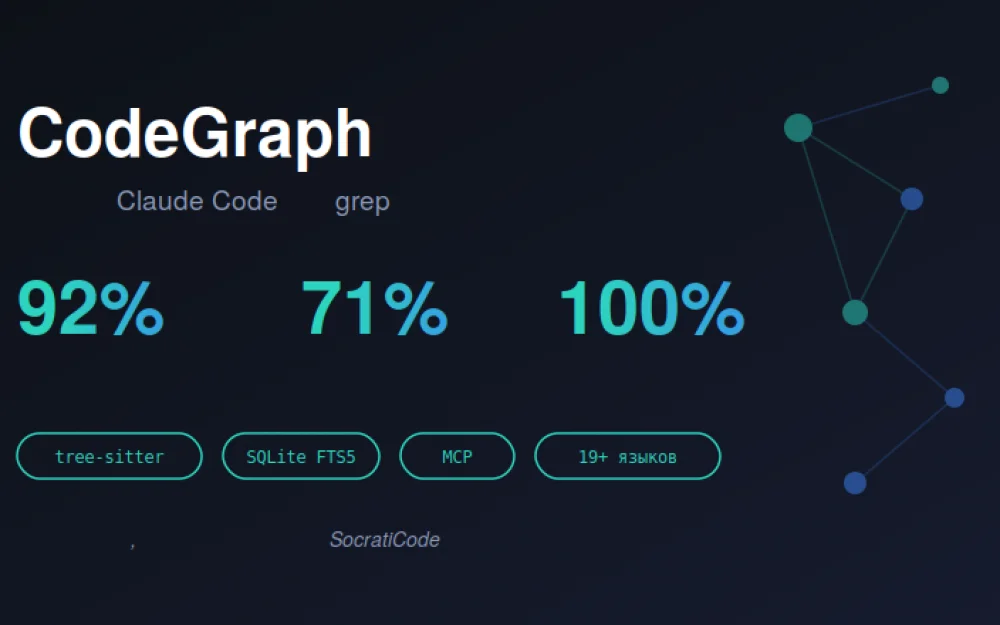
First, a note about Telegram marketing. The post through which I learned about the tool contains a few inaccuracies that I will correct along the way. For example, the claim "the Hermes AI agent built context from 3479 files" — there is no "Hermes agent" in the project at all, that is a fabrication. The 92%/71% figures are real, taken from the README. Let's break this down in detail.
What it is and what problem it solves
CodeGraph is an MCP server (Model Context Protocol) for Claude Code. It indexes your codebase into a knowledge graph and provides the agent with a set of tools to query this graph: find symbols, identify which functions call a given function, build context for a specific task, and analyze the impact of a change.
The core idea is to provide Claude Code's Explore agents with a pre-indexed graph instead of having them scan files live. The agent queries the graph instantly, rather than recursively reading the file tree.
Technical specifications from the repository:
Node.js 18+, installed via
npx @colbymchenry/codegraphMIT license, 552 stars on GitHub at the time of review
100% local — no API keys, no cloud, only an SQLite database
Support for 19+ languages: TypeScript, JavaScript, Python, Go, Rust, Java, C#, PHP, Ruby, C, C++, Swift, Kotlin, Dart, Svelte, Liquid, Pascal/Delphi
File watcher with auto-synchronization via native OS events. This falls into the same category as SocratiCode, Aider repo-map, and Continue codebase indexing. However, its implementation differs significantly, and this warrants more detailed discussion.
Architecture: tree-sitter → SQLite graph
Unlike SocratiCode, which builds a vector index using Ollama embeddings, CodeGraph takes the approach of static AST analysis. There are no neural network embeddings in the index itself — it is a pure structural graph.
The process is divided into four stages.
Stage 1: Extraction. tree-sitter parses source code into an AST. Then language-specific queries extract nodes (functions, classes, methods) and relationships (calls, imports, inheritance). tree-sitter is the same library that GitHub uses for syntax highlighting and code navigation — a proven, battle-tested tool.
Stage 2: Storage. All data is stored in a local SQLite database .codegraph/codegraph.db with full-text search via FTS5. Choosing SQLite here is a sensible decision: it is a zero-configuration embedded database that does not require running a separate service (unlike Qdrant used by SocratiCode, which requires Docker).
Stage 3: Resolution. After extraction, references are resolved: function calls are matched to their definitions, imports are matched to source files, class inheritance, and framework-specific patterns are all linked. This turns isolated nodes into a connected graph.
Stage 4: Auto-Sync. The MCP server monitors the project via native OS events (FSEvents on macOS, inotify on Linux, ReadDirectoryChangesW on Windows). Changes are debounced (with a 2-second window), filtered to only include source files, and incrementally re-synced. The graph stays up to date as you write code, with no need for manual reindexing.
The key difference from the vector-based approach is that the graph is deterministic. If a function login() calls validateToken(), that is a fact extracted from the AST, not a "semantic similarity score of 0.87". For call tracing tasks, this is far more reliable than vector search. For tasks like "find something conceptually similar", on the contrary, graphs fall short compared to vectors.
Installation
It's all very simple, which is a nice touch. One-command interactive installer:
npx @colbymchenry/codegraph
The installer handles several tasks on its own: it installs codegraph globally (required for the MCP server), registers the MCP server in ~/.claude.json, configures auto-allow permissions for CodeGraph tools, and adds global instructions to ~/.claude/CLAUDE.md.
Next, initialize the graph in your project:
cd your-project
codegraph init -i
After that, Claude Code will automatically use CodeGraph whenever it detects a .codegraph/ directory in the project.
If you prefer not to use automation, you can set it up manually. The installer writes a block similar to the following to ~/.claude.json:
{
  "mcpServers": {
    "codegraph": {
      "type": "stdio",
      "command": "codegraph",
      "args": ["serve", "--mcp"]
    }
  }
}
Note that the type is stdio, not url. CodeGraph runs as a local process that communicates with Claude Code via stdin/stdout, rather than as a network service. This makes sense for a tool positioned as "100% local".
Tools the agent gets access to
After launch, CodeGraph exposes a set of MCP tools to Claude Code. Below is the list of tools and their purposes:
codegraph_search— find symbols by name across the entire codebasecodegraph_context— build relevant context for the given taskcodegraph_callers— find what calls the functioncodegraph_callees— find what the function itself callscodegraph_impact— analyze what will be affected by a change to a symbolcodegraph_node— details on a specific symbol (optionally with source code)codegraph_files— structure of indexed filescodegraph_status— index health and statistics
An interesting architectural detail: the installer writes instructions into CLAUDE.md that prohibit the main session from calling heavy tools directly. Quoting the core gist from the README:
NEVER call
codegraph_exploreorcodegraph_contextdirectly in the main session.
The reasoning behind this is that these tools return large chunks of source code that bloat the main session's context. Instead, CodeGraph mandates that a separate Explore agent is always spawned for research questions. The main session can only use lightweight tools (codegraph_search, codegraph_callers, codegraph_impact, codegraph_node) for targeted queries before editing.
This is well-thought-out design. The authors recognize the "context bloat" problem and address it at the architectural level: heavy code is routed to the subagent, whose context is subsequently collapsed, while the main session remains clean.
Benchmarks: what is stated and how to interpret them
The authors tested it on 6 real codebases, comparing the Explore agent for Claude Code with and without CodeGraph. All tests ran on Claude Opus 4.6 (1M context), Claude Code v2.1.91. Each test used a single Explore agent with the same question.
Average result: 92% fewer tool calls, 71% faster. The main README page even lists 94%/77% — likely based on a different dataset, while the detailed table shows an average of 92%/71%.
Most illustrative cases:
VS Code (TypeScript, 4002 files): 3 calls in 17 seconds vs 52 calls in 1m37s. That's 94% fewer calls, 82% faster.
Swift Compiler (Swift/C++, 25,874 files, 272,898 nodes): the largest codebase. CodeGraph indexed it in under 4 minutes, and the agent answered a complex cross-cutting question with 6 calls and zero file reads in 35 seconds. How to critically interpret these numbers.
First, this is the author's own benchmark, not an independent verification. To confirm the questions are representative, you need to reproduce it yourself. I did not run the full benchmark myself, but based on the description the methodology is sound — exact questions, versions, and codebases are specified. This is better than "it felt faster to us".
Second, "92% fewer calls" refers to the agent's tool calls, not "code calls" as a Telegram post misrepresented it. This number counts the Explore agent's accesses to tools (grep, read, glob vs codegraph queries).
Third — and this is the key point — the performance gain becomes apparent on large codebases and for architectural questions. Benchmark questions of the form “how does the extension host communicate with the main process” or “how does collaborative editing work” are structure-related queries that require traversing a large number of files. For a narrow, point-specific task like “show the definition of the parseConfig function”, grep will work just as fast, and you will get no benefit from the graph.
This, by the way, is exactly the same conclusion I reached when analyzing SocratiCode. Code indexing tools have a performance advantage when it comes to “understanding project structure”, not for point-specific search.
Where did the figure “3479 files in 3 minutes” and the mention of “agent Hermes” come from
I will address the Telegram phrasing “the tool built context from 3479 files in three minutes for the Hermes AI agent” separately, as it is a mix of truth and fiction.
There is no “Hermes agent” in the CodeGraph project at all. I read the full README, CLI reference, and list of MCP tools — the word Hermes does not appear anywhere in these documents. Where the post’s author got the reference from is a mystery; they may have confused it with a different tool.
The figure “3479 files in 3 minutes” is close to real data but inaccurate. In the benchmark, the largest indexations are: VS Code — 4,002 files, Swift Compiler — 25,874 files in “less than 4 minutes”. It appears the post’s author took the ballpark estimate of “several thousand files in a few minutes” and rounded it to specific but incorrect numbers.
This is a typical case with Telegram reposts: the core fact (fast indexing of large projects) is true, but the specific details are fabricated. That’s why I always verify the original source before writing anything.
How it differs from SocratiCode and other similar tools
Since I was already analyzing SocratiCode, I’ll do a direct comparison — it’s the closest competitor.
SocratiCode builds a vector index via Qdrant + Ollama, and performs hybrid search (semantic search + BM25 via RRF). Its key strength is conceptual search: it can find code related to authorization even if the word "auth" does not appear in the code. Its weakness is that it requires Docker for Qdrant and Ollama, and is more resource-intensive.
CodeGraph builds a structural graph via tree-sitter + SQLite. Its key strength is deterministic call tracing (tracking who calls whom, what impacts what) and its lightweight nature (it only uses SQLite, no Docker required). Its weakness is that it does not support semantic similarity: it searches by names and connections rather than by meaning.
Roughly speaking: if you need to "trace how a request flows from Session.request() to URLSession", that’s what CodeGraph is for — the graph will map out the full call chain. If you need to "find all places where we implement something similar to rate limiting, no matter what it is called", that’s what SocratiCode is for — the vectors will pick up synonyms.
Other alternatives:
Aider repo-map — built-in repository map, but it lacks a full relationship graph and MCP support
Continue — local indexing via its own custom format, tied to the Continue extension
Cody from Sourcegraph — powerful, but primarily operates through its own dedicated client and is not a universal MCP. CodeGraph wins out in the niche of "lightweight deterministic graph via standard MCP": it is installed via an npx command, works in any MCP-compatible host, and does not require Docker.
Where this is actually useful
After reviewing the project and its benchmarks, I will outline when this tool is justified.
It’s worth installing if:
You have a large codebase (hundreds of files or more), and you regularly work with it via Claude Code
You often solve architectural tasks: refactoring, call tracing, and impact analysis before making changes
You want a lightweight solution that does not require Docker or external services
Privacy is important — everything runs locally, your code never leaves your machine. An especially valuable use case is impact analysis before refactoring. The
codegraph_impacttool shows what will be affected by a change to a code symbol before you make that change. This is a task that would take ages to complete manually with grep, but here it only requires a single query to the graph.
You shouldn’t bother with this if:
Your project is small (dozens of files) — grep will work instantly, so you don’t need a graph for that
You mostly need semantic, meaning-based search — in that case, SocratiCode or a vector-based solution is better
You don’t use Claude Code or another MCP-compatible host — the tool is built specifically for MCP
Limitations you should know about
To avoid sounding like an advertisement, I’ll highlight the weak points.
Only structural search. The graph tracks calls and imports, but it does not understand semantics. “Find code that is conceptually similar to X” is not within its scope.
Quality varies by language. Tree-sitter parsers have varying quality across different languages. For TypeScript, Python, and Go, they are mature. For Pascal/Delphi, Liquid, and Svelte (which are on the 19+ list), they are almost certainly less accurate. For niche languages, the graph may be incomplete.
Resolution is not perfect. Mapping calls to definitions for dynamic languages (Python, Ruby, JS) is a fundamentally difficult task. Dynamic dispatch, monkey-patching, reflection — all of these are poorly captured by static analysis. The graph will have gaps.
Index freshness has a delay. The file watcher has a 2-second debounce. If you just added a function and immediately query for it, it might not make it into the graph in time. It's a small thing, but it happens.
Young project. 552 stars, 237 commits, 10 open issues. This is not a mature product on Sourcegraph's level, but an actively developing single-author pet project. This is worth considering for critical workflows.
Benchmarks are not independent. I'll reiterate — the 92%/71% figures come from the author. They appear methodologically sound, but they have not been verified by a third party.
My key takeaways
Several lessons that extend beyond the tool itself.
Graph vs vectors is a task-specific choice, not a question of "which is better". A structural graph is deterministic and precise for tracing. Vectors are flexible and capture meaning. The ideal tool of the future will likely combine both approaches: graph for structure, vectors for semantics.
Progressive context delivery is once again key. This pattern repeats across SocratiCode, DeerFlow, and book-to-skill as well: "don't dump everything into the context, let the tool request what it needs". CodeGraph goes a step further and architecturally prohibits the main session from loading heavy code, forcing the use of subagents. This is becoming the standard for designing agent systems.
MCP is solidifying its position as the integration standard. As recently as a year ago, every tool invented its own method of integration with agents. Now, a growing number of projects are simply MCP servers that work with any compatible host. CodeGraph, SocratiCode, LazyWeb — all of them use MCP. This is a positive trend for the ecosystem.
SQLite is an underrated choice for local tools. There is no need for Qdrant, no need for Docker, no need for a separate service. SQLite + FTS5 covers search and graph storage for projects with up to tens of thousands of files. For a local tool, this is the right level of minimalism.
Summary
CodeGraph is a functional lightweight tool for users who use Claude Code on large codebases and want to prevent their agent from wasting tokens on recursive grep. Its architecture is well-designed: it uses tree-sitter for parsing, SQLite for storage, MCP for integration, and has a thoughtful safeguard against context bloat via sub-agents.
The claimed 92%/71% metrics are real figures from the README, but this is the author's own benchmark, and the performance gains mostly apply to large projects with complex architectural requirements. The "Hermes Agent" mentioned in Telegram is a fabrication — no such feature exists in the project. The "no limitations" claim is only accurate in the sense that it runs locally and requires no API keys.
If you have a large project and use Claude Code, give it a try — installation takes just a minute, and the risk is zero (it runs entirely locally, under the MIT license). If your project is small or you need semantic search, look into alternative tools. All in all, it is useful to install both CodeGraph and a vector-based tool like SocratiCode, and use them for different task types: the graph for code tracing, vectors for conceptual search.
Useful links:
Repository: github.com/colbymchenry/codegraph
npm package: npmjs.com/package/@colbymchenry/codegraph
tree-sitter: tree-sitter.github.io
MCP Specification: modelcontextprotocol.io
My previous analysis of the similar tool SocratiCode — for comparing approaches







Write comment