- Network
- A
Balancing incoming traffic on bare metal: how to reliably expose Kubernetes externally with MetalLB, BGP and L2
External access to Kubernetes on bare metal is often a major headache: NodePort with random non-standard ports is not production-ready, and no cloud load balancer is available. MetalLB turns regular cluster nodes into a full-fledged load balancer with automatic failover. We cover BGP and L2 modes and also show a Deckhouse Kubernetes Platform feature that preserves active connections when a node fails.
How to publish an application from Kubernetes externally — with a stable IP, load balancing and automatic failover? In the cloud, this is handled by the provider: you create a service type: LoadBalancer — and get a ready-made load balancer. On bare metal, there is no such "magic": ClusterIP and NodePort do not provide any external IP or fault tolerance.
In this article, we will go over the principles of external L4 load balancing: from basic ClusterIP/NodePort services to MetalLB in BGP and Layer 2 modes. We will show how these mechanisms are implemented in practice in the Deckhouse Kubernetes Platform (DKP), which also offers an improved L2 mode. You will learn how to design a fault-tolerant entry point for traffic regardless of whether you use ready-made platforms or set up infrastructure on your own.
Why standard Kubernetes services are not enough for external access
Kubernetes has several types of services for balancing local traffic inside the cluster:
ClusterIP— assigns a stable IP and DNS name to the application with round-robin endpoint balancing;Headless— returns pod IPs directly to the client via DNS;NodePort— opens a port from the30000–32767range on all cluster nodes, allowing access to the application from the outside.
All of them solve the task of internal load balancing, but this is not enough for external clients (Internet/Intranet):
Both
ClusterIPandHeadlessare only accessible from within the cluster. You cannot connect to them directly from outside: for an external client to reach the application, you will additionally need to set up port forwarding, deploy external proxies, or devise workaround solutions.NodePortrequires a non-standard port, and most importantly: the client has no mechanism to check if the node it is attempting to reach is operational. If traffic lands on a failed node, the connection will simply be terminated — automatic failover to another node will not occur.
For full-fledged external load balancing, a dedicated L4 load balancer is required, which accepts traffic on standard ports, distributes load, and provides failover. In Kubernetes, a LoadBalancer type service is used for these purposes.
How LoadBalancer works in cloud infrastructure
The LoadBalancer service operates differently across various infrastructures. In a cloud environment (for example, Yandex Cloud), when the cloud-provider module is enabled, the cloud-provider-yandex controller monitors services with type: LoadBalancer.
What happens "under the hood":
As soon as a
LoadBalancerservice appears in the cluster, thecloud-providerorders a Network Load Balancer (NLB) from the cloud — an L4 load balancer with the required set of listeners and IP addresses (external or internal).A VIP is assigned to the service — a public IP in the cloud that becomes its
ExternalIP.In the NLB configuration, the
cloud-providerdefines aTargetGroup— a list of all cluster nodes in theNodeIP:NodePortformat.The NLB initiates active TCP/HTTP checks of nodes from the
TargetGroupand marks them ashealthyorunhealthyto track their status.
At this point, traffic from the client to the application running inside the cluster will follow the following path:
an external client accesses
externalIP:port, whereexternalIPis the address of the Network Load Balancer Listener in the cloud (VIP assigned to theLoadBalancerservice);the NLB routes traffic to
TargetGroup(NodeIP:NodePort) according to its configuration;when traffic arrives at a node via
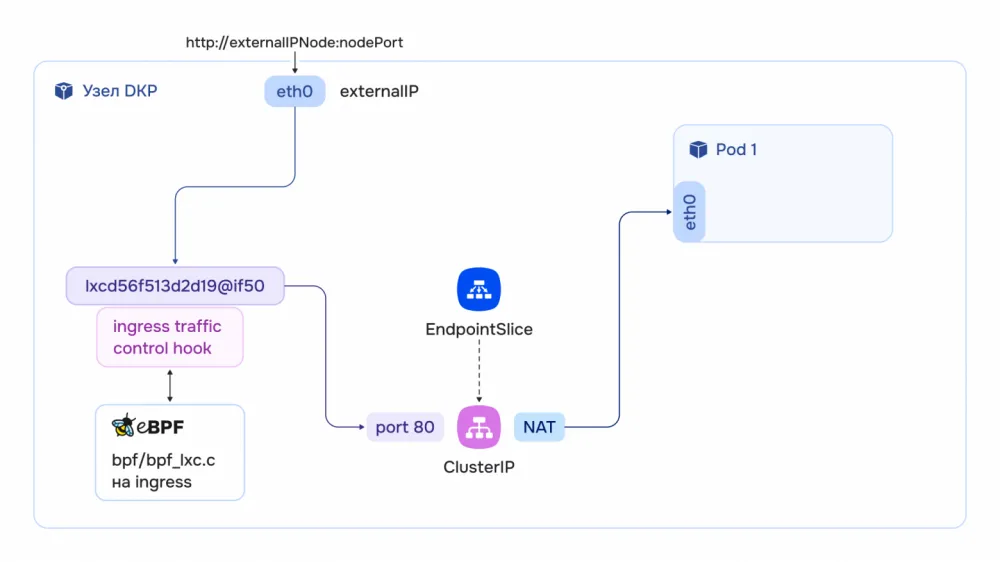
NodePort, the traffic control hook intercepts it and passes it to the network plugin (CNI) for processing. For example, in DKP the primary CNI is Cilium — it processes the packet directly via eBPF in the kernel, selecting the required pod via a BPF map. Other CNIs (Flannel, Calico) deliver traffic the same way but viaiptables/conntrack: the result is identical, but performance and debugging are worse with a large number of services.
LoadBalancer service in static infrastructure
In bare metal environments there is no pre-built cloud provider. In this case, any third-party balancer — hardware or software (HAProxy, nginx, Envoy) — can be used as an NLB.
Moreover, cluster nodes can also act as an NLB. For this purpose MetalLB is used. For example, in DKP it is implemented using the eponymous module, which supports two operating modes:
BGP — based on the original MetalLB;
Layer 2 — an improved implementation from the Deckhouse team.
BGP MetalLB mode
In this mode, the BGP (Border Gateway Protocol) is used for exchanging routing information. With its help, devices from different
First, routers establish a BGP session, then start exchanging routing information (prefix announcement with various attributes) via UPDATE messages. A router that receives an announcement adds the route to its routing table (if it is the best among other routes).
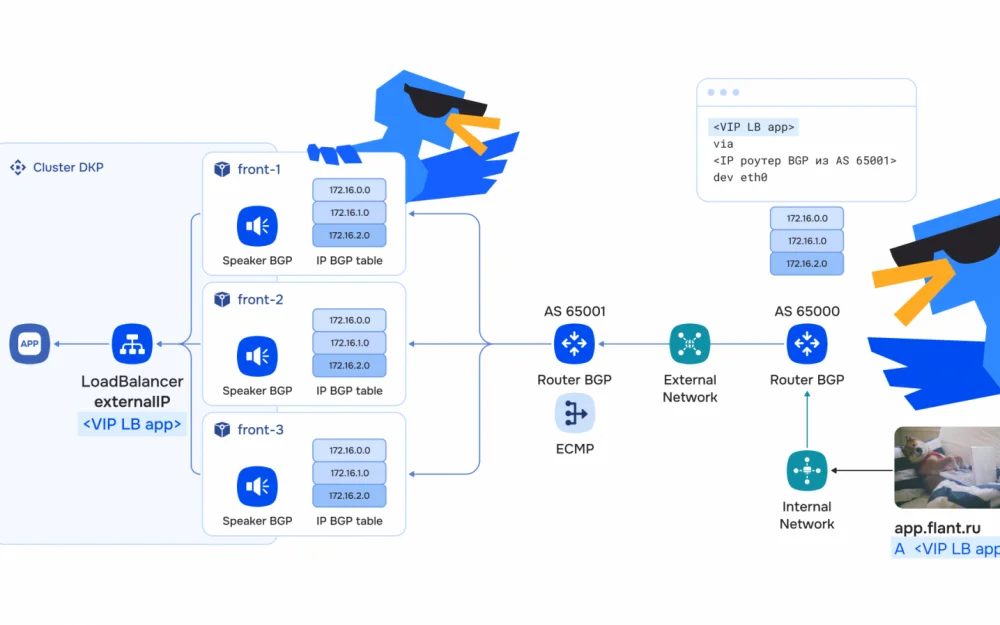
In BGP mode, MetalLB establishes BGP sessions with routers (or ToR switches) and announces IP addresses for LoadBalancer services. Traffic balancing in this case can be implemented using the ECMP (Equal-Cost Multi-Path) mechanism, which distributes traffic across multiple equivalent routes.
Let's look at an example: we have a DKP cluster in AS 65001. There is a border BGP+ECMP router (Router ID 10.12.0.94) in the same AS. Clients are located in a remote AS 65000, at the border of which there is its own BGP router (Router ID 10.12.0.10). The DKP cluster has dedicated nodes that will act as MetalLB speakers.
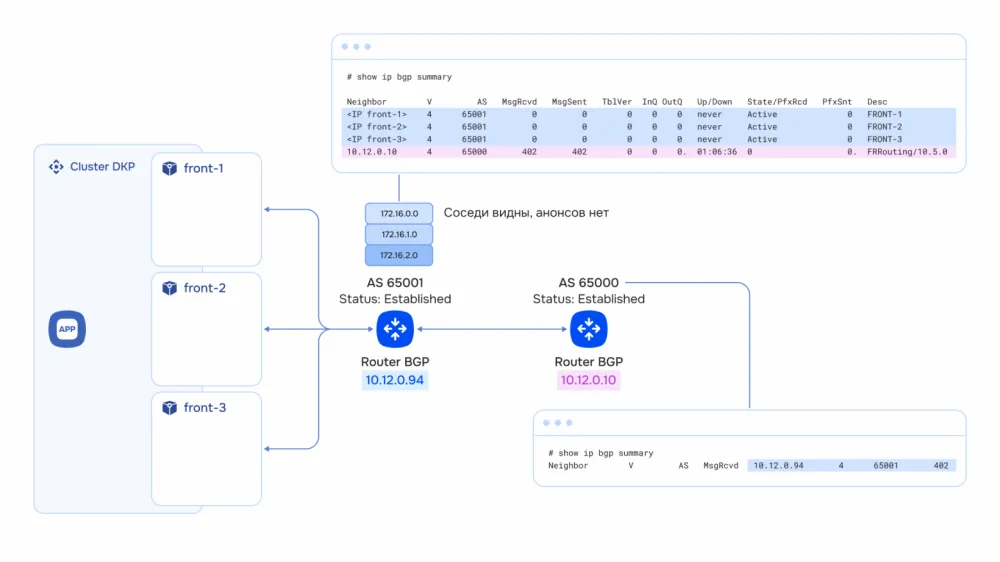
To ensure that MetalLB speakers are deployed on dedicated nodes (for interaction with other BGP neighbors) and an IP address pool is created to be assigned as VIPs to LoadBalancer services, you need to enable MetalLB in BGP mode:
apiVersion: deckhouse.io/v1alpha1
kind: ModuleConfig
metadata:
  name: metallb
spec:
  enabled: true
  settings:
    addressPools:
      - addresses:
          - 192.168.219.100-192.168.219.200
        name: mypool
        protocol: bgp
    bgpPeers:
      - hold-time: 30s
        my-asn: 65001
        peer-address: 10.12.0.94
        peer-asn: 65001
        peer-port: 179
    speaker:
      nodeSelector:
        node-role: front
version: 2addressPools— IP pool for LoadBalancer service ExternalIPs.
bgpPeers — BGP peer settings: hold-time, ASN, address and port.
speaker.nodeSelector — which nodes to deploy BGP speakers on.
In this case, LoadBalancer services will be assigned VIPs from the mypool pool and announced via BGP speakers deployed on the cluster's dedicated nodes.
To publish the application, create a LoadBalancer service with an annotation to select the pool:
apiVersion: v1
kind: Service
metadata:
  name: nginx
  annotations:
    metallb.universe.tf/address-pool: mypool
spec:
  type: LoadBalancer
  ports:
    - port: 80
      targetPort: 80
  selector:
    app: nginx
After creating the service, MetalLB assigns a VIP from the mypool pool and announces it via BGP speakers. On the AS 65001 router, an entry appears in the BGP table: the VIP is reachable via the cluster node IPs. The AS 65000 router sees the VIP with next-hop set to the AS 65001 router. The client then accesses the application via the LoadBalancer address, not the BGP speaker address.
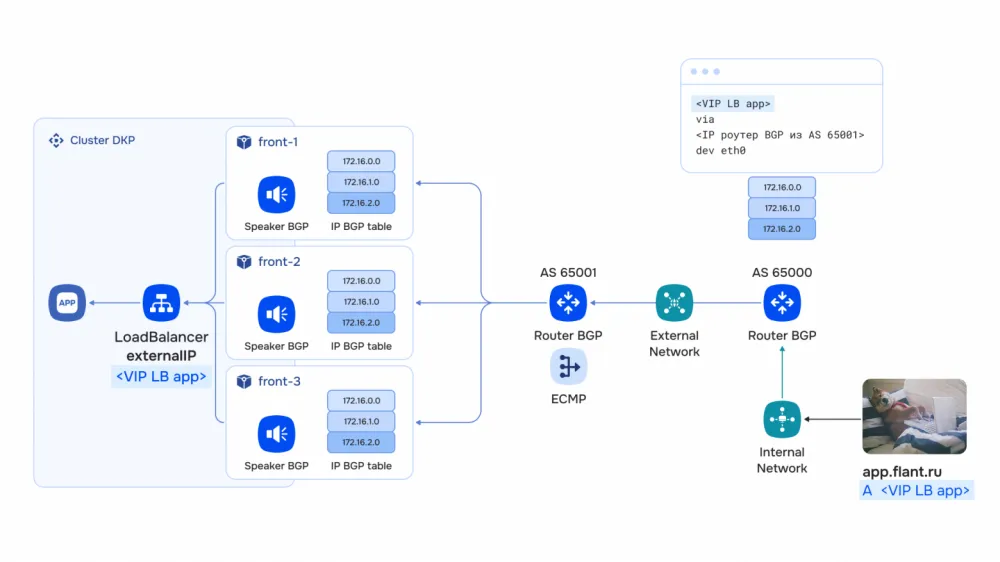
Thus, MetalLB uses the standardized BGP protocol in BGP mode. Using the ECMP mechanism, you can distribute load across cluster nodes; if a node announcing the IP address fails, routers automatically redirect traffic to other nodes announcing the same IP.
However, routers with BGP and ECMP support are often not available for administration — for example, carrier routers with restricted access are used. Therefore, adding speakers as BGP neighbors in such a system may be difficult.
Layer 2 Mode of MetalLB
When a BGP router is not available, you can use L2 mode. Traffic is received from local (Intranet) networks that are L2-adjacent to the cluster.
In MetalLB's standard L2 mode, an IP is allocated from the pool for the LoadBalancer service. One of the MetalLB speakers designated as the leader starts responding to ARP requests for this IP. For the external network, this looks like the IP is assigned to the leader node's interface. However, in this case, all traffic passes through a single node. If the leader fails, MetalLB selects a new leader that starts responding to ARP. But all active connections are terminated at this point. Thus, during failover, there is a complete connection interruption.
The Deckhouse team has significantly improved the standard L2 mode of MetalLB. Now, not just one, but multiple VIP addresses can be allocated to a service — the number of these addresses is specified via a special annotation in the service manifest. For example, you can set the number of addresses equal to the number of dedicated nodes for their announcements, in which case each node announces its own IP via ARP, and multiple A records are created in DNS. When a client connects, it selects the address on its own, and the load is naturally distributed across all nodes.
Suppose there are three dedicated nodes in a cluster on the same L2 network 10.241.36.0/22 with an L2 switch (or any device that processes L2 traffic in this segment). To activate Deckhouse's L2 mode, you need to enable the MetalLB module without additional settings, and also create a MetalLoadBalancerClass. The MetalLoadBalancerClass CRD defines the IP pool, interfaces, and nodes for announcements:
apiVersion: network.deckhouse.io/v1alpha1
kind: MetalLoadBalancerClass
metadata:
  name: front
spec:
  addressPool:
    - 10.241.36.100-10.241.36.200
  isDefault: false
  nodeSelector:
    node-role: front
  type: L2
After applying the configuration, L2 speakers are launched on nodes with the node-role=front label. Next, you can publish the application via a LoadBalancer service:
apiVersion: v1
kind: Service
metadata:
  name: nginx-deployment
  annotations:
    network.deckhouse.io/l2-load-balancer-external-ips-count: "3"
spec:
  type: LoadBalancer
  loadBalancerClass: front
  ports:
  - port: 80
    protocol: TCP
    targetPort: 80
  selector:
    app: nginx
The service specifies loadBalancerClass: front — this is the name of our MetalLoadBalancerClass, which is responsible for requesting ExternalIP from the MetalLB address pool. The annotation specifies how many external IPs from the MetalLB pool should be assigned to the service in L2 mode. In this case, 3 VIPs will be assigned to the service. MetalLB responds to ARP requests for each VIP from its dedicated node. ARP table on the L2 switch:
10.241.36.100    aa:bb:cc:00:00:10   # VIP → MAC front1
10.241.36.101    aa:bb:cc:00:00:13   # VIP → MAC front2
10.241.36.102    aa:bb:cc:00:00:16   # VIP → MAC front3
Then the traffic will reach the application as follows:
Based on the
ExternalIPof the service, traffic arrives at the port of the dedicated cluster node;Next, traffic is forwarded to the
LoadBalancerservice via its ClusterIP on port 80;Based on
Endpoints, the service performs NAT of traffic to pod IP addresses on port 80.
When one dedicated node is lost, MetalLB redistributes its VIP to the remaining nodes. You can verify the binding via SDNInternalL2LBService:
$ kubectl -n test describe sdninternall2lbservices
nginx-deployment-front-0
Events:
  Normal  nodeAssigned  metallb-speaker  announcing from node
"demo-front-...-x8whc" with protocol "layer2"

$ kubectl -n test describe sdninternall2lbservices
nginx-deployment-front-2
Events:
  Normal  nodeAssigned  metallb-speaker  announcing from node
"demo-front-...-x8whc" with protocol "layer2"
Two VIPs (10.241.36.100 and 10.241.36.102) moved to one node, while 10.241.36.101 remained on the second. The ARP table was updated, and connections to the active VIPs were not disrupted.
LoadBalancer + ALB: NLB and ALB Combination
Now that we have covered the basic working mechanism of the load balancer, let's look at its operational architecture.
In the examples above, MetalLB exposed each application directly via its own LoadBalancer service. This is a functional but not the most convenient option: every HTTP/HTTPS application requires a separate public IP, and all complex logic — TLS termination, routing by domain and path, authentication, request rate limiting — has to be configured individually inside each application. As the number of services grows, public IP addresses are quickly exhausted, and managing L7 policies across dozens of different locations will be practically impossible.
Therefore, in practice, the NLB + ALB combination is often used: the type: LoadBalancer service is provisioned not for the application itself, but for the L7 load balancer (ALB). The ALB itself processes HTTP/HTTPS traffic and routes it to the required applications based on Host/Path, terminates TLS, applies security policies, and handles other application layer tasks. This approach provides several important advantages at once:
Savings on external IPs. A single VIP MetalLB on the ALB serves tens and hundreds of applications instead of a separate IP for each one.
Single point of management for L7 policies. TLS certificates, authentication, WAF rules, rate limiting, headers and redirects are configured centrally on the ALB, rather than duplicated in every application.
Clear separation of responsibilities. The NLB handles what it does most efficiently — L4 load balancing and failover; the ALB handles tasks that require protocol understanding, i.e. application-level routing at L7.
Flexibility and scalability. Adding a new application does not require provisioning a new LoadBalancer and a new IP — it is enough to define a routing rule on the already running ALB.
At the same time, the LoadBalancer service for the ALB continues to work exactly as described above: in the cloud it is handled by the cloud-provider, on bare metal — by MetalLB in BGP or L2 mode. The only difference is that the customer of this service is now the ALB controller, not a separate application.
In this setup, MetalLB acts as an NLB: it accepts TCP/UDP traffic on the VIP and distributes it between ALB pods (on the nodes where they are running). The specific ALB implementation does not matter here — for MetalLB it is just another type: LoadBalancer service. Thanks to this, the same NLB layer is reused for different ALBs and different traffic classes.
Conclusions
For full external load balancing of applications in Kubernetes, a dedicated L4 (NLB) load balancer is required: it accepts TCP/UDP traffic on the VIP via standard ports, distributes load between cluster nodes and provides failover. Its implementation depends on the infrastructure:
In the cloud, the task is solved by
cloud-provider: when creating a service oftype: LoadBalancer, the controller orders a ready-made NLB with VIP andTargetGrouponNodeIP:NodePortfrom the provider. Healthcheck and failover checks work entirely on the cloud side.On bare metal, there is no cloud provider, so MetalLB takes on the role of NLB, turning cluster nodes into a load balancer. In BGP mode, MetalLB establishes sessions with the border router and announces VIP services, and ECMP on the router distributes traffic across nodes with fast failover. When BGP is unavailable on the border equipment, L2 mode is used: standard — with one leader node per VIP and connection break when switching — or Deckhouse's improved L2 — with multiple VIPs per service, announcing each VIP from its node via ARP and balancing on the client side through multiple A-records.
NLB + ALB bundle: if there is already an L7 load balancer (ALB) in the cluster, MetalLB naturally integrates in front of it as NLB. One service of
type: LoadBalancerfor ALB receives all incoming L4 traffic on MetalLB's VIP, and ALB further terminates TLS and routes HTTP/HTTPS requests to specific applications. A separateLoadBalancerfor each application is not needed, and MetalLB provides a fault-tolerant entry point on L4 even where there is no cloud provider.
Where to study the topic in-depth
The topic of MetalLB and L4 traffic balancing is covered in detail in the course «Networking capabilities of Deckhouse Kubernetes Platform» (5 days, 5 lectures, online). In the remaining lectures of the course, we will dive into other network aspects of DKP. The course covers the full path from basic work with the internal network to managing incoming and outgoing traffic and network security. It is suitable for those who want to understand how the network is organized in DKP:
how to prepare static and cloud infrastructure for a cluster;
how CNI Cilium works and internal load balancing via Services and DNS;
how to balance L4 traffic using MetalLB and L7 traffic via NGINX Ingress Controller;
how to manage outgoing traffic via Cilium Egress Gateway;
how to create network policies, configure mTLS with Istio, and troubleshoot DKP network components.
Each lecture includes theory with a live cluster demonstration and hands-on practice on a training sandbox.
P. S.
Also read in our blog:
Deckhouse Prom++: how we put Prometheus on a RAM diet and saved 89 % of memory in the data storage
Give us self-governance! We manage HashiCorp Vault configuration from the inside, relying on Git and a quorum of signatures
From dawn to dusk, or How Deckhouse Kubernetes Platform manages the cluster node lifecycle



Write comment