- AI
- A
Gemma 4 Fine-Tuning on Cloud Run Jobs: Using Server GPUs for Animal Breed Classification
In this generation of open models, reasoning capabilities and architecture efficiency have been improved. Below is a guide on fine-tuning the model on your own data.
But first, what has changed in Gemma 4
Gemma 4 has received an Apache 2.0 license and an updated architecture. The main parameters are as follows:
• 31B and 26B MoE
• Support for windows up to 256K
• Native processing of images, video, and audio
• Built-in support for function calls and structured JSON
Due to architectural changes, scripts for previous versions of Gemma are not suitable. It is necessary to change the logic of data loading and preparation.
Memory and GPU
A NVIDIA RTX PRO 6000 with 96 GB of VRAM is used for operation on Cloud Run. The Gemma 4 31B model in bfloat16 precision occupies about 62 GB. Using 4-bit QLoRA quantization through the bitsandbytes library reduces memory consumption to 18-20 GB. This leaves free VRAM capacity for processing long contexts and multimodal data.
Changes in code for Gemma 4
Input data
Gemma 4 requires the image to be passed before the text. Instructions are now combined with the user prompt. In the code, a placeholder {"type": "image"} is used, which indicates to the processor where to insert the image tokens.
Model class
To correctly work with all types of data, AutoModelForMultimodalLM is now used.
Masking labels
In previous versions, fixed token IDs could be used to find the beginning of the assistant's response. In Gemma 4, the number of image tokens is dynamic. If the text is tokenized separately, its length may not match the length in the overall chat template. The solution is to search for response tokens in the full array of input_ids from the end to accurately determine the masking boundary.
LoRA tuning
In Gemma 4, Gemma4ClippableLinear is used to stabilize training. A regular LoRA may ignore this wrapper, leading to training errors. To avoid this, you need to specify target_modules="all-linear" in the PEFT parameters.
Results
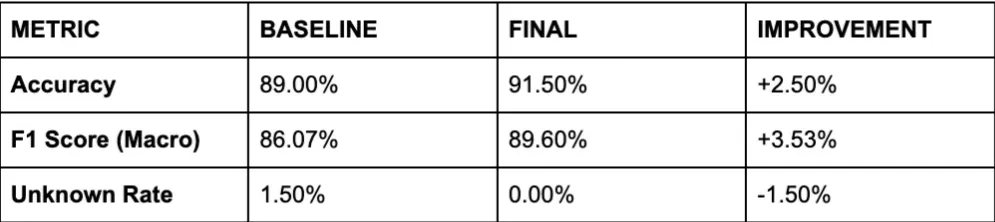
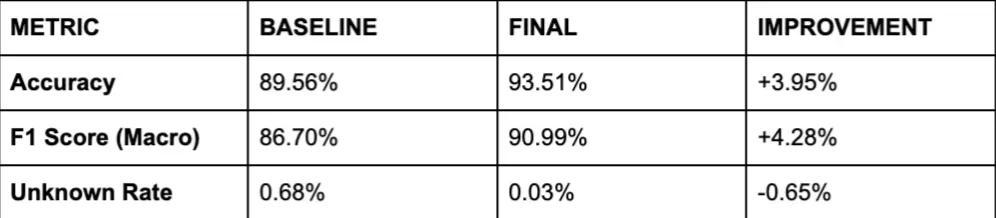
The base accuracy of Gemma 4 on the test was 89%. After training on the full Oxford-IIIT Pet dataset, the accuracy increased to 94%. The configuration used was Rank 64 / Alpha 64 and a learning rate of 5e-5.
Starting Training on Cloud Run
You need a project in Google Cloud with billing enabled and the Cloud Run and Cloud Build APIs activated. A Hugging Face token is also required to access the model weights.
• Clone the repository
git clone https://github.com/GoogleCloudPlatform/devrel-demos
cd devrel-demos/ai-ml/finetune_gemma/
• Test the script on CPU with a small 2B model and a small amount of data
python3 finetune_and_evaluate.py \
  --model-id google/gemma-4-e2b-it \
  --device cpu \
  --train-size 20 \
  --num-epochs 1
To speed up the task launch in the cloud, upload the model weights to a Google Cloud Storage bucket in the same region where Cloud Run will operate.
• Build the image using Cloud Build
gcloud builds submit --tag $REGION-docker.pkg.dev/$PROJECT_ID/$AR_REPO/$IMAGE_NAME:latest .• Create a Cloud Run job with GPU support and mount the GCS bucket as a local disk
gcloud beta run jobs create gemma4-finetuning-job \
  --region $REGION \
  --image $REGION-docker.pkg.dev/$PROJECT_ID/$AR_REPO/$IMAGE_NAME:latest \
  --gpu 1 \
  --gpu-type nvidia-rtx-pro-6000 \
  --cpu 30.0 \
  --memory 120Gi \
  --add-volume name=model-volume,type=cloud-storage,bucket=$BUCKET_NAME \
  --add-volume-mount volume=model-volume,mount-path=/mnt/gcs \
  --args="--model-id","/mnt/gcs/google/gemma-4-31b-it/","--output-dir","/mnt/gcs/gemma4-finetuned"
• Start the execution




Write comment