- AI
- A
Grep-AST or How We Replaced Vector Search with Just One Library
Hello everyone! This is Sofia from the large language model application team at ecom.tech. Today, I want to share a little-known library that, by fate, we found on GitHub, tried using it for searching through our codebase, and, lo and behold! It significantly helped us. It might seem like a small step for mankind, but it was incredibly useful for our project.
What are we solving?
Here, we need to understand the specifics and details of our task. We are automating the reverse engineering process - restoring REST API and Kafka documentation from code. In simple terms, we need to search for relevant code snippets in one or more repositories, process them, and then generate documentation using LLM. We will definitely tell you more about the LLM part in our next articles, but today we’ll only talk about the search.
Speaking of code, an important point is that we need to cover repositories in different languages - Golang, Kotlin, Ruby, Elixir, and PHP. Our company has hundreds of microservices written in different programming languages and using various frameworks. Despite this abundance of technologies, architectural standards prescribe placing descriptions of REST endpoints in strictly defined locations.
For example, in Golang projects, these are handlers tied to routes via http.HandleFunc or GET/POST method calls in the Gin/Echo framework. In Kotlin — Spring controllers with annotations @RestController, @RequestMapping, or declarative routes in Ktor (routing { get("/") { ... } }). In Ruby — Rails controllers and the routes.rb file, where resources or get explicitly declare endpoints. In Elixir — modules using Phoenix.Router, macros get "/", PageController, :index. In PHP — routes in routes/api.php Laravel (callbacks or arrays [Controller::class, 'method']) or annotations in Symfony controllers.
The same picture is observed with Kafka: producers in Golang call producer.SendMessage (sarama library), in Kotlin — inject KafkaTemplate and the send method, in Ruby — call producer.produce in ruby-kafka, in Elixir — KafkaEx.produce, in PHP — methods KafkaProducer::send on top of php-rdkafka. Consumers are annotated @KafkaListener (Kotlin/Spring), subscribe to topics through consumer.Subscribe (Go, Sarama), use consumer.subscribe in Ruby, declared as GenConsumer in Elixir, or through consumer groups in PHP.
In other words, developers follow unified corporate standards, so the patterns for finding entry points are known in advance and are the same for all projects within each language. It would seem that you can take any tool, look for these annotations/calls — and the documentation is ready.
Where did we start?
Initially, we tried to apply the Tree-sitter library directly, but it did not perform well on our codebase. In our task, the syntax is not as important as the semantics of the frameworks. The code actively uses wrappers over HTTP/Kafka libraries, basic controllers, DSL, and metaprogramming (especially in Ruby and Elixir), so the framework calls in the tree look like regular user-defined functions. As a result, tree-sitter either missed real endpoints or gave many false matches. In addition, for each language and framework, we had to maintain a separate set of rules, sensitive to code style and library versions, so accuracy fluctuated greatly from project to project, and support became very time-consuming.
Then we built a classic RAG pipeline with the gte-multilingual-base embedder, then converted it to a hybrid RAG with subsequent re-ranking through BM-25. But the search took quite a long time and still did not find all the files we needed. The average accuracy across all programming languages was 85%. Then we started looking towards the regular grep from Linux, cheap and effective.
What are the painful realities?
When using grep, we literally had to "twist" regular expressions to filter out false positives: comments in Russian and English, string literals containing similar signatures, imports, and type declarations. For example, in Java, the @GetMapping annotation might be part of Javadoc, while in Golang, the comment // GetUser has nothing to do with a handler. Without understanding the syntactical structure of the code, it is impossible to reliably distinguish an endpoint declaration from a simple mention of the same words in a different context. We tried refining patterns, adding lookaheads/lookbehinds, limiting the distance from the start of the line—this helped, but the fragility of such rules became evident with the slightest change in formatting style (for example, the annotation is moved to a new line, or another decorator is placed before it). There are many projects, the code is updated daily, and maintaining this set of clunky regular expressions became more painful. And I haven’t even mentioned legacy code that doesn’t conform to current architectural rules.
Considering all this, the solution was decent but had its nuances, related to the difficulty of selecting exact patterns and the lack of understanding of the code and project structure. So we started looking for modernized versions of it. That’s when we stumbled upon grep-ast. We were looking for copper and found gold.
So what is this grep-ast
grep-ast is a Python library for searching and analyzing source code based on its abstract syntax tree (AST). Unlike regular grep, it not only performs simple text search but can also search for structural patterns in the code, understanding its syntactical structure (which is critical for us!). Grep-ast shows matches not as strings, but as AST elements with context: functions, classes, loops, and nested blocks.
With grep-ast, you can view corresponding lines with useful context that shows how they fit into the code. You can see loops, functions, methods, classes, etc., that contain all the necessary lines, and learn what’s inside the corresponding class or function definition. We see the required code at every level of the abstract syntax tree, above and below the matches. Grep-AST is based on tree-sitter and tree-sitter-languages, so it supports many languages (Russian, English, Chinese, okay, just kidding :) In essence, it’s a powerful combo of grep and tree-sitter.
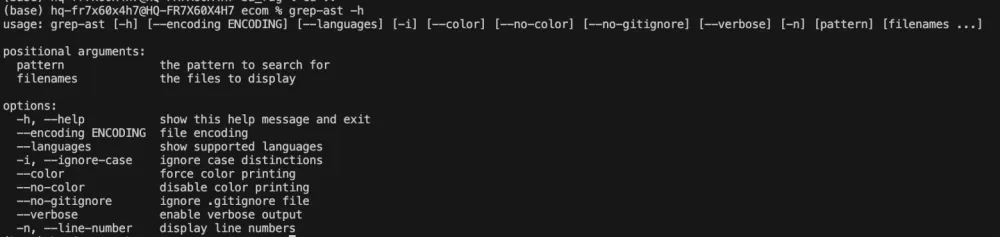
By default, grep-AST performs a recursive search through the current directory across all files. It also supports working with .gitignore. The interface is similar to grep: the basic call looks like `grep-ast [pattern] [filenames...]`, there’s a case-insensitive flag, output color control, explicit encoding configuration, and also a mode to print parser tables (--languages).
How AST trees differ from poplars
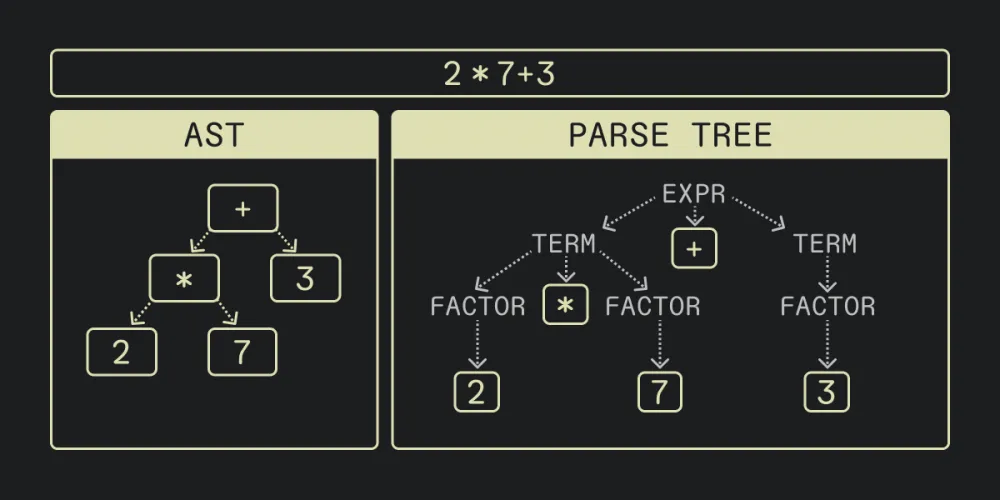
AST (Abstract Syntax Tree) is an abstract syntax tree, a data structure that represents the source code of a program as a tree, reflecting its logical and syntactic structure, rather than the specific text. AST is the way a compiler or interpreter "understands" the code.
It parses the program text and turns it into a tree of nodes: operations, variables, expressions, etc. Unlike a Parse Tree, which contains all syntactic elements (brackets, commas, semicolons), strictly following grammar, an AST is a simplified, semantic version that contains only the structural elements of the code necessary for compilation or interpretation, excluding unnecessary symbols.
Let's compare grep and grep-ast with examples. To make the difference clear, let's take a small synthetic project with two files.
1. Searching for a method
Let’s find the method check_requirement inside helpers.py
Regular grep
`grep -n "def check_requirement" mini_project/helpers.py`

We only received the line number. Now, we need to open the file, scroll, and figure out where the method starts and ends. Let's try to get the context:
`grep -n -B 3 -A 10 "def check_requirement" mini_project/helpers.py`
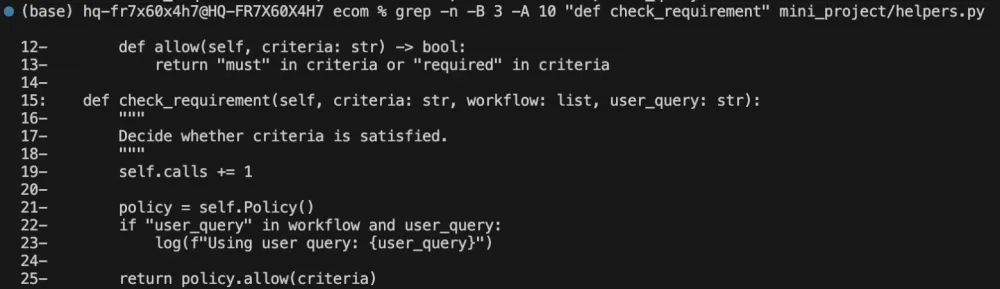
Some might think that grep -B/-A solves the context problem. Formally – yes, we can see several lines before and after the match. But in practice, this context is random, it doesn't know where the method starts and ends, it easily "captures" code from neighboring functions, and it completely loses information about the class or logical block we're in.
grep-ast, on the other hand, always works in terms of AST. The method is shown exactly within its boundaries, inside the required class, without manually adjusting the number of lines and without the risk of breaking the structure.
grep-ast
`grep-ast "def check_requirement" mini_project/helpers.py`
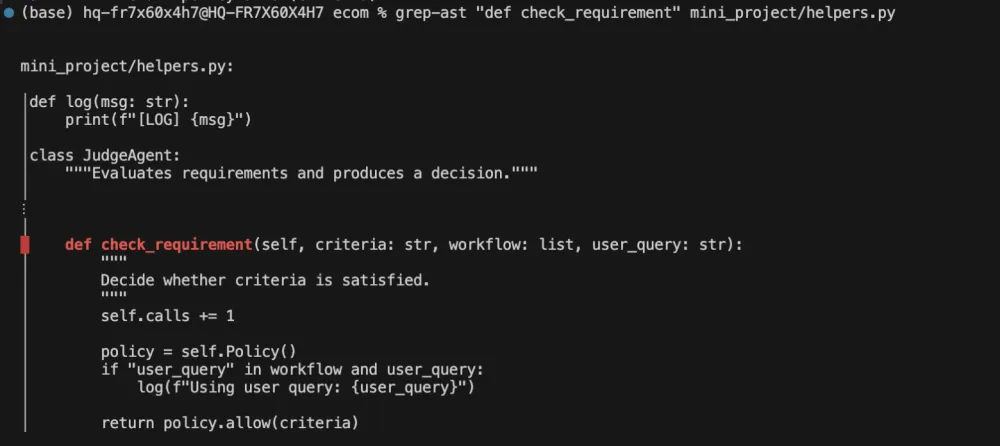
We get the method as a whole, the docstring, its body, and most importantly, it belongs to the JudgeAgent class. Essentially, instead of the "entry point," we immediately get a meaningful code fragment that we can continue working with – both for humans and AI agents.
2. Searching across all project files
Now, let's find JudgeAgent throughout the entire project.
Regular grep grep -r "JudgeAgent" mini_project/ --include="*.py"

The result is a mix of declarations, imports, and usages, with no distinction between JudgeAgent and NotJudgeAgent, no understanding of relationships, requiring the manual opening of each file. It's just a list of matches.
grep-ast grep-ast "JudgeAgent" mini_project/
When searching across the entire project, it seems the difference is visible to the naked eye. grep returns a set of scattered lines from different files—imports, class declarations, calls—without any understanding of the relationships between them. grep-ast groups the results by files and displays them in a structural context: where a class is declared, where it is used, at which specific place, and within which logical block. For a person, this saves dozens of file transitions, and for an AI agent, it transforms the search from a "search for lines" into a search for meaningful code entities.
In the end, the key difference between grep and grep-ast is not whether it finds a line, but what exactly it returns as the result. Grep answers the question "where does this text appear," while grep-ast answers "which part of the program stands behind this."
For code analysis tasks, project navigation, and especially for AI tools, the latter is significantly more important than the former.
Why does everyone confuse us with you?
By searching for grep-ast on Google, you'll also find a library with a reversed name - AST-GREP. It is more similar in name and general concept, both tools use AST at their core, are based on Tree-sitter, and are polyglots.
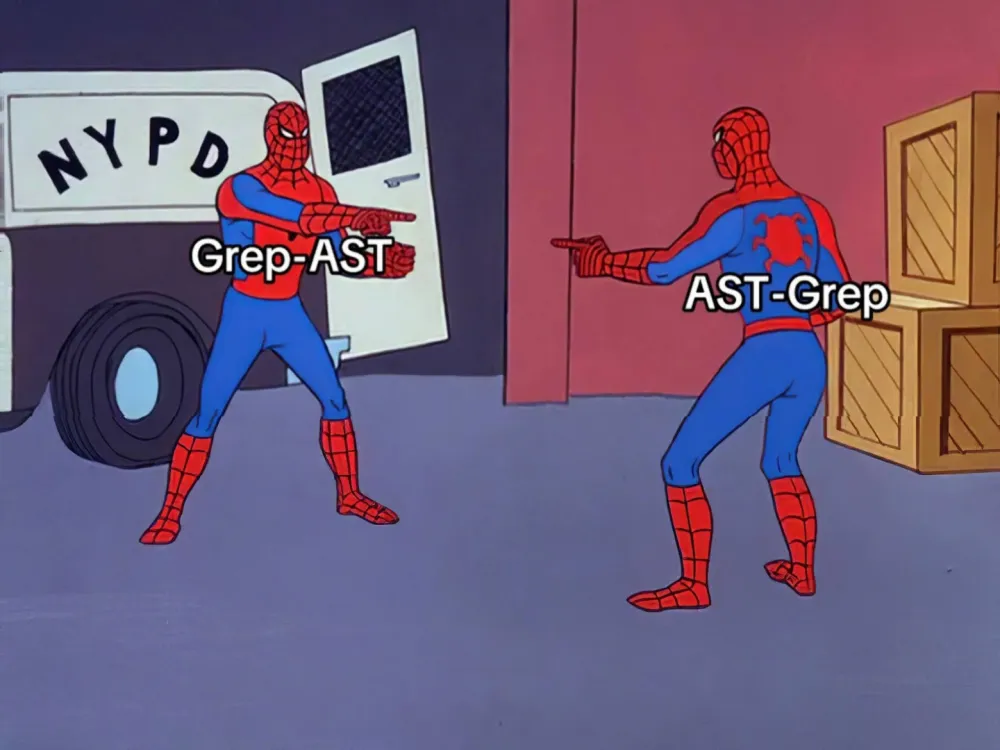
They differ in how they use the obtained AST. Grep-ast: shows the context around found lines, ast-grep: performs structural search and rewriting. There are a few more nuances: AST-GREP is faster because it is written in Rust, more complex because it requires complex structural queries for AST, not for lines, and more multifunctional or, simply put, overloaded, with features like code rewriting, linting with custom rules, rule composition (operators, complex conditions). We concluded that for our AI agent, this is too complex a tool with redundant functionality, and we ended up sticking with grep-ast.
Criterion | grep-ast | ast-grep |
Implementation Language | Python | Rust |
Performance | Moderate | Very High |
Main Task | Search with AST context | Search + Replace + Linting |
Patterns | Regex over text | AST Structural Patterns |
Refactoring | No | Yes (interactive codemod) |
Custom Rules | No | Yes (YAML configs) |
Interfaces | CLI | CLI + Node.js API + LSP |
How grep-ast became a compass for LLM
At some point, we looked at all this from a slightly different perspective. If grep-ast can already find structural entities in the code - classes, methods, entry points, then it's not just a CLI utility for developers. It’s a ready-made code navigation operation that can be provided to an agent as a tool.
In fact, we can turn grep-ast into a tool for tool calling. After this, the LLM stops working blindly. Instead of guessing based on context fragments or relying on embeddings, it starts acting like a developer: finding the relevant class, checking the methods, understanding dependencies, and refining the next request. In this case, once we stop giving the model ready-made pieces of code and allow it to traverse the repository itself, the search stops being a one-time retrieval request. It turns into iterative exploration.
By the way, thanks to the tool calling wrapper, we can get another unexpected but extremely valuable bonus – complete traceability. Each call to grep-ast by the LLM is automatically logged: with which pattern it was called, what it found in which file, and where it decided to go next. Now, there’s no need to guess why the agent made a particular decision. We can literally see its chain of reasoning: "first, it looks for controllers, then dives into DTO, then refines Kafka producers." The black box stops being black.
Not every code search task needs to be solved via RAG
In our case, the majority of the value was not in semantic search across the entire project, but in the precise and reproducible finding of structural code elements – classes, methods, entry points. And here, the AST approach proved to be much more effective than ubiquitous embeddings.
grep-ast became the missing link for us between the "dumb" grep and more complex tools. It does not try to be everything at once, but it solves its narrow task excellently, and that's why it fits well into the architecture of our AI agents. Perhaps grep-ast will not become your main tool, but at the very least, it deserves a place in your toolbox.







Write comment