- AI
- A
MCP Aggregator: Combine LLM Tools into a Single Server
When working with local LLMs via Claude Desktop, Kilo Code, Cursor or other MCP clients, you often run into the same situation: you need filesystem for file operations, web-search for internet searches, memory to store context between sessions, and sequential-thinking for complex reasoning. And another dozen servers…
Each MCP server is a separate process, separate configuration, separate point of failure. The MCP configuration file grows with dozens of entries, and managing this flock of servers becomes yet another problem. Where the MCP configuration file is located for a specific agent application—it would be better to choose it yourself, for example, keep it directly in the project folder. Besides, the name of the mcp-server is generally not as important for the LLM as the names and descriptions of tools in it, so one complete list of tools (functions) would be sufficient.
What if you could run one server that would automatically pull in all the others?
Solution: MCP Aggregator🔌
which:
✅ Reads a single MCP.json with configuration for all servers
✅ Automatically launches them as child processes
✅ Proxies all tools through a single interface
✅ Manages lifecycle (auto-restart on failure)
✅ Works with any MCP client
How it works
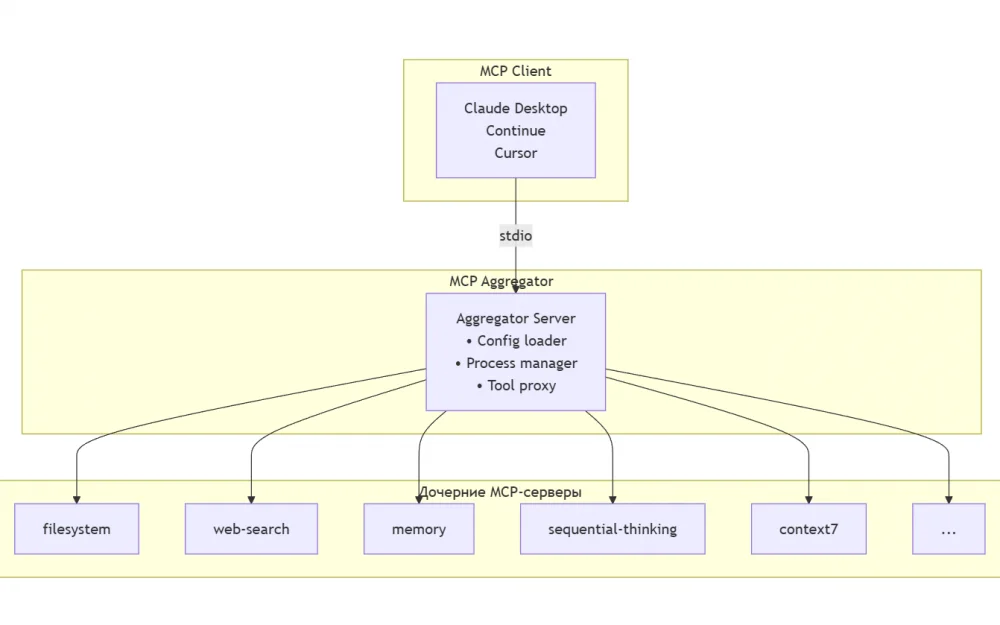
The aggregator works as an MCP client for child servers and as an MCP server for the application. It:
Parses
MCP.jsonand finds all configured serversLaunches each one via
StdioClientTransportQueries capabilities (
tools/list,resources/list,prompts/list)Registers them under their own names with prefixes
Proxies tool calls to the appropriate server
Tool Namespace
To avoid name conflicts, all tools are assigned a server prefix:
Server | Original | Via aggregator |
|---|---|---|
|
|
|
|
|
|
|
|
|
|
|
|
This allows the LLM to explicitly understand which tool from which server is being invoked.
Configuration
All management is handled via a single MCP.json file:
{
  "mcpServers": {
    "filesystem": {
      "command": "npx",
      "args": ["-y", "@modelcontextprotocol/server-filesystem", "~/projects/data/"]
    },
    "web-search": {
      "command": "node",
      "args": ["~/mcp/web-search/dist/index.js"]
    },
    "memory": {
      "command": "npx",
      "args": ["-y", "@modelcontextprotocol/server-memory"],
      "env": {
        "MEMORY_FILE_PATH": "~/.mcp/memory.jsonl"
      }
    },
    "sequential-thinking": {
      "command": "npx",
      "args": ["-y", "@modelcontextprotocol/server-sequential-thinking"]
    },
    "context7": {
      "command": "npx",
      "args": ["-y", "@upstash/context7-mcp"]
    }
  }
}
The format is fully compatible with the configuration of popular MCP clients — you can copy the mcpServers section from your client's configuration file.
Installation and Usage
Option 1: Via npx (quick start)
# Create MCP.json with your servers
npx @vugu/mcp-aggregator --config MCP.json
Option 2: Global installation
npm install -g @vugu/mcp-aggregator
mcp-aggregator --config MCP.json
Option 3: From source
git clone https://github.com/vuguzum/mcp-aggregator.git
cd mcp-aggregator
npm install
node src/index.js --config MCP.json
Connecting to an MCP client (using Claude Desktop as an example)
Add it to your client's configuration file (for example, claude_desktop_config.json for Claude Desktop):
{
  "mcpServers": {
    "aggregator": {
      "command": "mcp-aggregator",
      "args": ["--config", "~/.config/mcp/MCP.json"]
    }
  }
}
Now instead of 10 separate entries, there is only one left — aggregator. All tools from all child servers are automatically available in Claude Desktop.
Key features
🔄 Auto-restart
If a child server crashes, the aggregator automatically restarts it with exponential backoff (up to 5 attempts). This is critical for long-running sessions.
🛡️ Fault tolerance
If one server fails to start (for example, Python is not installed for file-search-mcp), the rest continue to work. The aggregator simply skips the problematic server and logs the error.
📊 Full proxying
Not only tools are proxied, but also:
Resources — reading resources from child servers
Prompts — prompt templates
Capabilities — automatic capability discovery
🔍 Debug mode
Running with DEBUG=1 provides detailed logs:
DEBUG=1 node src/index.js --config MCP.json
All logs are sent to stderr (stdout is reserved for the MCP protocol).
Performance
The aggregator adds minimal overhead:
Proxy latency: <1ms (direct transmission of JSON-RPC messages)
Memory usage: a few megabytes for the aggregator itself
Child server startup: parallel
When is this useful?
✅ Multiple MCP Servers — simplifies configuration
✅ Frequent Experiments — easy to add/remove servers
✅ Production Environment — auto-restart and stability
✅ Team Collaboration — a single MCP.json in the repository
✅ CI/CD — one server instead of ten
When Is It Not Needed?
❌ Only 1-2 MCP servers — simpler to configure directly
❌ If maximum performance is required, direct calls are always faster
❌ Custom error handling logic for each server
Results
MCP Aggregator solves the problem of managing multiple MCP servers. Instead of manually launching dozens of processes and complex configuration — one server, one config, one entry point.
Try it out:
📦 npm:
npm install @vugu/mcp-aggregator💻 GitHub:
github.com/vuguzum/mcp-aggregator📖 Documentation: README available in two languages






Write comment