
- DIY
- A
Partisan Telegram: How to Raise a Proxy-Hidden Identity While Disguising as an Online Store
Hello, tekkix!
TL;DR: A regular MTProxy with Fake TLS masks the protocol but gets exposed during active probing. Telemt, when trying to "feel" your proxy from the outside, returns the real site with a real TLS certificate. For DPI and crawlers, this is
petrovich.ru. For you, this is stable Telegram.
This is a continuation of the series on bypassing Telegram blocks. In the first part, we deployed MTProxy on nineseconds/mtg with Fake TLS. It works, you connect and forget. But there is a nuance.
Fake TLS masks the protocol. DPI looks at the packets and sees regular TLS to 1c. Everything is fine until a crawler comes to your server and tries to access it.
Problem: active probing
Imagine that the DPI not only analyzes packets but also connects to a suspicious IP and checks: "Is this really 1c ru?". This is called active probing, and it's not theory, it's real practice.
# The crawler does:
curl -v --resolve 1c.ru:443: https://1c.ru/

# mtg responds:
# Connection reset / Timeout / Garbage
# Conclusion: this is not 1c.ru. Block it.
The nineseconds/mtg has no answer for this. If a client arrives without the correct secret, mtg simply drops the connection. The crawler sees this and draws conclusions.
Telemt: a proxy that pretends to be a website
Telemt is written in Rust + Tokio. The key feature: transparent TCP splice. If a client arrives without a secret, Telemt does not drop the connection but transparently redirects it to the real site.
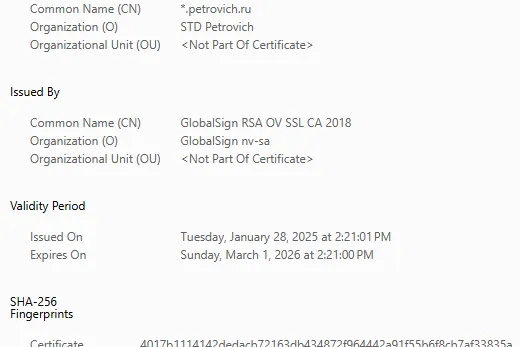
No MITM. Telemt does not replace certificates or generate fakes. It simply stitches TCP streams. The crawler receives a real response from petrovich.ru with a real GlobalSign certificate. No claims.
Why you should switch from mtg
Feature | nineseconds/mtg | Telemt |
Language | Go | Rust + Tokio |
Active probing | ❌ Drops | ✅ Proxies real site |
Container | Regular image | Distroless, non-root |
Config | CLI flags | TOML file |
Users | One secret | Each with their own + quotas |
Upstream | Only direct | Direct + SOCKS5 |
Project status | 🔴 Abandoned | 🟢 Actively developed |
Step 1. Preparation
Is Docker and Compose in place?
docker --version
docker compose version
If port 443 is occupied, free it up:
ss -tulpn | grep 443Step 2. Secret
In Telemt, the secret is just 16 random bytes.
openssl rand -hex 16
# Result (write it down): a1b2c3d4e5f6a7b8c9d0e1f2a3b4c5d6
Step 3. Configuration
Create a working directory:
mkdir -p /root/mtproxy-telemt
cd /root/mtproxy-telemt
Write telemt.toml:
# telemt.toml

show_link = ["user1"]

[general]
prefer_ipv6 = false
fast_mode = true
use_middle_proxy = false

[general.modes]
classic = false
secure = false
tls = true

[server]
port = 443
listen_addr_ipv4 = "0.0.0.0"
listen_addr_ipv6 = "::"

[censorship]
tls_domain = "petrovich.ru"   # domain for SNI (example! see below)
mask = true # Enables proxying of the real site
mask_port = 443
fake_cert_len = 2048

[access.users]
user1 = "YOUR_SECRET_FROM_STEP_2"


type = "direct"
enabled = true
weight = 10
⚠️ petrovich ru — this is an example from the telemt documentation. DO NOT use it in production: if all readers of the article use the same domain, it will itself become a marker.
Choose your own: leroymerlin ru, dns-shop ru, mvideo ru, etc.
Step 4. Docker Compose
Create docker-compose.yml:
services:
  telemt:
    image: whn0thacked/telemt-docker:latest
    container_name: telemt
    restart: unless-stopped
    environment:
      RUST_LOG: "info"
    volumes:
      - ./telemt.toml:/etc/telemt.toml:ro
    ports:
      - "443:443/tcp"
    security_opt:
      - no-new-privileges:true
    cap_drop:
      - ALL
    cap_add:
      - NET_BIND_SERVICE
    read_only: true
    tmpfs:
      - /tmp:rw,nosuid,nodev,noexec,size=16m
    deploy:
      resources:
        limits:
          cpus: "0.50"
          memory: 256M
Step 5. Launch and Check
Start:
docker compose up -dGet the link from the logs:
docker compose logs | grep "tg://proxy"Check for masking (active probing test)
curl -v -I --resolve petrovich.ru:443: https://petrovich.ru/ If the response includes Server certificate: CN=*.petrovich.ru and HTTP/1.1 200 OK — you are invisible.
Features Not Available in mtg
Individual secrets: Remove leaked keys without changing the password for all others.
SOCKS5 upstream: Ability to redirect traffic through Tor or another proxy.
Hardening: Distroless image and running as a non-root user make it much harder to hack the server.
Which Domain to Choose for Masking
Good Options | Bad Options |
|
|
|
|
|
|
Conclusion
We have set up MTProxy, which behaves like a real web server during active probing. Telemt closes the main hole of Fake TLS and adds capabilities for full administration.
In the third part, we will go beyond Telegram. We will set up Hysteria 2 — a proxy on QUIC that circumvents TCP throttling. Stay tuned!
🎁 Bonus: Where to Find Ready-made Proxies?
If you currently do not have a free server available or just want to test how MTProto with Fake TLS works in practice, you can use ready-made solutions from the community.
One of the most popular aggregators is the channel @ProxyMTProto.
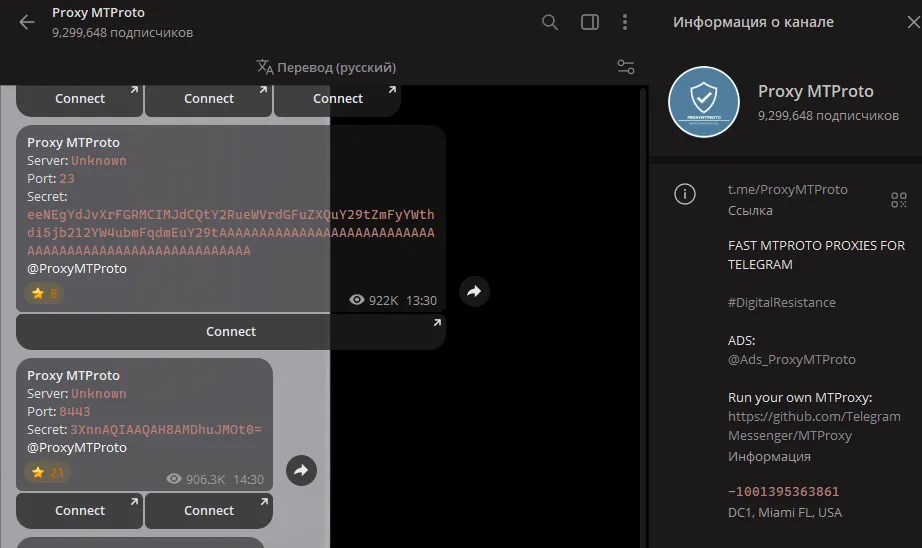
How it works:
Join the channel @ProxyMTProto.
Choose any fresh post with a proxy.
Press the “Connect” button.
In the pop-up window in Telegram (as shown in the screenshot below), click “Enable”.
🛑🛑🛑It is important to understand: Free proxies are often sponsored. This means that after connecting, a “Sponsored Channel” may appear at the top of your chat list. This is standard Telegram mechanics that allows proxy owners to cover server rental costs. Your traffic remains encrypted and inaccessible to the proxy owner.




Write comment