
- DIY
- A
Monitoring LTE Modems: Huawei B535-232a
In the previous article, I talked about my app that allows monitoring signal levels and internet types on smartphones and some router models working with mobile internet. In the poll for that article, the winning opinion was to describe adding new routers to the app using Java code. I don't know which hub the winners came from, but there's another reason to promote the app.
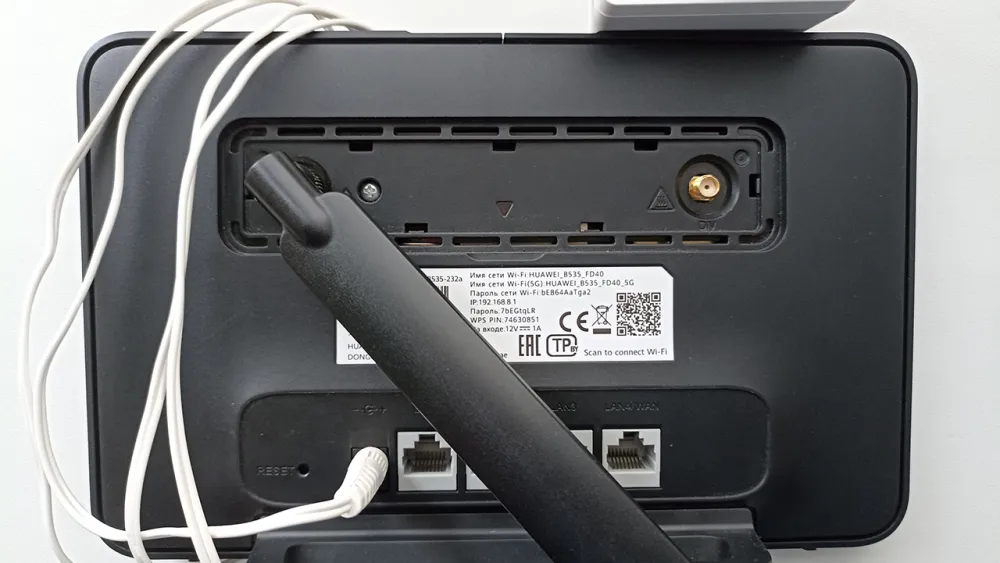
As planned, I acquired a Huawei B535-232a. It’s used, with one antenna, a scratched body, slightly glitchy, but working.
The fact that the router came with one antenna is not a problem; it has a full-fledged connector for an antenna that works for both receiving and transmitting, and there is only one, MAIN. The second DIV is auxiliary and works only for receiving. It will work with just one antenna. To retrieve data from the router about the current type of network and signal levels RSRP and RSSI, we need to authenticate with the router by mimicking browser behavior, looking into its JS scripts.
Authentication in the Huawei B535-232a looks like a combo of a kinetic device and a modem E3372h. And it seems this combo has a name: SCRAM (Salted Challenge Response Authentication Mechanism).
The router will not respond if you do not send any cookies in the requests, so first, we ask for cookies by making a GET request to some API endpoint, for example, to the status.
 Request request = new Request.Builder()
                .url(HTTP + router.getAddress() + "/api/monitoring/status")
                .header(HOST, router.getAddress())
                .header(RESPONSE_SOURCE, BROWSER)
                .header(REFERER, HTTP + router.getAddress() + "/")
                .header(X_REQUESTED_WITH, XML_HTTP_REQUESTED)
                .header("Update-Cookie", "UpdateCookie")
                .header(USER_AGENT, MOBILE_USER_AGENT)
                .build();
The main thing here is the Update-Cookie header; this is how we ask for a guest cookie. Immediately after receiving the response, we can request a token from the router, which we will later use to make requests.
Request request = new Request.Builder()
                .url(HTTP + router.getAddress() + "/api/webserver/token")
                .header(HOST, router.getAddress())
                .header(RESPONSE_SOURCE, BROWSER)
                .header(REFERER, HTTP + router.getAddress() + "/")
                .header(X_REQUESTED_WITH, XML_HTTP_REQUESTED)
                .header(USER_AGENT, MOBILE_USER_AGENT)
                .build();
The router sends responses in XML format, we simply parse the necessary data from the tags. The token consists of 64 hex characters.
"El0IHnhJq0A7z0NHk56106bEg0XUBY9bJ14XfURzQmk4hzwG0h82VLRQ641PedXx "64 characters is a lot, it's inconvenient to read. We discard the first 32 and keep the back part.
Everyone always loves the back part, there's a lot of meat and few bones there. (film Garage 1979)
We generate a random string of 64 hex characters ourselves, to be sent as firstnonce in the first step of the handshake. The negatively optimized token is sent in the header __RequestVerificationToken. We send admin as the login.
String firstNonce = generateFirstNonce();
params.setFirstnonce(firstNonce);
String xmlBody = "admin "
+ firstNonce + " 1 In response, we receive a lot of things, in the header __RequestVerificationToken of the response comes a new 32-character token, which we save for the next request, and from the body of the response, we parse three values
servernonce: 96 characters, this is our firstnonce plus a tail generated by the router
salt: 64 characters
iterations: this is just the number 1000
Now we need to encrypt our password strongly and complicatedly using the obtained data. We convert the salt string into a byte array and encrypt the password with it 1000 times, as specified by the router.
byte[] saltBytes = hexToBytes(params.getSalt());
PBEKeySpec spec = new PBEKeySpec(password.toCharArray(), saltBytes, params.getIterations(), 256);
byte[] saltedPassword = mSkf.generateSecret(spec).getEncoded();
Next, our password encrypted with salt needs to be signed with the client key and obtain a hash from the result in the form of a byte array.
// signing the password
byte[] clientKey = hmacSha256("Client Key".getBytes(StandardCharsets.UTF_8), saltedPassword);
// getting hash
byte[] storedKey = MessageDigest.getInstance("SHA-256").digest(clientKey);


private synchronized byte[] hmacSha256(byte[] key, byte[] data) throws InvalidKeyException {
        mMac.reset();
        mMac.init(new SecretKeySpec(key, "HmacSHA256"));
        return mMac.doFinal(data);
    }
Using our firstnonce, which we sent to the router, and the servernonce that it replied with, we create a long string of 258 characters by concatenating our nonces with commas. And we sign our password hash with it.
// signature string
String authMessage = params.getFirstnonce() + "," + params.getServernonce() + "," + params.getServernonce();
// signed password hash
byte[] clientSignature = hmacSha256(authMessage.getBytes(StandardCharsets.UTF_8), storedKey);
And finally, we perform an XOR operation, applying the encrypted password (which only uses the salt) byte-by-byte with the signed hash of the password that was made using the concatenated nonces, using exclusive OR. The resulting array is converted to a string.
for (int i = 0; i < clientKey.length; i++) {
     clientKey[i] ^= clientSignature[i];
    }
    return bytesToHex(clientKey);
This will be sent in the request body as clientproof along with the servernonce. In the header __RequestVerificationToken, we will place the token received from the previous response.
String clientProof = calculateClientProof(router.getPass(), params);
String xmlBody = "" +
"" + clientProof + " "
+ params.getServernonce() + " And if you didn’t mix up the keys while signing the password, which is the key and which is the message, like I did, because the Huawei script sends the key as the second parameter, not the first.
this.cfg.hmac(e,"Client Key") then in response you will immediately receive 32 tokens, two of them in separate headers __RequestVerificationTokenone and __RequestVerificationTokentwo. I don't know what they are needed for and it's not very interesting, because along with them come new cookies. These allow you to request data about the network and signal. The request is made just like on E3372h, to /api/monitoring/status and /api/device/signal
and the result returns just like on E3372h. RSSI and RSRP as normal parameters -51dBm, -89dBm, and the network type as codes
Hidden text
    MACRO_NET_WORK_TYPE_EX_NR: "111",
        MACRO_NET_WORK_TYPE_EX_LTE_PLUS: "1011",
        MACRO_NET_WORK_TYPE_EX_LTE: "101",
        MACRO_NET_WORK_TYPE_EX_802_16E: "81",
        MACRO_NET_WORK_TYPE_EX_TD_HSPA_PLUS: "65",
        MACRO_NET_WORK_TYPE_EX_TD_HSPA: "64",
        MACRO_NET_WORK_TYPE_EX_TD_HSUPA: "63",
        MACRO_NET_WORK_TYPE_EX_TD_HSDPA: "62",
        MACRO_NET_WORK_TYPE_EX_TD_SCDMA: "61",
        MACRO_NET_WORK_TYPE_EX_DC_HSPA_PLUS: "46",
        MACRO_NET_WORK_TYPE_EX_HSPA_PLUS: "45",
        MACRO_NET_WORK_TYPE_EX_HSPA: "44",
        MACRO_NET_WORK_TYPE_EX_HSUPA: "43",
        MACRO_NET_WORK_TYPE_EX_HSDPA: "42",
        MACRO_NET_WORK_TYPE_EX_WCDMA: "41",
        MACRO_NET_WORK_TYPE_EX_HYBRID_EHRPD_REL_B: "36",
        MACRO_NET_WORK_TYPE_EX_HYBRID_EHRPD_REL_A: "35",
        MACRO_NET_WORK_TYPE_EX_HYBRID_EHRPD_REL_0: "34",
        MACRO_NET_WORK_TYPE_EX_EHRPD_REL_B: "33",
        MACRO_NET_WORK_TYPE_EX_EHRPD_REL_A: "32",
        MACRO_NET_WORK_TYPE_EX_EHRPD_REL_0: "31",
        MACRO_NET_WORK_TYPE_EX_HYBRID_EVDO_REV_B: "30",
        MACRO_NET_WORK_TYPE_EX_HYBRID_EVDO_REV_A: "29",
        MACRO_NET_WORK_TYPE_EX_HYBRID_EVDO_REV_0: "28",
        MACRO_NET_WORK_TYPE_EX_HYBRID_CDMA_1X: "27",
        MACRO_NET_WORK_TYPE_EX_EVDO_REV_B: "26",
        MACRO_NET_WORK_TYPE_EX_EVDO_REV_A: "25",
        MACRO_NET_WORK_TYPE_EX_EVDO_REV_0: "24",
        MACRO_NET_WORK_TYPE_EX_CDMA_1X: "23",
        MACRO_NET_WORK_TYPE_EX_IS95B: "22",
        MACRO_NET_WORK_TYPE_EX_IS95A: "21",
        MACRO_NET_WORK_TYPE_EX_EDGE: "3",
        MACRO_NET_WORK_TYPE_EX_GPRS: "2",
        MACRO_NET_WORK_TYPE_EX_GSM: "1",
        MACRO_NET_WORK_TYPE_EX_NOSERVICE: "0",
        MACRO_NET_WORK_TYPE_LTE_NR: "20",
        MACRO_NET_WORK_TYPE_LTE: "19",
        MACRO_NET_WORK_TYPE_HSPA_PLUS_MIMO: "18",
        MACRO_NET_WORK_TYPE_HSPA_PLUS_64QAM: "17",
        MACRO_NET_WORK_TYPE_3XRTT: "16",
        MACRO_NET_WORK_TYPE_1XEVDV: "15",
        MACRO_NET_WORK_TYPE_UMB: "14",
        MACRO_NET_WORK_TYPE_1XRTT: "13",
        MACRO_NET_WORK_TYPE_EVDO_REV_B: "12",
        MACRO_NET_WORK_TYPE_EVDO_REV_A: "11",
        MACRO_NET_WORK_TYPE_EVDO_REV_0: "10",
        MACRO_NET_WORK_TYPE_HSPA_PLUS: "9",
        MACRO_NET_WORK_TYPE_TDSCDMA: "8",
        MACRO_NET_WORK_TYPE_HSPA: "7",
        MACRO_NET_WORK_TYPE_HSUPA: "6",
        MACRO_NET_WORK_TYPE_HSDPA: "5",
        MACRO_NET_WORK_TYPE_WCDMA: "4",
        MACRO_NET_WORK_TYPE_EDGE: "3",
        MACRO_NET_WORK_TYPE_GPRS: "2",
        MACRO_NET_WORK_TYPE_GSM: "1",
Oh, if only
The first one I had was B535-232a, I wouldn’t have to do anything for E3372h-320, the code written for the router easily retrieves data from the modem, which does not require such authorization. Detailed code can be found on GitHub, and the application on Google Play
Thank you for your attention.


Write comment