
- DIY
- A
Can AI print a usable model on a 3D printer?
I'm tired of articles about how everything in the world can be entrusted to AI. And the crazy idea that everything in the world can be printed on a 3D printer is also tiresome. Well, why not combine AI, 3D printing, and dissatisfaction in one article, just to be sure? Let's go! Let's make AI give instructions to the printer, and then evaluate the result.
I'm tired of articles about how everything in the world can be delegated to AI. And the insane idea that everything in the world can be printed on a 3D printer has also gotten old. Well, why not combine AI, 3D printing, and discontent into one article, just to be sure? Let's go! Let's make AI give instructions to the printer, and then evaluate the result.
Important disclaimer. This article is in no way informative or educational. Everything written below is exclusively my personal experience. I'm just a woman with internet access and a 3D printer who decided to stir up another hornet's nest with an AI queen inside. If services worked differently for you — great. Unfortunately, there are now interruptions and some sites are down or behave unpredictably. It's quite possible that I was just unlucky, but all the difficulties in the process definitely affect the final opinion, and there's nothing you can do about it.
A Little Primer, or an Introduction
Wow, what's going on! We can already use AI for 3D generation. I won't explain how these neural networks work — other articles will gladly help you with that… Tricked you, you believed it? Of course I will, let's quickly run through the superficial basics.
AI models for generating 3D objects can and should be divided into two main classes.
Text-to-3D
The neural network, akin to a serf, will do everything you tell it to. But, like any serf, it leaves the method of execution and the final result to its own conscience. This works wonderfully when you need to generate some draft or concept, and is also suitable for rapid prototyping. Accordingly, there is always a chance to get a fever dream at 39°C as the result.
With this scheme, the AI still goes down the path of creating a 2D artwork first, and only then starts generating geometry based on it.
Image-to-3D
From one or several photographs, the algorithm reconstructs the object's shape. This method uses computer vision techniques: the neural network analyzes perspective, textures, and tries to "figure out" the invisible parts of the object. It is often used for digitizing real items (furniture, sculptures), creating 3D avatars or product models for online stores. Or, as in my case, for attempting to turn a photo of a T-Rex from the internet into something printable.
Note: here we do not consider texture generation, rendering, stylization, etc., only the path from scratch to a model.
Generation Technologies
According to the review article, modern 3D generators are built on four main types of models:
Architecture | Principle of Operation | When to Choose |
VAE (Variational AutoEncoder) | Compress 3D data into a compact representation, then decompress it back. | This is more like searching through saves than full-fledged generation. Better suited for preparing animations thanks to the interpolation used, but if you need to create a completely new model, it won't work. |
GAN (Generative Adversarial Network) | Two neural networks compete: one generates, the other evaluates quality. | The fastest generation, suitable for sketches, simple objects, but the quality will likely wave you goodbye and never get back in touch. |
AR (Autoregressive Models) | Predict the next 'piece' of the model based on previous ones. | Good for generating meshes with correct topology (if you need control over vertex and edge construction in the model), but it can become overconfident in its knowledge beyond what is appropriate. |
Diffusion Models | Gradually remove noise from a random point cloud, turning it into a model | Best suited for Text-to-3D, will make you a wonderful texture and won't shy away from complex shapes (not guaranteed the result will meet expectations, but it will generate very confidently). |
Most modern services (Tripo, Meshy, HiTech) use hybrid models—these are exactly what provide that 'quality leap' in recent versions.
Popular hybrids:
VAE+GAN (high geometry quality, but resource-intensive),
VAE+AR (should have excellent topology, but generates very slowly and an early error will ruin everything),
Diffusion+GAN (high speed, good texture and generation quality, but hard to train and geometry control isn't as good as with VAE+GAN).
Thus, technologies balance each other's flaws, unlike the Habsburgs.
Sounds cool, right? In practice, these networks have several key limitations:
Artifacts and incorrect geometry — models often end up with "holes" or parts floating in mid-air. It gives the impression that the neural network was trained on broken toys.
Textures can be blurry, with seams, and don't always match the object's material. That's the case when "steel" in the image looks like "plasticine painted with silver paint." Fortunately, for printing, this isn't such a critical criterion.
The mesh topology is irregular: the number of polygons and their placement are random. Such a mesh is only good for putting on a shelf and never touching again. It's unsuitable for animation, and for printing, it requires the intervention of a shaman with a drum.
So, the output is most often a rough sketch. Subsequent manual refinement (retopology, normalization, texturing) is almost inevitable.
Therefore, I decided to conduct a simple and silly experiment. Take the fierce Mesozoic predator, also our beloved and gentle T-Rex, and feed its description to various AI generators.
My goal is to make it as high-quality as possible for exactly the amount of money I'm willing to spend on AI generation. Namely, for zero rubles. So, we're only testing free limits. Often, this is a completely wrong approach; you can end up cursing everything after wasting a lot of time on a garbage result. Never do this, but rather see how I struggled.
Stories that cannot be kept silent about
What inspired me? Before we move on to the generation results, I want to tell a couple of life stories.
And the clocks don't tick
A friend of mine asked to print stylish sundials generated by a neural network on a 3D printer. In the picture, it was beautiful: a dial with Roman numerals, an elegant gnomon.
We print. We discover that all three of us (me, him, AI) differ in intelligence and wit. What happened? The dial on the model was convex, and the gnomon was beautiful but crooked and positioned strictly vertically. In the real world, sundials work only if the tilt of the gnomon is designed considering the latitude of the location. So the time on these clocks falls into the category of "always wrong, even twice a day".
Simply, the face shape is heavy.
There was another case when a face model was generated. But when we opened the mesh, it turned out to consist of over 40 million polygons. At this point, it became clear that my PC can't handle AAA projects. My computer is not one of the worst of its kind, but during the remeshing stage, it knelt down many times in a row.
Will it roll? Unlikely.
An interesting case — a tube through which a metal ball was supposed to roll. I receive a model at night with a request to print and an indication that it's a matter of life and death, since the deadline is almost upon us.
Externally — an excellent tube, nice and neat, but inside there is absolutely no opening. And the mesh also has holes. I had to, reluctantly, take out the blender from my wide trousers, covered in cold sweat, and patch it up again.
Why exactly T-Rex?
Because it's not just a "ball in a cube". It has complex geometry: a massive body, thin front legs (arms that in neural networks always grow from the wrong places and in the wrong directions), there's a tail (ideally one, but during generations there were different variations), and there are also letters (with those too, difficulties arose). If the AI can adequately generate such a solid T-Rex, it will be incredibly convenient for designers and lovers of printed models. If it doesn't work out — well, at least there will be something to laugh at. Overall, such a question arose from the desire to make the non-free thing free.
I am interested in another question: is it really applicable in practice, in the harsh reality of 3D printing, as we are told in promotional posts? Spoiler: yes, but not very.
So, here is our prompt image that we will give to neural networks (accordingly, we will use Image-to-3D to achieve portrait similarity). We could have chosen simpler geometry to increase the chances of success. But I took on this project not out of a desire to do useful things.
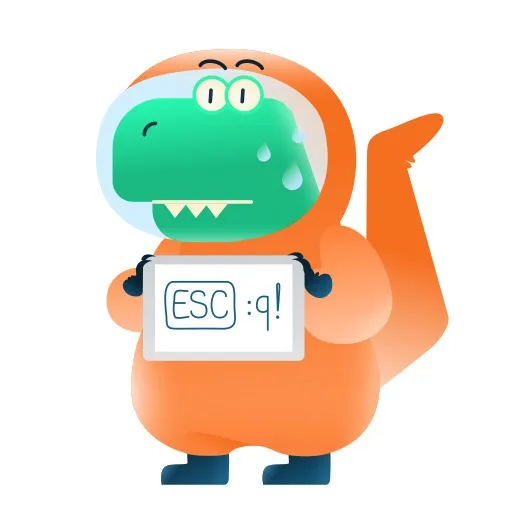
The Test Subjects
To avoid any embarrassing bias in choosing which AI models to test, I simply took an averaged top list from various sources (which I'll mention at the end). I didn't choose anything myself—even the AIs were chosen by AI, just how you hate love it. Today's fighters in the ring, from different weight classes, are as follows.
Tripo. A Major Platform for Creating 3D Models for Printing and Game Dev
A typical overachiever with an inflated self-esteem, in the style of "I can do everything, I'm from the cloud." Creates a model in 10 seconds, pretends to clean up the topology, and generally acts like it needs you more than you need it.
Let's look at the result:
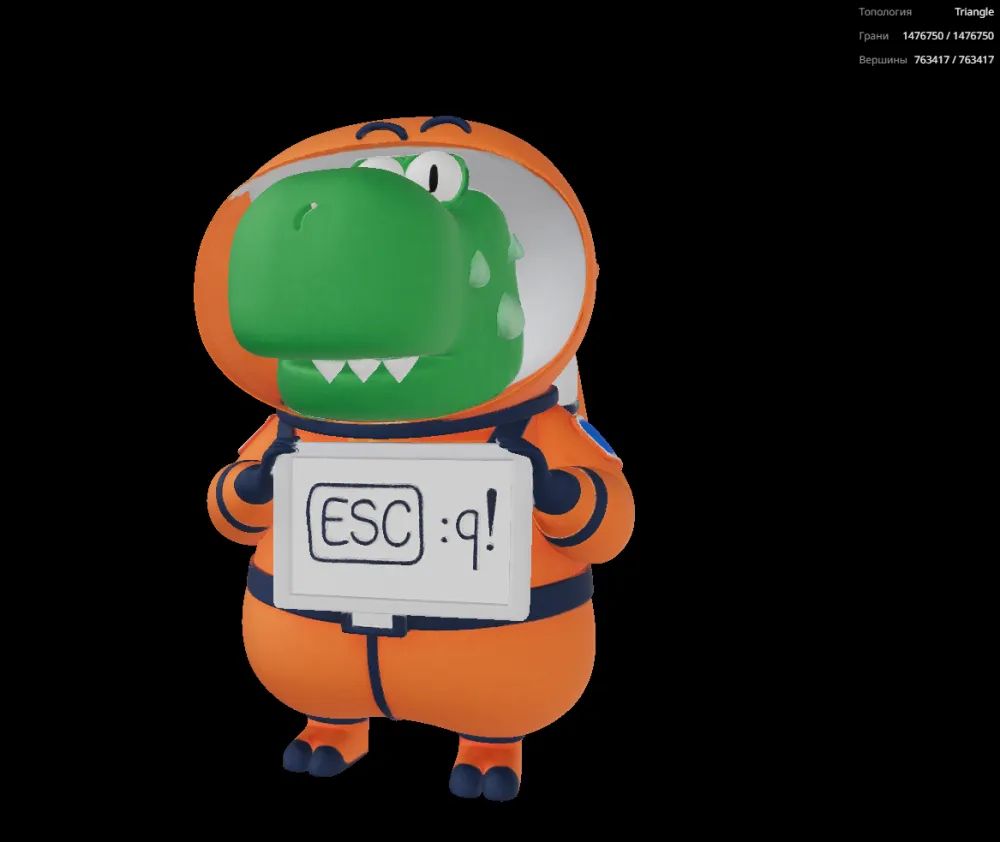
In my unskilled, clumsy layman's opinion, that's pretty decent.
Meshy. A Fellow for 3D and Texture Generation Who You'd Be Ashamed to Shake Hands With for Free
A geeky cool guy who adores all sorts of variations of the phrase "for money—yes" and PBR textures with auto-rigging. The neural network zips through generating a 3D mesh from a photo in a couple of minutes; the topology in the newer versions is quite decent. It's a shame that for printing, you can only save generations from older versions.
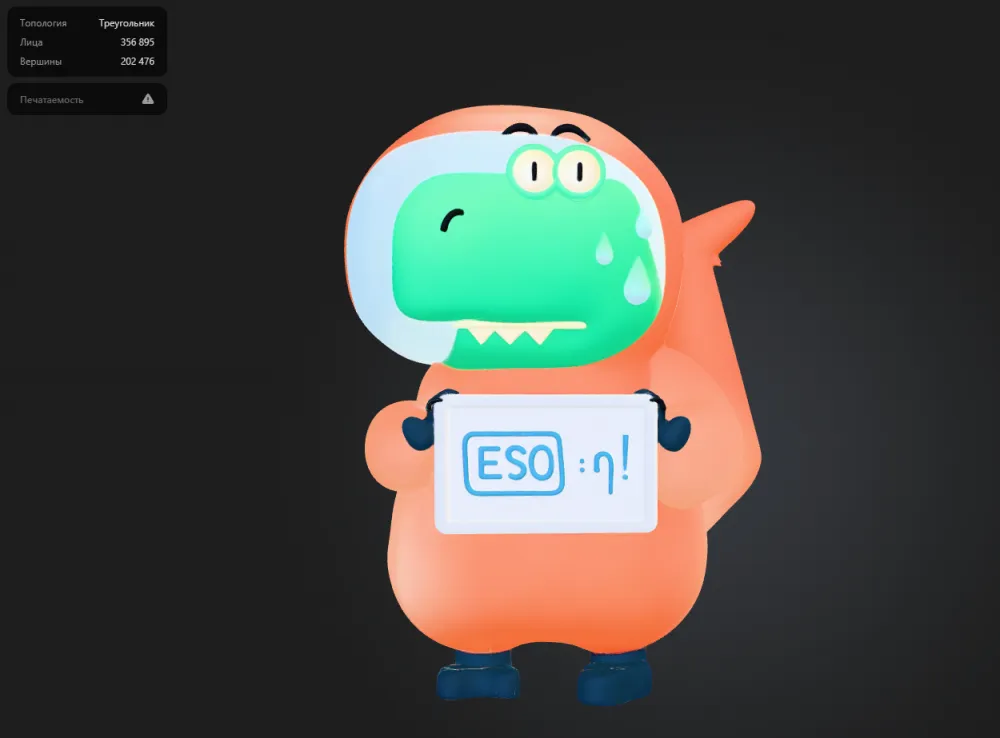
It produced a very good result but, unfortunately, demanded money. For free, it only let me download a model from an older version of the neural network—barely acceptable quality, but suitable for export and printing. Well, it insulted my freebie feelings.
3DAIStudio. Promised a Lot, But Gave Me Only Errors (Mentioned for Decency's Sake)
My journey from "Ooh, a new tool!" to "Thanks for the error simulator, get $*&@^" happened faster than I would have liked.
Let's look at the generation result:
The "Generate" button is a lie and a provocation. You click it, the server thinks for a couple of seconds... and then outputs a Generation Failed Error. The reasons? Who knows. According to the docs—"server overload, incorrect input, or network issues." So you could have a perfect network, a textbook prompt, but it just wasn't meant to be. Attempts to seek justice burn up like heretics in the Middle Ages.
HiTech 3D. The Dark Horse the Internet Recommended
A choice for bold ones who are tired of the mainstream and want sharp sensations. Sometimes it delivers an ideal object for printing or gamedev.
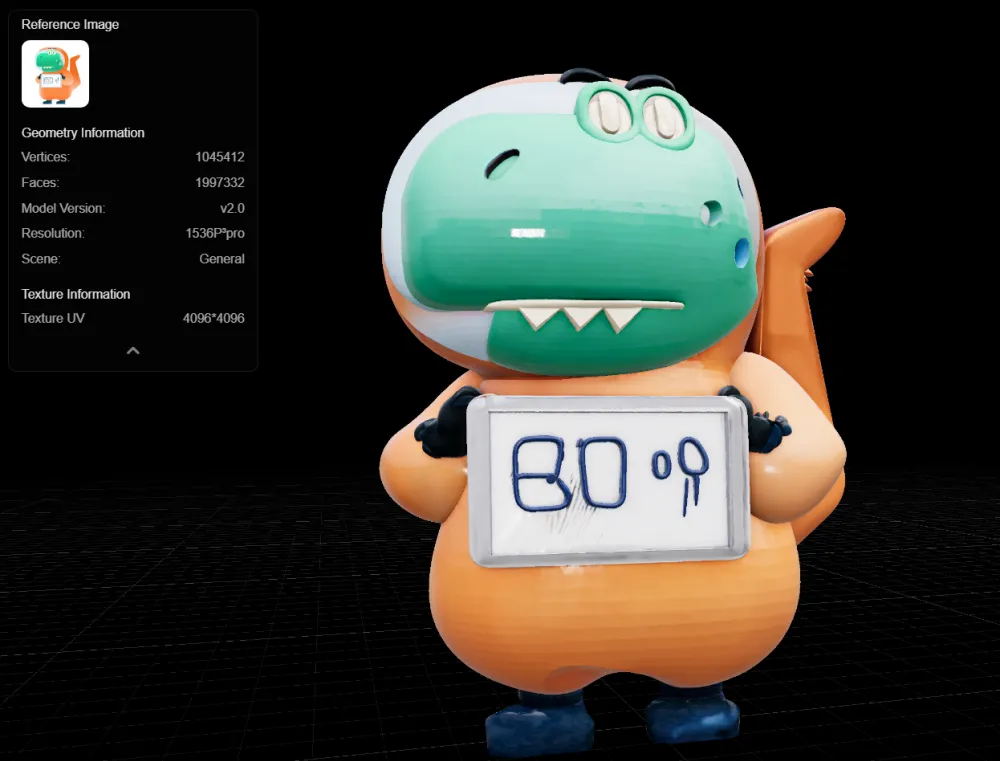
Comparison
If your task is to get a model for printing (FDM/FFF or full-color), the requirements are simpler than for games. You don't need rigging or LODs. But the model still must be hole-free and have sufficient wall thickness (usually >1–2 mm, depending on the printer and nozzle). HiTech 3D is an unexpected leader in this regard: no holes, polygons in moderation (by AI standards, don't spit in my face), ready to print immediately.
Before sending to the printer, always check:
mesh closure (are there holes through which the slicer will see emptiness) — HiTech is fine with this, Tripo and Meshy — not so much;
wall thickness (thin areas simply won't print or will break off);
normals (they should face outward, otherwise the slicer will go crazy);
geometry intersections (can create internal stresses).
Approximately how our test subjects look. The Meshy dinosaur got badly roughed up. Since the ability to download the model is only available for older versions, in this case the quality differs drastically.
Summary
Tripo

Overall, the result was pleasantly surprising, complex geometry is preserved. Generation takes up to 3 minutes. There are holes, but few. Free attempts seem sufficient due to decent generation quality.
Meshy
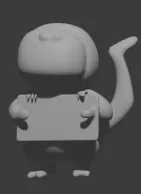
Not a bad result on the paid model, but on the free one leaves something to be desired, so it doesn't suffer. 3–5 minutes of your time, holes in the mesh, and free attempts will run out faster than you can create something adequate.
HiTech
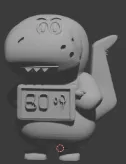
Overall — not bad, but looks like low-poly despite a non-meager number of polygons. Failed with text completely, can't read. Plus it works slowly: good for tea/coffee breaks and doomscrolling reels, took 10–12 minutes. No holes in the mesh, which is especially good considering free attempts end very quickly.
Where is 3DAIStudio?
He went out for bread and never came back. Crossing him out.
The Bottom Line
And this is where things get really interesting. Everyone expected that even in case of success, we'd have to adjust geometry, add holes to walls, or resort to slicer plugins. Nope. Here's a photo of the printed test subject without any mechanical post-processing:
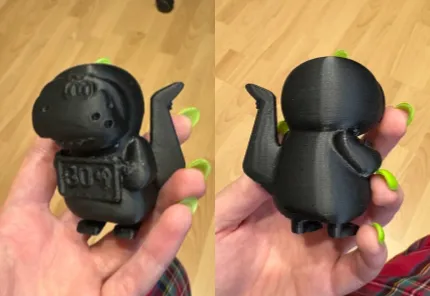
The figure generated by HiTech 3D, after export, looked... strangely normal. Topology? What topology... hmm... But! The slicer didn't spit out a single error. Supports went up perfectly. The print itself went smoothly—no stringing, no layer separation. I still don't get it: did the model generate exceptionally well, or are we simply witnessing a miracle of techno-nature? But the fact remains: an "unidentified pixel blob" turned into a physical object you can put on a shelf.
Of course, expectations for this whole experiment were different.
Final Verdict
And most importantly: this is all highly subjective. I tested what interested me, with a specific prompt featuring a specific animal. Perhaps generating vases or abstract sculptures would go differently. But for models with complex anatomy, when your wallet is thin and you want a printed T-Rex, here's the breakdown:
Want to print immediately and can tolerate slow generation and low-poly visuals? Go for HiTech 3D. It even produced a mesh without holes.
Want to brainstorm ideas and tinker in Blender, sifting through the results? Choose Meshy or Tripo.
Want it pretty, fast, and without breaking the bank? Tripo with a subscription, and you'll be happy.
Just want to burn time and credits? 3DAIStudio is the best way to start hating AI generation.
I'd love to unleash a torrent of curses, but I'm forced to admit: yes, AI knows how to generate 3D. Yes, it's fast and sometimes beautiful, but you can't yet count on getting a print-ready product with the click of a button. Holes in geometry, twisted topology, artifacts, and a complete misunderstanding of real-world physics—these are what you'll most likely encounter. Free services give you a decent draft model, but you'll usually have to polish it yourself.
Treat AI generation as an advanced reference search or a quick way to get a draft for further work. Then there will be less disappointment, and more useful (and not so useful) models.
By the way, here are the materials that helped me in my searches:
Top-5 free AI services for generating 3D models;
Neural networks for creating 3D models: AI services for working with 3D;

Write comment