
- Hardware
- A
Does the Bezel Affect Server Cooling: OpenYard RS201I Stress Test Results
Can the server front panel impact its cooling? This question arises during server design, especially in high-density systems with elevated intake air temperatures.
To test this in practice, we conducted a stress test of the OpenYard RS201I server based on a third-generation Intel processor and compared its performance in two scenarios ― with the bezel installed and without it.
If the protective panel affects airflow and raises component temperatures, this can impact the server’s stability. Therefore, during the design stage, thermal modeling (CFD) is first performed, followed by verification through practical thermal testing of the equipment.
By “bezel” in this case, we mean the front decorative-protective panel of the server, installed on the front of the chassis.
The purpose of the tests was to evaluate whether installing the bezel affects the temperatures of key components and the performance of the cooling system under full load on the compute, network, and storage subsystems.
Configuration and Test Conditions
Testing was conducted on the OpenYard RS201I server configured with two Intel Xeon Platinum 8352Y processors (2.20 GHz), 32 memory modules (16 × 8 GB and 16 × 32 GB), six NVMe drives, six SAS drives, and ten SATA drives.
The load simulated a stress usage scenario: 100% CPU load, 100% memory load, full utilization of network interfaces and RAID subsystem. Each test scenario lasted 30 minutes. The inlet air temperature in the scenario without the bezel was 35° C, and in the scenario with the bezel ― 37° C. It is important to note that the scenario with the bezel installed was conducted at an ambient temperature 2° C higher than the test without it.
Temperature measurements were performed using built-in hardware sensors. The temperatures of the following components were monitored:
CPU
DIMM
NVMe
NIC
Additionally, the fan speeds were compared for the server with and without the bezel at an inlet temperature of 21° C.
Measurement Results
During the testing, the average and maximum temperatures of the key components of the server were analyzed. The comparison of average temperatures showed a slight increase in values with the bezel installed, however, all indicators remained within the permissible operational ranges.
During the testing, the temperatures of several key components were monitored. The acceptable temperature for the NIC i350 network controller is 80° C, for the NVMe SSD ― up to 80° C, and for the DIMM memory modules ― up to 85° C. The values obtained in the test remained below these thresholds.
The situation with processors is somewhat more complex. The documentation specifies a maximum temperature of Tcase = 81° C, measured on the processor lid. In our testing, the Package temperature (Tpackage) was used, which comes from the processor’s internal sensors. These values are typically higher than the temperature on the lid, so direct comparison with Tcase is not correct, but even taking this into account, the obtained values did not approach critical levels.
Sensor | Average, °C (without bezel, intake air 35° C) | Average, °C (with bezel, intake air 37° C) | Maximum, °C (without bezel, intake air 35° C) | Maximum, °C (with bezel, intake air 37° C) | Δ Average, °C | Δ Max, °C |
CPU1 Package | 71.69 | 73.83 | 74.0 | 74.0 | +2.14 | 0.0 |
CPU0 Package | 71.18 | 72.83 | 72.0 | 73.0 | +1.65 | +1.0 |
NIC i350 Loc1 | 63.82 | 64.83 | 64.0 | 65.0 | +1.01 | +1.0 |
nvme1n1 | 42.69 | 44.00 | 45.0 | 44.0 | +1.31 | -1.0 |
DIMMG1 TEMP | 51.55 | 51.57 | 52.0 | 52.0 | +0.02 | 0.0 |
Below is the comparison of component temperatures in two scenarios.
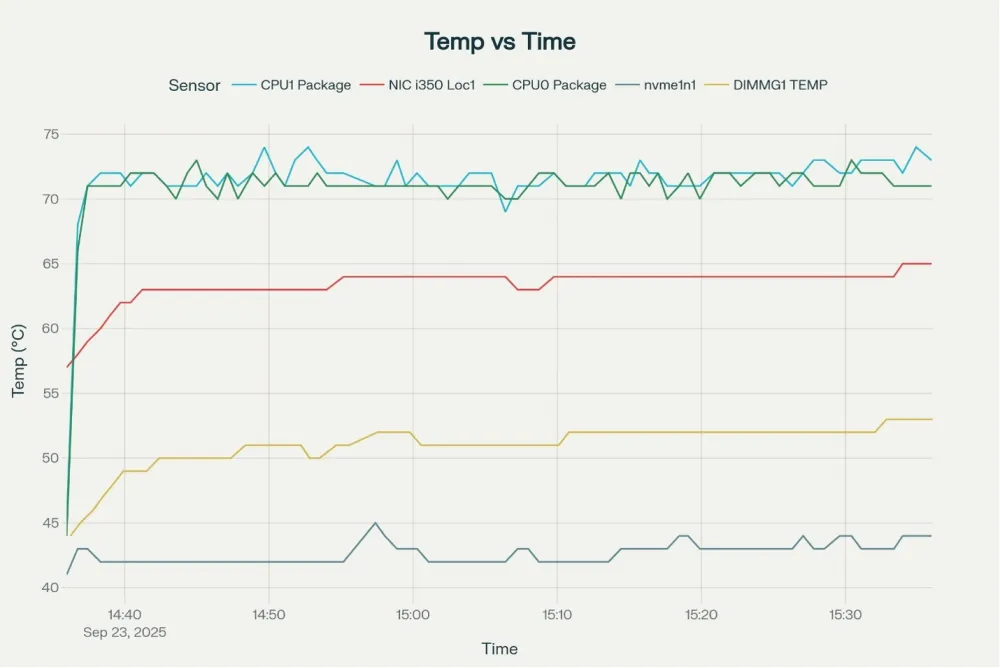
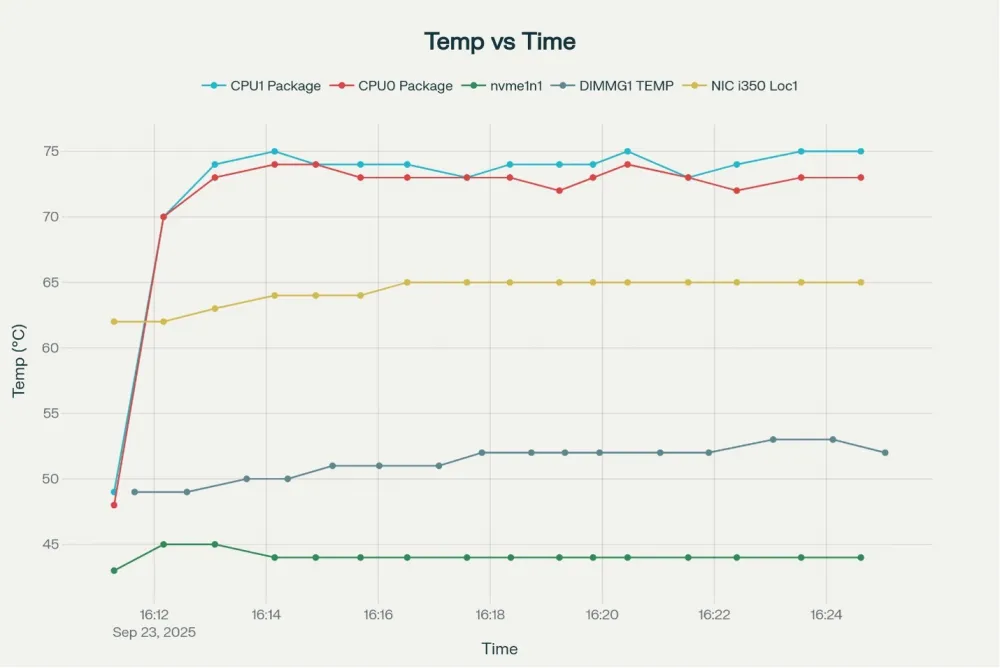
Maximum temperatures also remained within acceptable limits and did not show critical trends. None of the monitored components approached the operational threshold limits.
Considering relative values, the processor temperature increase was around 2–2.5%, which is insignificant for a stress scenario with elevated intake air temperature.
Cooling System Behavior
The maximum allowable fan speed in the server is 14,000 RPM. At an intake temperature of 21°C, the server without a bezel operated at 9000–9150 RPM, whereas with the bezel installed ― around 9300 RPM. The fan speed increase was approximately 3%.
Sensor | Server without bezel (intake air 21°C) | Server with bezel (intake air 21°C) |
CPU1 Package | 62°C | 63.0 |
CPU0 Package | 62°C | 62.0 |
DIMMG1 TEMP | 37°C | 37.0 |
Fans | 9000 - 9150 RPM | 9300 RPM |
This is the expected result. The bezel creates additional aerodynamic resistance to the airflow, which the cooling system compensates for by increasing fan speed. At the same time, the increase is not significant and does not cause the system to enter an extreme operating mode.
Analysis
The obtained data show that installing a bezel has minimal impact on the server’s thermal state. Even with higher intake air temperature, the difference in component temperatures is within 1–2°C, and fan speed increase is around 3%.
From an engineering perspective, this means the cooling system has sufficient performance margin and correctly compensates for the small increase in airflow resistance.
It is important to emphasize that testing with the bezel was performed at an ambient temperature 2° C higher than in the scenario without it. This further confirms that the bezel's impact on the server's thermal characteristics is not critical.
Conclusions
Based on the stress test results, it can be concluded: the installation of a front bezel does not have a significant negative impact on the thermal regime of the OpenYard RS201I server. All components maintain operating temperatures within normal limits, and the cooling system compensates for the additional airflow resistance without a significant increase in load.
From a practical perspective, this means that bezel usage is acceptable even under conditions of elevated inlet air temperature and full computational load.
Additional benefits of the bezel include protection of the server's front side from dust and mechanical impacts. It is worth noting that in early versions of the plastic bezel, decorative cutouts could contribute to dust accumulation. Such elements are absent in the final design.
Thus, the bezel's impact on the server's thermal regime can be considered minimal and not affecting the stability of equipment operation.
P.S. And if you want to learn how we created our bezel, you can read about it here.


![From Virtual Hands to AI for Survivalists: Curious Open Agent OSes [and One Hardware Project]](https://cdn.tekkix.com/imgs/2026/05/habrcom/big/ce0b1057616faed51cd8b9f3b2b9.webp)

Write comment