
- Security
- A
From CI to GitOps: Bootstrap Namespaces in Kubernetes
Hello, tekkix! My name is Nikita Chubarov. According to my labor contract, I am an engineering expert in service development and maintenance, but in reality, I am a DevOps engineer focusing on delivery in platform teams that provide common solutions for a dozen subsidiary teams.
Over time, this delivery has ceased to be transparent and predictable, and has started to resemble a spaceship where the pilot manually connects wires, checks pressure in circuits, and presses dozens of buttons from a list before each launch. While there are only a few launches, it's still manageable, but when there are hundreds of them and dozens of ships, this scheme quickly becomes a source of errors and burnout.
Bootstrap Namespaces was in a similar state. In this article, I will discuss how we transitioned from complex CI orchestration to declarative management of Bootstrap Namespaces through Argo CD and GitOps, what problems this allowed us to eliminate, and what new constraints we had to accept.
Bootstrap Namespaces
Let's start with the fact that by Bootstrap k8s Namespaces, we mean the infrastructure preparation of a namespace before it is received by the development team. This is not a one-time operation but a reproducible process that should work the same for all teams and environments. It includes several mandatory steps. It is necessary to create a namespace, deploy a dozen manifests in it, and a couple of applications.
Bash scripts were written that applied raw manifests in the namespace, changing values based on the commented lines in the script. This was stored in a remote git repository and was occasionally applied by platform engineers interactively, upon request from the development teams.
Requested → cloned → fixed the scripts → ran → done!
Later, we had clear requirements for the namespace preparation process:
Scalability: the number of namespaces should grow without complicating the process.
Single repository for control and management from the platform team; any configuration should be transparent and reproducible.
The context is also important. At that time, we had eight Kubernetes clusters and more than forty-five namespaces in each. Therefore, we immediately evaluated any decision not in the context of a single cluster, but on the scale of the entire infrastructure. Manual management in such conditions quickly stopped working, and all logic inevitably moved to automation. This is how we got the separate pipeline for Bootstrap k8s Namespaces.
Spaceships, my spaceships
Historically, in the platform team, Bootstrap Namespaces was implemented through Downstream Triggers in CI. Each namespace was created and configured by a separate set of jobs, and the YAML configurations for them were generated by a Go script, packed into a special Docker image. The script had its own structure for the configuration file, describing what exactly needed to be created in the namespace.
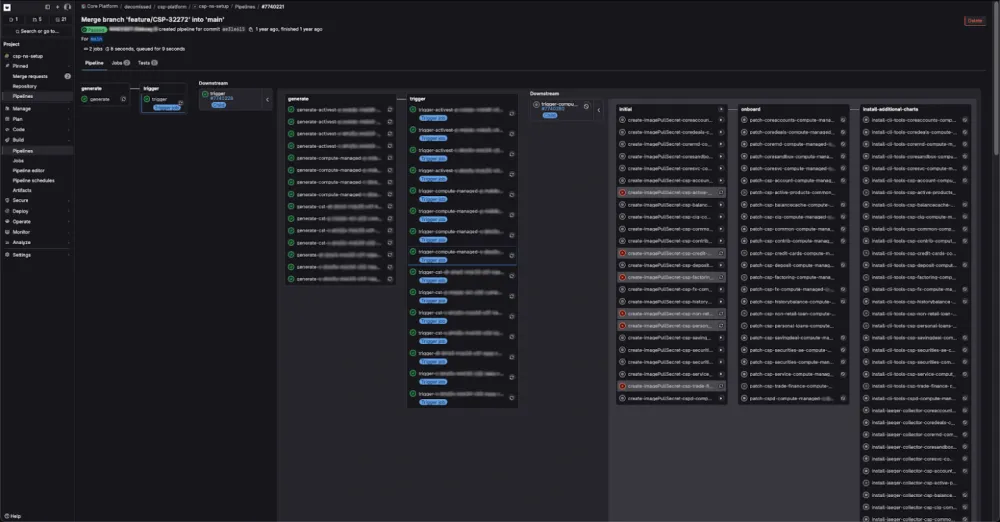
The screenshot shows only a small part of the generated jobs. With the historical approach, their total number was approaching a thousand! A real “job carpet.” Making massive changes to it was extremely inconvenient. And running all this in automatic mode inevitably meant creating a huge load on the infrastructure of the organization's shared runners and ensuring a huge queue for the execution of not only their own jobs but also for all the parallel tasks being created by colleagues. Time had to be spent to choose exactly what you wanted to run.
The situation was exacerbated by the confusing navigation in the pipeline: changing the scale of the interface, scrolling horizontally, then vertically, selecting the needed item in the dropdown, scrolling again, and manually launching individual jobs. It was too easy to make a mistake in such a process.
In such conditions, mass changes took tens of minutes.
As a result, the pipeline resembled the control panel of a spaceship with a million buttons. Only an experienced pilot could quickly navigate it. And that was the developer.
Therefore, training a new engineer took a lot of time, and the knowledge gained in the process was difficult to reuse anywhere else. For a system ensuring the operational activities of a bank, where the cost of an error is particularly high, such a level of complexity seemed unjustified.
In this state, I found the repository for setting up namespaces when I joined the team. But all these problems were distant from me until I took on the task of setting up trace collectors. We wanted to make this a delivery standard, a kind of package that would come along with the namespace.
Decisive Sprint
The deeper I dived into the task, the clearer it became that the current scheme was poorly suited for it. The tech lead had already asked why everything was taking so long, since, seemingly, "it should just be added in one place." In practice, this meant unraveling a tangle of Bash scripts and Go scripts, making changes to their configurations, going through the existing "job carpet," manually running the necessary pipelines for all clusters and namespaces. In addition to the labor intensity, this approach preserved all the accumulated complexity of the system and made it even less manageable.
So, we needed either to fit into the existing system and accept its limitations, or try to simplify the process, even if it required changes to the approach itself.
I started discussing with colleagues why Bootstrap was arranged this way, while also exploring more native GitLab CI options to move away from the downstream architecture. I reviewed several options. But not all of them fit our requirements and infrastructure. In the end, I settled on parallel:matrix. This solution was perfect.
During one of the sprints, when we were discussing the task's progress, I told the team about the native GitLab CI mechanism that allows you to describe matrix jobs without generating separate YAML files.
The idea was simple. We needed to multiply the list of clusters and namespaces and perform identical actions within one pipeline. Without downstream triggers and external generators.
My suggestion triggered polar reactions: some people were skeptical, while others were very inspired. But in the end, we agreed that this approach would simplify our lives.
After the sprint ended, the collectors were installed via parallel:matrix. This was a step forward. The process became clearer, but in essence, it remained the same "job carpet," albeit more neatly laid out.
Argo CD and the New Bootstrap
A small victory inspired me to make new changes. The solution with parallel:matrix eased some of the pain, but it didn’t address the root cause of the complexity. Bootstrap was still tied to CI and a set of jobs, rather than to a declarative description of the desired state. Therefore, we started looking broader and analyzing approaches to deploying not only infrastructure but also applications.
GitOps has largely become the new standard for delivery. This conclusion can be drawn by looking at our Western colleagues. A separate stage at Kubecon has been dedicated to Argo CD for several years, and on the CNCF blog, you can read statistics on GitOps usage and the tools being applied.
By that time, I already had some knowledge about the functionality of Argo CD and the advantages of the GitOps approach. Framing these in presentations and diagrams, I approached the team with a proposal to try applying all of this with us. The team agreed, the tech lead gave the green light, and we started the transition. Argo CD, compared to Flux, better suited our needs. Especially its ability to manage deployments across multiple clusters from a single point.
In this article, I will not cover how to "do it right." For that, there are more detailed materials, such as the talk: "GitOps on Argo CD. Best practices 2025" (Youtube | Rutube) from UFADEVCONF. I will focus on a general description of the scheme we implemented for ourselves, without diving into specific configurations and best practices.
Argo CD Tools
Argo CD works with Kubernetes declaratively and brings the cluster to the state described in Git. To implement the new Bootstrap Namespaces, we used standard mechanisms for fetching and applying Kubernetes manifests:
Raw manifests
Kustomize
Helm
We use all three options, but mostly rely on Helm. It all depends on the situation. Helm is definitely better when you need a complex template and want to logically combine a whole bundle of manifests. Kustomize is suitable when the complexity and volume are lower, say, when you need to change a couple of lines in two or three manifests. Raw manifests are a great option for delivering static manifests that don’t change from environment to environment.
Chart NS-setup
The question of Bootstrap content remained. Some of the services we installed in the namespace already had their own Helm charts, but the basic configuration of the namespace was scattered across separate manifests. Therefore, we decided to collect them into a single common chart, ns-setup, developed and versioned in a separate repository.
The ns-setup chart includes:
namespace.yamlimage-pull-secret.yamlresource-quota.yamlresource-quota-alerts.yamllogging-flow.yamllogging-output.yamldebug-pod.yamlextra-manifests.yaml
It describes everything that should appear in the namespace by default.
But choosing the manifest rendering mechanism solves only part of the task. After creating them, you still need to automate their delivery to dozens of namespaces and several clusters.
ApplicationSets
In Argo CD, the basic unit of delivery is the Application. It describes where to get the manifests from and where to apply them. In simple scenarios, this is enough, but for Bootstrap Namespaces, it was not. To manage dozens of similar installations, the best fit was Argo CD's feature — kind: ApplicationSet. It templates the Application based on lists. The list can be specified manually (list-generator) or generated automatically, for example, based on a list of connected clusters for remote management (cluster-generator) or the directory structure in the repository (git-generator). Generators can also be combined (matrix-generator).
We used a combination of generators to multiply two lists using the matrix generator. Essentially, this was the same idea as parallel:matrix, but already at the GitOps level and without CI.
For most scenarios, the listed generators will be sufficient, but there are even more possibilities! This includes SCM repository auto-discovery and generating temporary deployments as a response to open pull requests. If you are just starting with Argo CD, make sure to explore ApplicationSet. It will help you eliminate unnecessary duplication and further automate the process.
Let's take a closer look at ApplicationSet, this is a version that is actually working in production for us.
apiVersion: argoproj.io/v1alpha1
kind: ApplicationSet
metadata:
 name: csp-ns-setup
 namespace: argocd-prod
spec:
 syncPolicy:
   preserveResourcesOnDeletion: true
 goTemplate: true
 goTemplateOptions: ["missingkey=error"]
 generators:
   - matrix:
       generators:
         - git:
             repoURL: https://.raiffeisen.ru//csp-infra.git
             revision: HEAD
             directories:
               - path: prod/values-and-manifests/namespaces/*/*
         - clusters:
             selector:
               matchLabels:
                 argocd.argoproj.io/secret-type: cluster
 template:
   metadata:
     labels:
       cluster: "{{ .name }}"
     name: '{{ .path.basenameNormalized }}-{{ trimSuffix "..raiffeisen.ru" .name | trunc -3 }}-csp-ns-setup'
     namespace: argocd-prod
   spec:
     project: "{{ index .path.segments 3 }}"
     sources:
       - chart: csp-ns-setup
         repoURL: https://.raiffeisen.ru//csp-internal-helm
         targetRevision: 0.7.0
         helm:
           valueFiles:
             - $values/prod/values-and-manifests/namespaces/stage-csp-ns-setup.yaml
             - $values/{{ .path.path }}/csp-ns-setup.yaml
           releaseName: "{{ .path.basenameNormalized }}"
           parameters:
             - name: "clusterName"
               value: "{{ .name }}"
       - repoURL: "https://.raiffeisen.ru//csp-infra.git"
         targetRevision: HEAD
         ref: values
     destination:
       server: "{{ .server }}"
       namespace: "{{ .path.basenameNormalized }}"
     syncPolicy:
       automated:
         selfHeal: true
         prune: false
       syncOptions:
         - ServerSideApply=true
The spec consists of two large blocks: template and generators. In the generators, it's clear that we declare a matrix, and then specify git and cluster in parallel. The specification of the template block mirrors the specification of kind: Application, where we use values provided by the generators. For example, .name or .path.basenameNormalized. Under the hood, it's a Go template, so you can use familiar Helm functions, like trimSuffix and trunc, which helped me extract the cluster index from its name.
A convenient solution turned out to be the ability to pass separate values files via multi-source. Outside the scope of deploying namespaces, I used multi-source for its more direct purpose. You can combine multiple charts into a single package. Argo CD, under the hood, will render them all and apply the resulting manifests within a single Application. This approach can be used for deploying multi-component releases, although I'm not a fan of such a practice.
App-of-apps
The next issue was organizational. When there are many Applications, a unified entry point for the delivery system is required. For this, we used the app-of-apps approach to organize delivery through Argo CD. Thus, it is enough to create a single Application that will fetch other Application manifests from the Git repository. This creates an entry point from which the chain of automatic application and delivery begins.
Connecting everything together
Once the basic mechanisms of Argo CD became clear, the most difficult part was organizing them into a working scheme. In GitOps delivery, this almost always comes down to the structure of repositories and their quantity.
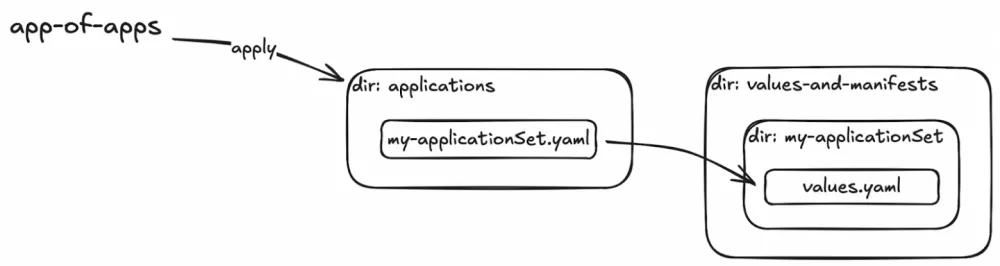
We needed a single repository because we were creating a unified infrastructure management point for the platform team. However, logical separation was required within the repository. Separate areas for installation at the cluster level and for installation in each namespace.
The scheme was built from the already familiar Argo CD components. We used the app-of-apps approach as an entry point and ApplicationSets in combination with the matrix generator: cluster-generator * git-generator.
The entry point became the applications directory. Its manifests are applied through app-of-apps. After that, ApplicationSets refer to the same repository to find values files for rendering the manifests.
What we got
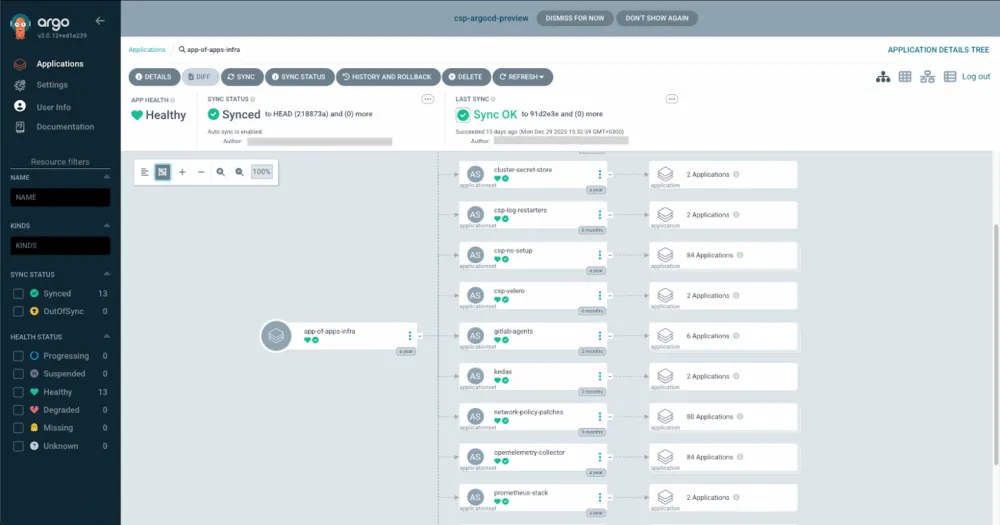
The advantages of the GitOps approach are well known and thoroughly described in other materials. For us, the key advantages were:
Scalability by abandoning custom tools in favor of industrial standards. Adding new NS through
ApplicationSetis simple and transparent.Simplification of mass changes: changing the manifest in all namespaces on the test stand has become easier. Just update the chart version in
ApplicationSet.Unification of CD: engineers no longer need to wade through endless bash or Go scripts, deal with complicated GitLab CI, or search for logic that individual authors embedded into the pipeline.
Unification of secret management: switched from custom scripts to External Secrets Operator, which speeds up development/delivery.
Versioning of Helm chart: provides controlled updates on the stands. It has become easier to improve the chart, and breaking changes no longer break everything at once.
Self-service: it is so much easier to create new namespaces that we trained colleagues to work with the new repository infrastructure and transitioned to self-service. Development teams create their own MR with a minimal values file for the new namespace, and all we have to do is conduct a review. The rest will be handled by Argo CD.
GitOps as a concept is very appealing and seems like it's "for all good, against all bad". The devil is in the details of implementation.
I will outline several challenges that you are likely to encounter on the path to implementation and operation.
Example 1. With great power comes great responsibility
In the provided ApplicationSet there is a key preserveResourcesOnDeletion, but it did not appear there immediately. While refining our solution during operation, I decided that I wanted to increase transparency for development teams by moving their namespaces into their visibility area in Argo CD. I updated the field spec.template.spec.project and it became dynamic, populated by the consumer team's project.
I considered this a minor change in metadata. Well, ownership is ownership. There was one — there will be another, that's all. But the real consequences were much more serious. Argo CD deleted the old Application and created a new one. This led to the deletion of manifests created within it. In our case… these were namespaces full of applications deployed even without Argo CD.
With a simple wave of the hand, we lost hundreds of applications in several clusters. We only noticed something was wrong after cleaning up two environments like this. Fortunately, it didn’t reach production, but our faces grew pale and our hands trembled as we searched for the freshest backups. We restored the applications and added the preserveResourcesOnDeletion key in ApplicationSet.
So, when using GitOps, making mass changes becomes really easy. It’s frustrating when a change turns out to be erroneous.
Example 2. Working with Resistance
During the implementation and preparation for GitOps, you will have to explain to your developer colleagues many times how this now works. Often, they feel no need to transition. Depending on your implementation, even the button in the pipeline might disappear. For example, with a clear indicator — "red" means bad, "green" means good. In the end, we switched to Argo CD for deploying business services. And at first, not everyone liked it.
In a large project, this can be a long marathon during which it’s easy to burn out and lose the desire to run at all. So, if you decide to go down this path, be prepared for the resistance to not pass quickly.
Example 3. Many Commits to Main
In fact, the problem is not in the commits themselves, but in wanting to build the system properly and well. For example, with audit changes (the merge request review process). But when launching a new service or quickly debugging, this only slows things down. Of course, you can always find a workaround, deploy to dev from a workstation. Or set up an auto-approve mechanism for MR when changes are related to the dev/test environment. We are thinking about looking into a Pull request generator. It seems this will be a good way out of the situation. Because the devil is still in the details. We also didn’t manage to make everything convenient right away.
Summary
It has been a long journey from a spaceship control panel with a million buttons to a clear and readable delivery structure. Making changes to existing configurations and adding new namespaces has become noticeably easier. Work satisfaction has increased, and happy people create better products. If you’ve also gone through this path, share your successes and challenges in the comments, and we’ll discuss.









Write comment