- AI
- A
Veai 5.4: Images in Chat, Context Compression, and Up to 70% Savings on Anthropic
The new version Veai 5.4 features practical enhancements for everyday development.
The new version Veai 5.4 (plugin for IntelliJ IDEA with its AI agent for writing code, testing, and debugging) brings practical improvements for everyday development.
Personal users can now attach images directly in the chat (convenient for frontend and UI testing), requests to Anthropic models have become up to 70% cheaper due to improved caching, and large chats automatically compress without additional requests to LLM.
There are new scenarios for automatic merge conflict resolution and UI autotest generation from manual cases, as well as flexible mechanisms for cybersecurity purposes — global read and write bans on files via .readignore and .writeignore.
The release is complemented by interface improvements: a unified diff of multiple changes in the chat, customizable input window size, copy buttons, and rating buttons for agent responses (👍 👎), as well as more noticeable formatting for user messages.
The ability for personal users to attach images in chat
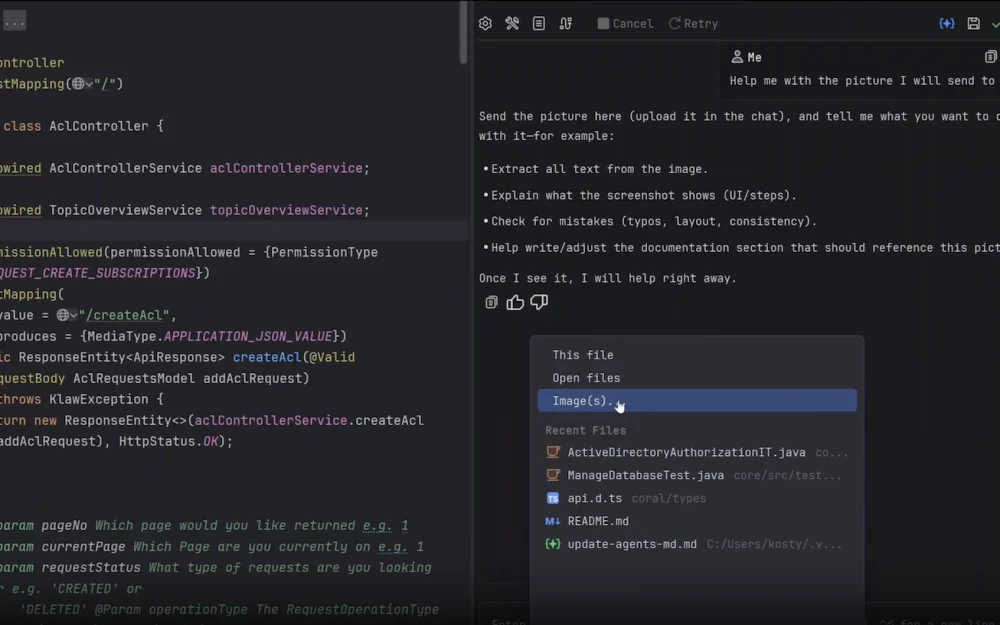
You can now add images to the chat. This is especially useful for frontend development and UI testing.
To do this:
click the plus in the chat
select the item
Image(s)...choose the desired image
the image will appear as an attachment in the chat
when sending the message, the agent will receive the image and will be able to see its content.
The nearest plans to improve this functionality include support for image insertion via clipboard and drag-and-drop.
Improvement of caching requests to Anthropic for personal users
We have improved the plugin's performance with Anthropic caches. In our benchmarks, we see the following results: requests to Anthropic models have become 70% cheaper. So choose your favorite Claude and conquer new horizons!
Chat compression
If the chat with the agent becomes too large, there is a risk of hitting the size of the context window: the quality of the model's work decreases, and the cost and time of operation increase. We have implemented automatic chat compression that reduces its size when the chat becomes too large. It is triggered automatically and does not make additional requests to the LLM, so it does not waste your time and tokens.
You can adjust the moment to trigger automatic compression and call compression manually at any time directly from the chat interface, as shown in the video.
New Scenarios
Many have asked us to add automatic resolution of merge conflicts and the creation of a UI autotest based on a manual test case. You can invoke them from the new chat menu by clicking on Fix merge conflict (Automate manual test case in UI autotest), or invoke the corresponding Workflow by typing in the chat #workflow:merge-conflict.md (#workflow:automate-manual-test.md).
The Ability to Globally Prohibit Reading or Editing Specified Files in the Project
For cybersecurity reasons, it may be necessary to prohibit the agent from reading or editing certain folders or files in the project. This can be done by creating .readignore and .writeignore files in the .veai/tools/ folder in the project.
The syntax of the files is the same as that of .gitignore.
If you add a file or folder to the .writeignore file, the agent will be able to read it but will not be able to edit it. This is useful, for example, if you want to change your code in TDD style using the agent but ensure that the tests are not adjusted to fit the implementation.
If you add a file or folder to the .readignore file, the agent will neither be able to read it nor write to it. This is necessary if a certain file contains confidential data, for example, your API keys for paid services required for the application logic, and you do not want the agent to see them.
Interface Improvements
We continue to work on the user interface to make our plugin more convenient for everyday use.
Unified Diff Output of Multiple Changes
Some users prefer to view changes made by the agent directly in the chat window, without opening the modified files in the editor. Now this can be done by clicking on the eye icon.
Resizing the input window
You can resize the input window by dragging its top edge. You can also enable automatic resizing of the input window by clicking on the lock icon.
Copy, like 👍, and dislike 👎 buttons for the agent's response
The agent's message can be copied by clicking on the corresponding icon under the message. You can also rate the agent's response by clicking the like 👍 or dislike 👎 button. Feel free to write feedback and suggestions in the chat — we read and consider all questions and issues.
User messages are highlighted among the entire chat
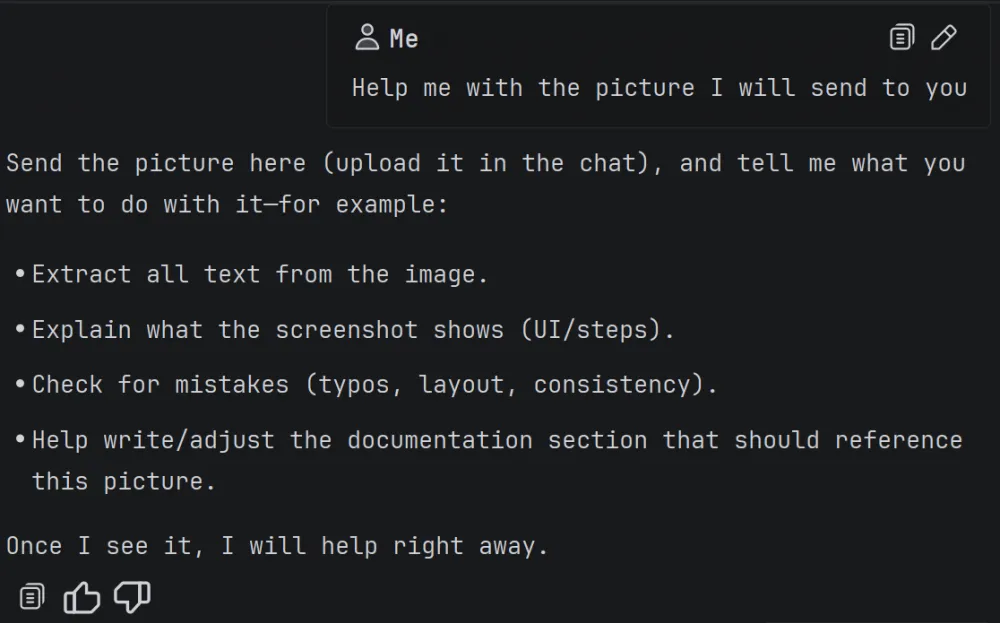
User messages are now formatted differently to stand out among the agent's messages.
The update Veai 5.4 can be installed from our website. For feedback — [email protected] and chat with the team (we also publish product news there).
Veai is a team of professional researchers and developers with practical experience in code analysis, test generation, and vulnerability discovery.





Write comment