
- DIY
- A
BLE for Arduino: Write Commands, Not Descriptors
Building a Bluetooth LE device for Arduino is not particularly difficult. The real hassle begins when you need to set up proper command and response exchange on the client side. You simply want to send a command and receive an immediate reply. Or have the device transmit coordinates on its own while the small car is in motion. No need to delve into GATT or deal with awkward asynchronous workarounds.
I’ve developed two libraries — one for Arduino and one for .NET (MAUI, WPF, WinForms) — that abstract away all BLE complexities behind a simple text protocol.
Features:
Text protocol: easy to log and debug.
Ease of use: no need to learn the intricacies of GATT, characteristics, descriptors, and buffering.
Cross-platform support: unified API for MAUI (Android/iOS), WPF, and WinForms.
Reliability: automatic reassembly of fragmented packets, response waiting, and timeout handling.
Advanced use cases: convenient BLE device interaction with access to native objects.
Arduino Code: Write a Sketch in a Minute
Install the BleCommands library and write the following:
#include

BLECommandsServer server;

void setup() {
  Serial.begin(9600);
  while (!Serial);

  if (!server.begin("BLECommands Device")) {
    Serial.println("BLECommands server failed to start");
    while (true);
  }

  server
    .onCommand("PING", [](const String& command, const String& args) -> String {
      return "PONG";
    })
    .onCommand("ECHO", [](const String& command, const String& args) -> String {
      return args.isEmpty() ? command : command + " " + args;
    })
    .onCommand("GET", [](const String& command, const String& args) -> String {
      if (args == "MAC") return BLE.address();
      if (args == "NAME") return "BLECommands device";
      return "WRONG ARGS";
    });
}

void loop() {
  server.poll();
}
The first space in the line acts as the delimiter between the command and its arguments. This makes it easy to handle commands like GET MAC and GET NAME.
You can also override the handler for unknown commands:
server.setFallbackHandler([](const String& input) -> String {
  return "UNKNOWN: '" + input + "'";
});
C# client code: one more minute
using var transport = await ArduinoClient.CreateTransportAsync(deviceName);
if (transport == null)
{
    Console.WriteLine($"Failed to connect to device '{deviceName}'");
    return;
}

await transport.StartAsync();

var reply = await transport.SendCommandAsync("PING");
Console.WriteLine(reply); // "PONG"
The BleTransport object contains a Disconnected event — for handling connection loss.
Now let's go into more detail.
Text Message Exchange
Once, while experimenting with the HM-10 Bluetooth module connected to Arduino via UART, I ran into a message fragmentation issue. Even short text could get split: the message «POS 100» would be transmitted as two separate strings «POS 1» and «00». To solve this problem, I had to separate messages with a non-printable character (for example, ‘\n’) and reassemble the full messages in the characteristic update event handler.
This same approach is also implemented in the library. On boards with built-in Bluetooth, the message fragmentation issue is no longer as relevant. Nevertheless, the approach implemented in the library allows for convenient transmission of long strings.
What do you do if you need to send a long text from the device, for example a settings JSON? The Arduino library automatically splits the text into chunks, sends them sequentially, and sends a final delimiter at the end. On the client side, the TokenAggregator class comes into play: it collects the individual chunks and triggers the TokenReceived event when the delimiter is received.
In addition, you can send not only ASCII but also UTF-8. You can send Russian text without worrying about its length, and it will be correctly reassembled on the client side.
Request-Response
What is the complexity of implementing such an obvious and familiar paradigm in the Bluetooth LE stack? And is it possible to do without it? In principle, if we are dealing with sensors — yes, it is possible. In that case, the characteristic simply supports an state, which is exactly what GATT is tailored for.
But is it possible to control a complex device this way? After all, the application needs to know how the device responds to commands. Without this capability, implementing complex logic will be extremely difficult, if not outright impossible.
Imagine your device is a coffee machine with 20 parameters:
Water temperature, pressure, grind size, brew mode, timers, locks
Transitions between states have preconditions (“you cannot turn on heating without water”).
If you try to model this using a single state characteristic, you will run into major issues. When the client writes a new state, the device needs to check if the transition is possible and return an error if it isn’t. But GATT Write doesn’t return an error with text! At most, you get a standard ATT error code with no way to pass custom error text. You won’t get any “insufficient pump pressure” message.
So we need a function that sends a command to the device and returns a response.
The solution is two characteristics:
Write — for sending commands;
Notify — for receiving responses.
The client writes the command to the characteristic with the Write property, subscribes to Notify, and waits for a response with a timeout. If no response is received, it returns null. It’s all very simple.
Task SendCommandAsync(string command, CancellationToken token = default); There is also a third characteristic for sending periodic messages from the device. We’ll cover that a little later.
Connection
Before exchanging information, you need to connect to the device. Connecting to a Bluetooth LE device is organized roughly the same way across different operating systems:
Windows: it is enough to obtain the device by calling one of two static methods
BluetoothLEDevice.FromBluetoothAddressAsync()orFromIdAsync(). However, this does not mean that the connection has been established. Nevertheless, after this you can immediately retrieve services from the device — in this case the connection will definitely be established. It should be noted that if the device has not been paired and is not present in the system cache, these functions will returnnull. That is, if you are opening the device for the first time, you can only connect to it via scanning. There is also theGattSessionclass, which allows you to set the connection lifetime. Practice shows that after creating a session, connection to the device happens almost instantly.In Android a synchronous function
device.connectGatt()is used to establish the connection. After that, just like on Windows, the connection process runs in the background, and the user can receive information about the current status in callbacks.In iOS the connection is established by the
CBCentralManagerclass via theconnect()function. And similar to Android and Windows, the connection process can be monitored and connection errors can be handled.
Thus, on all three platforms, the connection runs in the background. Therefore, the Device.ConnectAsync() function does not return a result, and the Device.IsConnected property changes dynamically.
Device, Service, and Characteristic Objects
I aimed for maximum simplicity, so the interfaces only contain the most essential elements. For example, there are no descriptors in ICharacteristic. This is a deliberate decision. You can always access the native object (and through it, the descriptors).
Device generates Services, Service generates Characteristics. All of these are disposable objects. If Device is disposed, all child objects stop functioning. To spare the user from having to dispose of all objects in the hierarchy, Device and Service, as implementers of the IChildDisposer interface, store all their child objects obtained by the user. Thus, to free up system resources, it is enough to call Device.Dispose().
Windows does not have an explicit Disconnect method. To terminate the connection to the device, it is enough to call Dispose on the device. The library follows the same philosophy. The main thing is not to forget to do this.
Listening
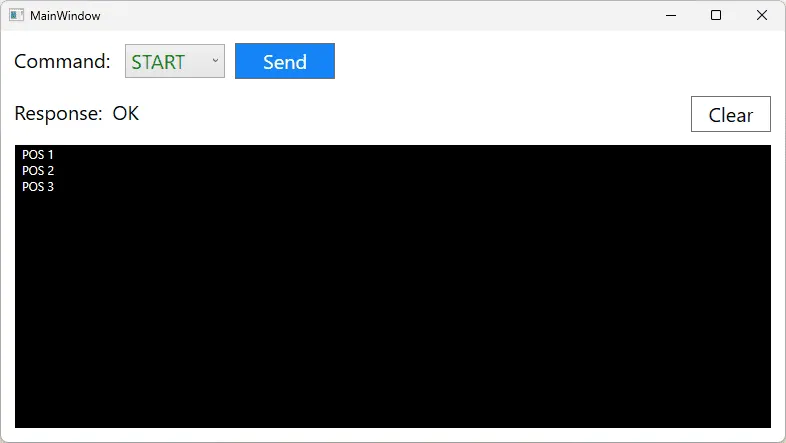
A request-response model alone is not always sufficient. Imagine: you send a START command, and the device needs to start sending its current coordinates every 100 ms. How can you achieve this? This is what the Listening mode is for. The third characteristic, Notify, is used for listening.
After receiving the command, the device starts sending messages to the client using the server.send() method. On the client side, you need to subscribe to the BleTransport.ListeningTokenReceived message and call the StartListening function, setting the timeout between messages. If no message is received from the device within the timeout period for any reason, the BleTransport.ListeningTimeoutElapsed event is triggered.
When developing your own communication protocol, you should account for the ability to notify the client that listening needs to be stopped. For example, when the device stops moving, the final message should include some end-of-movement marker, such as END or FINISH.
You can see how this works in practice in the WpfSample example. In the Messaging sketch, the START command triggers the sending of "POS
Characteristics
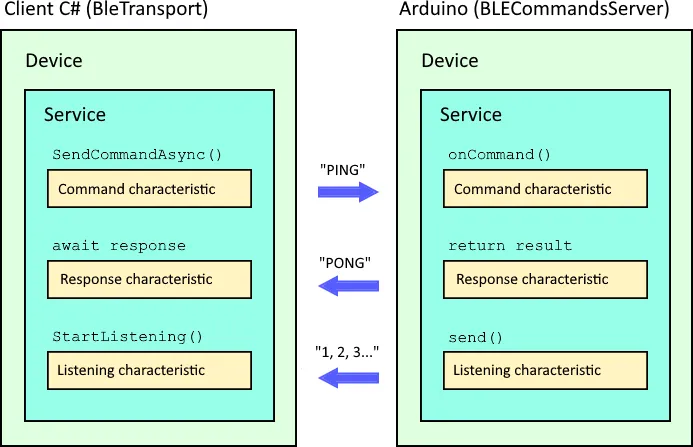
Thus, there are three characteristics with predefined UUIDs:
Characteristic | UUID | Properties | Purpose |
Command | DB341FB3-8977-4C2D-AC6C-74540BD8B902 | Write | WriteWithoutResponse | Commands from client |
Response | DB341FB3-8977-4C2D-AC6C-74540BD8B903 | Notify | Indicate | Responses to commands |
Listening | DB341FB3-8977-4C2D-AC6C-74540BD8B904 | Notify | Indicate | Periodic data |
Identifiers (along with the UUID of service DB341FB3-8977-4C2D-AC6C-74540BD8B901) are identical for Arduino and the client.
Note: characteristics support sending data both with and without confirmation (properties Write | WriteWithoutResponse and Notify | Indicate). This gives the client full flexibility. The library sends commands to the device with confirmation enabled, while Notify mode is used for Response and Listening characteristics.
Cross-platform compatibility without surprises
The library is available in two versions:
BleCommands.Windows — for WPF, WinForms, Console (native WinRT objects).
BleCommands.Maui — for Android/iOS via the popular Plugin.BLE package.
BleCommands.Core contains shared abstractions and base implementations.
Each Device, Service, Characteristic stores a native object. If needed, you can drop down to a lower level and leverage the full power of the native API.
On the Arduino side, the BleCommands library uses the cross-platform ArduinoBLE library.
Advanced use cases
Since the library provides access to native objects, its use is not limited to Arduino only. The repository includes a sample MauiSample — an app that:
connects to any device with active advertising;
displays services and characteristics;
allows writing text to a characteristic and monitoring changes on a Notify characteristic.
Out of the two days spent developing this sample, most of the time went to UI work rather than BLE logic.
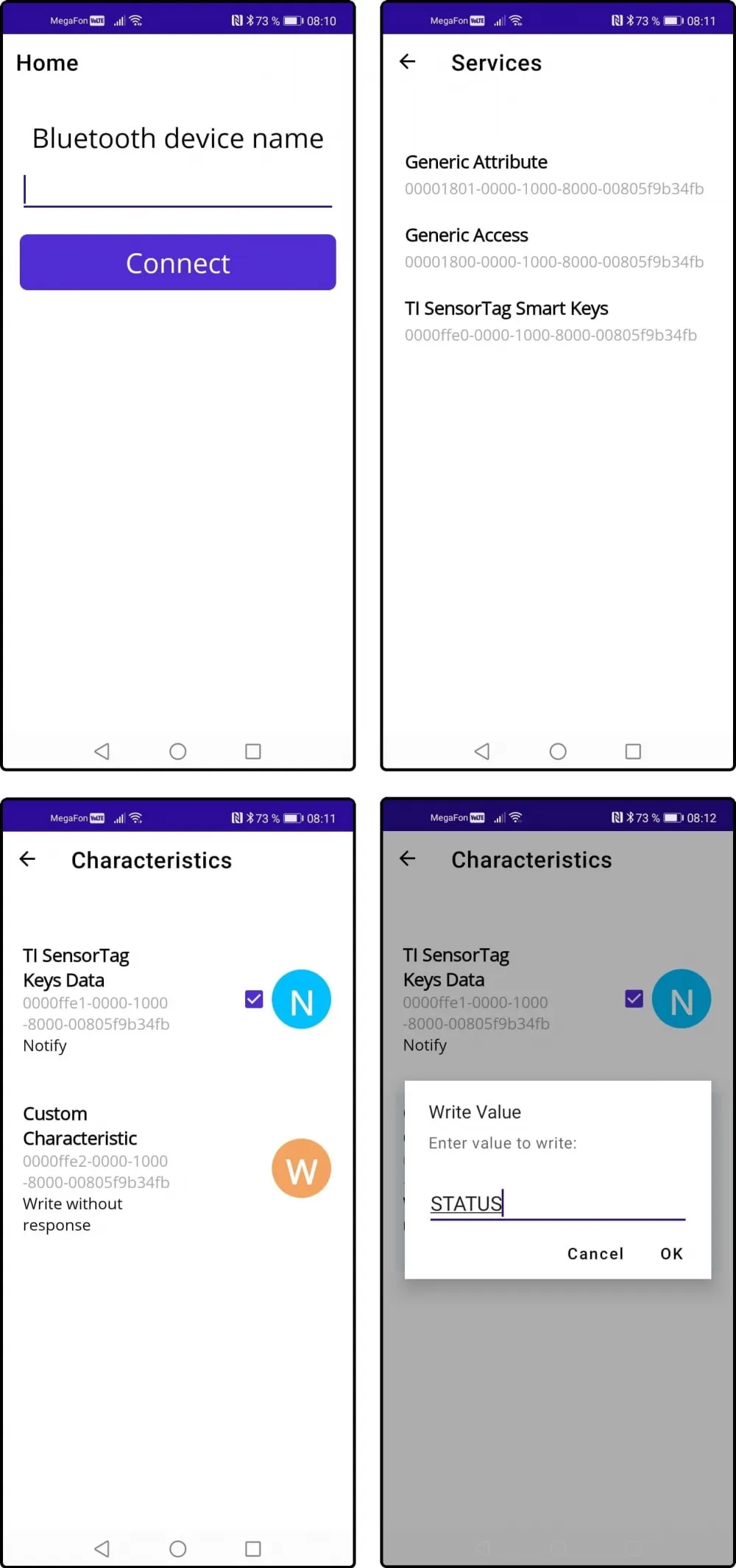
The sample uses the BleScanner class to search for a device by name and connect to it, as well as subclasses of Service and Characteristic.
Links to save you the search
NuGet packages:
BleCommands.Core
BleCommands.Maui
BleCommands.Windows
Arduino library: BleCommands
Disclaimer
When developing the Arduino library, I used an ESP32; I have not tested it on other boards yet. Bluetooth functionality uses the standard ArduinoBLE library, which is designed to work with many different boards. I acknowledge that the current implementation of the BleCommands library for Arduino may be too memory-intensive for some boards due to its use of std::map and std::function.
In my tests sending long strings, I managed to send a 65520-character string to the client. It is not possible to create a String longer than that: apparently, this is the maximum size that realloc can allocate for the String type.
Don’t reinvent the BLE wheel.
Use existing libraries, connect, send commands. All the GATT asynchronous logic, fragmentation, timeouts, and object lifecycle management are already built in.
Fork the project, give it a star, open issues and pull requests.
The author is reachable.
Write comment