
- AI
- A
We are not fine-tuning the neural network, we are fine-tuning the script: How Mac Mini and local LLM wrote Regex for us
Hello! My name is Maxim Morozov, I am the AI Project Manager at Bitrix24.
In the previous article, I talked about local neural networks as a safe and economical alternative to cloud APIs. Today — a practical case where we applied this approach in a real project.
The main idea of this work: instead of fine-tuning the neural network on our data — which is time-consuming, expensive, and requires dataset maintenance — we use the standard model without additional training. The model generates regex, and the script saves these rules and uses them autonomously.
I will show the architecture of the system where the local LLM generates regular expressions for parsing logs, saving hundreds of hours of manual debugging. All computations occur within the company's perimeter, without sending data to the cloud.
Problem: Parsing Various Logs for Wazuh
We have a centralized Syslog server where data from all department services flows:
Standard logs: Nginx, Apache, Linux system logs;
Custom software and microservices;
Handwritten scripts with their own output formats.
All this information is aggregated in Wazuh (Open Source SIEM) — a security monitoring system that can respond to incidents. But for this, Wazuh must understand the log structure: where the IP address is, where the severity level (Critical/Warning) is, where the informational messages are.
Native XML Decoders in Wazuh
For Wazuh to understand a non-standard log, it is necessary to write an XML decoder with a regular expression inside. The process looks like this:
Analyze the format of the new log;
Write an XML decoder with Regex;
Upload the configuration to Wazuh;
Restart the service.
The main problem is debugging. If there is an error in the Regex:
Wazuh does not specify the line with the error;
Does not explain the nature of the problem.
Debugging turns into an iterative process: you copy the XML to external validators, check the Regex, see what works — insert it into Wazuh, get an error. When you have dozens of services with constantly changing log formats, maintaining SIEM becomes a significant burden.
Example of a Simple XML Decoder:
Example of a complex decoder:

Each new service is a new XML file, its own regex, and a debugging cycle. The solution is a single built-in JSON decoder.
Changing architecture: JSON proxying
Wazuh has a built-in JSON decoder that works much more reliably than XML decoders.
  "integration":"ms-graph"
  JSON_Decoder
  discard


  ^{\s*"
  JSON_Decoder
If you feed structured JSON instead of raw strings into SIEM:
json
{
  "timestamp": "2025-01-15",
  "level": "Error",
  "user": "admin",
  "action": "failed login",
  "src_ip": "192.168.1.5"
}
...then Wazuh will automatically parse the fields. It is enough to set rules like: “If the level field equals Error — create an alert”.
New architecture
We moved the parsing logic outside of Wazuh. Now the pipeline looks like this:
The syslog server receives raw logs;
The Python script (pre-parser) intercepts them on the fly;
The script applies a regular expression to the string;
If the string can be parsed - we send it to Wazuh.
The problem with decoders is solved, but one task remains: we need regular expressions for the Python script, and they need to be written for each new log signature. This is where we incorporated a local LLM.
Hardware and Stack: Why we need a Mac Mini in the department
Usually, when talking about AI, people imagine racks with NVIDIA H100 or powerful GPU servers. But for our task, this is excessive. We used an existing Mac Mini with an M4 Pro chip and tested it on this task.
Why not cloud?
Logs may contain IP addresses, paths, logins. Sending this data to the cloud is a violation of the security perimeter. A local model ensures that the data does not leave the perimeter;
Cloud APIs cost money. A Mac Mini consumes 30–40 W, which is peanuts compared to paying for cloud APIs.
Software and Model
Runtime environment: LM Studio or Ollama. They provide an API compatible with OpenAI;
Model: we use our own BitrixGPT model, but others will work too. For example, GPT-OSS-20B — open-weight from OpenAI;
Performance: ~70 tokens/sec on M4 Pro.
Thus, we have a free, private, and fast generation service.
Architecture of the Solution
Before moving on to the algorithm, let's consider the architecture of the system.
Components
Drain3 Manager: Clustering log lines by patterns;
Regex Generator: LLM-generation of patterns with validation and retry mechanism;
Regex Parser: Applying validated patterns to logs;
Stream Listener: Real-time processing via TCP socket for syslog-ng;
Feedback Loop: Retraining the system on unrecognized lines;
Service Registry: Filtering and managing the list of services.
Data Flows
Full Pipeline (for batch file processing):
Log File → Ingest (Drain3) → Signatures→
LLM Generation → Regex → Parse → Output
Stream Pipeline (for real-time processing):
syslog-ng → TCP Socket → Drain3 clustering →
Parse with existing regex → OK or FAIL buffer →
[threshold reached] → Feedback to Drain3 → Generate new regex → Re-parse FAIL
Data Structure
**Signatures JSON** (output from Drain3):
json
[
{
"cluster_id": "c2",
"size": 85,
"signature": " Regex JSON (generation result):
Drain3 determines that this is a single template: User <*> login failed from <*> and assigns it a unique cluster ID. If the script sees a log with a known cluster ID, it applies the ready-made rule without referring to the LLM.
Implementation example:
def process_line(self, line: str) -> Optional[str]:
    """Processing a single log line through Drain3."""
    result = self._template_miner.add_log_message(line)
    cluster_id = result.get("cluster_id")

    if cluster_id:
        if cluster_id not in self._cluster_examples:
            self._cluster_examples[cluster_id] = []

        if len(self._cluster_examples[cluster_id]) < 5:
            self._cluster_examples[cluster_id].append(line)

    return cluster_id
Step 2: Generation (Prompt Engineering)
If Drain3 signals a new template, the script collects a buffer of 5 real examples and forms a prompt for the local model.
Retry logic: A maximum of 3 attempts to fix an invalid regex. Each attempt includes feedback about the error. Upon success, we save the regex.
The model returns a regex, which we immediately validate.
Example regex generated by the model:
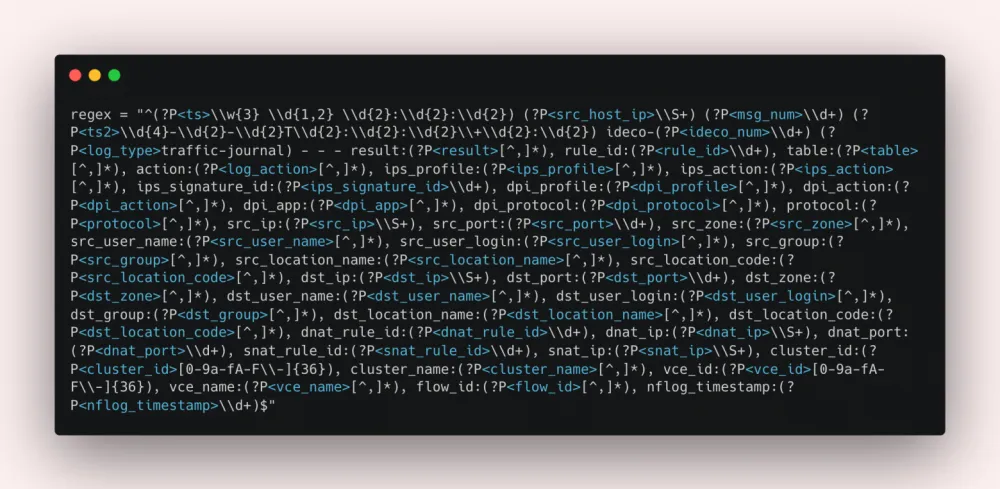
40+ named groups. Writing such a regex manually takes a long time and is prone to errors, while the LLM generates it in seconds.
Performance Metrics
On real data, our approach shows the following results:
Generation accuracy: 85-90% of regex pass validation on the first attempt;
Retry efficiency: After 2-3 attempts, success reaches 98%+;
Processing speed: Stream Mode processes ~100-500 lines/sec (depends on regex complexity);
Incremental processing: Re-runs are 50-100 times faster due to hash-based deduplication.
Step 3: Validation with Automatic Correction
We do not trust code from the neural network without verification. The script receives a response from the model and immediately validates it—attempts to apply this regex to the same 5 examples. If the regex does not work, the system returns the examples, regex, and error back to the model with a request to correct it.
Example of a validation function:
def _validate_regex(regex: str, examples: List[str]) -> Dict[str, Any]:
    """Compile regex and check against examples."""
    try:
        compiled = re.compile(regex)
    except re.error as exc:
        return {
            "valid": False,
            "matched": 0,
            "total": len(examples),
            "error": f"Compile error: {exc}"
        }

    matched = sum(1 for ex in examples if compiled.match(ex.strip()))
    return {
        "valid": matched == len(examples),
        "matched": matched,
        "total": len(examples),
        "error": None if matched == len(examples) else f"Matched only {matched}/{len(examples)}"
    }
Logic of result processing:
Regex works and extracts data → save to the database and bind to the Drain3 cluster ID
Error or incomplete match → the script asks the model to regenerate the regex (usually gets it right on the second attempt)
Step 4: Production (Caching)
Now that there is a validated Regex for this template, the neural network is no longer needed.
When such a log appears, the script retrieves the rule from the database, parses the line, and sends it to Wazuh.
Result: The neural network operates only at the moment a new service appears or the format of logs changes. 99.9% of the time the system runs on pure CPU, consuming minimal resources.
Technical pitfalls and nuances
In theory, everything sounds great, but in practice, we’ve gathered quite a few pitfalls. Here’s what to consider if you want to replicate our experience.
1. Reserved fields in Wazuh
In practice, we found that some field names can cause conflicts with Wazuh's internal logic. For example, you cannot use the name "action" for fields in rules. Instead of "action," use "log_action," etc. https://documentation.wazuh.com/current/user-manual/ruleset/ruleset-xml-syntax/rules.html
2. Regex hallucinations
Sometimes the model gets carried away and produces overly complex Regex — for example, using complicated Lookbehind checks or atomic groups, which are slow on large volumes.
And sometimes, on the contrary, it creates too “greedy” patterns that try to capture 90% of the log in one (?P
Fortunately, all these complexities can be resolved with a simple guideline:
1. USE ONLY named groups of the form (?P
2. PROHIBITED:
lookahead (?=...)lookbehind (?<=...)
2.1 creating a group (?P
The following are considered as structure:
URL addresses (ws://..., http://...)IP addressNumbersStable phrases (Connecting to, Failed at, User logged in)
2.2 It is forbidden to use "action" for field names. Instead of "action", use "log_action", etc.
Optimizations
Incremental Processing
Recomputing all clusters at each run is costly. Added hash-based identification of processed clusters.
def _compute_cluster_hash(signature: str, examples: List[str]) -> str:
    """Calculates a stable hash for the cluster."""
    if not examples:
        return hashlib.sha256(signature.encode()).hexdigest()[:16]

    content = f"{signature}|{examples[0]}"
    return hashlib.sha256(content.encode()).hexdigest()[:16]

# In the main loop:
if _compute_cluster_hash(cluster.signature, cluster.examples) in processed_hashes:
    print(f"Skipping already processed: {cluster.cluster_id}")
    continue
Feedback Loop with Automatic Trigger
New types of logs appear at arbitrary moments. Implemented buffering of FAIL lines with a trigger based on threshold OR interval.
def _check_and_trigger_feedback(self, service: str) -> None:
    """Checks conditions to trigger feedback loop."""
    if service not in self.feedback_buffers:
        return

    buffer_size = len(self.feedback_buffers[service])
    now = datetime.now()
    last_trigger = self.last_trigger_times.get(service, now)

    # Trigger: accumulated 100 FAIL lines OR 5 minutes have passed
    threshold_reached = buffer_size >= 100
    interval_reached = (now - last_trigger).total_seconds() >= 300

    if threshold_reached or (interval_reached and buffer_size > 0):
        # Feed to Drain3 → Generate new regex → Re-parse FAIL
        self._trigger_feedback_loop(service)
        self.last_trigger_times[service] = now
Graceful Shutdown and Persistence
When the service crashes, the current state can be lost. Added periodic saving + graceful shutdown.
def gracefulshutdown(self):

    """Saving state on shutdown."""

    for service, manager in self.drain_managers.items():

        manager.save_state()  # Save Drain3 state

        manager.dump_signatures()  # Save signatures
Hybrid Scheme (Local + Cloud)
The local model on Mac Mini perfectly handles the tactical task — writing specific regular expressions. But Wazuh also has a strategic level — hierarchy of rules (Rules).
This is when one rule depends on another: “If the Nginx parser (Parent) triggered, AND the error level is Critical, AND the IP is from the blacklist (Children) — then raise the alarm.”
Building such a beautiful tree-like structure (XML) for the local model is quite challenging — it lacks the context and "intelligence" for global logic.
Therefore, we use a hybrid approach:
Locally (Mac Mini): We parse the "raw" logs, generate basic Regex bricks, and create XML rules for each signature. All personal data (IP, logins) remains here.
Anonymization: The script takes a batch of ready-made, verified regex and XML rules for the service, removes log examples, leaving only the structure of fields (src_ip, user_name),
Cloud: We send the anonymized structure to a larger model
Request: “Here are 30 regex and 30 XML. Build the optimal hierarchy of XML rules for Wazuh with inheritance.”
Result: The cloud model returns a structured XML that we import into Wazuh.
    json
    ^traffic-journal$
    Base rule for Traffic Journal logs


    26000
    ^drop$
    Traffic journal: Result DROP
    traffic-journal, drop
etc.
This way, we automate the SIEM administrator's task by 80-90%, leaving only the final "OK" for the person. And at the same time, no sensitive data leaves the perimeter — only the dry logic of the rules goes to the cloud.
Conclusion
What we achieved:
Automatic generation of Regex and XML without human involvement;
Real-time processing with a feedback loop for "retraining" the script on new types of logs;
Data privacy — all processing of sensitive data happens within the company perimeter.
If you have the opportunity, use LLM as the architect of rules, not as an executor.












Write comment