- AI
- A
How I Wrote a Qt Application Almost Without Writing Code
Everything started as an experiment. At my main job, management strongly encouraged using AI in development. At some point, I became curious how far this could go. Could a real desktop application be written with most of the code generated by AI?
Not in the sense of "sometimes suggesting syntax" or "helping to find an error." But literally, in the sense that AI writes the code, and the human formulates the tasks and checks the results.
For the experiment, a task was needed that, on the one hand, was quite real, and on the other hand, was not directly related to work projects.
In the end, there were two candidates.
The first option was to write a utility for calculating the coefficients of digital filters. Such tools are used to calculate filters with specified characteristics — for example, with the required frequency response, limited delay, and filter length.
The task was engineering and interesting.
But there was a reason to reject this idea. A similar tool already existed within the work projects, and I didn’t want to mix work code with personal experiments.
So, in the end, the second option won — to write a desktop application for recording sound with a binaural head.
I already wrote about the head on Habr:
https://habr.com/ru/articles/1007864/
In short, the idea of binaural recording is quite simple. A model of a head with ears is taken, microphones are placed in the ear canals, and sound is recorded in a way that a person would hear it.
When listening to such a recording through headphones, a rather convincing effect of spatial presence occurs.
By the time I was working on the hardware part, software for recording already existed for the head. However, it worked on MFC and was more of an engineering utility for tests rather than a full-fledged user application.
So the idea of writing a separate program for the PC seemed quite logical — and I tried it.
However, the first attempt ended rather quickly and not very successfully.
The task was formulated as follows: to write a desktop application in C++ using Qt, which would be built in Visual Studio 2022. Nothing exotic — just a standard Qt application for Windows.
I started the experiment with the free version of the chat and asked it to create a simple Qt project for Visual Studio — not a full-fledged program, but a minimal application framework.
But at this point, the experiment unexpectedly stalled.
The model got confused with the project files, generated code that wouldn’t compile, and ultimately couldn’t even properly create the project structure.
Honestly, I expected more from it. Especially since earlier this same tool had helped quite confidently with individual tasks — for example, optimizing DSP code for speed.
At this point, the experiment was practically over.
But then there was a small plot twist: I was given access to the paid version of the chat — and I decided to try again.
Attempt #2: starting to write the application with AI
I started with a question:
Me: Is it possible to write a C++ application using Qt and build it in Visual Studio 2022?
And which GPT model is better to use for such a task?
The answer was as expected: such development is possible, and it’s better to use a more advanced model for it.
But the very first response showed one peculiarity of communicating with AI — the word model was understood completely differently than I expected.
The model assumed the question was not about a GPT model, but about the architectural model of the application — for example, MVC or MVVM.
As a result, the conversation first went into discussing the architecture of Qt applications, and only later did it become clear that the question was about something else.
On one hand, it looked amusing.
On the other — it immediately highlighted an important point: when working with AI, much depends on the precision of phrasing.
To start, I showed the model an example of an interface. As a reference, the good old Winamp was chosen — a compact application with a menu and basic control elements.
Based on this description, the model proposed a minimal Qt application framework: the program entry point, the main window class, and the project structure for Visual Studio.
It is from this moment that the experiment can truly be considered to have begun.
The work proceeded in quite an unusual way. The main part of the code and interface was generated by AI, and my role was to formulate tasks, check the results, and integrate the code into the project.
Step by step, a working application started to take shape from this framework.
Generation of the first Qt project
After discussing the structure of the application, I asked the model to generate a minimal Qt project that could be built in Visual Studio 2022.
The model suggested a standard QtWidgets application framework: the program entry point, the main window class, and the structure of the source files. It was the usual project template that most Qt applications start with.
Then began the most interesting part of the experiment.
Instead of creating the project manually, I simply asked the model to generate the necessary source files.
The response was a set of code for a simple application with a main window and a menu. The interface was created directly in C++ code.
Later, .ui files appeared in the project, but at the initial stage, the entire interface was described in text. This was a deliberate decision: I am not a specialist in user interface development and wasn't sure I could effectively work with Qt Designer.
So, at the initial stage, we simply edited the code — the model generated the interface elements, and I inserted the suggested fragments into the project.
After a slight adjustment of the settings, the project was successfully built in Visual Studio and launched.
The first window of the application looked modest — it was basically just a skeleton of the program with a menu. But it was at this moment that it became clear that the experiment was working: AI was able to generate the Qt application code that could be built and launched.
Building the project: Qt, Visual Studio, and a bit of reality
The AI generated C++ code for the Qt application, but the integration with Visual Studio still had to be set up manually. It was necessary to check the paths to the Qt libraries, project parameters, and a few minor things that Qt Creator usually sets up automatically.
A separate feature was that the project did not use CMake.
I worked with a standard Visual Studio solution (.sln) and project files (.vcxproj), so all settings were made directly in the project configuration.
After adjusting the build parameters, the application was successfully compiled and run in Visual Studio.
This was an important moment in the experiment: it became clear that the code generated by the model could be integrated into a regular working Visual Studio project.
Of course, it didn’t go completely without manual work — but there was very little of it.
First functionality: starting to write a real application
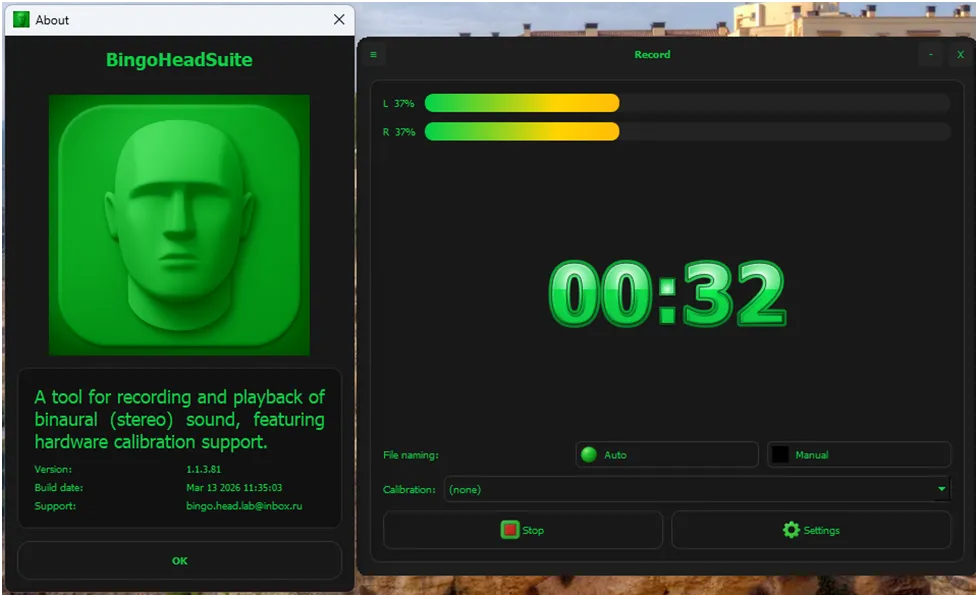
Our application was conceived as a tool for working with a binaural head — a device for recording spatial sound. We had to solve quite practical tasks: working with audio devices, recording a signal and saving it to a file, playing back previously recorded signals, calibrating microphones.
I described this task to the model and asked it to suggest a general structure for the program. We decided that the application would have three main operating modes: playback, recording, and microphone calibration. Each mode had a separate interface window.
In addition, auxiliary windows were planned: a program settings window, an About window, and a window for analyzing identification results. Later in the development process, other utility windows appeared, but the main set remained the same.
For working with audio devices, it was decided to use the PortAudio library — primarily because I already had experience with it.
As a result, the solution structure in Microsoft Visual Studio 2022 turned out to be simple: the .sln contained two projects (.vcxproj). The first contained the PortAudio library, the second — the application code. PortAudio remained unchanged, and the main project was gradually supplemented with new code.
From this point, the development process began to resemble a form of pair programming.
I would formulate the next small task — for example, adding a record button or a device selection field — and the model would suggest changes in the code of the corresponding application window.
Thus, the interface gradually took shape: control elements appeared, event handlers were added, and the logic of interaction between program objects was formed.
Of course, not everything worked perfectly on the first try. Sometimes the model would suggest code that required minor adjustments—like fixing the names of UI elements or handler signatures. Occasionally, the result would be far from expected, and the task would need to be rephrased.
But overall, the process turned out to be productive: step by step, a simple framework turned into an application that could already be used for real work.
When the code starts living its own life
Up to this point, the experiment looked neat. The project framework was formed, the application compiled, and the program structure looked reasonable. The AI generated code, and I gradually added it to the project.
The workflow quickly formed into a characteristic cycle:
the task is formulated
the model proposes an implementation option
the code is added to the project
it becomes clear that something needs to be clarified, fixed, or changed
the cycle repeats
Sometimes it looked completely typical. For example, a button click handler needed to be added.
The model proposed the standard Qt scheme using signals and slots:
connect(ui->recordButton, &QPushButton::clicked,
this, &MainWindow::onRecordButtonClicked);
Then the corresponding handler was added:
void MainWindow::onRecordButtonClicked()
{
// handler logic
}
From a Qt perspective, this is completely standard code. But these types of fragments make up a significant portion of any desktop application.
Moreover, the AI handled both standard event handlers and more complex tasks equally confidently: streaming signal processing, computational logic, and mathematical operations.
In fact, the model acted as a developer who knows the documentation well and can quickly write clean code. It’s just a shame that this developer can’t press Compile and see the red error screen.
And here’s the main nuance: the AI understands the structure of the code well but cannot see how the actual program behaves. It cannot run the program, doesn’t see compilation errors, and doesn’t observe the interface behavior.
Therefore, my dialogues with the model often looked something like this:
“You wrote beautifully, and I’ll go catch the compilation errors.”
Sometimes the model would suggest a solution that seemed correct at first glance, but in a real project, it required further refinement.
In this sense, working with AI turned out to be very similar to regular team development — only instead of a colleague sitting next to you, the author of the code was the chat.
Free and Paid Versions: A Difference You Can't Miss
The experiment with developing the application started with the free version of the chat. The logic was simple: if the tool can help write code, it should at least handle creating a minimal project — the standard set of Qt files for Visual Studio, which is where almost any application begins.
In practice, it turned out to be more complicated. The free version couldn't even properly generate the minimal project file needed for building. It would suggest separate code fragments, but putting them together into a working application framework wasn’t possible.
This same tool had previously helped confidently with individual tasks — like optimizing DSP code or finding typical solutions. But creating a full application structure turned out to be a task of a different level. If the minimal project doesn’t build, talking about further development is simply premature.
The situation changed after access to the paid version. The difference was noticeable immediately.
Firstly, the model started to maintain the project structure better. If the conversation involved several files, it didn’t “lose” them between messages and didn’t generate incompatible code fragments.
Secondly, the responses became more coherent. There was a clear logic: first, the project structure was discussed, then the framework was created, after which the application gradually developed.
And most importantly — the code started to compile and run.
For a programmer, this may sound trivial, but this was the moment when AI stopped being just an interesting toy and turned into a working tool.
Of course, no magic happened. The code still needed to be checked, sometimes corrected, and the task specification clarified. But with the paid version, the experiment started to resemble ordinary development — just with an unusual partner who writes code while you deal with compilation errors.
At the same time, not everything was straightforward. The free version unexpectedly handled graphics generation better: icons, diagrams, and simple interface sketches. In this sense, both versions complement each other — one is more convenient for working with code, the other for visual elements.
What the development process looked like
After switching to the paid version, working with AI became genuinely productive. The model confidently generated working code snippets for Qt: creating interface elements, connecting signals and slots, event handlers, class structures. Everything that normally has to be written manually or copied from old projects appeared almost immediately.
At the same time, the AI remained "non-living": it could not run the application, see compilation errors, or observe interface behavior. Any more or less complex piece of logic still required checking and sometimes minor refinement.
As a result, a familiar work rhythm developed: I would formulate the next task, the model would suggest code, after which it needed to be tested in a real project and, if necessary, refine the implementation.
What the experiment showed
When the development reached a working state, it became clear that the main result of the experiment was not related to Qt, VisualStudio, or a specific application. Much more important was the change in the human role in the development process.
When I started this experiment, the expectations were quite bold: I wanted to see if it was possible to write an application such that most of the code was written by AI, while the human mainly formulated tasks and checked the results.
After a failed first attempt with the free chat version, expectations dropped significantly. I no longer counted on anything serious and was ready for the AI to turn out to be more of an auxiliary tool.
But the result of the second attempt was pleasantly surprising. Throughout the further development, the AI confidently acted as a full-fledged programmer: writing code, proposing function structures, creating handlers, explaining the operation of libraries, and performing a significant amount of routine development.
In this experiment, I almost didn’t write any code. The AI wrote the code.
My role shifted to formulating tasks, integrating solutions, testing, and adjusting the results. The most difficult part of the work was the exact formulation of the task: if the formulation was inaccurate or incomplete, the AI produced code that did not meet expectations.
Over time, the model's limitations became apparent:
different names for the same variables or functions;
repeated corrections that had already been made;
proposals that were not entirely aligned with the original request.
Sometimes, corrections went in circles, returning to previous versions, which resembled teamwork—only instead of a colleague at the neighboring desk, there was a chat.
If something needed to be changed in the already functioning code, adjusting the architecture or logic could be painful, which is also characteristic of regular development.
During the experiment, the AI not only helped write code—but also helped assemble a complete product. In addition to the application, an installer, delivery structure, and user manual were prepared. The same scheme appeared again: the person formulates the task, the AI suggests the implementation, and it remains to check and assemble the result.
In the end, the AI wrote not only the code but also helped assemble a working solution ready for use. The main conclusion of the experiment is simple:
The AI is capable of performing a significant part of a programmer's work. The human role remains as the task architect, solution integrator, and observer when things don’t go as planned.
Should programmers be worried?
After the experiment, the natural question arises: does this mean that the profession of a programmer will gradually disappear?
In my opinion, no. But the role of the developer is indeed changing.
In the classic model, the programmer spends most of their time writing code: thinking through function structures, implementing algorithms, creating interfaces, and gradually assembling a working system.
When AI is actively used in development, a significant part of this work can be performed automatically. The code is generated by the model, and the human focuses on defining the task, checking the result, and integrating parts into a unified product.
The developer increasingly becomes a task architect: defining what exactly needs to be done, how the system components interact, what the constraints are, and how everything works together. In this model, AI acts as a fast executor capable of creating the implementation.
It is important to remember: AI works well only when the task is clearly defined. If the requirements are vague or incomplete, the result will be the same. Therefore, the ability to formulate tasks and see the overall system architecture becomes even more important than before.
There is also another limitation. AI does not understand the project context like a human does. It does not run the code, does not test it on a real machine, and cannot evaluate whether the result meets user expectations. All of this remains the developer's responsibility.
Complete automation of development does not exist yet. But it is already noticeable that the main focus of work is shifting: less manual coding and more task definition, solution validation, and process management.
My small experiment showed that such a working model is already quite possible and may become common over time.





Write comment