- AI
- A
Local AI in Obsidian without Subscriptions: A Working Combination with Ollama, Gemma 4, and Infio Copilot
I wanted to create a local AI assistant for Obsidian that can work with my notes offline and without subscriptions. As a result, I tested several approaches and settled on the combination of Obsidian + Ollama + Gemma 4 to see how suitable it is for everyday use.
In short: what I ended up with
The final working scheme I came up with looks like this:
Obsidian as a knowledge base
Infio Copilot as the AI plugin
built-in
bge-micro-v2for embeddingsOllama for running a local language model
gemma4:e2bfor responses based on notesqwen3.5:9bandqwen3.5:4bas alternatives that I also tried
As a result, notes are indexed quickly, semantic search works, responses can be obtained directly within Obsidian, and data in local mode does not go to the cloud. And all of this is free, not counting electricity, the cost of the computer, and the time spent on installation.
I should clarify right away: this is not an ideal and not a completely seamless system. Plugins change, models sometimes behave unpredictably, and setup takes time. But the basic functionality is already there, and for a personal knowledge base, this turned out to be enough for the idea to finally become practically useful.
Background: why the "second brain" concept didn’t work
Before this, I had started maintaining a knowledge base several times. First in Notion, then in Obsidian. I created a folder structure, tags, templates. After a couple of weeks or months, I abandoned all of it. Perhaps there are people who really enjoy taking notes, but I apparently am not one of them. Although it is a useful skill in itself.
Honestly, I have always thought that the “second brain” story is more suited for enthusiasts and a specific community. A beautiful concept, but without a large number of convincing success stories. Systematization for the sake of systematization. At least, that’s how it often looked.
But now the situation has changed.
Over the past year, I, like many others, have accumulated a large number of chats with neural networks. Claude, ChatGPT, Gemini, and others. These are dozens of dialogues related to work: architecture, BIM, vibe coding, research tasks. There is a lot of valuable content in them: reasoning, practical solutions, interesting findings, conclusions I reached through several iterations. All of this was scattered across different interfaces and was almost impossible to search properly.
This is personal knowledge, and it's clear how it literally slips through your fingers. It's hard to remember in which chat the needed answer was if you didn't save it in advance.
This is where Obsidian starts to make sense. Not as a diary, but as a context database from which you can ask questions. You can revisit your old thoughts, search for recurring ideas, and conduct a meta-analysis of what you've already discussed and tried.
For this, you need AI embedded right into Obsidian. Ideally, it should work for free and locally.
In practice, this turned out to be not so simple.
What I Wanted to Achieve
My task was quite simple:
store notes and context in Obsidian
quickly index notes for semantic search
ask questions about my database
avoid sending data to the cloud whenever possible
not pay for a subscription during the experimental phase
An important point that I understood and which turned out to be one of the main obstacles in the setup: the language model and the model for embeddings are two different parts of the system. This is often confused by new users who are trying to assemble such a setup for themselves. And there are many of them now, and there will be even more in the future. It seems to be becoming a new useful working skill.
The language model answers questions. The embedding model converts notes into vectors so that semantic matches can be searched. Both layers are needed for RAG.
And while the answers are more or less clear, it turns out that embeddings unexpectedly became the main bottleneck.
Step 1: Ollama. And My High Expectations
Ollama is a convenient tool for running local models. It installs like a regular program, and models can be downloaded with a single command in the terminal:
Here, the amount of video memory starts to play a role. I have an RTX 3060 Ti with 8 GB VRAM, and not every model fits entirely into it. If the model is larger, some data goes into RAM or the CPU, and the speed noticeably drops.
It is also important that the problem was not only in response speed. For a simple chat, this might still be enough. But for normal RAG performance based on notes and your context, an embeddings layer is also needed. And that's where the main difficulties began.
Step 2: Smart Connections. Fast search, but paid chat
Next, I tried Smart Connections by Brian Petro. The plugin is installed through the regular Obsidian marketplace and quickly provides the first result.
I was pleasantly surprised by the speed of indexing. The plugin uses bge-micro-v2, a small and well-optimized embedding model built directly into the plugin. There's no need to download anything separately through Ollama.
My database is still small: about 150 notes of varying lengths, totaling around 70 MB of markdown files. Such a database was indexed almost instantly, in about 1–2 minutes. After that, semantic search worked as intended.
However, the practical value of such a search turned out to be not obvious to me. It shows notes that are close in meaning and content, but I didn’t get the feeling that it radically changes the experience compared to regular search. Although as a separate tool, it can still be useful.
But when I tried the chat from Smart Connections, it turned out that Smart Chat already requires a subscription. Previously, this was a free tool, and in my case, this became a deal-breaker.
The idea of the plugin was sufficient for testing, but it didn't suit me as a permanent solution. I wanted to find an option where both search and chat work for free.
Step 3: Copilot by Logan Yang. Chat worked, but there were questions about indexing
Then I installed Copilot by Logan Yang. The plugin is popular and has many downloads.
Connecting Ollama in it is quite simple: in the settings, you specify http://localhost:11434, choose a model, and the chat starts working. However, in each plugin, you still have to figure things out manually a bit because there are usually not many precise instructions.
But I encountered problems again with the indexing of notes. In my scenario, Copilot with embedding models through Ollama indexed notes significantly slower than solutions with the built-in bge-micro-v2. While Smart Connections managed in 1-2 minutes, here the indexing on the same database could take a very long time, up to an hour.
Several factors likely influenced this: the speed of the embedding models, long notes, the peculiarities of text segmentation, and possible errors in the indexing process.
Additionally, I missed the ability to control the text slicing into fragments, that is, chunks. I didn't find an explicit chunking setting in the plugin interface, at least in the version I was working with. For RAG, this is important because the accuracy of finding relevant pieces of notes depends on chunking. Perhaps a more granular setting here could improve the results in both quality and speed.
As a result, the picture was as follows: the chat itself worked, but my indexing was too slow, and the meaning of the entire endeavor began to fade.
Step 4: Infio Copilot. A fork that solved the problem with embeddings
Next, I spent time searching and found Infio Copilot. As far as I understand, this is a fork of Copilot, which is currently installed not through the usual plugin directory, but via BRAT. This is a separate plugin for installing extensions that are not yet in the Obsidian directory.
The main difference for me was that it has built-in fast embeddings, again based on bge-micro-v2, and you can also use your local models through Ollama for generating responses.
Installing BRAT
Open Obsidian → Settings → Community Plugins → Browse
Find
BRAT, install, and enable itIn the BRAT settings, select Add Beta Plugin
Insert the repository Infio Copilot
Configuring Infio Copilot
In the plugin settings, choose the Ollama provider
Specify the address
http://localhost:11434Choose a model for the chat
In this setup, embeddings are built using the built-in model bge-micro-v2, so the index is created quickly. The local model through Ollama is used only for responses.
This combination worked best for me.
Step 5: gemma4:e2b. New bundle
At the end of March, Google released Gemma 4, and I tried the gemma4:e2b variant.
ollama pull gemma4:e2bHere, the difference became noticeable in practice.
If I compare my feelings with what I tried before, gemma4:e2b responded about twice as fast as qwen3:8b. I am not providing full specifications of the computer and did not measure tokens per second, so I will leave it as a practical observation: with Gemma, responses became fast enough for real work, whereas qwen3:8b was too slow in my case.
Usually, the response took about 15 seconds, depending on the complexity of the request and the amount of context found.
I had a good impression of the quality of the responses. I specifically used gemma4:e2b. The model can be imperfect and sometimes behaves inconsistently, but in tasks involving note analysis, summarization, and working with personal context, it seemed quite useful to me. Moreover, I generally like how it formulates responses.
It's important not to draw too harsh conclusions about the hardware. In my case, 8 GB of VRAM already allows for comfortable use of such a model. Running it with less memory is also possible, but performance will likely be noticeably lower, especially if part of the data starts being offloaded to RAM. Without a graphics card, it can also be run, but the speed for continuous work will probably be too low. The general rule is simple: the more VRAM, the better.
After connecting gemma4:e2b in Infio Copilot, the system finally worked as I originally wanted:
note indexing occurs quickly
knowledge base responses come at an acceptable speed
everything can work locally
you don't have to pay for it
notes remain on your machine
But it is also important to make a reservation: sometimes all this works unstably. Often, one has to start a new chat for the system to respond adequately again. There are times when the model does not respond as needed. But with gemma4:e2b, in my feeling, the situation has improved a bit.
What was the outcome
The workflow looks like this:
Obsidian notes (.md files)
→ splitting text into fragments and embeddings via built-in bge-micro-v2
→ local vector index
→ user query
→ searching for suitable fragments
→ sending fragments along with the question to Ollama
→ response from gemma4:e2b. directly in Obsidian
In short, the division of roles here is as follows:
the built-in small embedding model provides fast indexing
the local language model answers questions based on the found fragments
If you want higher quality
The fully local setup is already working and providing benefits. But if privacy is not critical, and the cost of queries through paid models is not intimidating, Infio Copilot allows you to connect external APIs.
For example, through OpenRouter, you can use more powerful cloud models. This is no longer an offline scenario, but the quality and speed of responses are usually higher than that of local models.
Here it is important to understand the boundary: if an external API is used, the relevant fragments of notes along with the question will be sent outside. That is, locality and privacy are lost in this case.
Some services have free tiers, and sometimes they may be enough for at least some of the queries.
Why not Claude Code
Nowadays, people often talk about Claude Code and similar tools. They are indeed powerful. But they have a clear downside: tokens are consumed quickly, and if you constantly work with notes, the bill can rise unnoticed.
The setup I describe here is rather needed for another purpose. It allows you to understand whether you even need AI in Obsidian without investing in subscriptions and without sending all your context to the cloud.
And then you can decide whether you need a paid solution and whether you are ready to assemble a personal knowledge base. Even with automation, this still requires time and effort. But I think it’s worth it. Especially since everything is heading toward making the process easier in the future.
Another Unexpected Plus of Gemma 4
Gemma has another interesting advantage. Google is developing the ability to run the model locally on the phone through an app. In particular, you can already view the Google AI Edge Gallery.
This is not a replacement for working fully on a computer. The phone will use a less powerful version of the model, and this scenario is more of a backup. But the idea itself is interesting: you can synchronize Obsidian with your phone, keep your note database handy, and in extreme cases, refer to the local model even without the internet. Moreover, the model is multimodal, meaning you can work not only with text but also with images.
For field scenarios or just as a backup option, this seems surprisingly useful. In this sense, the ecosystem around Gemma gives the model an additional advantage. Overall, both model developers and device manufacturers are clearly looking toward local mobile models.
A Small Observation on Models
I don’t want to turn this article into a full comparison of models because I had a different task: to assemble a working setup for Obsidian, not to create benchmarks.
But I will leave a few practical observations.
qwen3:8b responded too slowly for comfortable work, although it is a strong variant in itself.
qwen3.5:9b on 8 GB VRAM launched for me and provided interesting, substantial responses, but it was still slow.
qwen3.5:4b works faster but feels inferior to the larger models in depth. In terms of speed and quality ratio, this is a good option, in my opinion.
gemma4:e2b is the model I use most often now. It can be unstable, like other models in this stack, but overall it works well.
So there is no universal winner here. It all depends on what is more important to you: speed, stability, response depth, or the ability to work entirely locally.
Final Comparison
Tool | Embeddings | LLM | Price | Offline |
|---|---|---|---|---|
Smart Connections | Fast | Paid chat | Freemium | Yes |
Copilot (Logan Yang) | Slow in my case | Ollama / API | Free | Yes |
Infio Copilot + | Fast | Ollama locally | Free | Yes |
Infio Copilot + OpenRouter | Fast | Cloud | Based on tokens | No |
What you need to get started
local model, for example
gemma4:e2b
If you want a more comfortable experience, it's advisable to have more video memory. In my case, 8 GB of VRAM already gives practical results. You can run smaller models with less memory, but then the local scenario may turn out to be too slow, and the responses less substantive. In that case, it's easier to temporarily use cloud models via API.
Limitations that should be honestly mentioned
It’s important not to create false expectations here.
This combination cannot yet be called a perfectly tuned tool that always works flawlessly. Plugins change, models sometimes behave strangely, the index may be built differently than expected, and some features may suddenly stop working after an update.
Some of the problems might be related to my setup, and some are because the ecosystem itself simply hasn’t matured to the state of “set it and forget it.”
However, the basic functionality is already there, and it is useful.
You can build your context database in Obsidian, save important dialogues, conduct meta-analyses, search for insights, extract recurring ideas, structure knowledge, and learn to work with RAG on your own data.
While I was figuring out all this scheme, Gemma 4 was already released. This is a good example of how quickly everything changes. Most likely, in a few months, new models, more convenient plugins, and more cohesive solutions for Obsidian will appear.
Therefore, for me, the main conclusion is this: it is already worth starting to build your knowledge base, even if the tools around it are not perfect yet.
Where this can be useful besides personal notes
In my opinion, this approach is interesting not only for a personal knowledge base.
It can also be applied in professional work: uploading documents, regulatory materials, construction standards, technical notes, project notes, technical snippets, template solutions, and then searching for answers through RAG.
That is, Obsidian here can be not just a "second brain," but a working shell for your local document base.
But it is especially important to remember that the first brain is still irreplaceable. You cannot rely on such answers without verification. It is a useful assistant, not a fully autonomous expert.
Conclusions
The second brain starts to make practical sense at the moment when AI can work with the accumulated context directly within the note-taking tool.
My path to this turned out to be longer than I expected. At first, there were slow embeddings, then a paid chat, then limitations on configuration and speed. But in the end, a working combination was found.
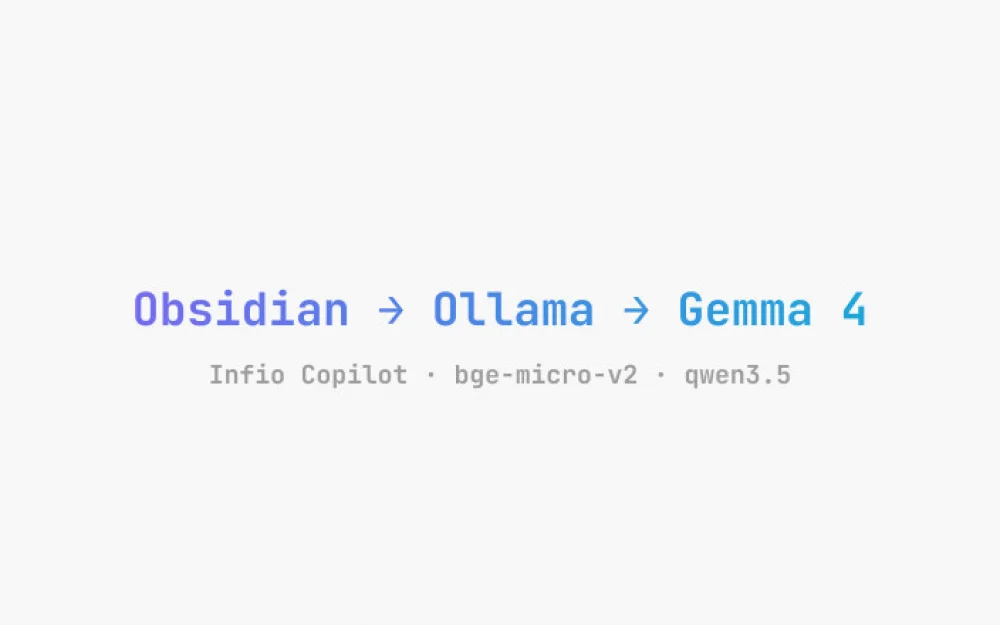
At the current stage, it looks like this for me: Obsidian + Infio Copilot + built-in bge–micro-v2 + Ollama + gemma4:e2b.
This is not yet an ideal tool. But it is already useful enough to seriously try RAG on my notes, especially if I have long wanted to turn scattered chats, notes, and drafts into a system that can converse.
About the Author
Vladislav Ponomarev
Architect, researcher in the application of AI in the construction industry, creator of the Virtual Museum of Architecture in Sochi.




Write comment