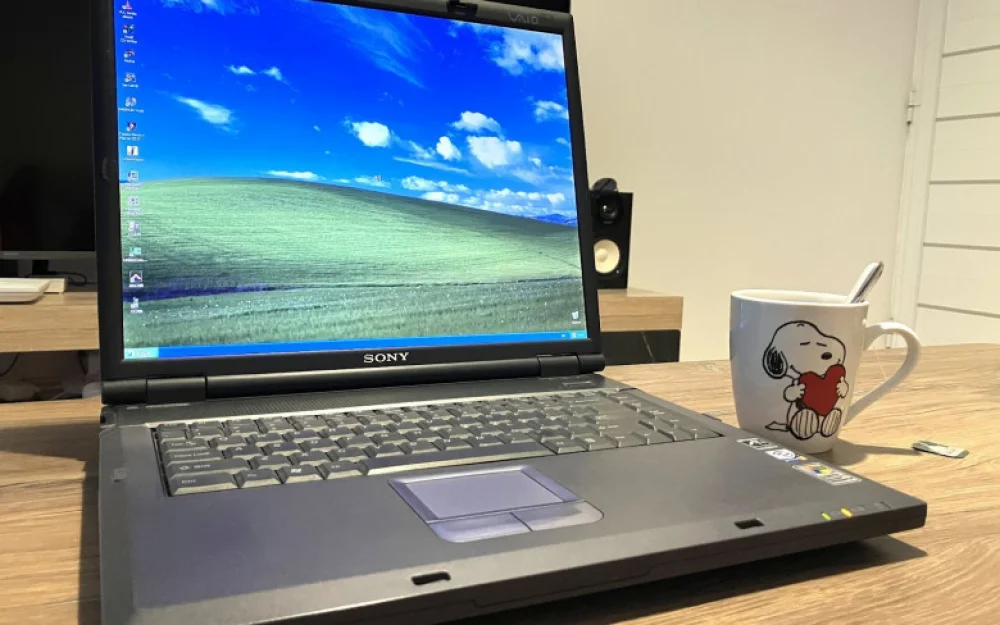
- Hardware
- A
Sony Vaio PCG-GRX700P Laptop: A Retired Samurai
While my car was in repair, I had to rely on car sharing. Hybrids are certainly economical and practical, but incredibly boring. They don't deliver strong emotions. It's a whole different story with an old Japanese car like the Toyota Mark II or Crown. It consumes gas by the bucketload, looks like a museum exhibit, but behind the wheel, you feel like a driver, not an appendage to the onboard computer.
This also applies to laptops. Modern models, with rare exceptions, in pursuit of lightness and cheaper construction, have become “refined”—convenient, but faceless. They lack individuality, and we lack the emotions from interacting with them. This probably explains my passion for ancient Compaq, ThinkPad, and VAIO. Engineers poured their soul into creating unique devices that, with their features and design, elicited a lively response.
Recently, I came across a rather rare and interesting specimen that, despite its venerable age, still works. It couldn’t be bought in a regular store—this is an exclusively custom assembly. The details are, traditionally, under the cut.
Digital Dream Kids
We often hear public figures say phrases like “Zoomers are the generation that grew up in the digital age.” This is true: from early childhood, they already had smartphones, computers, and access to the internet. And one might think of it as a result of a random turn of events, not something planned. But if we dig deeper into Sony’s history, it becomes clear: the company started preparing for this period back in 1995.
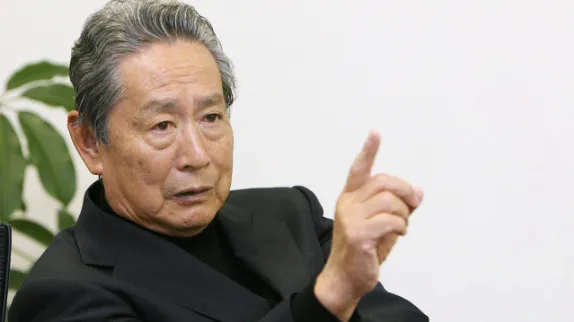
The concept of Digital Dream Kids was first formulated by Idei Nobuyuki when he became president of Sony in 1995. His vision was that products should initially be aimed not at current consumers, but at future ones—the generation of children growing up in the digital age. And to achieve this, engineers themselves need to be Digital Dream Kids, embracing new technologies with enthusiasm.
One of the physical embodiments of this idea became the VAIO laptops, the first of which was released a year later. This marked Sony's return to the personal computer market. Add to that an impressive portfolio of multimedia devices: Walkman players, Handycam cameras, PlayStation consoles, and even proprietary memory card formats. By 1996, Sony was already on track to pursue this path.
However, the perfect ecosystem did not materialize. There were two key factors that played an important role: the presence of a competitor in the form of Apple and the serious internal rivalry between company divisions. The latter often resulted in different Sony devices not being compatible with each other. The market was flooded with numerous models and a whole zoo of operating systems. Another problem was that Sony started aggressively implementing DRM technologies to combat piracy, which made their products less user-friendly.
One of the key objectives when developing VAIO was not just to create “another PC.” It had to become the embodiment of a new concept — a bridge between the company’s existing AV products and the world of computer technology. The management did not aim to compete with Compaq or Dell — they wanted to turn VAIO into a universal multimedia tekkix, a kind of digital entertainment hub. This was a long-term strategy aimed at maintaining the business for decades to come.
The subject of today’s review became the result of this strategy, which Idei “pushed” through a restructuring of the board of directors. By the time the GRX700P was released, it could safely be called a personal multimedia station in the premium segment. But this was just the tip of the iceberg. Such a laptop belonged to the CTO (Configure To Order) category, rather than fixed configurations. But let’s talk about this in more detail.
SonyStyle and Customization
It should be noted that Sony was not a pioneer in the field of custom configuration. The pioneer of CTO from the very beginning was Dell (then PC Limited), founded by Michael Saul Dell. Since 1985, the company had been offering its customers computers with a customized set of options, each of which was assembled separately. Buyers noted the high quality and reasonable price.
Dell built its business on direct sales and custom-built assembly with zero inventory. This minimized the delay between purchase and delivery, and also allowed users to save. The customer could easily assemble the cheapest computer for specific tasks. IBM followed a similar approach by offering customization for ThinkPad, but exclusively in the corporate segment.
Sony, in the early development of VAIO, took a different path. The company focused on ready-made configurations, which were distributed through retail networks like BestBuy. Therefore, it was not difficult to find GRX670, GRX690, and similar devices — this was the main business model. As a secondary model, they came up with the SonyStyle customizer. It was not created for cost savings, but for multimedia personalization — the customer could choose the screen size, optical drive type, processor speed, and more for their needs.
I could not find exact information about when VAIO launched the CTO program (sometimes referred to as BTO, Build To Order). However, based on indirect signs and pages from the internet archive, it can be concluded that at least the C1, SR, GRX, and R505 series could be ordered through SonyStyle. The assembly was done at the Sony factory in San Diego, which was later closed in 2010. One of these devices was my GRX700P.
Appearance and Specifications
The first thing that immediately catches the eye is the screen size. It’s UXGA: a full 16.1 inches with a resolution of 1600 x 1200 pixels and 32-bit color depth. The laptop itself, in the best traditions of the "desktop replacement" class, has impressive dimensions: 355 x 292 x 38 mm and weighs about 3.8 kg. So portability here is a relative concept — you wouldn’t carry this around with you to work every day. The main usage scenario is stationary, though particular attention has been paid to battery life. Take a look at the two battery charge indicators:
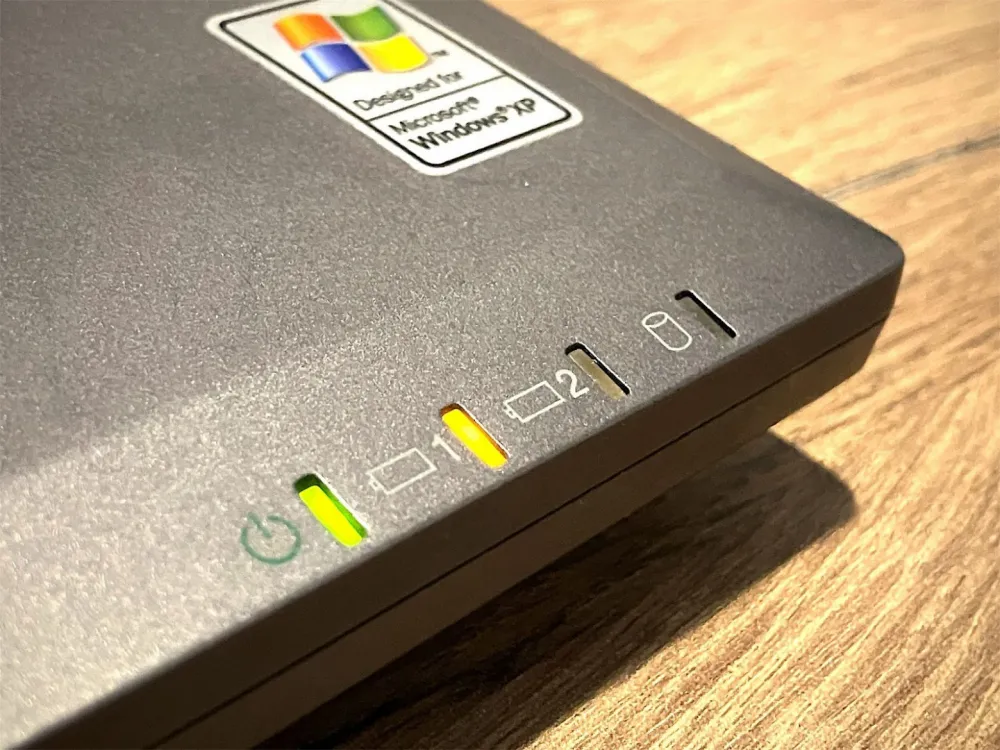
This is not an error: the laptop can indeed hold two batteries. Moreover, they support "hot swapping" — meaning you can replace them with charged ones without interrupting the work. One is installed by default, while the second connects in place of the optical drive. Inside one slot, there are actually two connectors:
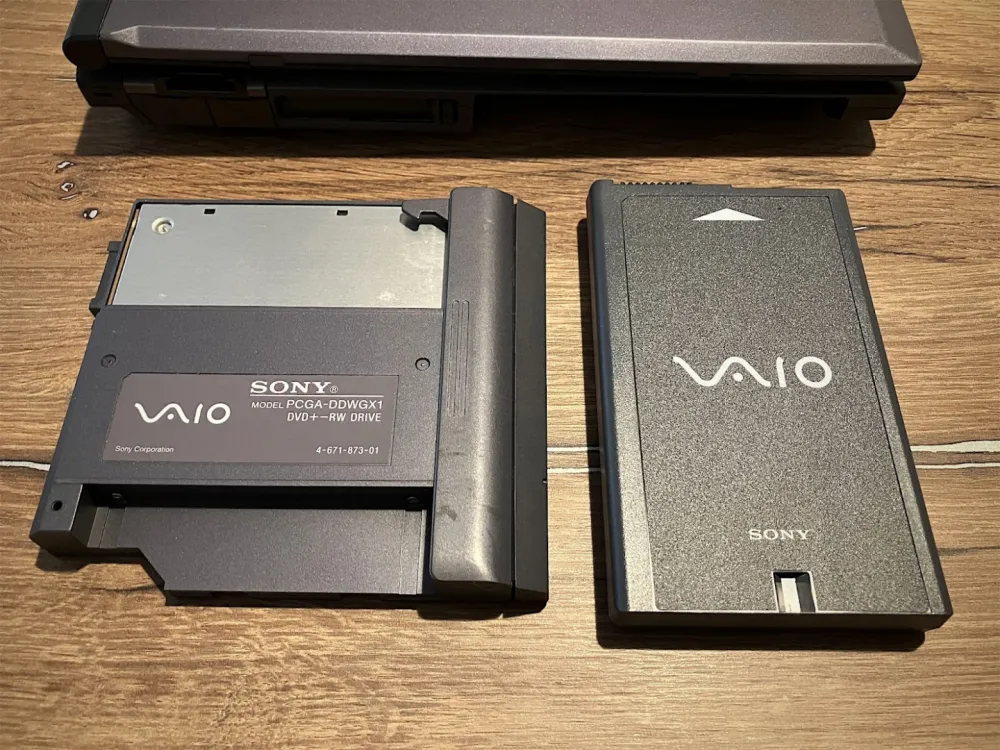
I am not sure I can find a couple of such new batteries right now, although in theory, one could be re-soldered using fresh 18650 cells. But, without a spot welding machine and a decent 3D printer, it's pointless to try. Interestingly, this power configuration is quite commonly supported in Windows XP:
Theoretically, with two fresh batteries, the laptop should have worked for 3 to 9 hours, depending on the chosen power-saving profile and computing load.
Now let's talk a bit about the silicon heart of the machine. The customer could have installed a single-core Intel Pentium 4-M processor with the following frequency options:
1.6 GHz,
1.7 GHz,
1.8 GHz,
2.0 GHz,
2.2 GHz,
2.4 GHz.
In my case, it's an Intel Pentium 4-M with a 2.2 GHz frequency and a 512 KB L2 cache, built on a 130 nm process. This is approximately 55 million transistors. At that time, motherboards used a traditional 478 mPGA socket, not BGA, which allowed easy processor replacement. Combined with a small TDP of 35 W, this was a reasonable solution for a multimedia laptop that required good performance comparable to a desktop PC:
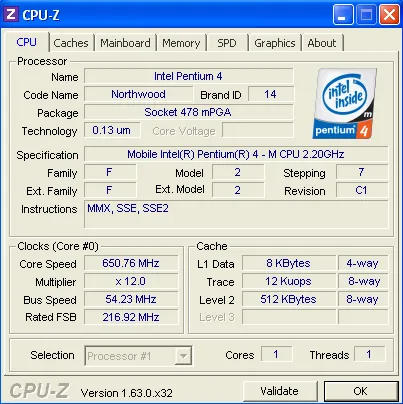
As for RAM, these machines had options of 256 MB, 512 MB, and the top variant of 1 GB. The type was DDR SDRAM SO-DIMM (PC2100), and the RAM controller was integrated into the chipset (Intel i845D northbridge). There was also an AGP 4x bus, which allowed the ATI Mobility Radeon 7500 (codename M7) graphics card to work. It supported DirectX 7.0 and OpenGL 1.3, a typical fixed-pipeline GPU (before the era of programmable shaders).
The video memory was a bit limited — 32 MB DDR SDRAM, but the 128-bit bus allowed the full potential of the memory to be realized, providing a bandwidth of 5.3 GB/s. This was critically important for 3D applications: if the machine had a 64-bit bus, at high screen resolution (and I remind you, it was 1600 x 1200), its bandwidth would simply not have been enough.
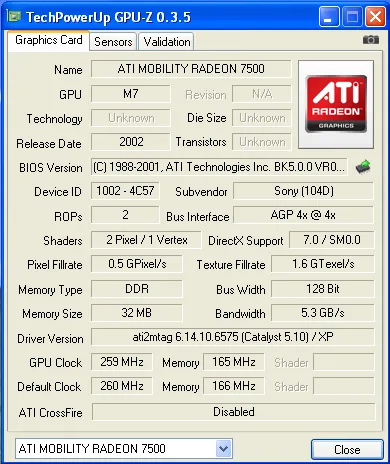
It is worth noting the presence of the PowerPlay technology. This is somewhat similar to Intel SpeedStep, but for ATI’s GPU: the chip could automatically adjust the frequency and voltage when switching from the power adapter to battery power. Moreover, power consumption parameters changed significantly depending on the type of graphics (2D or 3D) and separately when playing DVD discs.
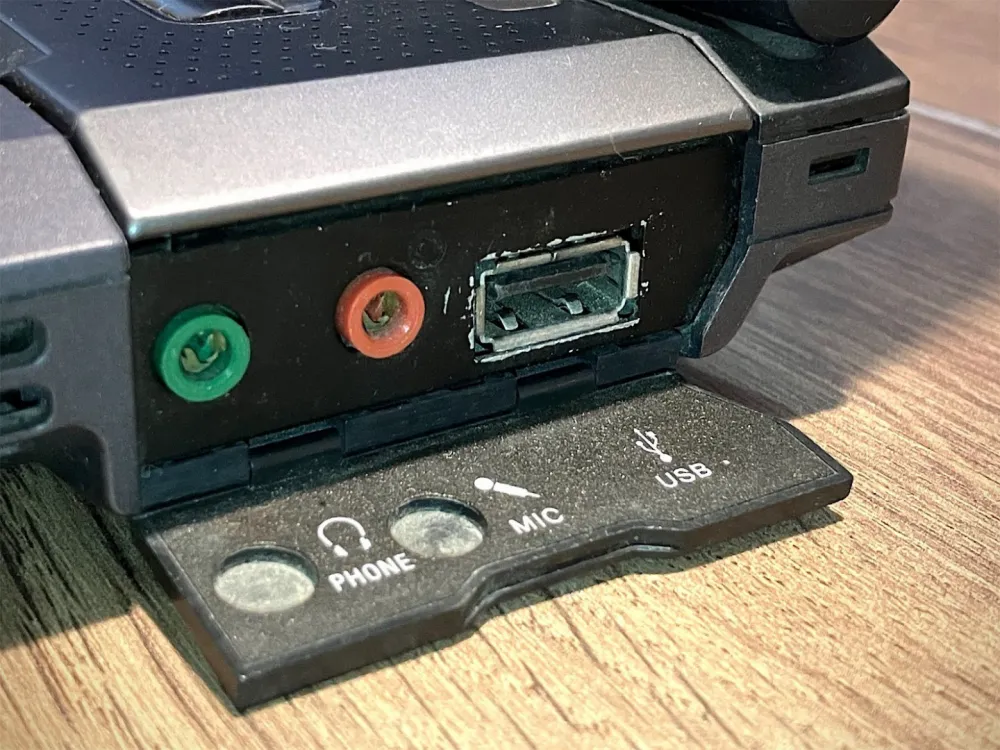
The rest of the peripherals connected via the south bridge ICH3-M. Sony was generous with the ports. All of them are covered by plugs—a simple but useful protection. The right edge housed the connectors for headphones, microphone, and USB. It is worth noting that all these ports are USB 1.1:
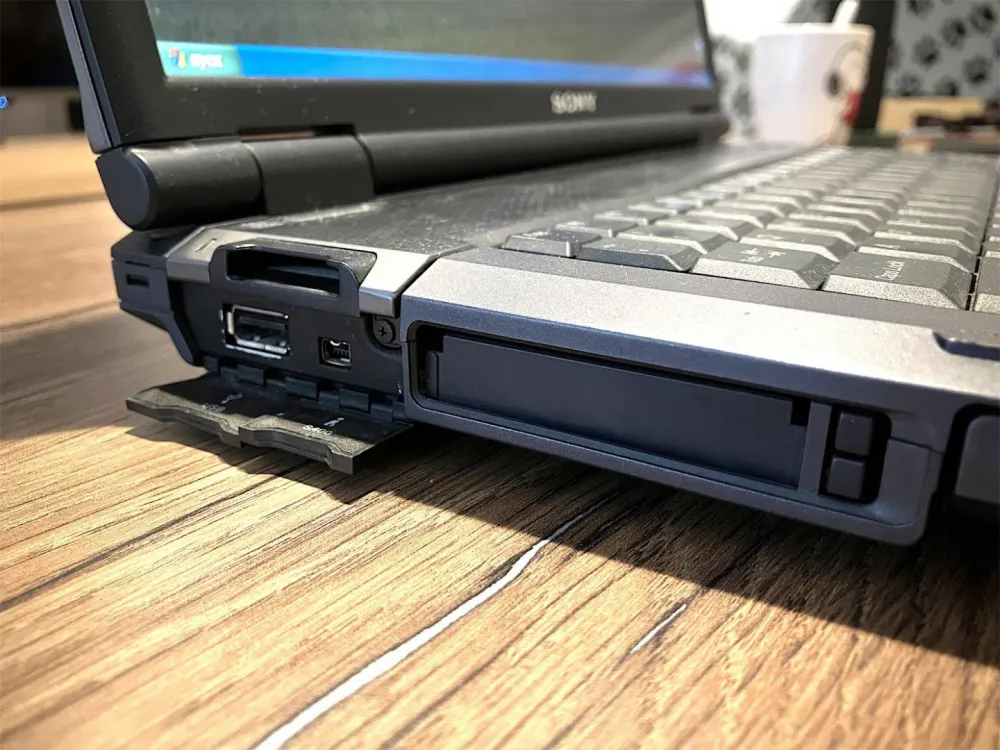
On the left edge, there was a high-speed i.Link 400 (FireWire IEEE 1394) port, which was needed either for high-speed data exchange with peripherals or for establishing a direct "point-to-point" connection between two computers. Also located there was a dual-slot PCMCIA (CardBus) expansion card socket and another USB port. On the same side, there was a card reader for reading Sony’s proprietary Memory Stick (MS) memory cards:
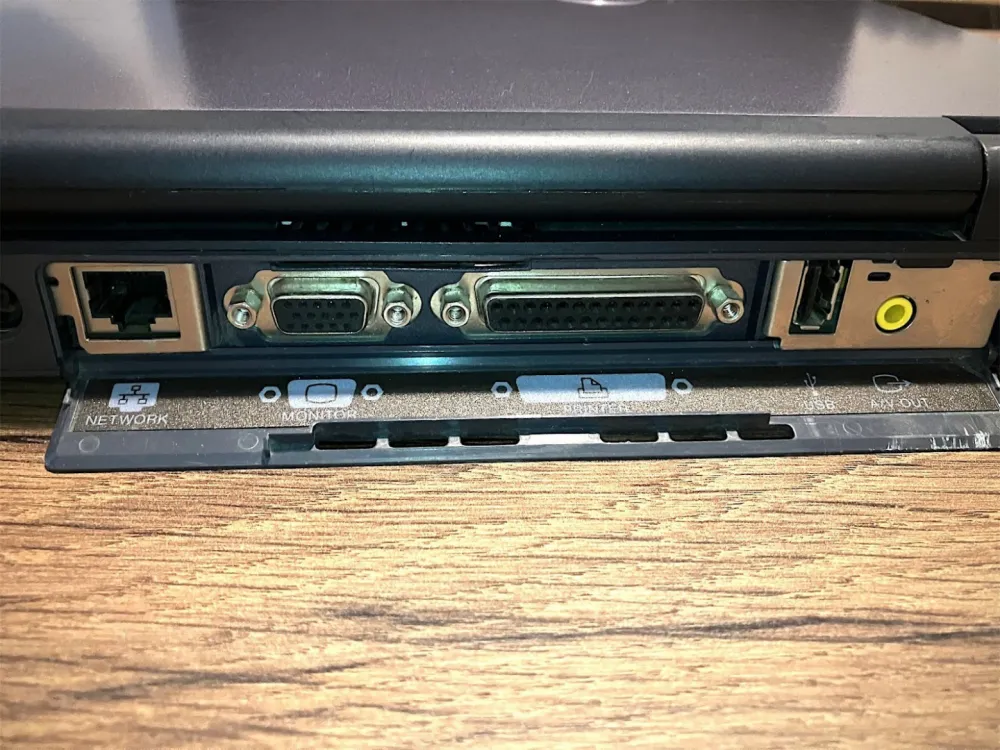
At the back, there was also a decent set of ports: modem, 10/100 Ethernet network adapter, AV-out, LPT for connecting a printer, and VGA for an external monitor or multimedia projector. The power port was also located there:
It is also worth mentioning the body. Yes, it's plastic, but it's remarkably rigid and durable. This is not like a modern flimsy panel that you can accidentally press through—here, you'd rather break your finger. The hinges are also made to last—they have not loosened or lost their balance over more than 20 years. Every mechanical element in this laptop is designed with a very solid safety margin.
The only real issue is the anti-slip feet and display dampers. They literally deteriorated into mold and linden honey. They were most likely made from thermoplastic polyurethane or styrene-butadiene rubber, which makes them susceptible to hydrolysis. Plus, the plasticizers migrated to the surface over time — in the end, instead of resilient feet, we got a sticky and gooey substance. However, removing the remnants of this with isopropyl (or ethyl) alcohol and replacing them with silicone is not a problem.
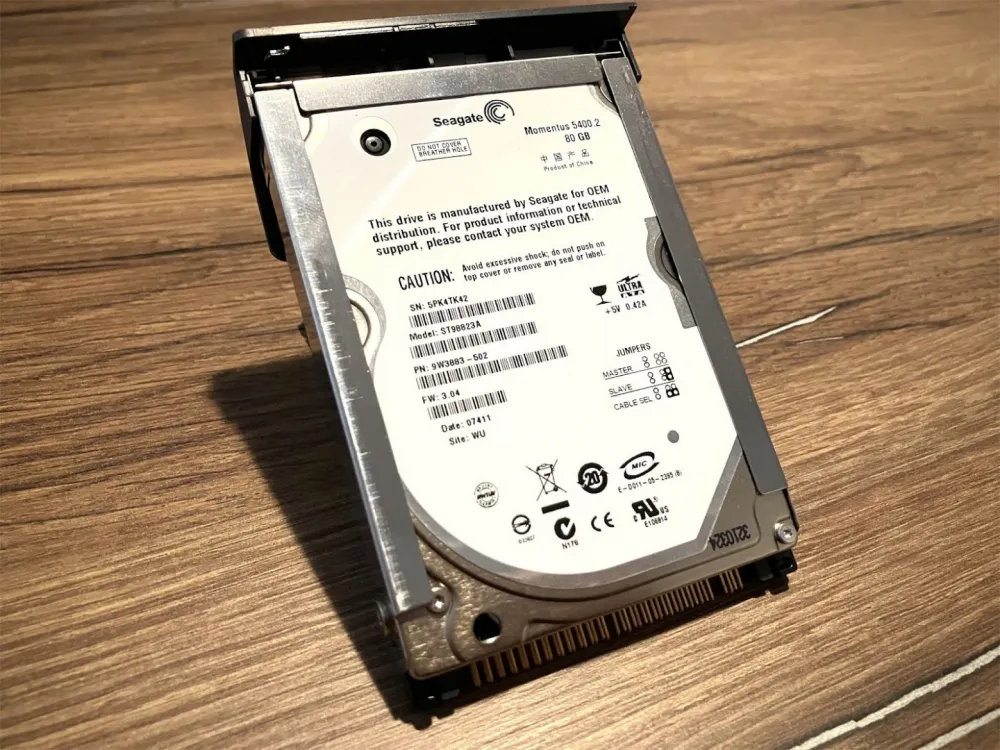
The disk drive in my unit is a Seagate Momentus 5400.2 hard drive with a capacity of 80 GB. It was quite a fast, but not exceptional, drive for its time. The manufacturer promised 600,000 hours of mean time between failures (MTBF), but in reality, such drives rarely lasted more than 3–5 years under load. However, with careful handling — without vibration and overheating — many lasted even longer.
Conclusion
Quality devices are expensive — and the GRX700P was no exception. Its price ranged from $1,800 to $2,200. Adjusted for inflation, today this is equivalent to $3,200-3,500. Since the brand positioned itself as premium, they didn’t cut corners on the components: here you’ll find quality capacitors, reliable connectors, and an efficient cooling system. The case materials were also durable and wear-resistant. This is what allowed the laptop to survive to this day without critical component degradation.
It's also worth noting Sony's approach to documentation. The company released very detailed service manuals containing all the necessary information for maintenance and repairs. Unfortunately, I was unable to find the manual specifically for the GRX700P. However, in the manual for the GRX670 model (the closest relative to my 700P), you can even find the diagram for the correct placement of DIP switches. As I mentioned in one of my previous articles, these are used to set the parameters of the installed LCD screen.
What's interesting: the laptop can't be called completely outdated even today. You can easily install the MyPal browser on it and browse modern websites without any issues. You can visit tekkix, read an article, or give it a thumbs-up — it can handle that. It performs well as a "movie theater," but only at 720p. I also use it as an SSH terminal: the large screen allows me to keep plenty of information in front of me, and the keyboard turned out to be surprisingly comfortable.
In general, this veteran has firmly established itself on my desktop. My upcoming plans include experimenting with operating systems. I want to try installing something more interesting than Windows 2000/XP on it. Perhaps even Haiku OS might work on it — a project truly deserving of respect. At first glance, the hardware meets the requirements, but there could be issues with screen resolution. However, that's already a topic for separate research.

![From Virtual Hands to AI for Survivalists: Curious Open Agent OSes [and One Hardware Project]](https://cdn.tekkix.com/imgs/2026/05/habrcom/big/ce0b1057616faed51cd8b9f3b2b9.webp)
Write comment