
- AI
- A
AI in the Work of a Systems Analyst: From Prompts to Specifications
A practical analysis with examples: requirement gathering, diagrams, Use Cases, and specifications. Advantages, disadvantages, pitfalls, and a prompt checklist for systems analysts.
Practical analysis with examples: requirements gathering, diagrams, Use Cases, and technical specifications (TS). Advantages, disadvantages, pitfalls, and a prompt checklist for a systems analyst.
Introduction
AI tools like GPT, Claude, or Qwen are actively being integrated into the daily work of a systems analyst. But how useful are they really? Can they replace an analyst?
In this article, I will explore 3 use cases of AI in the work of a systems analyst:
Requirements gathering and clarifying details.
Process modeling and diagram generation.
Writing user stories and Use Cases.
For each scenario, I will show:
Prompts of different levels of detail.
Results from different models (ChatGPT, Qwen, DeepSeek).
What worked well and what didn’t.
How much time was saved.
Spoiler
AI will not replace an analyst, but it can save them up to 70% of time on routine tasks. If, of course, you know how to work with it.
1. Requirements Gathering: How to Ask the Right Questions, Even If You Don’t Know Them Yet
Task: The stakeholder says: "We need a personal account with the ability to view orders and change contact details." A list of clarifying questions needs to be prepared.
Prompt (basic):
You are an experienced systems analyst. Create a list of clarifying questions for the stakeholder based on the description: "We need a personal account with the ability to view orders and change contact details."
Result: The AI provided general questions, but there was a lot of "noise" — questions about integrations, security, mobile version, even though the context was unclear.
Prompt (structured):
You act as an experienced systems analyst. You receive a brief description of functionality as input. Your task is to create a list of clarifying questions for the stakeholder that will help prepare detailed functional requirements. Requirements for the questions: They should be specific, not general. Focus on business logic. Identify user roles (who and how interacts with the system). Identify constraints (regulatory, technical, time, data availability). Pay attention to alternative scenarios (exceptions, abnormal situations). Indicate dependencies and integrations with other functionality or external systems. Try to formulate questions so that the stakeholder can give a clear and unambiguous answer easily. At the end, group questions by blocks: Business Logic, User Roles, Constraints, Alternative Scenarios, Dependencies. Be brief and ask questions only to the point. Functional description: "A personal account is needed with the ability to view orders and update contact information."
Comparative table “Prompt Results: Basic vs. Structured”
Criterion | Prompt 1 (Basic) | Prompt 2 (Structured) |
Specificity | ❌ The questions are general, many abstractions: “What data is mandatory?”, “Are notifications required?” | ✅ The questions focus on details: “Which contact data can be changed?”, “Which order statuses should be displayed?” |
Structure | ❌ A list of questions without grouping, chaotic order | ✅ Questions are grouped by blocks: “Business logic”, “Roles”, “Restrictions”, “Alternative scenarios”, “Dependencies” |
Suitability for stakeholder | ❌ Difficult to answer — the questions are vague, require additional clarifications | ✅ Convenient to answer — the questions are specific, focused on business logic, the stakeholder can provide clear answers |
Effectiveness | Requires further reworking by an analyst | ✅ Ready to use after minimal adjustments |
Example question | “Is integration with other systems planned?” (without clarification) | “Should the order history be shown completely or only the current/most recent?” |
🏆 Result: Much better. ChatGPT, Qwen, and DeepSeek produced structured lists.
What worked:
✅ Grouping by blocks helps systematize the questions.
✅ The clarification “without general phrases” reduced the level of “water”.
✅ Different models complement each other — Qwen, for example, asked about hiding orders with the “Cancelled” status.
What didn’t work:
❌ Some questions are still too abstract.
❌ The AI doesn’t know the context of the company — for example, regarding internal integrations.
Conclusion: AI can generate 80% of the questions in 5 minutes instead of 40 minutes of manual work. But the final selection, rewording, and contextualization are up to the analyst.
2. Process modeling: how to get AI to draw a diagram that won’t be embarrassing to show to an architect
Task: Describe the user registration process in an online store in the form of a sequence diagram (PlantUML).
Prompt (basic):
Generate code for a sequence diagram in PlantUML for the user registration process.
Result: A low-detail diagram.
It took several iterations before I got a version I was satisfied with
Prompt (detailed):
Generate code for a sequence diagram in PlantUML describing the user registration process in an online store. System participants: User (Actor), Front-end (Interface), Registration Service, "Users" Database. Required fields: Last Name, First Name, Phone Number. Be sure to account for alternative scenarios: This user already exists in the system, Invalid data (last name, first name, phone), Connection timeout. Include requirements for specifying HTTP statuses and error messages. Technical requirements: Use separators for logical blocks. Add auto-numbering for messages. Use different arrow types for synchronous and asynchronous operations. Add notes for complex operations. Return only the PlantUML code.
Final Result
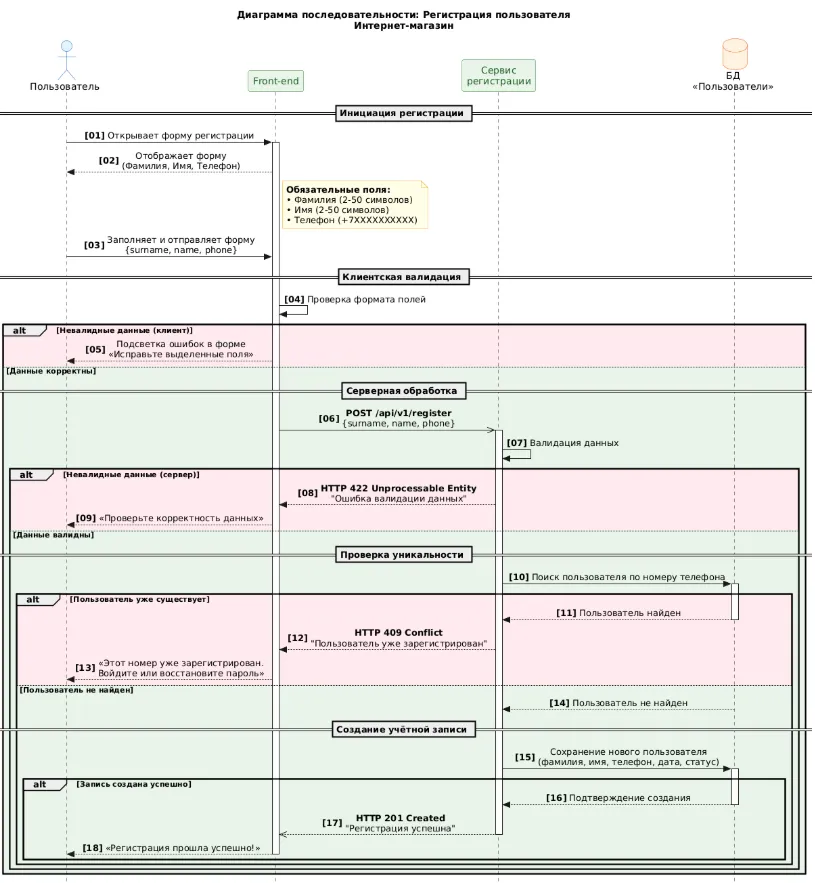
🏆 Result: The diagram became detailed, with alt-blocks and error messages.
What worked:
✅ The more detailed the prompt, the better the result.
✅ Quick debugging possible thanks to PlantUML code support.
What didn’t work:
❌ AI does not understand nuances of business logic (for example, "phone verification via SMS").
❌ Manual adjustment of names and step order is required.
Conclusion: AI generates the skeleton of a diagram in 10–15 minutes instead of 30 minutes. But exception logic and business rules must be added by a human.
3. Use Cases: from template texts to technical specifications
Task: Describe the Use Case "Sorting reviews on a product page".
Prompt (basic):
You are an experienced systems analyst. Your task is to prepare the most detailed use case based on my description. Context:
System: "Online Store Website". Use Case: "Sorting reviews on a product page". Main actors: "Customer" and "Website"
Result — vague formulations, no technical details.
Prompt (detailed, with structural requirements):
Role: You are an experienced systems analyst, an expert in describing requirements through use cases. Task: Based on the context below, prepare a detailed, structured, and technically correct use case oriented towards implementation in a web application. Context: System: online store website. Use Case: sorting reviews in the product card. Actors: User, Website (frontend + backend). Use Case format requirements: 1) Title — short and meaningful. 2) Brief description — 1-2 sentences reflecting the goal and essence of the scenario. 3) Actors — all participants with indication of primary and secondary. 4) Preconditions — what must be true before the scenario begins. 5) Postconditions — the state of the system and data after successful completion. 6) Main scenario — numbered “happy path” (1..N), step-by-step, atomic actions with indication of actor-system interaction. 7) Alternative scenarios — all significant errors, exceptions, boundary cases, and branches with reference to the steps of the main scenario (e.g., absence of reviews, server error, incorrect sorting parameter, etc.). Additionally: Use professional terminology, but without excessive abstraction. Consider both client-side (frontend) and server-side (backend) logic.
🏆 Result — specific steps, API endpoints, HTTP statuses, alternative scenarios tied to the steps.
Example fragment (result of ChatGPT's work):
Steps of the main scenario suggested by ChatGPT:
Main scenario | 1 | The buyer opens the product page (for example, by following a link from the catalog). |
2 | The website loads product data and a list of published reviews via the API (for example, GET /api/products/{id}/reviews?page=1&sort=date_desc). | |
3 | The frontend displays the reviews in the default order (date_desc — from newest to oldest). | |
4 | The buyer notices the sorting control (a dropdown list with options). | |
5 | The buyer selects a sorting criterion, for example, "By rating: from high to low" (rating_desc). | |
6 | Frontend generates a new request to the backend: GET /api/products/{id}/reviews?page=1&sort=rating_desc | |
7 | The backend validates the sort parameter, checking it against the list of valid values. | |
8 | The backend retrieves reviews from the database based on product_id, applies sorting, and returns the result in the response body. | |
9 | The frontend receives the response, clears the current review block, and renders the updated list. | |
10 | The buyer sees the sorted reviews and can continue interacting with the site. |
Alternative scenario steps suggested by ChatGPT:
Alternative scenario 1 – The product has no reviews (deviation from step 2 of the main scenario)
| 1 | The backend returns an empty array of reviews. |
2 | The frontend displays the message: "No reviews yet. Be the first!" | |
3 | The sorting control is hidden or inactive. | |
4 | Use Case ends — sorting is unavailable. | |
Alternative scenario 2 - Error during API request (deviation from step 8) | 1 | The backend returns HTTP status 5xx or 4xx |
2 | The frontend displays a notification: "Failed to load sorted reviews. Please try again later." | |
3 | The review block remains in its previous state. | |
4 | The URL does not change. | |
5 | The sorting control reverts to its previous value. | |
Alternative scenario 3 - Invalid sorting parameter (deviation from step 7) | 1 | The buyer manually modifies the URL: ?review_sort=unknown_value. |
2 | The backend rejects the parameter as invalid and applies the default sorting (date_desc). | |
3 | The frontend adjusts the URL, replacing the parameter with the correct one. | |
4 | The buyer sees the reviews in the default order without errors. |
What worked:
✅ Clear structure (Preconditions, Postconditions, Main scenario, Alternatives).
✅ Technical details — endpoints, statuses, parameters.
What didn’t work:
❌ AI can “hallucinate” — for example, add non-existent fields.
❌ Business context (for example, “show only reviews with a rating > 3”) needs to be added manually.
Conclusion: AI helps quickly sketch the framework of a Use Case, but the detailing and validation should be done by the analyst.
The dark side of AI: what marketing articles don’t mention
Hallucinations — AI can invent non-existent entities, fields, APIs.
Input data quality — “
garbage inbad prompt → garbage out”. The prompt must be well-formed.Security — uploading confidential data to cloud AI services is risky. It is better to use local solutions (e.g., corporate GPT).
Responsibility — the final decision, validation, and signing of the technical specifications remain with the analyst.
Conclusion: AI as an assistant, not a replacement for the analyst

AI tools do not replace system analysts, but become their assistants, which:
Speed up routine tasks by 60–70%.
Help structure thoughts.
Generate document frameworks.
AI allows the analyst to focus on the main tasks: deep understanding of the business, decision-making, and formulating clear requirements for development. It is important to use GPT wisely, not as a replacement for the analyst, but as a solution that speeds up their work.
A well-formed prompt is the key to a quality result. Therefore, learning prompt engineering is necessary for working with AI, and if there is no time for deep immersion in the topic right now, you can use the checklist below.
Prompt checklist for system analysts:
Formulate a specific goal and expected outcome (what is needed and for whom).
Set the AI role and level of detail ("you are an experienced systems analyst in the field of ...").
Describe the context: system, users, key constraints.
Specify the format and structure of the response (list of requirements, Use Case, table, etc.).
Set quality criteria: no general phrases, technically accurate, mark assumptions.
Ask the AI to request clarifying questions if data is insufficient.
After the response, check applicability to the project and refine manually if necessary.





Write comment