- DIY
- A
3D Printing on Steroids: How I Taught the Creality K1C to Calculate Filament Costs
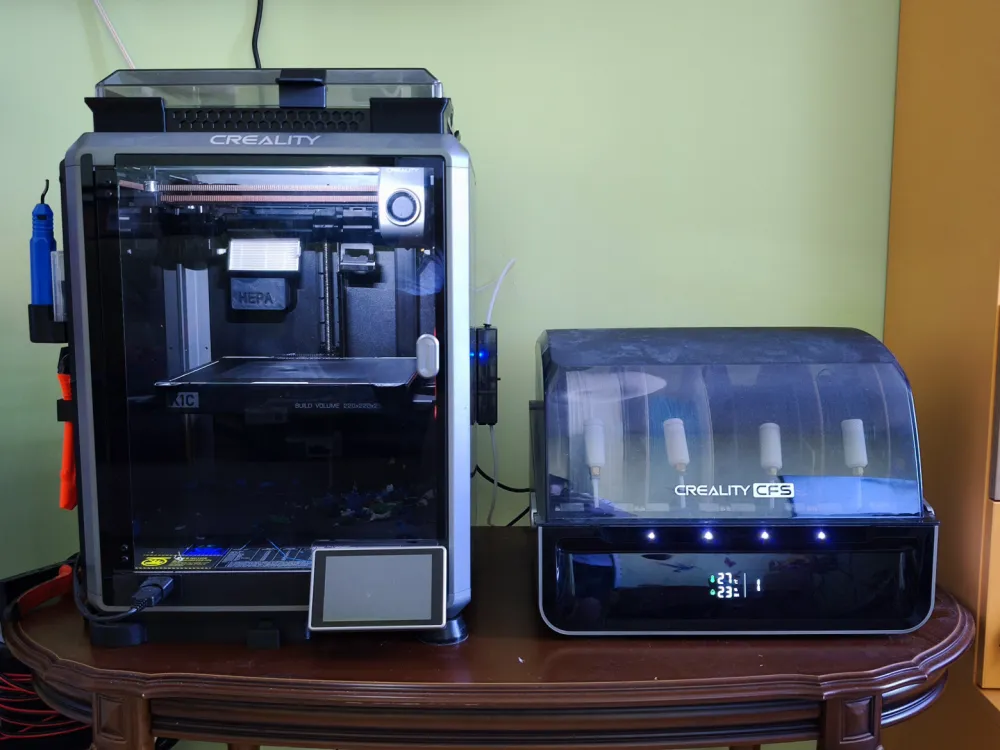
A little over a year ago, I bought a Creality K1C. Overall, I was satisfied with the printer, but over time, some inconveniences and flaws emerged, and I wanted to fine-tune the machine to my needs.
When I bought the Creality K1C at the end of 2024, it seemed like a foreign car compared to the "Zhiguli" — my previous 3D printer. I spent about three months setting up the old one, while the K1C worked as soon as I unpacked it. It prints pretty well out of the box (here are some examples of prints), but over time, this "foreign car" also had its flaws. And, to try to fix them, I did what I always do if the hardware allows — I rooted it.
Printer Drawbacks
First, I found a problem with the stock launcher: it would freeze during printing and not turn on the backlight. This bug has been around for months, and it’s unknown when it will be fixed.
Second, the default interface didn't allow sending custom commands or interfering with the printer's operation in any way. Overall, I also don’t like proprietary stuff.
And while I could somehow accept these shortcomings, there was one more that particularly upset me: the printer didn’t allow me to know in advance if there would be enough filament for the print, or if I would have to stop the process and change the spool.
Beginning of Customization
It turned out that customizing the K1C isn’t hard (especially with the older printer versions) — Creality Helper Script was our helper.
I solved the first two problems quite quickly: for the web interface, I chose the open-source Fluidd — it’s much more flexible than the built-in interface, and I replaced the freezing launcher with Guppy Screen. Meanwhile, the default Moonraker remained on the backend, and the entire cloud machinery stayed functional.
Now, about organizing filament counting. In the Guppy Screen menu, I noticed an interesting item — Spoolman. I decided to check what this was about, and found out that it’s essentially a filament inventory manager. You can log all your spools, indicate stock and leftovers, and then, during printing, use the Spoolman API to update the filament usage in real-time in the format: "using spool with ID such-and-such, spent X mm/g."
At first, I was happy, thinking this was it — almost a ready-made solution. But then, I realized…
Challenges with Filament Counting
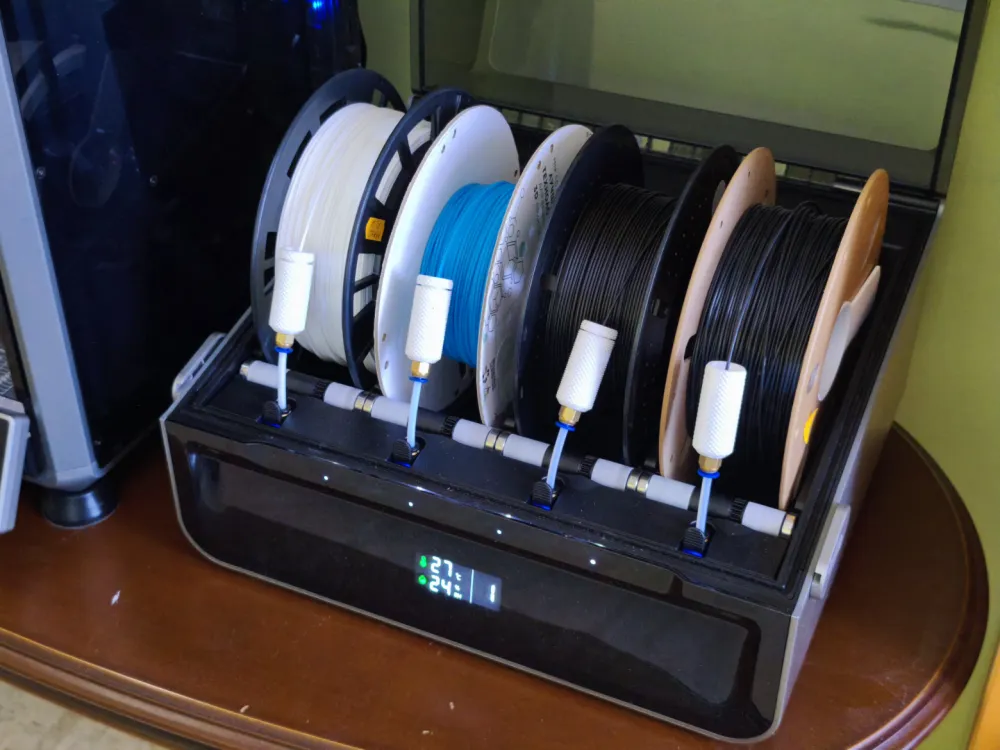
To partially solve the problem of constantly having to manually change the filament for multicolor printing (or when the spool runs out), I bought a CFS system — an automatic feeding system with four slots. This meant that for accurate filament tracking in Spoolman, I would have to manually press the "Change spool" button every time. I often print several parts in different colors as part of a single print job. And babysitting for hours to press the spool change button on time in Spoolman — that’s not our way. So, I decided to figure out how to automate the process.
In Spoolman, there is the concept of Location — where the spool locations are specified. You can get the contents of a specific Location through the Spoolman API in the form of spool IDs. This can be implemented in the following scheme: we set the spools in CFS according to the Location manually (create four slots + a fifth one with all the spools available), and in case of a physical spool change in CFS, we simply drag-and-drop the spools in the slots.
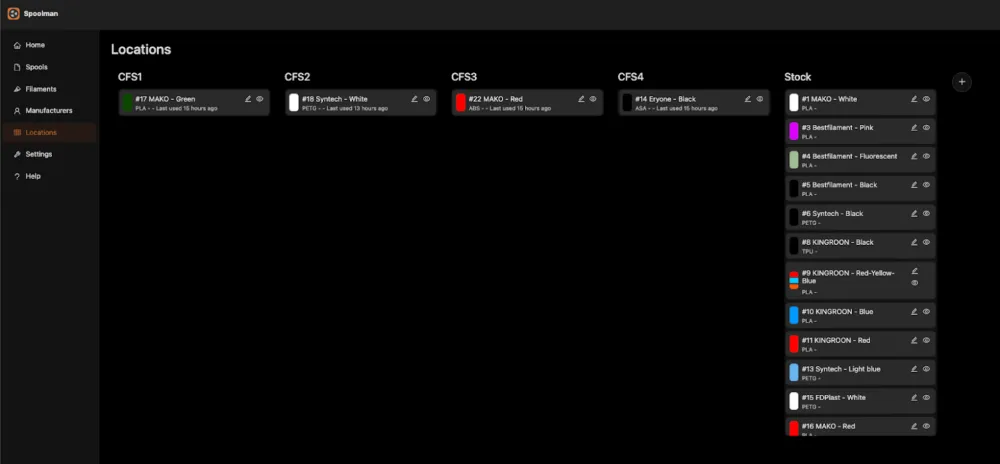
From there, it all boils down to the fact that during printing, you need to get the slot contents (spool ID) via the Spoolman API and select the required spool via the Moonraker API. Thus, when commands are executed on the extruder, the printer will pass a command via the API to Spoolman to subtract the encoded amount of plastic from the specific spool as encoded in the G-code.
It's worth mentioning a few limitations regarding the printer, which didn't allow the solution to be quite as "concise." The K1C "out of the box" did not support CFS, but after a couple of years, the manufacturer released an official Upgrade Kit, a new firmware version, and this became possible. On the slicer side (I use the stock Creality Print), CFS support also appeared in the interface. However, filament selection is done through macros T0–T3 (according to the number of CFS slots), which are hardcoded in the firmware, and we couldn't override them. And Moonraker has no idea how the printer interacts with CFS, so it can't display the current filament and, consequently, pass it to Spoolman.
Solution
I had to create an entirely new macro for slot switching and specify it everywhere in the gcode settings of the slicer. To do this, I added the following code to the files:
# /usr/data/printer_data/config/gcode_macro.cfg

[gcode_macro ACTIVATE_SPOOL_BY_CFS_SLOT]
gcode:
    {% set slot = params.SLOT|int + 1 %}
    RUN_SHELL_COMMAND CMD=get_spool_id PARAMS="CFS{slot}"

# /usr/data/printer_data/config/printer.cfg

[gcode_shell_command get_spool_id]
command: python3 /usr/data/scripts/get_spool_id.py
timeout: 10.
verbose: False

# /usr/data/scripts/get_spool_id.py

import urllib.request
import json
import sys
import os
# 1. Disable proxies to ensure local access works
os.environ['no_proxy'] = '*'
SPOOLMAN_URL = "http://172.17.2.222:7912"
MOONRAKER_URL = "http://127.0.0.1:7125/printer/gcode/script"
if len(sys.argv) < 2:
    sys.exit(0)
location = sys.argv[1]
try:
    # 1. Get Spool ID by location
    # Added timeout=2 to prevent hanging
    with urllib.request.urlopen(f"{SPOOLMAN_URL}/api/v1/spool?location={location}&archived=false", timeout=2) as r:
        spools = json.loads(r.read().decode('utf-8'))
    if spools:
        # Take the first matching spool
        spool_id = spools[0]["id"]
        # 2. Update Klipper/Fluidd UI (Proper JSON POST)
        # We send G-code in the body, not in the URL string
        req_ui = urllib.request.Request(
            MOONRAKER_URL,
            data=json.dumps({"script": f"SET_ACTIVE_SPOOL ID={spool_id}"}).encode('utf-8'),
            headers={'Content-Type': 'application/json'},
            method='POST'
        )
        urllib.request.urlopen(req_ui, timeout=2)
except Exception:
    # Silent fail for Klipper stability
    pass
In the printer settings in the Creality Print slicer, I added new lines.
Machine start G-code:
START_PRINT EXTRUDER_TEMP=[nozzle_temperature_initial_layer]
BED_TEMP=[bed_temperature_initial_layer_single]
ACTIVATE_SPOOL_BY_CFS_SLOT SLOT=[initial_no_support_extruder] # added line
T[initial_no_support_extruder]
M204 S2000
M104 S[nozzle_temperature_initial_layer]
G1 Z3 F600
M83
G92 E0
G1 Z1 F600
Change filament G-code:
ACTIVATE_SPOOL_BY_CFS_SLOT SLOT={next_extruder} # added line
G2 Z{z_after_toolchange + 0.4} I0.86 J0.86 P1 F10000 ; spiral lift a little from second lift
G1 X42 Y180 F30000
G1 Z{z_after_toolchange} F600
This code calls the Spoolman API from the G-Code of a specific part before loading filament, retrieves the spool from Location, and inserts the spool ID into the Moonraker API for display in the web interface and proper tracking during printing.
Naturally, the system is not without flaws. Here are the most obvious ones off the top of my head:
If Spoolman is unavailable, no change will happen.
The filament is not always calculated correctly because the weight of the empty spool is often unknown.
Moonraker itself may freeze during printing (likely due to insufficient RAM in the printer), which nullifies any attempts at tracking.
Some of these problems can be tolerated, others will be fixed over time. Otherwise, I'm happy as a clam — one more automation in the bank :)
And a few more improvements
But I wouldn't be myself if I didn't try to automate things a little more. With the current settings, during the physical change of the spool, you need to remember to place it in the corresponding Location in Spoolman. Naturally, I kept forgetting to do this. So, when I had a free minute, I improved the logic with auto-updating Locations through a cron job.
For this, I had to parse the logs /usr/data/creality/userdata/log/web-server.log. No other methods were immediately found, but the logs contain all the necessary information. Each spool has a unique serial number — I just assign it using a randomizer in "RFID for CFS" when writing the label. When unpacking a new spool and adding it to the Spoolman database, it goes into the additional Serial field. A CronJob is running on the printer, which parses the log every minute, finds all the serial numbers by CFS slots, and matches them with the corresponding Location in Spoolman.
Here's the script:
root@K1C-73A1 /root [#] cat /usr/data/scripts/cfs2spoolman.py
import json
import urllib.request
import urllib.error
import re
import sys

# --- CONFIG ---
SPOOLMAN_URL = "http://172.17.2.222:7912"
LOG_FILE = "/usr/data/creality/userdata/log/web-server.log"

def get_cfs_slots():
    try:
        with open(LOG_FILE, 'rb') as f:
            content = f.read().decode('utf-8', errors='ignore')
    except:
        return {}

    pattern = r'"materialId":\s*"([A-D])"(?:(?!"materialId").)*?"serialNum":\s*"([^"]+)"'
    matches = re.findall(pattern, content, re.DOTALL)

    slots = {}
    for letter, serial in matches:
        idx = ord(letter) - ord('A')  # 0..3
        slots[idx] = {"serial": serial}

    return slots

def get_spools():
    try:
        req = urllib.request.Request(f"{SPOOLMAN_URL}/api/v1/spool")
        with urllib.request.urlopen(req) as r: return json.loads(r.read().decode())
    except: return []

def update_spool(spool_id, loc, current_loc):
    if current_loc == loc: return
    print(f"    >>> Syncing Spool {spool_id} -> {loc}")
    try:
        data = json.dumps({"location": loc}).encode('utf-8')
        req = urllib.request.Request(f"{SPOOLMAN_URL}/api/v1/spool/{spool_id}", data=data, headers={'Content-Type': 'application/json'}, method='PATCH')
        urllib.request.urlopen(req)
    except Exception as e: print(f"    [!] Update failed: {e}")

def main():
    print("--- CFS Sync V8 (with cleanup) ---")
    slots_db = get_cfs_slots()
    if not slots_db:
        print("  [FATAL] No serials found.")
        sys.exit(0)

    spools = get_spools()

    # Collect the serials that are currently in the slots (valid).
    current_serials = set()
    for i in range(4):
        serial = slots_db.get(i, {}).get("serial")
        if serial not in ["0", "000000", "None", "", "N/A", None]:
            current_serials.add(serial)

    print(f"Current active serials: {sorted(current_serials)}\n")

    # === DIRECT SYNCHRONIZATION: place spools in slots ===
    for i in range(4):
        serial = slots_db.get(i, {}).get("serial")
        slot_name = f"CFS{i+1}"

        if serial in ["0", "000000", "None", "", "N/A", None]:
            print(f"Slot {i+1}: [Empty/No Serial]")
            continue

        print(f"Slot {i+1}: Serial='{serial}'")

        found = None
        for s in spools:
            extra = s.get("extra", {})
            if isinstance(extra, str):
                try: extra = json.loads(extra)
                except: extra = {}
            extra = {k.lower(): str(v) for k,v in extra.items()}

            if extra.get("serial") == serial or extra.get("sn") == serial:
                found = s
                print(f"  -> Match: {s['filament']['name']}")
                break

        if found:
            update_spool(found['id'], slot_name, found.get("location"))
        else:
            print(f"  [WARN] Not found in Spoolman. Add 'serial': '{serial}'")

    # === BACK SYNCHRONIZATION: clean old spools from CFS slots ===
    print("\n--- Cleanup phase ---")
    cfs_locations = {"CFS1", "CFS2", "CFS3", "CFS4"}

    for s in spools:
        loc = s.get("location", "")
        if loc not in cfs_locations:
            continue

        # Extract serial from extra.
        extra = s.get("extra", {})
        if isinstance(extra, str):
            try: extra = json.loads(extra)
            except: extra = {}
        extra = {k.lower(): str(v) for k,v in extra.items()}

        spool_serial = extra.get("serial") or extra.get("sn")

        # If this spool's serial is NOT among the active ones, move to Stock.
        if spool_serial not in current_serials:
            print(f"Spool {s['id']} (serial={spool_serial}) is in {loc} but NOT in CFS anymore")
            update_spool(s['id'], "Stock", loc)

if __name__ == "__main__":
    main()
We put all this in Cron:
crontab –e
* * * * * python3 /usr/data/scripts/cfs2spoolman.py > /dev/null 2>&1
It turned out that Cron cannot be set up inside the printer without workarounds, as the system expects the path /var/spool/cron/crontabs. This folder is located in the printer’s temporary memory (tmpfs) and is completely erased during every reboot, causing all tasks to disappear.
To prevent the tasks from disappearing, we allocate space on the permanent disk partition /usr/data. First, we need to create a directory for the reliable storage of the root user’s crontab:
mkdir -p /usr/data/crontabsThen, you can create an empty task file that will be copied to tmpfs on each system startup:
touch /usr/data/crontabs/rootFor automatic service startup, create an autoload file /etc/init.d/S98cron. This script will recreate the folder structure, pull the task file from the permanent disk, and start the crond process in the background every time the printer is turned on.
cat << 'EOF' > /etc/init.d/S98cron
#!/bin/sh
mkdir -p /var/spool/cron/crontabs
if [ -f /usr/data/crontabs/root ]; then
    cp /usr/data/crontabs/root /var/spool/cron/crontabs/root
fi
crond -b
EOF
After creating the script, you need to give it permissions with the command chmod +x /etc/init.d/S98cron and start the service using /etc/init.d/S98cron start.
When adding scripts using the standard command crontab -e, the changes are only saved to the temporary memory /var/spool/cron/crontabs/root. To ensure the tasks don’t disappear after a printer reboot, they must be copied back to the disk. To do this, after every crontab edit, you must manually execute the save command:
cp /var/spool/cron/crontabs/root /usr/data/crontabs/rootConclusion
As I mentioned above, the solution has its drawbacks, but overall, they don’t prevent me from roughly determining how much filament is left and whether it will be enough for the print. For example, from a recent experience: I saw that there were only 8 grams of plastic left on the spool (literally a few turns), so I didn’t start the print. If I hadn’t seen the remaining filament and started the process, the print would have stopped, and after changing the filament, there would have been a visible joint on the print where the spool was changed. So now my prints have the bonus of neatness.
In the future, I would like to figure out how to swap the bed, so I could print continuously without waiting for the print to finish and without having to clean the bed manually before the next job. But that’s probably going to be a whole different story :)
P. S.
Also read:
Rigonda 2.0: how I married Alice on a radio, or two reasons to open up a Soviet music center
How I taught an old DVR to send alerts from home surveillance cameras to Telegram
Checking if the fire suppression module could have caused the fire in the warehouse

Write comment