- Software
- A
Not just OpenBMC: how we built our BMC
Last summer we shared a complex yet fascinating journey in creating a UEFI bootloader for OpenYard's server products. Now we want to turn to its constant companion - the BMC, without which it's hard to imagine a complete server platform today.
When talking about a server platform, the focus is usually on processors, memory, storage, and network cards ― in other words, everything that directly affects performance. However, any modern server system has another, less noticeable layer, without which normal operation quickly turns into a set of compromises. We are talking about BMC ― embedded software that remains active even when the main server is turned off, hung, or hasn’t even reached the operating system boot.
It is BMC that allows you to remotely turn on the machine, view the console, mount an image for installing the system, check the temperature, power, and hardware logs. In words, this sounds like a standard set of capabilities. In practice, it is here that the difference between a formally working solution and a system that is truly convenient to operate quickly becomes apparent.
What is BMC and why is it important
Baseboard Management Controller (BMC) is a specialized independent microcontroller embedded in the motherboards of servers and industrial workstations. To put it simply, it is a computer within a computer: it lives its own life, has its own firmware, and continues to operate independently of what happens with the main OS.
This is why you can manage the server through BMC even in cases where a kernel panic has occurred, the hypervisor has hung, or the system is not even installed yet.
In everyday use, this means quite simple but critically important things. If a server crashes at night in a remote rack, there’s no need to send an engineer to the data center just to press the power button or connect a monitor. If the system needs to be urgently reinstalled, the image can be mounted remotely. If there’s suspicion of overheating, power issues, or failure of one of the components, the necessary telemetry and logs usually come through the BMC. Therefore, in the infrastructure's daily life, this has long ceased to be an optional feature and has become a basic working tool.
To put it briefly, BMC is needed for four basic scenarios:
remote power management of the server,
access to the console and service functions regardless of the OS,
monitoring the hardware state,
collecting events, logs, and diagnostic information.
Every major server hardware manufacturer has its own BMC stack and its own name for it: Dell develops iDRAC, HPE - iLO, Lenovo and IBM - IMM. Smaller players often use ready-made platforms from American Megatrends or Insyde Software. And here begins an important part of the story for us: a noticeable share of modern solutions of this class already relies in one way or another on OpenBMC - an open project that has become the technological basis for the new generation of BMC firmware.
OpenBMC as a support point
To simplify, OpenBMC is an open-source platform for creating BMC firmware. Essentially, it is a specialized operating system for the server management controller. Unlike older closed implementations, where each vendor had its own stack with its own limitations, OpenBMC offers a more understandable and modular architecture based on Linux and the Yocto Project. The hardware configuration here is described in text files and manifests, and a significant part of the logic is built around a set of user-space services.
This is the path that OpenYard has chosen as well. The reasons were quite pragmatic: open source code, accessible documentation, minimal closed components, and the ability to deeply adapt the platform to its own tasks. For a server solution, this is important not only from an engineering perspective but also in terms of transparency, security, and certification.
In practice, OpenBMC was attractive to us for several reasons:
provides access to the source code and a predictable architectural base,
allows for reduced dependence on closed components,
offers a large amount of basic functionality out of the box,
leaves room for deep product customization according to specific requirements.
At first glance, the scenario seems obvious: take OpenBMC, adapt it for your hardware, check the basic services ― and the task is solved. But it quickly becomes clear that there is a significant difference between “OpenBMC has booted on a new platform” and “this is actually convenient to use in real infrastructure.” The base project provides a solid foundation: remote power management, working with sensors, event logs, KVM, Virtual Media, network configuration, NTP, and user management. The problem lies elsewhere: in almost every one of these areas, real-world operation requires either greater depth, greater flexibility, or simply a clearer user scenario.
Therefore, the task of OpenYard from the very beginning was not just to run OpenBMC on its own platform. It was important for us to build our own solution based on it, suitable for normal daily operations. Thus, OYBMC was born ― a fork and a separate development layer, where the typical adaptation ended quite quickly, and full engineering work began.
Where porting ends and the product begins
One of the first major focuses is the web interface. Despite the overall trend towards automation, the WebUI in BMC remains an important part of the user experience. Even in a well-automated environment, a very mundane scenario regularly arises: quickly accessing the interface, checking the hardware status, opening the event log, inspecting one specific node, or performing a one-time action with just a couple of clicks without a separate script and the hassle around the API. Therefore, the interface in OYBMC did not remain a formal overlay over the services but became a full-fledged area for development.
We consciously did not change the stack: Vue.js remained the foundation. However, the interface has been significantly revamped both in terms of appearance and use cases. More convenient navigation, quick access elements, summary tables, additional visual objects appeared—in short, the interface became less utilitarian and more suitable for everyday work.
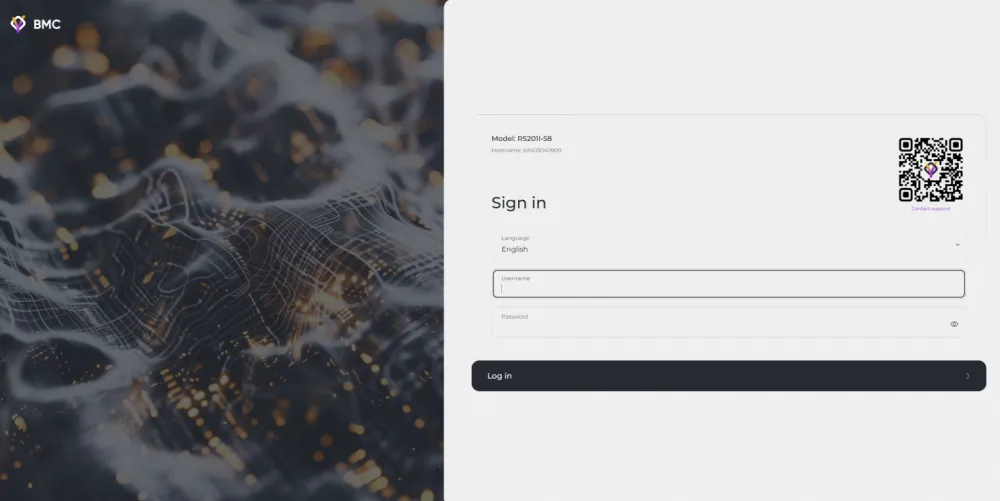
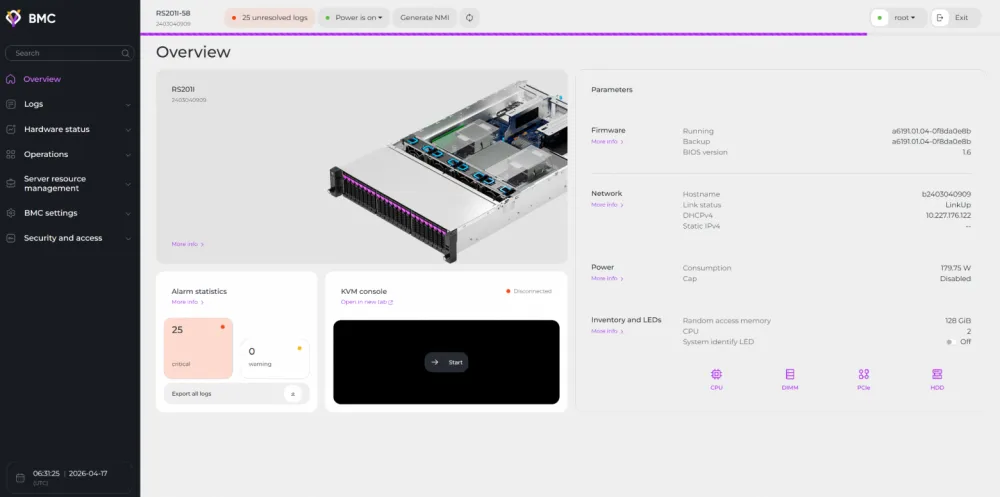
Moreover, this required not only careful frontend development but also serious optimization. Any unnecessary diagram or another layer of telemetry quickly turns the BMC interface into a heavy structure. We wanted to achieve the opposite effect. As a result, after the overhaul, the WebUI became not only more functional but also faster than the original.
The functional part also required significant changes. This is precisely the area where engineers usually start the most lively discussions: what exactly should a modern BMC be capable of, and what can already be considered excess. For some, minimal sensor monitoring and remote power management are sufficient. For others, in-depth inventory, convenient log handling, notifications, flexible access rights, and extended service scenarios are mandatory. Practice shows that the closer the system is to real-world operation, the faster the second approach prevails.
The basic OpenBMC addresses a significant portion of the initial tasks, but many services in the standard implementation operate quite austerely. Therefore, we had to enhance a large share of truly important scenarios.
What exactly needed enhancement
Here are a few areas where this was particularly noticeable.
First, logging. It was important for us not just to record an event as such, but to provide it with context: from which service it came, from which IP address the operation was initiated, under which user it occurred. Without this, the log remains just a collection of entries. With such context, it becomes a working tool for incident analysis.
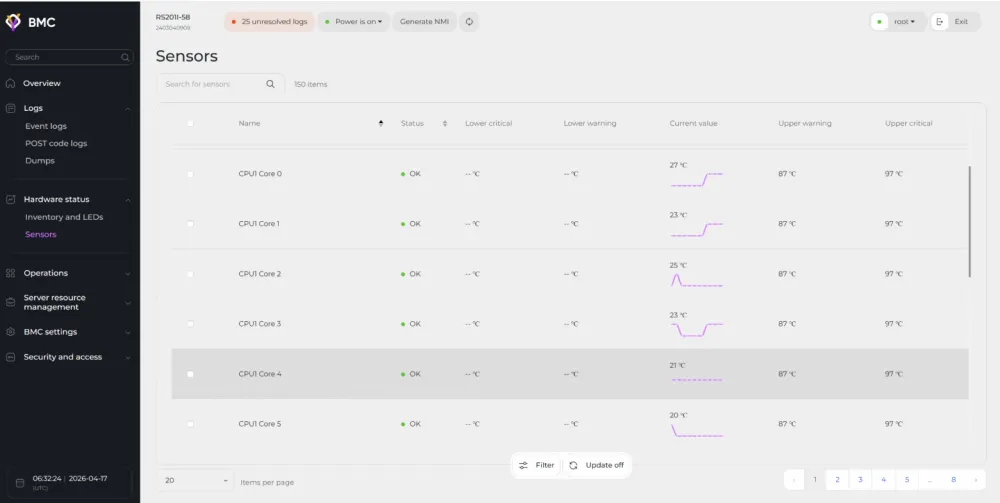
Secondly, sensorics. We have moved away from the scenario of "showing the current value right now." For operation, it is important not only to know that the processor temperature is currently normal, but also to see the dynamics: how it has changed over the last few hours, whether there were any sharp spikes, and whether it is possible to export the history for analyzing a specific case.
Thirdly, the cooling system. Here, we focused not on the abstract "as long as it works," but on the expectations that have long been formed among users of Dell and HPE solutions. As a result, OYBMC not only features a pre-configured thermal profile that can be used as a universal starting point, but also allows for more flexible cooling logic settings.
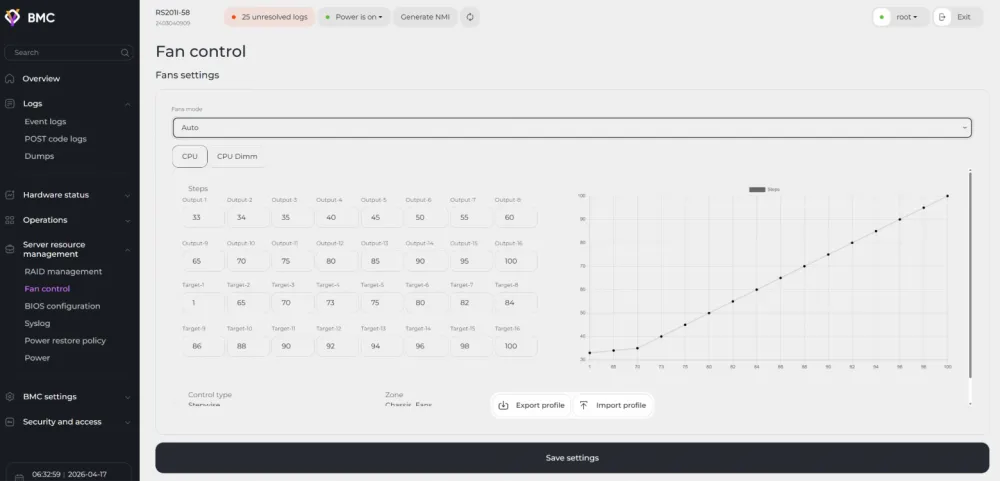
Finally, Virtual Media. In the standard implementation of OpenBMC, this mechanism is mainly designed for mounting ISO images for remote OS deployment. For the basic scenario, this is sufficient, but in real-world operations, more flexible options are periodically needed—especially in service and diagnostic tasks.
In practice, this looks quite grounded. In the logs, it is important not just to see the fact of configuration change, but to immediately understand who exactly changed it and from where. In sensorics, the current temperature value is not only important, but also the history that can help analyze the incident. In the cooling system, everything boils down to the familiar compromise between noise, temperature, and reliability margin. And in Virtual Media, it is more convenient to have not only the ability to present the system with an ISO, but also a proper way to transfer files for maintenance and diagnostics without unnecessary detours.
Access rights that do not interfere with life
A critical part of the solution was the role model. The basic roles of OpenBMC—Admin, Operator, and No-Access—are a good starting point, but this is usually insufficient for an enterprise environment. Different employees almost always have varying levels of access: one needs access to KVM, another only to network settings, and a third needs the right to use IPMI without the ability to change everything else. Therefore, OYBMC implemented a more granular permissions model with the ability to create custom roles.
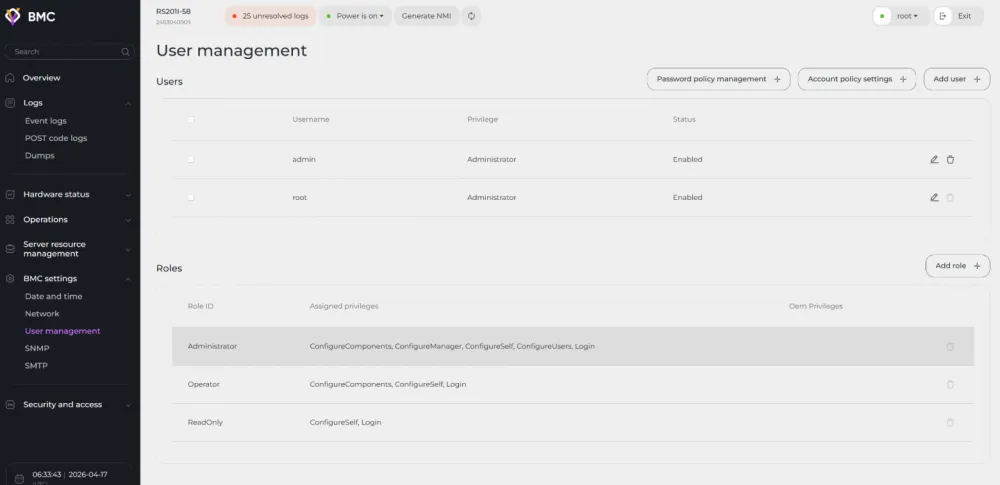
For such roles, access can be separately managed, for example, to the following functions:
IPMI;
KVM graphical console;
Virtual Media;
network configuration.
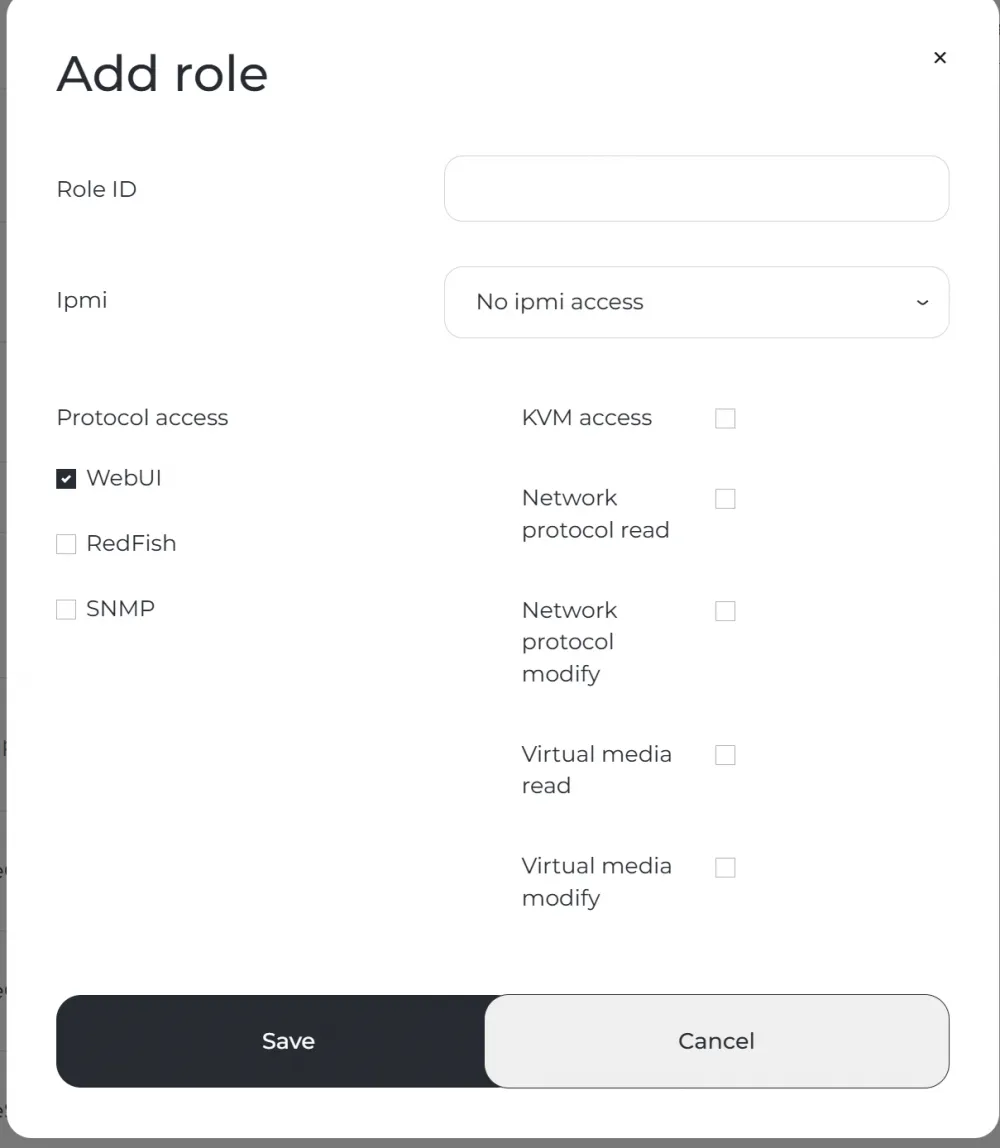
For real-world operation, this is not just a pleasant bonus but a standard way to avoid granting unnecessary permissions where they are not needed.
What was added beyond basic OpenBMC
When discussing what significantly expands the capabilities of OYBMC compared to basic OpenBMC, several areas stand out.
In particular, we added:
extended SNMP support, including SNMP v3 with encryption;
Syslog configuration;
sending notifications via SMTP;
monitoring and managing RAID controllers;
support for PLDM for working with the firmware of server components where supported by the components themselves.
Individually, all of this looks like a set of specific engineering tasks. Together, it represents a completely different level of system suitability for life in an infrastructure where not only basic capabilities are important, but also how convenient it is to integrate the server into existing processes for monitoring, maintenance, and diagnostics.
Interfaces and Integration
It is worth mentioning the supported interfaces. For us, Redfish remained fundamentally important as a modern and standardized way to manage servers. At the same time, we tried not to resort to proprietary extensions where it was possible to remain within the framework of the standard. Meanwhile, support for IPMI was maintained ― an old but still in-demand interface that continues to exist in many infrastructures for quite understandable practical reasons. SNMP also plays a significant role, especially in telecom and infrastructure scenarios, where the server must seamlessly integrate into existing monitoring frameworks rather than forcing the client to restructure half of their processes for a new tool.
If we summarize this in a short list, the key external interfaces for OYBMC remain:
Redfish;
IPMI;
SNMP v2c / v3.
The most labor-intensive part ― inventory
Perhaps one of the most energy-consuming parts of development has been the inventory of server components. From the outside, the task seems almost trivial: to show which CPUs, DIMMs, storage devices, and PCIe cards are installed in the system. But underneath this hides a considerable amount of low-level work.
To collect inventory information, the following are used:
SMBIOS;
MCTP over PCIe;
IPMB.
As a result, OYBMC can obtain data about processors, RAM, PCIe expansion cards, and SAS, SATA, and NVMe storage devices.
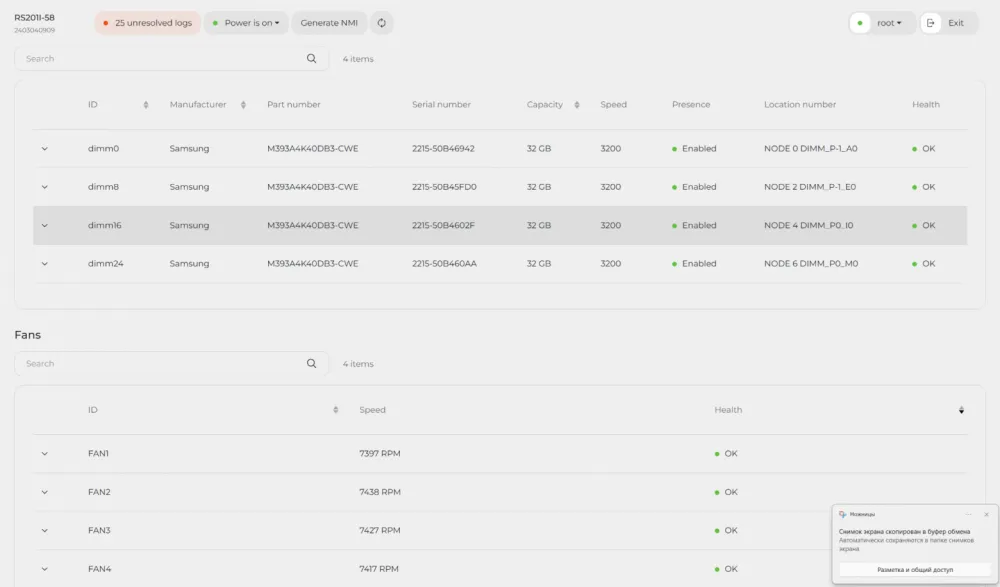
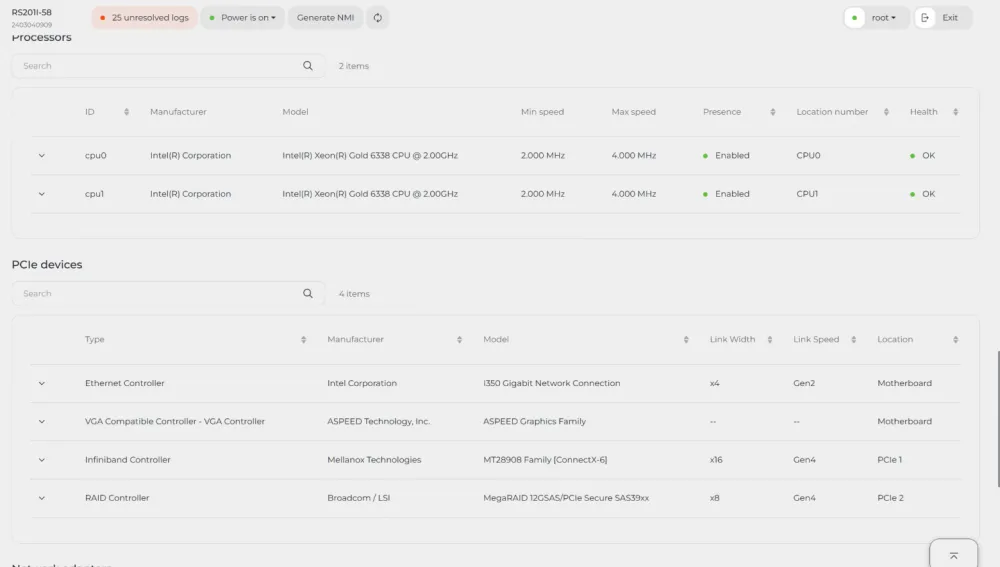
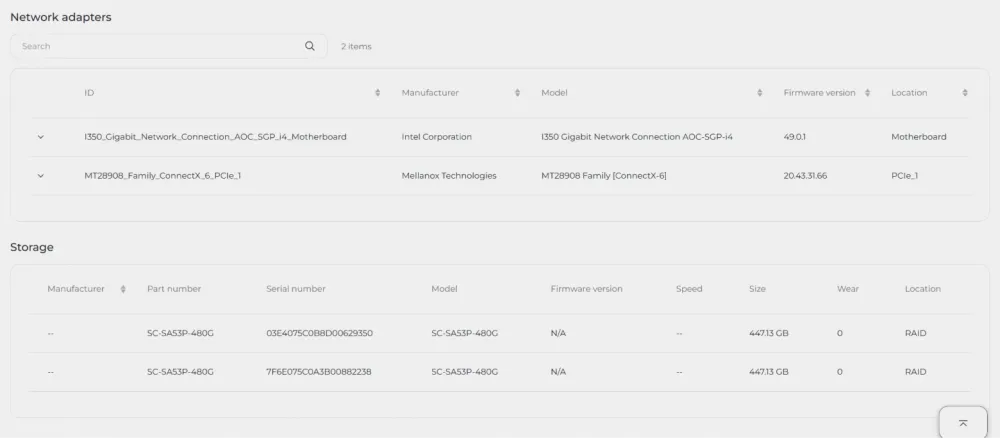
Here, the importance lies not in the mere act of reading data but in how reliably, uniformly, and predictably it operates across different configurations. It is precisely on such seemingly technical details that the quality of the system can be tested most quickly.
Scaling to other platforms
In conclusion, it is worth mentioning the scalability of the solution within the OpenYard line. All the functionality described above, including the interface part and service improvements, was created in about a year and a half by a team of fewer than ten people. The first target platform was the OpenYard server based on Intel Xeon Scalable 3rd Gen (Ice Lake) — RS101I/RS201I.
After OYBMC became available for external testing, we were also working on making the process of transferring to other platforms not a one-time engineering acrobatics but a reproducible procedure. On average, such a migration took 2-3 months, including at least one cycle of internal testing. This means that the system quickly ceased to be a solution "for one specific piece of hardware" and demonstrated that it could be scaled further without manual magic in each new case.
As a result, in less than two years, OpenYard received not just an adapted OpenBMC for its own hardware, but an independent solution with significantly expanded functionality, more convenient everyday operation, and a good margin for further development.
The open-source foundation alone does not make the system complete. The most interesting things begin at the moment when its own engineering logic, discipline in improvements, and the readiness to refine basic mechanisms to a state where they are truly convenient to use every day emerge on top of it.






Write comment