- Hardware
- A
PCIe is dead, long live CXL [part 2]: a server for 5+ years with DDR4
Today I will talk about server selection, but I want to move away from boring, quickly outdated, and often impractical recommendations — like, you need this much memory, expensive admins, a specific generation of processor and a certain number of cores, otherwise the system will degrade after the rain on Thursday.
Note! I am not against specific numbers and configurations — I am against trying to present them as a universal recipe. So let’s leave this approach for SEO articles.
In this longread, I will touch on the thinking errors in server selection for 5+ years and the shifts that have occurred in recent years (and I especially want to talk about the huge influence of CXL). I have been working in this industry for over 6 years and have gone through a similar cycle in practice, and veteran admins have shared a lot of interesting stories about what it was like before.
Let’s sit down, lie down, or get into whatever position you read in — and let’s begin.
A powerful server is the choice of weak admins
And today, not everyone can select a server for tomorrow. Rather, not just anyone can… Well, you get it.
Modern servers are literally packed with the latest software and hardware features: at the beginning of 2026, market leaders (Intel, AMD, HPE, Dell, Cisco, and other guys who jumped ship) are supplying builds with processors boasting hundreds of cores, terabytes of DDR5 memory with enormous bandwidth. Large and medium corporations are actively exploring CXL 3.2 technology (Compute Express Link — I have a huge long-read on this technology with 80,000 views and 65 likes). Various proprietary iDRAC, iLO, and other IPMI/RESTful-like technologies for remote administration have made significant strides forward. Everyone wants monstrous GPUs from NVIDIA and AMD to train models and simultaneously heat Khrushchyovkas near the data center. And in the upcoming roadmaps of vendors — PCIe 6.0, CXL 4.0 (it's possible that soon we will be renting RAM in the cloud), new memory form factors, and NVMe. Oh yes, let’s not forget about various ASIC goodies and rare hardware from admin forums.
This rapid development is not because the vendors are doing great — the R&D departments are leveling up — but because business challenges and markets are changing faster than Elon Musk's moods on the internet (but that's not certain). Yesterday, no one had heard anything about LLMs, and today OpenAI has crazy contracts with all the tech giants; NVIDIA's capitalization is higher than the GDP of almost all countries in the world (3rd-4th place), etc.
Even during the dot-com era, investors didn't spend SO quickly and SO much on ventures that lacked a sustainable business model. But I won’t dissect the AI bubble (it’s already a long-read). But it’s important to note that LLM models have reshaped the entire industry — and even poor gamers have been affected by the ricochet, who are generally not involved at all.
In general, the competition in the server market is such that if you slow down — someone younger and quicker in decision-making overtakes you at the turn. And since everything is developing rapidly, it seems strange to assemble a super-powerful but inflexible server in maximum configuration. It's not that a powerful server is bad. It’s bad when suppliers replace understanding of the task with raw power. It often turns out that the server is designed for 5 years under a load that either will never appear or will appear in a different form.
And the conclusion from all this is simple: in 2026, if you are a small business, you need to look towards used, refurbished servers or clouds; if you are a medium or large business — you need to select not a separate device, but a modern architecture of servers that can be adapted on the go without completely upgrading the hardware (or a cloud, but then you need to consider nuances regarding profitability, confidentiality, and manageability).
And since my article is about hardware, not clouds, it’s time to get down to business :)
The central processor is no longer the central component
I have seen infrastructures several times where processors were idle, memory was filled with page cache, and almost everything depended on the network or disk subsystem. The CPU was chosen with a surplus, but there was no flexibility.
This happens because about 5 years ago, server architecture revolved almost entirely around processors: you choose a dual-socket (and more) platform with high TDP, more cores and cache, high frequency, and a wider bus — and that’s it, any assembly automatically became more powerful. But in 2026, this approach no longer works.
Not because processors have stopped evolving — they are actually progressing quite well: the Xeon 6 series and current AMD EPYC have under the hood heat dissipation covers hundreds of cores, 8–12 channels of DDR5, and dozens of lines of PCIe 5.0, with excellent performance per watt. Even ARM platforms in the server segment are no longer exotic but competitive systems in hyper-scaler infrastructures (like Amazon and Alibaba, which produce their own hardware).
The key change is that processors have lost their status as a bottleneck around which the entire system is built.
AI training, inference, and related topics, analytics, high-load databases, streaming, SmartNICs (network cards with brains), all-flash architectures on NVMe — all of this scales poorly if the CPU is at the center and all data flows through it in the system.
For example, NVIDIA BlueField-4 is a DPU (Data Processing Unit, co-processors for data processing) operating at 800 Gbps, which independently performs encryption, routing, and other service functions. |
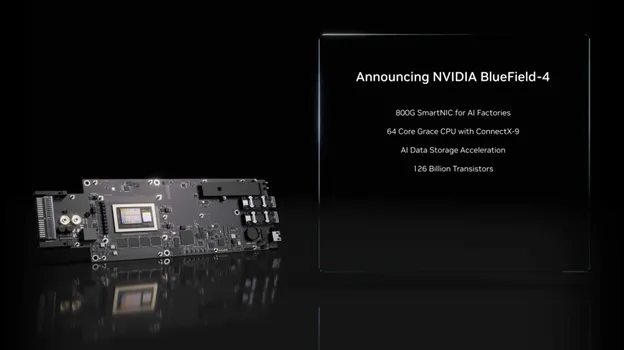
Currently, various DPUs and SmartNICs handle input-output, networking, and cryptographic tasks. The processor mainly coordinates the flows (processes metadata and data transfer) — this allows it to direct all its resources to heavy computations, such as virtualization.
If previously the limit was computational power, now it is the speed of data delivery from memory, disks, networks, and accelerators (GPUs, FPGAs) to the processor and various points in the infrastructure. This is even reflected in marketing — Intel and AMD are increasingly saying less about frequencies, the number of cores, and process technologies, and more often about AI acceleration (special blocks for matrix operations), specialized cores (Intel's division into powerful "P-cores" and energy-efficient "E-cores"), and offloading mechanisms (delegating routine tasks to network cards and controllers).
So, a modern server in 2026 is no longer just a combination of CPU and everything else, but a set of relatively equal components (each with its own task), where the overall system performance is determined by the balance between the processor, memory, accelerators, network, and input-output. If this balance is disrupted — no processor will save it.
Therefore, when designing a server for 5+ years for a medium or large company, it makes sense to leave free PCIe lines in advance — for GPUs, DPUs, or SmartNICs, even if they are not needed right now. In recent years, acceleration is increasingly shifting from CPUs to the network and specialized devices, and network bandwidth is growing faster than the demands on the servers themselves. The ability to switch to 100–200 Gbps Ethernet or use InfiniBand and NVLink for GPUs is far more important than excessive performance at the start.
And now it's time to move on to the most interesting part — RAM.
Memory is no longer the dullest and cheapest component
“The reason why RAM has increased fourfold in price is that a huge amount of yet-to-be-produced RAM was purchased with non-existent money to be installed in GPUs and servers that have also yet to be produced, to be housed in data centers that have not yet been built, powered by infrastructure that may never materialize, to satisfy demand that does not actually exist, and to generate profits that are mathematically impossible.”Unknown author (C).
So, local DDR5 memory in servers is still a basic solution (and will remain so until 2029–2030, when DDR6 is released). Memory standards and frequencies continue to progress (for example, the MRDIMM Gen2 form factor will operate at a frequency of 12800 MHz as early as 2026–2027).
Note! MRDIMM (Multiplexed Rank DIMM) — unlike Registered DIMM, uses two data buffers that alternately (multiplex) transmit data from two memory ranks to the controller as if through one wide bus. This sharply reduces the load on the controller and increases effective frequency. |
However, the industry shift to AI has led to a multiple increase in DDR5 prices. Previously, memory was an inexpensive consumable that was bought in large quantities, with spare sticks reserved on the shelf in the server room. Today, it is considered strictly under load (only minimal reserve for growth and peak loads of 20-30% is kept, and sometimes even that is not done), and ways to maximize utilization through virtualization, etc., are being sought.
As of early 2026, purchasing spare memory in excess is either impossible due to empty stocks or economically unfeasible. Companies are renegotiating contracts, fixing supplies in advance, and accepting current profit reductions to spread the purchase of expensive new hardware over the years (they pay more now but guarantee themselves supply and stable prices in the future). Moreover, they have to choose suppliers from large OEMs (Dell, Lenovo, HPE, Supermicro, etc.), as purchasing outside the list of compatible hardware can lead to incompatible components. Saving on second-tier manufacturers will not work for everyone.
And how to deal with memory then? To be honest — there’s no way, just wait until everything calms down. But there is a way to make life a little easier.
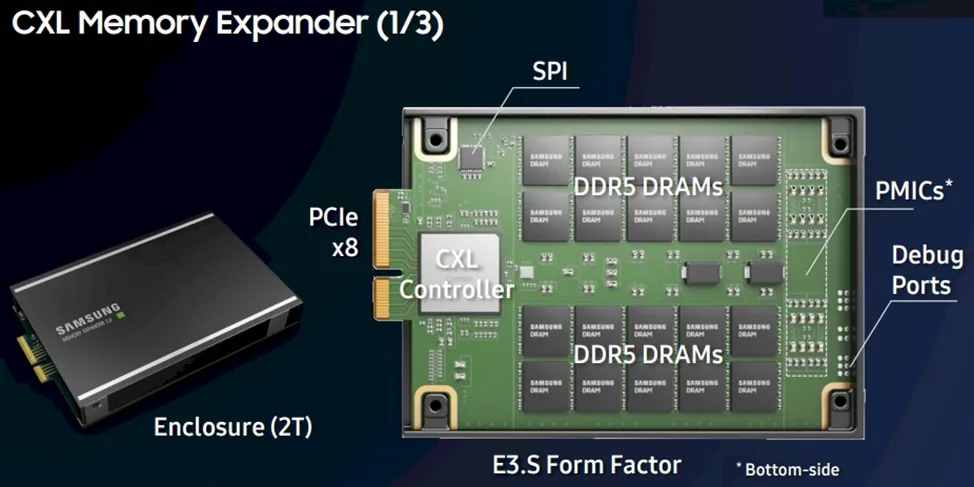
I already wrote above about CXL — it is an interconnect for combining CPU memory and external devices. It uses the physical and electrical foundation of PCIe, and on top offers a layer of its own protocols. This technology allows memory to be expanded in form factors other than DIMM, such as DRAM or PMem in the form of EDSFF E1.S or E3.S drives. Additional boards can be inserted into standard PCIe slots, and they can support standard DIMM modules (which means that CPU and GPU even in different servers and different racks can work with the same coherent data in shared memory without copying).
If you use CXL, you can build a hybrid model — local memory in the server + coherent via CXL. And it is nearly as fast for direct access as local RAM, but scales more easily. And if designed properly, you will achieve maximum memory utilization (and savings) — even lower than with virtualization, since there are no additional levels of abstraction.
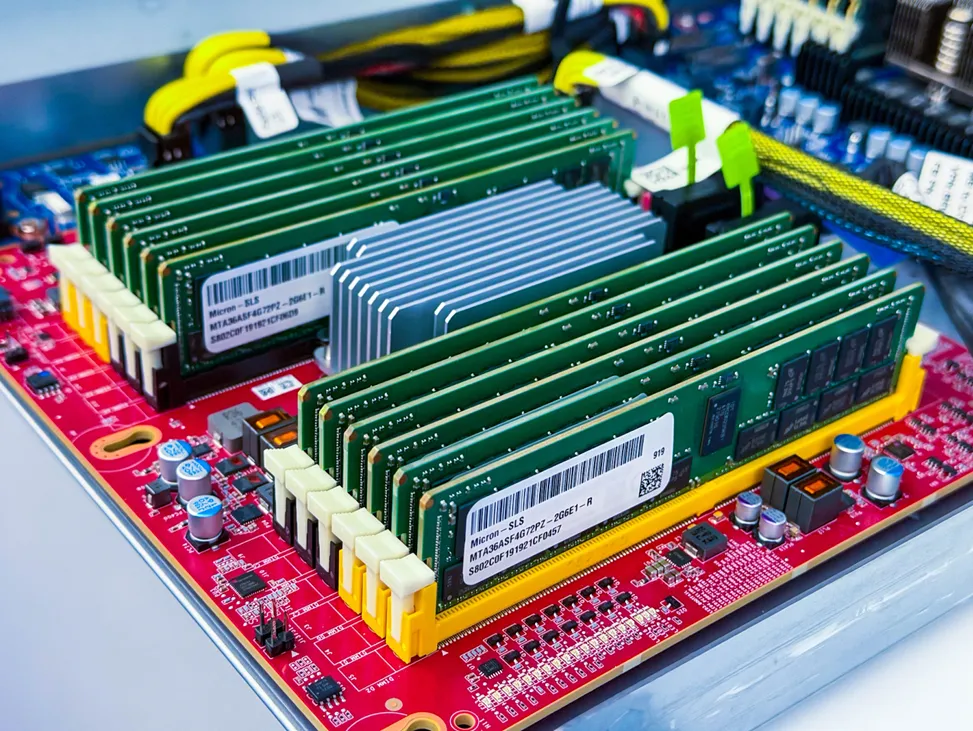
Major suppliers are already fully implementing CXL in their mass products: for example, Dell PowerEdge R7725 based on AMD EPYC (5th generation) supports CXL 2.0 Type 3 for connecting memory expanders. This allows scaling the volume of RAM beyond local — useful for in-memory databases or AI/ML, where a huge amount of memory is required.
The influence of CXL doesn’t end here — but first, a few words about PCIe.
Switch to PCIe 5.0 to work with DDR4
It sounds paradoxical, but I will explain now.
In interconnect technology, everything is calm — PCIe is used everywhere, and a new specification is released every few years. The PCIe 6.0 standard is already present in some products in data centers, such as Nvidia Blackwell GPUs, but there are no mass platforms in production (accelerators often operate in 5.0 mode), and in the consumer segment, widespread adoption is expected only by the 2030s. However, PCIe 5.0 is already everywhere and offers excellent bandwidth. So what’s the issue?
Firstly, in practice, there are situations where a server with PCIe 5.0 underperforms compared to an older system with PCIe 4.0 — simply because the GPU and NVMe are behind an unfortunate PCIe switch or share lanes with network cards. The version of the standard in such cases is secondary — what matters more is how the lanes are routed inside the chassis.
Secondly, many companies with servers on PCIe 4.0 and DDR4 (for example, Dell PowerEdge R750 — a great server from late 2021 to early 2022, still relevant today) are not in a hurry to upgrade — they are waiting for the mass adoption and cost reduction of PCIe 6.0 to jump straight to it. Additionally, DDR4 cannot be installed on the motherboard of a Dell R760 or any other modern server.
But what if I tell you that with CXL, you can install DDR4 in a new server? I remind you that this is a memory disaggregation technology (not tied to a server), which means you can not only install DDR4 but also combine old and new versions (CXL memory does not have to match the type of local memory).
IMPORTANT! Of course, this refers not to DIMM on the motherboard, but to CXL memory devices (Type-3 — these are pure memory expanders without compute units), which live outside the CPU's NUMA domain. |
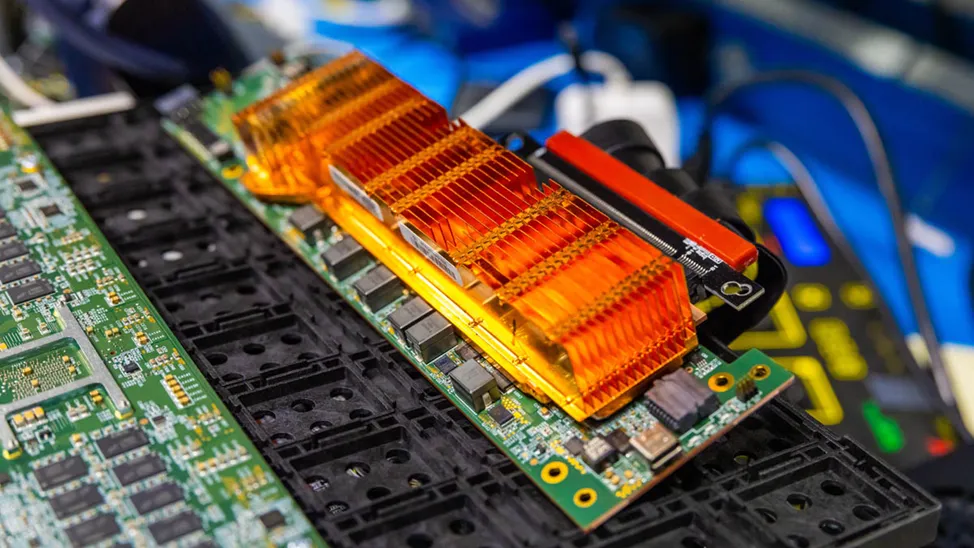
Large data centers are already connecting previously decommissioned DDR4 memory in CXL chassis through CXL controllers (for example, Marvell Structera). Essentially, it is possible to avoid losing money due to the discarding of existing DIMMs and to create a pool from the freed-up modules that will be dynamically redistributed among nodes.
Note! Discarding (from English discard — to throw away) is the act of throwing away still functional memory to free up slots. A classic example: - You have server A with 512 GB of memory and server B with 256 GB of memory. - Server A is experiencing peak load, and it urgently needs another 128 GB. - Server B has low load, and 100 GB of memory is idle there. In a classic server architecture — or even a cluster without memory pooling — you cannot simply take 100 GB from server B and give it to server A at the hardware memory level. The only way to provide server A with more memory is to buy and physically install new memory modules in it. The old, less capacious modules will have to be discarded/written off/sold (discarded) to free up slots. |
CXL is a good solution, but despite the low latency, it does not replace local memory, as the latencies are tens of percent higher than that of DDR5 on the motherboard (depending on implementation and stack depth). Therefore, combinations of CXL with DDR4 are used as a large shared memory pool rather than as a fast NUMA resource. Latency-sensitive tasks are better left for local RAM.
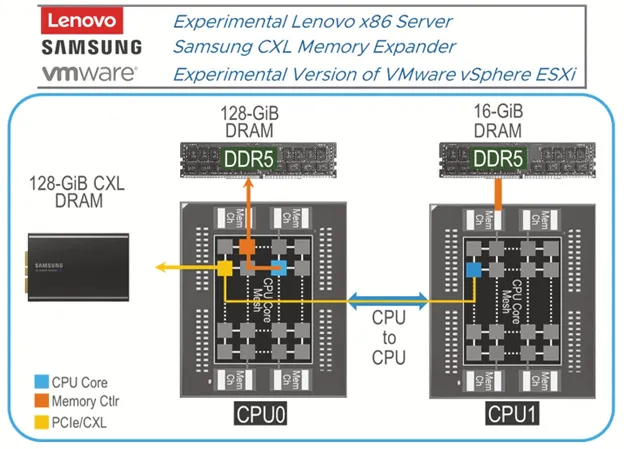
The conclusion is this: when designing infrastructure, if you want to work with CXL, you need to look for equipment with PCIe 5.0 and newer (PCIe 4.0 does not support it). And you need to read the specifications of these servers to ensure support for CXL devices (Type-3).
Not the most obvious effect of CXL — extending the lifecycle of infrastructure. With it, you can buy servers, CPUs, and memory now (occupying all slots), and increase the amount of memory later without discarding (whether you want DDR4 or DDR5). While this practice is more common in large data centers and HPC environments, technologies like this are indeed trickling down to the mass segment. I wish the same for you.
Storage and NVMe — it's not about speed, but about architecture
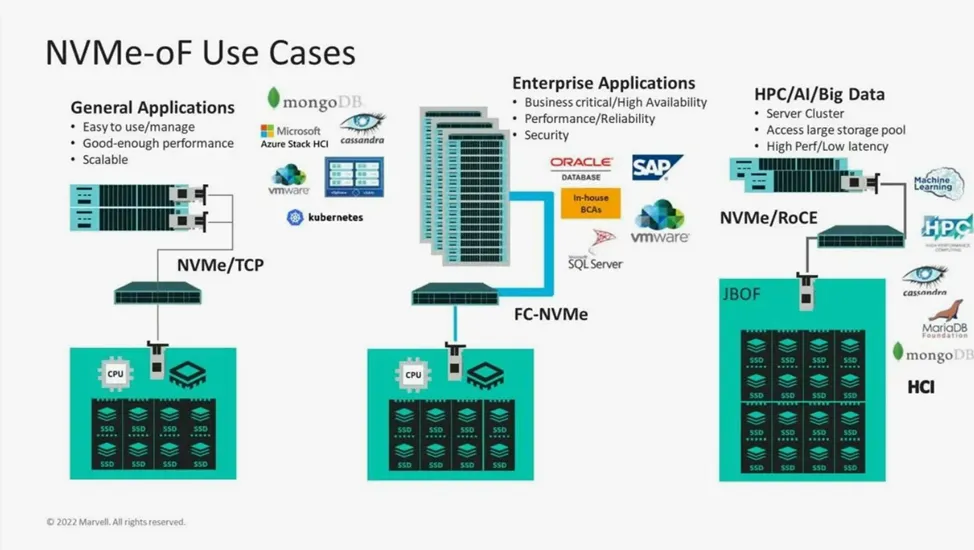
Once the logic was simple: SATA — slow, SAS — normal, NVMe — fast. The same goes for HDDs and SSDs.
But now NVMe is not just a fast SSD. It is now a way to organize input-output. And here the classic thinking error kicks in: it seems that if you fill a server with local NVMe, it will last longer and work faster. In practice, the opposite turns out to be true—local NVMe ties data to a specific server. Over time, this breaks horizontal scaling, complicates generation upgrades, and takes PCIe resources away from more priority tasks—in the end, fast disks turn into expensive ballast that is hard to find a use for.
Now everyone is trying to aggregate and externalize data storage: NVMe-oF, external shelves, software-defined storage. One must slowly quickly get used to the fact that a server is not a storage (if we are not talking about SAN), but a computing node that takes data for processing from outside. Such architecture will live longer.
The server should not know what it will become (and neither should you)
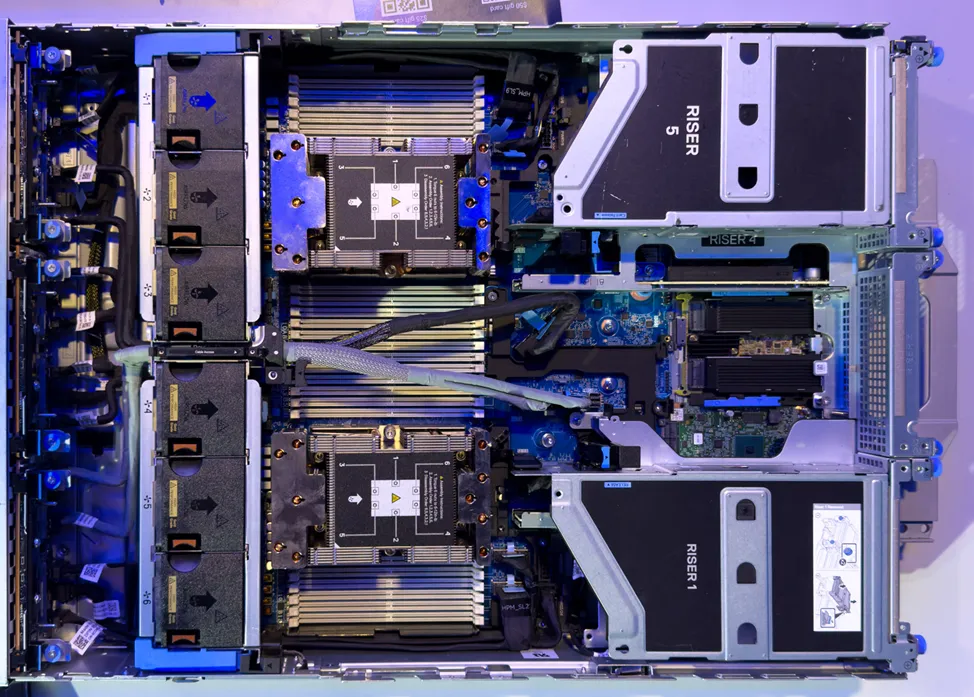
The most reliable way to shorten the lifespan of a server is to rigidly define its fate at the procurement stage. No one knows what will happen to the equipment in four years: it may become a virtualization node or part of a hyper-converged system (HCI), a database server, an edge node, or it could be a working node for Kubernetes or just a general-purpose office server. Or it might become terribly outdated—it depends on the initial parameters.
Small and medium-sized businesses usually argue that they are small, and one powerful server, or at most two in a cluster, is enough for them—why complicate things? The problem is that such (once and for all) configurations usually fare worse when the tasks change.
A universal server is not a Swiss army knife with everything at once, but a system capable of changing roles without changing architecture. Standard form factors, predictable platforms like HPE, Dell, Lenovo, Supermicro, Huawei, and balanced component specifications—this is what prolongs the life of a server, not attempts by an admin to guess the future.
But the exotic works against you: rare backplanes for one specific type of NVMe, non-standard PCIe risers, reliance on specific network cards or controllers that are only supported in one generation of servers and/or by one manufacturer. As long as the task aligns with the admin's intention, everything is great. As soon as the scenario changes (and the admin changes jobs), such a server is either difficult to upgrade or needs to be almost completely rebuilt from used components from Avito.
The more specialized the server is at the procurement stage, the faster it will become obsolete. But specializing a server for a task is also important — hence the need for balance.
Conclusions
Building the most powerful server for five years ahead is not a great idea. Hardware requirements and the market as a whole change faster than plans, and experts' forecasts about usage scenarios often do not match reality over a 5-year horizon.
What truly makes an infrastructure resilient is not peak performance, but architectural flexibility. The ability to change the role of the server, reallocate resources, scale without complete redesign, and not be tied to one scenario — all of this is more important than any attempts to predict the future. Yes, several flexible servers — in a cluster or not — do not guarantee that everything will work for many years without problems, but it will be easier and cheaper to survive planning mistakes.
![From Virtual Hands to AI for Survivalists: Curious Open Agent OSes [and One Hardware Project]](https://cdn.tekkix.com/imgs/2026/05/habrcom/big/ce0b1057616faed51cd8b9f3b2b9.webp)

Write comment