
- AI
- A
Tools 2.0: Turning Hell in Notes into a Work Tool
We had three hundred memes in Downloads, two folders of downloaded books, 75 notes hastily written on the knee... Seems like a lot of useful stuff for development, but finding absolutely NOTHING is possible.
I was the same until I found the solution – a personal knowledge base. Now I have my own Wikipedia. But what if you already have notes, already have a bunch of downloads and the accompanying chaos, and you want to sort it out somehow quicker than manually sifting through everything? I tested 5 tools and now I’ll tell you which ones will turn your dump of texts into a functioning library.
Affine: a beautiful notebook with autocomplete (and a surprise)
In 2024 it was trending: 62 thousand stars on Github, open source, AI-first. It seemed like an alternative to the closed Notion. But after two years, the still rough UI, the inability to export notes in bulk (and thus easily migrate) dulled public interest.
What's great:
Supports all platforms, there’s a web version
Supports a large number of models (Gemini, ChatGPT, and others)
Fast operation and loading (but there’s a nuance, see below)
A fly in the ointment:
Does not support pdf. In general, very few file formats – so if you write anywhere other than .md files and Affine itself, it is unlikely to be convenient.
Bugs! Bugs-bugs-bugs. In half an hour of getting to know the app on Mac, I encountered: an error when canceling a download, a rollback of position in the chatbot when switching, lack of document switching – and this is not an exhaustive list.
The chatbot needs to be taught how to write MOC on your own (otherwise it starts to babble), it cannot create folder structures (only suggest), and the tokens are quite expensive, considering how much time you need to spend to set it up for yourself and your tasks.
Summary – my experience with Affine was not very successful: the bot initially enthusiastically explained how to combine PARA and Zettelkasten, then generated completely watery and useless MOCs, asked me to save them myself and create a folder structure for preparation. All this time it firmly and clearly insisted that it could edit files, but when it came to it – it turned out either to be a bug or that it doesn’t work in the free version, and I had to manually change the content of the notes. Thank you, idiot. Not quite what I wanted, moving on.
Elephas: for masochistic Mac users (as always)
The app has a super stylish icon, an impressive list of advantages, but very high requirements for users. Not only must you be exclusively a Mac user (nothing but macOS is supported, the stripped-down version for iOS doesn’t even deserve mention), but the version must also be 14 or higher (although the website states 13.4 – doesn’t work, checked, dug into the crash log for you).
Pros:
Decent free period – 7 days
15 supported models, including local ones
Free credits are sufficient to get acquainted with a knowledge base of 100+ notes in 7 days
Can parse videos from YouTube, images, notes, web pages
Integrations with Apple Notes, Notion, Obsidian, Logseq, and others
Can create and edit files, but there’s a catch...
Cons:
Absolutely unintuitive setup of agents for creating and editing PKMS. Moreover – it’s also inconvenient: you need to create several agents with different functions, fine-tune everything manually, and there’s zero flexibility.
Visual bugs (especially when working with code blocks)
Functional bugs (lost images during import)
Inconvenient UX in chat (messages can be copied either entirely or one paragraph at a time)
Theoretically, you can create notes from any app – in practice, it didn’t work
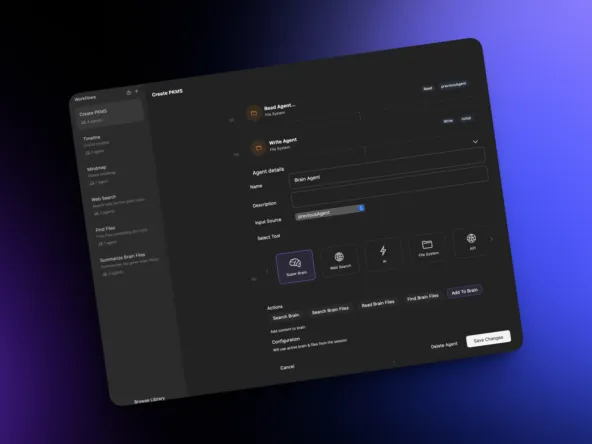
Conclusion – potential to the skies, but quite raw execution, full of bugs and a broken UX. For some use cases, this is not critical, but it cannot refactor PKMS for you (at least not yet – if the developers finish everything they want, it will be able to!).
fabric.so: (Dropbox with a librarian)
If notes are somewhat less important to you, but working with various files is more important, then this lightweight option might help you. fabric reminded me the most of Dropbox, if it were developed with AI in mind.
Pros:
Supports all platforms, synchronization
4 models (the free version only has ChatGPT 5.1 Instant)
AI answers questions about the content of notes and supported files
Supports images, PDFs, notes, and web page bookmarks
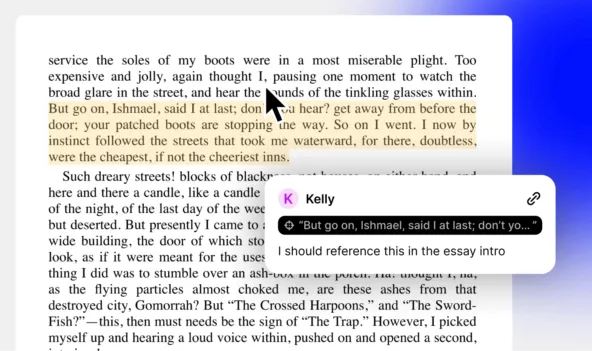
My favorite feature – the ability to add annotations anywhere for anything. Can I please have this function everywhere?
No setup required – just upload and you're ready
Cons:
AI cannot create and edit notes and folder structures – you will have to copy/paste manually
Conclusion – if after careful inspection you find that you don't have many notes, but a lot of books, articles, and journals, then you probably don't need PKMS that much, but fabric.so can help you not get lost in your favorite mess and work there as a sociable librarian.
VSCode + RooCode (magic outside Hogwarts, but only for hackers)
Now comes the part that is closest to magic, but also requires the most skills. Programmers are gradually starting to write code and technical documentation using AI agents, so what difference does it make whether to write and edit technical text or your notes? Right, none. But complete freedom of action opens up.
Let's start with a major downside of this whole scheme: it may seem complicated to non-programmers. Some VSCode, typing something in, setting it up... But trust me, if you have ever filled out a 3-NDFL form, you will definitely manage – you just need a good instruction (let me know in the comments if you need something like that).
In addition, synchronization will need to be organized independently – it won't be possible to fund it with money.
Pros:
You can use practically any model, as long as it has an API and you have money to pay for tokens. Free models can also be connected – the main thing is to know where to find them;
Can create and edit notes and folders (complete magic);
Absolute portability – VSCode is just a text editor, and AI will use whatever file format you specify – be it .md or .txt
Conclusion – if you want magic but are willing to put in some effort and specifically need PKMS (or you want to change the entire structure of your notes to another without spending a million hours on it) – then this is your option. But if you just want magic, then...
NotebookLM: (a magical forbidden item with a wow effect)
To be honest, I started this article because of it. How much hope was shining in my eyes when I first learned about it! But it turned out to be a stone around my neck and prevented me from finishing this article for a whole 2 months. All because Google constantly tightens account region checks and easily detects most VPNs.
For proper operation, you will need:
A foreign account (you can check here)
A VPN that does not show that you are from Russia on the page google.com
An alternative – configured DNS (for example, here)
Can do:
Answer questions based on data from sources with almost no hallucinations
Create audio podcasts from topics
Create tables, reports in free format, presentations, mind maps and self-assessment tests
Cannot do:
Export notes in free format (complete vendor lock, fully online)
Create and edit notes and folders
Use other models (but Gemini is more than good)
Conclusion – NotebookLM is a wow-effect tool that can be used as a tutor, a ready-made smart knowledge base, but if your goal is to set up your own PKMS and work as you please in the future, then this is not your tool.
Mini-test to choose your II Tool:
...if you really like writing notes in Notion/Obsidian and want it to be stylish and trendy – Affine
...if you are a principled Mac user and are ready to spend some time on setup – Elephas
...if you have many books and pictures, and you just need notes to not lose them – fabric.so
...if you are a wizard programmer Harry or not afraid of a couple of evenings of setup for real magic – VSCode + RooCode
...if you just want magic, can do location masking and agree to vendor lock-in – NotebookLM
Write in the comments who you are and a detailed guide on which II Tool you need (:









Write comment